
How to Use Trickle Charger on 2025 Corolla
Use a 12V smart battery maintainer set to the car’s AGM/lead-acid mode if available, and connect it to the 2025 Corolla’s under-hood jump-start posts or the 12V battery only if the manual allows it. A bad hookup or the wrong charger can damage electronics or overcharge the battery. This guide shows the safest connection point, charger setting, and disconnect steps for long parking periods.
What a trickle charger does
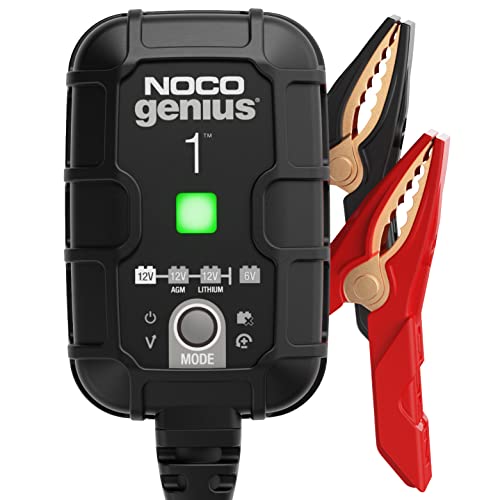
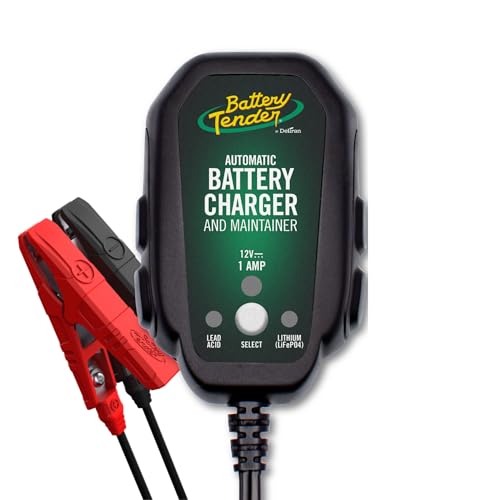
A trickle charger keeps a battery topped off. It does not refill one quickly. Basic trickle charging uses very low, steady power, which suits vehicles that sit for long periods. The classic use case is lead-acid batteries, which naturally lose 1% to 5% of charge every month unused.
For a 2025 Corolla, the better default is usually a smart battery maintainer. It adds automatic maintenance mode, can adjust for temperature, and is less likely to overcharge a battery that is already full. That matters because modern Toyota electronics do not benefit from a constant-output charger left on indefinitely.
Use a constant-output trickle charger only if it is specifically meant for unattended maintenance and matches the battery chemistry. Old-school units can keep pushing current after the battery is full. That is the wrong tool for long storage on a modern car.
When a maintainer is the wrong tool
If the battery is deeply discharged, a maintainer may never bring it back to a useful state. If the battery is swollen, leaking, or will not hold charge after a full recharge, replacement is the better path. A maintainer is for storage and light top-off work, not a rescue for a failed battery.
Does your 2025 Corolla need one?
A 2025 Corolla may need maintenance charging when it sits for about a week or longer, especially in cold weather or with short-trip use. If it is parked for a month or more, a maintainer becomes much more useful. If the car is driven regularly, charging may be unnecessary unless there is a known parasitic drain or weak battery.
The 12V battery in a 2025 Corolla typically starts the car and supports electronic systems when the engine is off. That means a weak battery can show up as a slow crank, warning lights during start-up, or settings that seem to reset. Modern battery management also means the car may not behave like an older Corolla when charging is attached.
Signs the 12V battery is weak
- Engine cranks slowly after sitting overnight.
- Interior lights dim more than expected during start-up.
- Start-stop behavior changes or is disabled more often than usual.
- Dashboard warnings appear after a low-voltage event.
- Settings or presets seem to reset after the battery goes flat.
Say your Corolla sits at the airport for three weeks in winter. If it starts sluggishly on return, that is a maintenance issue first, not a reason to keep a basic charger clipped on forever. A smart maintainer can top off the battery, but a battery that keeps falling low needs testing.
When to charge, test, or replace
Charge when the battery is healthy but low from sitting. Test when the car starts poorly after a full charge, or when the battery keeps dropping again after a normal drive cycle. Replace when the battery will not accept a charge, falls flat again quickly, or shows physical damage.
Best charger settings for Corolla
For a 2025 Corolla, choose a smart battery charger or maintainer with automatic maintenance mode, temperature compensation, and chemistry selection. The charger should support lead-acid and AGM batteries at minimum. If the charger also supports LiFePO4, that is useful only when the installed battery chemistry calls for it.
AGM is a lead-acid subtype and a common vehicle battery variant. Flooded lead-acid, AGM, and some gel batteries each want the correct charging profile. LiFePO4 batteries need a special charging profile and should not be treated like a standard 12V lead-acid battery.
Lead-acid and AGM settings
If the Corolla has a standard lead-acid or AGM battery, select the matching 12V battery mode. AGM batteries often need a charger mode that is compatible with sealed lead-acid construction. If the charger offers a dedicated AGM setting, use it instead of a generic car mode.
A charger with a thermal sensor or temperature compensation is safer in hot or cold storage. It adjusts charge based on ambient temperature, which helps prevent overcharging in heat and undercharging in cold weather. That matters for cars parked in a garage that swings between seasons.
Lithium compatibility and limits
If the battery has been replaced with a LiFePO4 unit, use a charger that explicitly lists lithium compatibility. Do not use a lead-acid-only maintainer on a lithium battery unless the charger manual says it is approved. Lithium batteries want a different charging profile and may react poorly to the wrong mode.
Force mode and recovery mode
Force mode is a manual override for very low-voltage batteries. It can charge batteries from as low as 1 volt on some smart chargers, which helps when the battery is too flat for normal automatic detection. Use it only when the charger manual says to do so, and watch the battery closely.
Recovery mode is for batteries that are deeply discharged, not for routine storage. If the battery has been flat long enough that the charger will not start normally, recovery may help bring it back to a usable state. If it still will not stabilize after that, the battery may be done.
Corolla charging checklist
Use this short sequence to limit setting loss and reduce clamp error risk. The 2025 Corolla has modern electronics, so clean connections and the right connection order matter. A careful setup also lowers the chance of nuisance error lights during the charging session.
- Turn the ignition off and remove the key or keep the fob away from the car.
- Make sure the charger is unplugged before attaching clamps.
- Confirm the battery chemistry mode: lead-acid, AGM, or lithium if applicable.
- Inspect the clamps and cable for damage.
- Attach the positive clamp to the positive post or approved jump point.
- Attach the negative clamp to the approved ground point or negative post if the manual allows it.
- Check that the clamps do not touch each other or painted body panels.
- Plug in and start the charger.
- Check the display for charging status, error lights, or a maintenance indication.
Before you connect
Check whether the battery is swollen, cracked, or leaking. If it is, stop. Charge only in a dry, ventilated area. If access is tight, clear the area around the battery or the jump points before you begin so the clamps do not slip while you are reaching in.
During charging
Watch for a charger that starts and then immediately throws an error. That often points to poor clamp contact, the wrong mode, or a battery that is too low for normal charging. If the charger is in desulfation, recovery, or maintenance mode for a long time, confirm that the mode matches the battery’s condition.
Before you disconnect
Unplug the charger from the wall first, then remove the negative clamp, then the positive clamp. That order reduces the chance of a spark near the battery or jump point. After removal, recheck that caps, covers, and trim panels are back in place.
Where to connect the charger
On a 2025 Corolla, the safest connection point depends on access and the owner’s manual. Many modern Toyotas provide under-hood jump-start posts specifically for charging and jump-starting, which can keep you away from the battery itself. If the manual allows direct battery access, that can also work.
When both options are available, the jump points are usually the cleaner choice for routine maintenance charging because they are easier to reach and reduce the chance of disturbing the battery area. Do not assume every Corolla trim is identical. Check the manual for the approved point.
Battery posts versus remote jump points
Battery posts are the direct positive and negative terminals on the 12V battery. Remote jump points are the under-hood connection spots intended for charging or boosting. Use the approved point listed for the car, because Toyota’s electronics and battery management can be sensitive to sloppy connections.
Suppose the battery sits under a cover and the jump points are easy to reach. In that case, use the jump points for a maintainer hookup if the manual approves them. If the battery is the only approved connection point, make sure the clamps bite clean metal and stay clear of nearby metal parts.
Clamp order and polarity checks
Connect positive to positive first. Then connect the negative lead to the approved negative point or ground. Never guess at polarity. A reversed hookup can damage the charger, the battery, or vehicle electronics.
If the charger display does not recognize the battery, stop and recheck the clamps. A loose clamp can make the charger cycle on and off, throw an error, or fail to hold maintenance mode. That is a common cause of “bad charger” complaints that are really bad contact problems.
What to do if access is tight
If the battery is hard to reach, use the approved under-hood jump points rather than forcing the clamps into a cramped space. If you must work near the battery, use a small charger lead that reaches cleanly and avoids pulling on the clamps. Never pinch a cable under a hood edge.
How long should you leave it on?
A smart maintainer can stay connected overnight and through longer storage periods if it is designed for maintenance mode and matched to the battery chemistry. A basic constant-output trickle charger is a different case. It should not be left connected without supervision unless the manufacturer explicitly says it is safe for that use.
Overnight charging
For an overnight top-off, a smart charger is the better choice. A healthy battery that only needs support from sitting may be ready by morning, but the charger may stay in maintenance mode after reaching full charge. That is normal for a maintainer.
Short-term storage
If the Corolla will sit for a week or two, connect a maintainer before storage and leave it attached if the charger is automatic and approved for that use. This is the most common maintenance scenario. It helps offset the battery’s natural monthly self-discharge and the small load from vehicle electronics.
Long storage and winter storage
For storage measured in months, use a smart maintainer with temperature compensation. In winter, a battery that is already weak loses more useful reserve, so a charger with automatic adjustment is worth the extra care. Check the charger status occasionally, especially after power outages or if the outlet is controlled by a timer.
How long should it stay on? Long enough to reach full charge, then maintain. For a healthy battery in storage, that can mean days or weeks on a smart maintainer. The point is not to “cook” the battery with constant current. The point is to hold it at a safe full state.
What can go wrong?
The most common problems are simple: loose clamps, the wrong mode, or a battery that is too far gone. A smart charger can also get stuck in a recovery or maintenance display if the battery is weak or if the connection is poor. Treat any error as a prompt to stop and check the setup.
Loose clamps and bad contact
If the charger keeps starting and stopping, the clamps may not be biting metal well enough. Clean the contact point and reattach the clamp. Make sure the cable is not resting on a painted edge, a plastic cover, or anything that can shift when the hood is closed.
Charger stuck in maintenance or desulfation
Maintenance mode is normal after the battery reaches full charge. Desulfation or recovery mode is different. If the charger stays there for a long time, the battery may be deeply discharged or sulfated. At that point, a full charge followed by a battery test is the sensible next step.
Low-voltage battery that will not accept a charge
If the charger will not begin normal charging, use force mode only if the charger manual permits it. That mode is for very low batteries, sometimes as low as 1 volt. If the battery still cannot hold charge after recovery, replacement is usually smarter than repeated rescue attempts.
A common first-timer mistake is leaving a constant-output charger on a Corolla for a whole weekend because the battery “seems fine.” A modern smart maintainer avoids that problem by tapering into maintenance mode. If the charger cannot do that, it is the wrong tool for unattended storage.
Corolla charging decision table
This table maps battery condition to the safest charger type, connection method, and a practical maintenance window for a 2025 Corolla. Use it as a decision aid, then confirm the exact connection point and battery chemistry in the owner’s manual.
| Battery state | Safest charger type | Connection method | Estimated maintenance duration |
|---|---|---|---|
| Healthy battery, car parked a few days | Smart battery maintainer in AGM/lead-acid mode | Approved under-hood jump points or battery posts if allowed | Top off until full, then leave in maintenance mode if approved |
| Weak battery after short storage | Smart charger with automatic charging and maintenance mode | Approved jump points preferred for access and consistency | Charge until full, then recheck after the next start cycle |
| Deeply discharged battery | Smart charger with recovery or force mode | Direct battery posts or approved jump points, per manual | Recovery first, then full charge and a battery test |
| Storage use for weeks | Smart maintainer with temperature compensation | Approved jump points or battery posts if manual allows | Continuous maintenance, checked periodically |
| Winter storage for months | Smart maintainer with thermal sensor and chemistry match | Approved jump points preferred; keep cables secure | Continuous maintenance, with occasional status checks |
Frequently asked questions
How do I use a trickle charger on a 2025 Corolla?
Set the charger to the battery’s correct chemistry, usually AGM or lead-acid if that is what the car has. Connect positive to positive, then the negative lead to the approved ground or negative point, and start the charger only after the clamps are secure. Unplug before removing the clamps.
Can I leave a trickle charger connected to a Corolla overnight?
Yes, if it is a smart maintainer approved for unattended use and matched to the battery type. That is the safer choice for overnight charging. Avoid leaving a basic constant-output trickle charger connected unless the manufacturer clearly says it is safe for that purpose.
Do I connect the trickle charger to the battery or the jump points?
Use the under-hood jump points if the owner’s manual lists them as the approved charging location. If the manual allows direct battery access, the posts can also work. For a 2025 Corolla, the approved connection point matters because modern electronics are sensitive to poor hookups.
Will a trickle charger hurt the Corolla’s computer or battery?
A properly matched smart maintainer should not hurt the car’s computer or battery. The risk comes from reversed polarity, loose clamps, the wrong chemistry setting, or a non-smart charger left on too long. Temperature compensation and automatic maintenance reduce that risk.
How long should I keep the trickle charger on a 2025 Corolla?
Keep it on long enough to bring the battery to full charge, then let a smart maintainer hold it there during storage. For short parking periods, that may be hours. For long storage, it may be weeks or months if the charger is designed for maintenance mode.
What type of charger should I use for a Toyota Corolla battery?
Use a 12V smart battery charger or maintainer with AGM and lead-acid support, and lithium support only if the installed battery is LiFePO4. Look for automatic maintenance mode, temperature compensation, and a recovery or force mode for very low batteries.
Products related to this article
Sponsored / affiliate links. As an Amazon Associate I earn from qualifying purchases. I may earn additional commission from eligible campaigns.