How to Put Tesla in Car Wash Mode: Step-by-Step Guide
To put your Tesla in Car Wash Mode, follow these simple steps. First, access the settings menu.
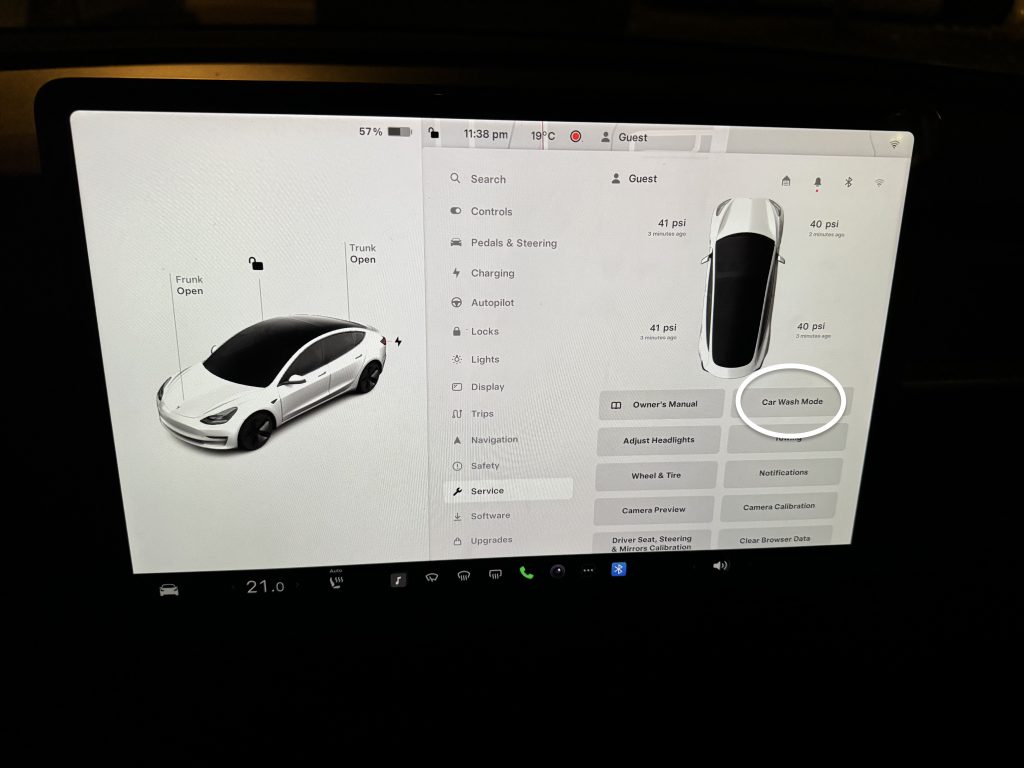
Then, select ‘Service’ and tap ‘Car Wash Mode’. Ensuring your Tesla is properly set for a car wash is crucial. This mode helps avoid potential damage during the wash process. It deactivates certain features, like automatic wipers and auto-locking, that could cause issues.
Understanding how to enable Car Wash Mode enhances your vehicle’s care routine. In this guide, we’ll walk you through the steps clearly. You’ll learn how to prepare your Tesla for a smooth and safe car wash experience. Whether you’re a new Tesla owner or just looking for a refresher, this post will help you ensure your car remains in top condition.
Preparing Your Tesla
Make sure your Tesla has enough charge. It is important for the car wash. You do not want it to run out of power. Check the charging status first. This will save you from any trouble. If the battery is low, charge it before you go.
Always check for software updates. Tesla often releases new updates. These updates can improve your car’s performance. They might also add new features. Make sure your car is up to date. This will ensure it works well in car wash mode.
Credit: tesloid.com
Accessing Car Wash Mode
To activate Car Wash Mode, use your Tesla’s touchscreen. First, tap the car icon at the bottom of the screen. This opens the control menu. Next, go to the Settings Menu. From there, find the option for Service. Tap it to access the service settings. Finally, locate and select Car Wash Mode. Your Tesla will prepare for the car wash.
Activating Car Wash Mode
First, get into your Tesla car. Make sure the car is in Park mode. Then, tap on the Car icon at the bottom of the screen.
Next, select the Service menu. Within the Service menu, find and tap on the Car Wash Mode option. Confirm your selection by tapping Enable.
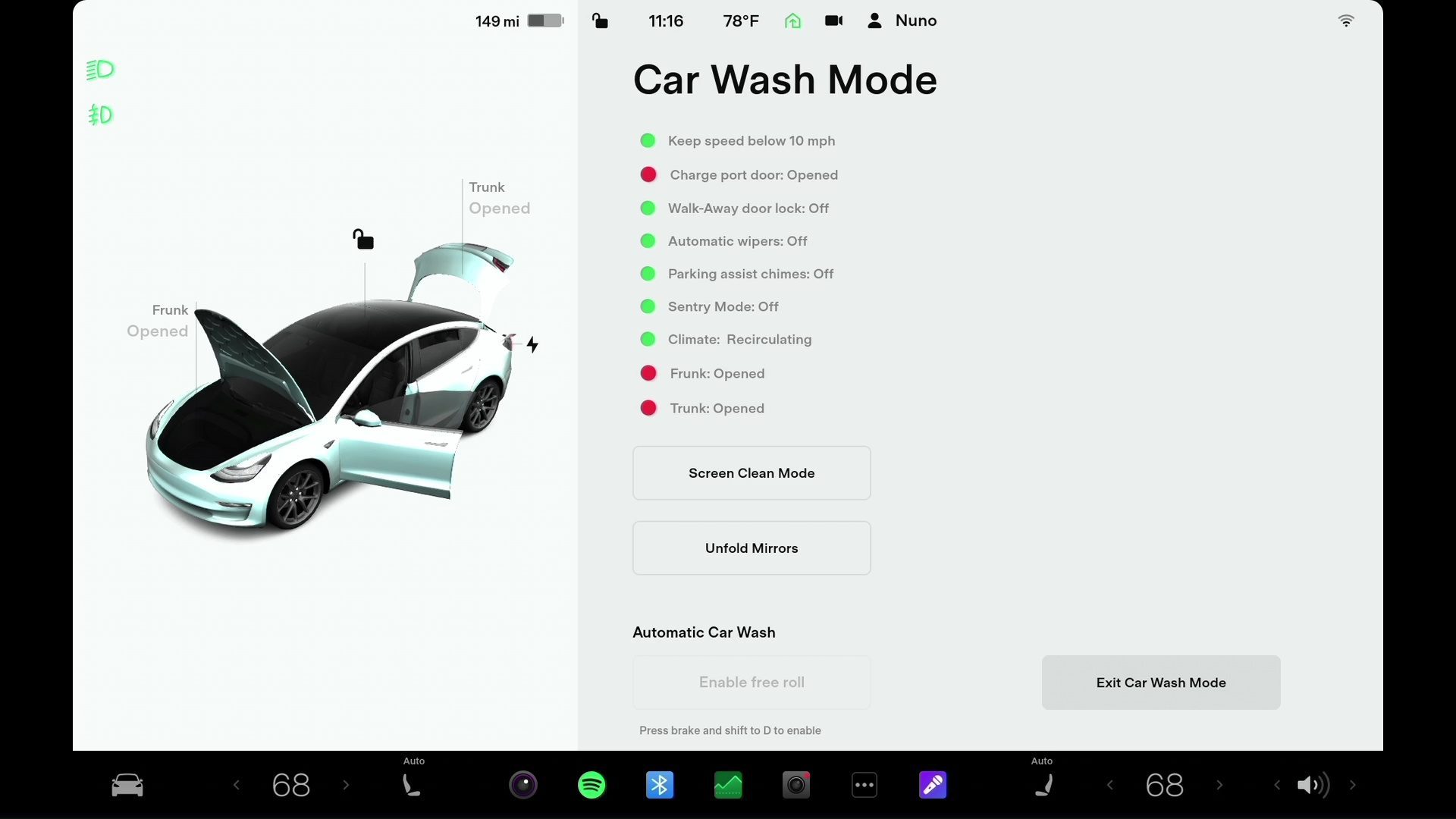
After enabling Car Wash Mode, check the screen for confirmation. Ensure all windows are closed. The mirrors will fold automatically. Additionally, the charge port will lock, and the windshield wipers will disable.

Credit: www.youtube.com
Features Of Car Wash Mode
With Car Wash Mode, the windows lock automatically. This prevents water from entering. No need to worry about cleaning up water inside. The feature is helpful for a quick, smooth car wash. Your Tesla stays dry inside.
Car Wash Mode also controls the wipers. The wipers do not move during the wash. No scratches or damage to the wipers. The car wash is safe for all parts. Your Tesla comes out clean and safe.
Deactivating Car Wash Mode
To exit Car Wash Mode, press the button on the screen. The Car Wash Mode will turn off. Make sure the car is in Park. You may need to press the brake pedal. Check that all doors and windows are closed.
Keep your hands and feet away from moving parts. Do not open the doors while in the car wash. Ensure that no one is inside or near the car. Follow the car wash instructions carefully. Be aware of your surroundings at all times.

Credit: www.youtube.com
Common Issues
Problems might happen during car wash mode. Sometimes the car does not enter the mode. Screen glitches could occur too. Sensors might get confused. The car wash mode can be tricky. Water might affect sensor function. Parts may not work as expected. These issues can be annoying. Knowing tips can help. Understanding problems helps to fix them. Simple steps can solve big issues. Always stay calm and check the basics.
Restart the car if stuck. Check the screen for errors. Make sure car is in park mode. Turn off any active features. Inspect sensors for damage. Use manual mode if needed. Read the manual for help. Call customer support for advice. Keep calm and follow steps. Simple fixes often work.
Contact Tesla support for help. Explain the issue clearly. Follow their advice. They have expert solutions. Support can fix complex issues. Always have your car details ready. Support team is trained well. Quick help is given. Trust their guidance. They solve many problems daily. Support helps to keep your car running smooth. Always reach out when in doubt.
Tips For Safe Washing
Use soft cloths to clean your Tesla. Hard brushes can scratch the paint. Choose a gentle soap made for cars. Regular soap can harm the finish. Rinse the car with clean water. This removes dirt and soap. Dry the car with a soft towel. This prevents water spots.
Keep the windows up when washing. Water can damage the inside. Close the sunroof tightly. Water can leak through gaps. Avoid spraying water directly at sensors. Water can cause sensors to fail. Always wash in a shaded area. Sunlight can cause soap to dry too fast.
Maintaining Your Tesla
Keep your Tesla looking new. Clean the exterior regularly. Use a soft cloth to avoid scratches. Wash it with mild soap and water. Rinse thoroughly to remove all soap. Dry with a clean towel.
Protect your Tesla from the elements. Use a car cover when parked outside. Wax the exterior every few months. This adds a protective layer. Check tire pressure often. Properly inflated tires wear evenly. Follow these steps for a shiny, healthy car.
Frequently Asked Questions
How Do You Turn On Car Wash Mode On A Tesla?
To turn on car wash mode on a Tesla, go to the Controls menu, select Service, then tap Car Wash Mode.
Can You Put Tesla In A Car Wash?
Yes, you can put a Tesla in a car wash. Use touchless or brushless car washes to avoid damage.
How Do You Leave A Tesla For A Car Wash?
To leave a Tesla for a car wash, enable Car Wash Mode from the touchscreen. This closes all windows, locks, and disables automatic wipers.
How Do You Put A Tesla In Clean Mode?
To put a Tesla in clean mode, tap “Controls” on the screen, then “Service,” and select “Clean Mode. “
Conclusion
Putting your Tesla in Car Wash Mode is simple. Just follow the steps we discussed. It’s important for keeping your car safe during washes. This mode protects your vehicle’s sensors and electronics. Now you can enjoy a clean car without worries.
Happy driving!