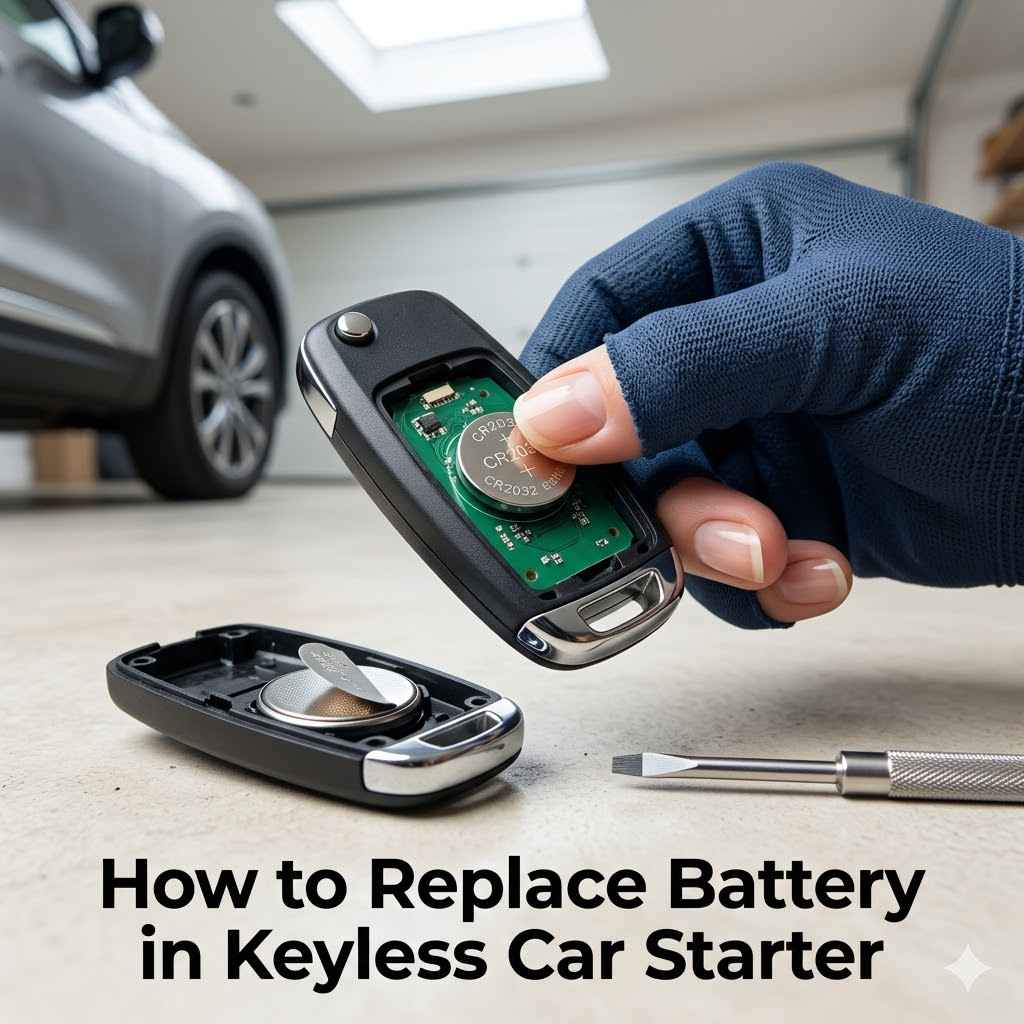
How to Replace Battery in Keyless Car Starter
Does your car key fob stop working? It can be a real bother when your keyless car starter stops responding. Many folks feel a bit unsure about How to Replace Battery in Keyless Car Starter, especially if they haven’t done it before.
It often seems more complicated than it really is. But don’t worry! This guide will show you how simple it can be, step by step.
Let’s get your key fob working like new again.
Your Key Fob Battery Needs a Change
Your key fob battery is the power behind your keyless entry and remote start system. Over time, this battery loses its power. When that happens, you’ll notice your car not responding to the fob.
This can happen gradually or suddenly. A dying battery means you might not be able to lock, unlock, or start your car remotely. It’s a common issue that affects many car owners.
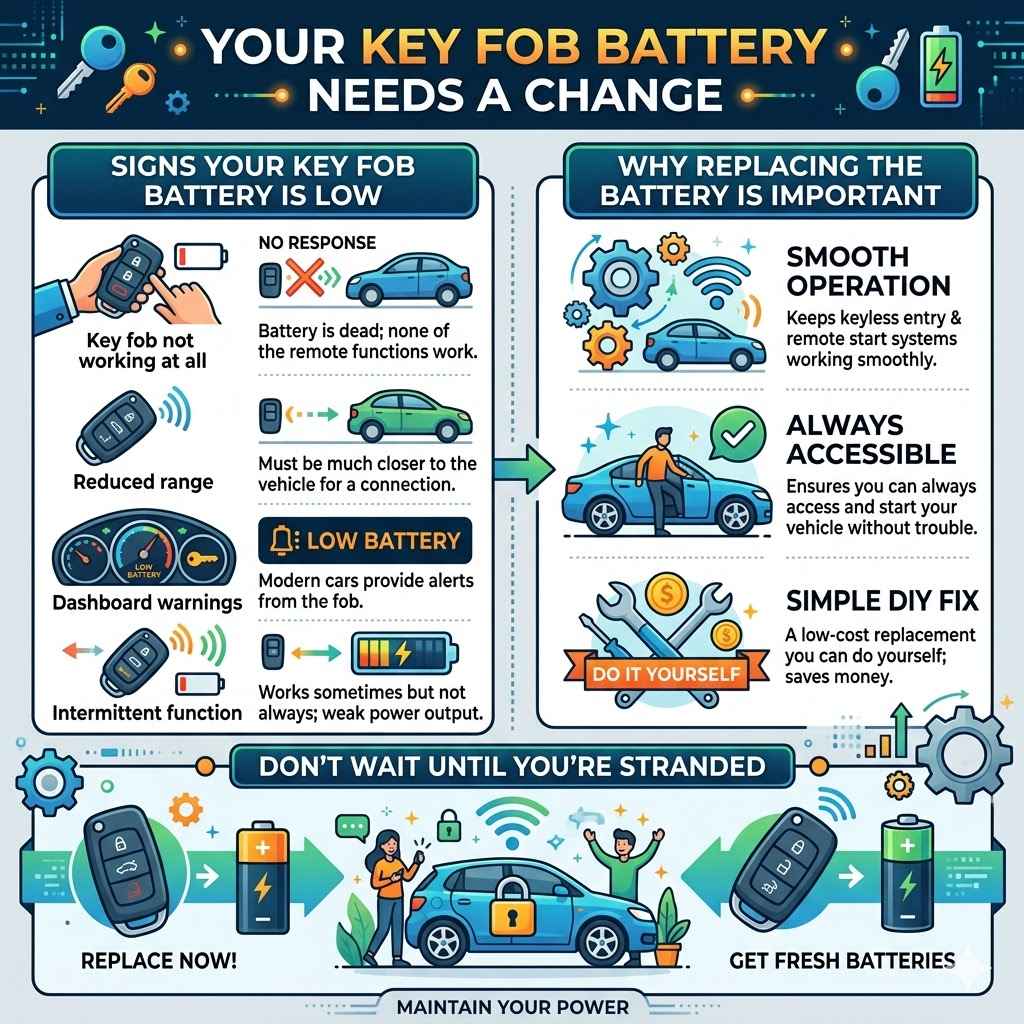
Signs Your Key Fob Battery Is Low
Several signs point to a battery that needs replacing. The most obvious is when your key fob doesn’t work at all. You might press the buttons, and nothing happens.
Sometimes, the range decreases. You may have to stand very close to your car for the fob to work. Other times, you might see a low battery warning on your car’s dashboard.
This is your car telling you the fob is losing power.
Key fob not working at all
This means the battery is likely completely dead. You won’t be able to use any of the functions like unlocking doors or starting the car.
Reduced range
You have to be much closer to your car for the fob to be recognized. The signal is weaker, which is a sure sign of a low battery.
Dashboard warnings
Some modern cars will display a message on the dashboard indicating a low key fob battery. This is a direct alert from your car.
Intermittent function
The fob might work sometimes but not others. This is a sign that the battery is weak and struggling to provide consistent power.
Why Replacing the Battery Is Important
Replacing the battery keeps your keyless entry and remote start systems working smoothly. A fresh battery ensures you can always access and start your vehicle without trouble. It saves you from being stranded or needing to manually unlock your car.
Plus, it’s a simple fix you can do yourself, saving money on dealership services.
Getting Ready to Replace the Key Fob Battery
Before you start, you need to gather a few things. Having the right tools and the correct battery type will make the process smooth. Most key fobs use common coin-cell batteries.
Knowing your car’s make and model helps you find the exact battery you need. It’s a good idea to have everything ready before you open up your key fob.
Identifying Your Key Fob Type
Key fobs come in many shapes and sizes. Some are small and simple, while others have more buttons or a built-in key. Look at your fob closely.
Does it have a small groove or seam where it seems to come apart? Some fobs have a small screw that needs to be removed. Others might require a bit of gentle prying.
Knowing your fob’s design helps you figure out the best way to open it.
What Battery Do You Need
The most common batteries for key fobs are lithium coin cells. These are small, flat, and round. You’ll often see numbers like CR2032, CR2025, or CR2016.
The number tells you the battery’s size and voltage. For example, CR2032 is a 3-volt battery that’s 20mm wide and 3.2mm thick. The best way to know for sure is to check your car’s owner’s manual.
You can also often find this information by searching online for your car’s make, model, and year, followed by “key fob battery type.
Tools You’ll Need
For most key fobs, you won’t need many tools. A small, flathead screwdriver is usually enough to gently pry open the fob. Sometimes, a Phillips head screwdriver is needed if there’s a tiny screw.
A plastic prying tool or even a guitar pick can be helpful for separating the halves of the fob without scratching the plastic. Make sure the screwdriver tip is small enough to fit into any gaps or slots on the fob. Having a soft cloth to place the fob on can also prevent scratches.
How to Replace Battery in Keyless Car Starter Step-by-Step
This section guides you through the actual process of changing the battery. We’ll break down each step so you can follow along easily. Taking your time and being gentle is key to avoiding damage to your key fob.
Most fobs are designed to be opened and have their batteries
Step 1 Open the Key Fob
Locate the seam or notch on your key fob. This is where the two halves of the plastic case join together. Insert the tip of your small flathead screwdriver or plastic prying tool into this seam.
Gently twist the screwdriver or pry tool to separate the two halves of the fob. Work your way around the seam if needed. Be careful not to force it, as this could break the plastic clips holding the fob together.
Some fobs might have a small screw that needs to be removed first. If you see a tiny screw, use the appropriate screwdriver to take it out. Once the screw is out, you can then proceed with prying the two halves apart.
If your fob has a metal emergency key, you might need to slide a release lever to remove it first. This often exposes a screw or a better point to start prying.
Step 2 Remove the Old Battery
Once the fob is open, you’ll see the old battery. It’s usually held in place by a small clip or is simply sitting in a compartment. If there’s a clip, gently push it aside with your screwdriver or fingernail to free the battery.
If the battery is just sitting there, you can carefully lift it out. Use your fingernail or the edge of your screwdriver to nudge it out of its spot. Note the orientation of the battery (which side is up) before you remove it, as you’ll need to put the new one in the same way.
Step 3 Insert the New Battery
Take your new coin-cell battery. Look at it closely to see which side has the positive (+) symbol and which side has the negative (-). Most of the time, the positive side (+) will be facing upwards.
Place the new battery into the compartment, making sure it sits snugly and is correctly oriented. If there was a clip holding the old battery, ensure the new battery slides under it or clicks into place properly. Double-check that it’s secure and won’t easily pop out.
Step 4 Close the Key Fob
Align the two halves of the key fob case. Gently press them together until they snap or click into place. You should hear or feel the edges connecting.
If your fob had a screw, now is the time to put it back and tighten it gently. If there was a metal emergency key, re are no gaps between the two halves of the case.
The fob should feel solid and secure again.
Step 5 Test Your Key Fob
Now for the moment of truth! Go to your car and try using the key fob. Press the lock button.
Does your car’s alarm chirp and lights flash? Then try the unlock button. Do the doors unlock?
If you have a remote start feature, try starting your car remotely. If all functions work correctly, you’ve successfully replaced the battery. If it doesn’t work, double-check that the battery is inserted correctly and that the fob is fully closed.
Troubleshooting Common Key Fob Battery Issues
Sometimes, even after changing the battery, your key fob might not work as expected. This can be frustrating, but usually, there’s a simple fix. We’ll look at what might be going wrong and how to solve it.
Most problems are minor and can be resolved with a few checks.
My Key Fob Still Doesn’t Work
If your key fob still isn’t responding after replacing the battery, there are a few things to check. First, ensure you used the correct battery type and it’s inserted with the correct polarity (positive side usually up). Sometimes, a new battery can be faulty, though this is rare.
Try a different new battery just to be sure. Also, inspect the inside of the key fob for any visible damage to the circuit board or battery contacts. Make sure the battery is making good contact with the terminals inside the fob.
Remote Start Feature Not Functioning
If the unlock and lock functions work but remote start doesn’t, it might be an issue with the remote start system itself rather than just the fob battery. However, some fobs have separate buttons or power needs for different functions. Double-check your car’s manual for specific instructions on the remote start fob.
In some cases, the car’s computer might need to re-sync with the key fob after a battery change. This usually involves holding down certain buttons on the fob while near the car.
A common issue is that the car needs to recognize the fob again. You might need to go through a re-synchronization process. This can vary greatly by car model.
For instance, some manufacturers require you to insert the key into the ignition and turn it to the “on” position a certain number of times, or press and hold buttons on the fob.
Check battery contact
Ensure the new battery is firmly seated and making solid contact with the metal terminals inside the fob. Bent or dirty contacts can prevent power flow, even with a new battery.
Re-synchronize the fob
Consult your car’s owner’s manual to see if your key fob needs to be re-paired or re-synchronized with your vehicle after a battery change. This is a common step for many car models.
Inspect for damage
Carefully examine the inside of the key fob for any visible signs of damage. This could include cracks on the circuit board, loose wires, or corrosion on the contacts.
Test other buttons
If only specific buttons aren’t working, it could indicate a problem with those particular buttons or their connections on the circuit board.
When to Seek Professional Help
If you’ve tried everything and your key fob still isn’t working, it might be time to visit a professional. This could be your car dealership’s service center or a specialized automotive locksmith. They have diagnostic tools and expertise to identify more complex issues.
Sometimes, the key fob itself might be damaged beyond repair, and you may need a
Key Fob Battery Lifespan and Maintenance
Understanding how long your key fob battery should last and how to care for it can save you hassle. Batteries don’t last forever, but a few simple tips can help them perform their best. Knowing what affects battery life can help you anticipate when you’ll need to replace it.
Average Battery Life
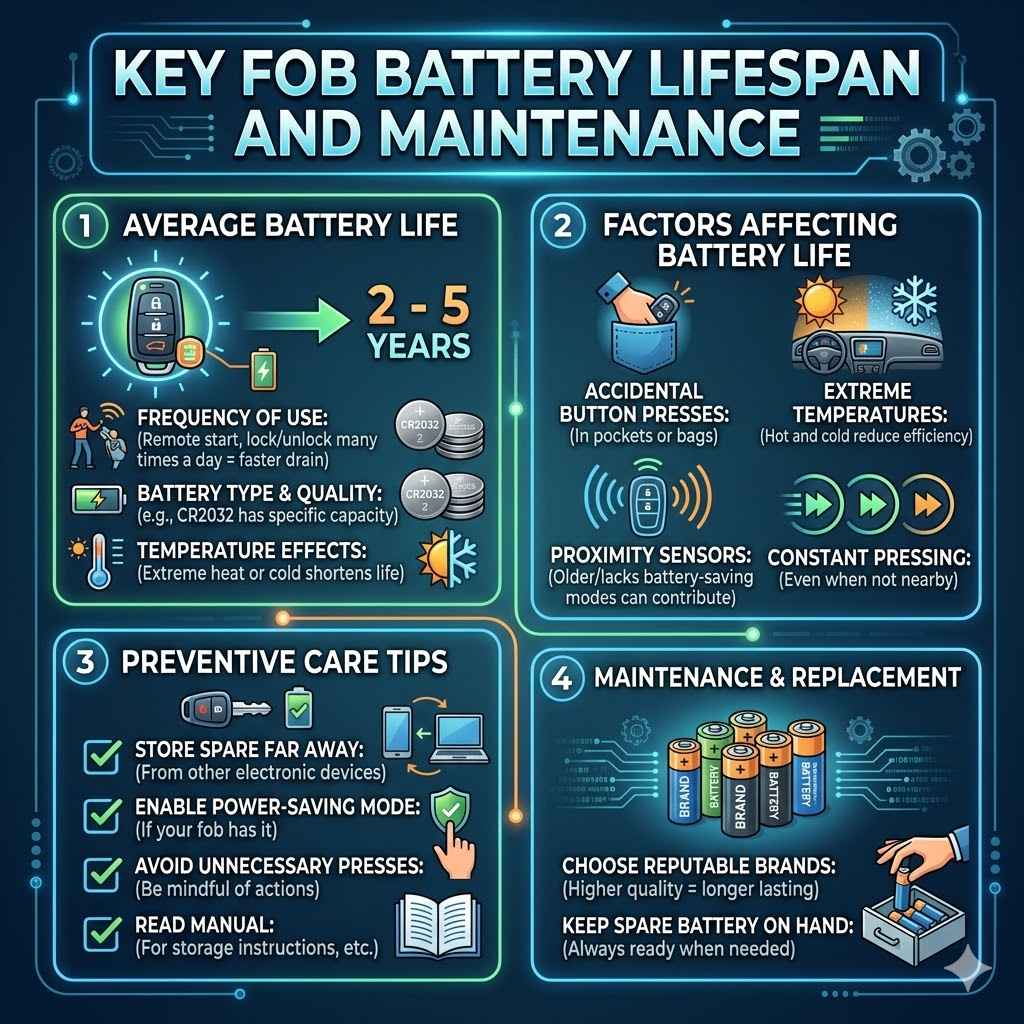
The average lifespan of a key fob battery is typically between two and five years. This can vary depending on several factors. The frequency of use is a big one; if you use your remote start and lock/unlock features many times a day, the battery will drain faster.
The type of battery also plays a role. Higher quality batteries or those with larger capacities tend to last longer.
For example, a CR2032 battery, commonly used in many fobs, is rated for a certain number of hours of continuous use. While this isn’t directly comparable to daily button presses, it gives an idea of its power capacity. The temperature can also affect battery performance; extreme heat or cold can shorten battery life.
Factors Affecting Battery Life
Several things can make your key fob battery die sooner than expected. Constant pressing of buttons, even when the car isn’t nearby, drains the battery. This can happen if the fob is in a pocket or bag where it accidentally presses buttons.
Extreme temperatures, both very hot and very cold, can reduce battery efficiency. Forgetting to turn off features that draw power, like proximity sensors in some advanced fobs, can also contribute.
Many modern key fobs are designed with battery-saving modes. However, if your fob is older or lacks these features, constant use will naturally lead to a shorter lifespan. Consider storing your spare key fob in a place where it’s less likely to be accidentally activated.
Some people even keep their spare fob in a metal box or Faraday pouch to block its signal.
Preventive Care Tips
To get the most out of your key fob battery, there are a few things you can do. Store your spare key fob away from other electronic devices. If your fob has a power-saving mode, make sure it’s enabled.
Avoid unnecessary button presses. If you know you won’t be using your remote start for a while, check your manual for any specific storage instructions.
When it’s time to replace the battery, choose a reputable brand. Cheaper, unbranded batteries might not last as long or perform as well. Keeping a spare battery on hand is also a good idea, so you’re ready when the time comes.
This way, you avoid being inconvenienced by a dead fob.
Frequently Asked Questions
Question: How often should I replace my key fob battery?
Answer: Most key fob batteries last between two to five years. You should replace it when you notice signs of a weak battery, like reduced range or non-responsive buttons.
Question: Can I use a different size battery if the exact one isn’t available?
Answer: It is best to use the exact battery size specified for your key fob. Using a different size can prevent it from fitting correctly or may not provide the necessary power, potentially damaging the fob.
Question: Do I need to reprogram my car after changing the battery?
Answer: In most cases, you do not need to reprogram your car. The key fob usually retains its connection. However, some vehicles may require a simple re-synchronization process, which is detailed in your owner’s manual.
Question: What should I do if my key fob is damaged?
Answer: If your key fob is physically damaged, it’s best to consult your car’s manual or a professional automotive locksmith. They can assess the damage and advise on repair or replacement options.
Question: Where can I find the battery type for my key fob?
Answer: You can find the battery type in your car’s owner’s manual. You can also often find this information by looking at the old battery once removed or by searching online for your car’s make, model, and year.
Conclusion
You’ve learned how easy it is to handle How to Replace Battery in Keyless Car Starter. With the right battery and a few simple steps, you can bring your key fob back to life. No more worries about getting locked out or not starting your car.
Follow these tips, and you’ll keep your key fob working perfectly. Enjoy the convenience of your keyless system again.