Ford System Off to Save Battery: What It Means and How to Fix It
What Does ‘System Off to Save Battery’ Mean?
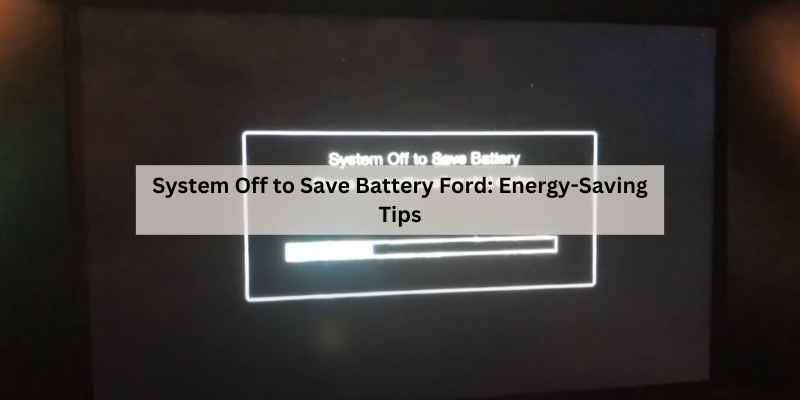
You park your Ford, shut the door, and glance at the dash. A message reads: System Off to Save Battery. It sounds like your car is about to die on the spot. It’s not. This is a deliberate power-management feature, not a failure alert.
Ford’s battery management system (BMS) monitors the 12V battery’s state of charge and voltage. When the system detects that the battery is getting low—typically below 12.2 volts with the ignition off—it starts shutting down non-essential electrical loads. That includes the radio, interior lights, power windows, and even the SYNC display. The goal is simple: keep enough juice in the battery to start the engine next time.
EDS
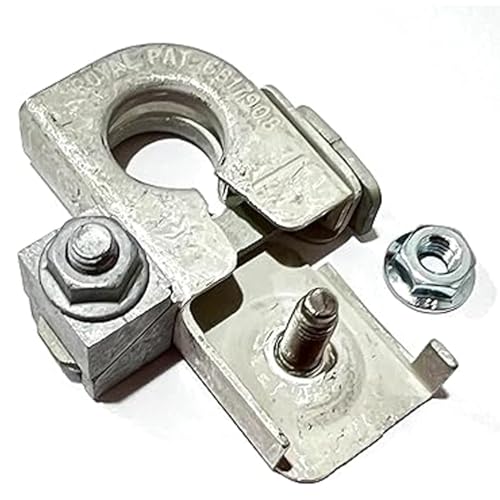
EDS 926-879 926879 Negative Battery Terminal Connector
- Direct OE-Style Replacement for Ford BT4Z-14450-BA: Engineered as an exact NEGATIVE battery terminal replacement for Ford part num…
- Wide Compatibility Across Ford & Lincoln Vehicles: Fits a broad range of models including Edge (’11–’24), Explorer (’11–’19), F-15…
- High-Quality C26000 Copper Alloy with Tin Plating: Constructed from durable C26000 copper alloy and tin-plated to deliver strong c…
This message is a warning, not a death sentence. But it’s also not something you should ignore for weeks. If you see it repeatedly, something is causing the battery to drain or charge improperly. This guide walks you through the diagnosis and fixes, step by step.
If you find that your battery terminals are corroded or loose, a quality replacement like the EDS 926-879 negative battery terminal connector can restore a solid ground connection. It’s a direct OE-style replacement for Ford part BT4Z-14450-BA, built from tin-plated copper alloy for reliable conductivity.
Is It an Emergency? (How Serious is This Warning?)
No, it’s not an emergency in the sense that your car will burst into flames. But it’s a signal that your battery is struggling. If you keep driving short trips with the radio and lights on, the battery may not recover. Eventually, you’ll face a no-start situation.
The severity depends on the root cause. A one-time occurrence after you left the interior lights on overnight is normal. Seeing the message every morning, even after a full drive, points to a deeper issue—like a failing battery, a parasitic draw, or a faulty sensor.
Here’s how to gauge urgency: if the engine cranks fine and the message appears only after sitting for days, you likely have a slow drain. If the message appears after a short stop (like 30 minutes), your battery is weak or the charging system isn’t doing its job. Either way, you should diagnose it soon, but you don’t need to pull over and call a tow truck.
The Root Causes: Why Your Ford is Powering Down
Several things can trigger the ‘System Off’ message. I’ve seen all of these in real-world Fords, from F-150s to Escapes.
Faulty Battery Sensor (EBS)
The electronic battery sensor (EBS) sits on the negative battery terminal. It measures current flow, voltage, and temperature. The BMS uses this data to decide when to cut power. If the sensor gives bad readings—like thinking the battery is weaker than it actually is—the system will shut things off prematurely.
A failing sensor is common on older Fords. The fix is replacement, which costs roughly $50–$120 for the part, plus labor if you don’t DIY. You can often find the sensor integrated into the negative battery cable assembly.
Weak or Failing 12V Battery
The most frequent culprit. A battery that’s near the end of its life (typically 3–5 years) can’t hold a charge well. Even if it starts the engine fine in the morning, the voltage drops quickly under load. The BMS sees low voltage and activates battery saver mode.
Cold weather makes it worse. At 0°F, a battery loses about 60% of its cranking power. So a weak battery in winter will trigger the message almost every time you park.
Parasitic Drain: The Silent Killer
Parasitic draw is any electrical load that continues to pull current after the ignition is off. Modern cars have some draw—the clock, the security system, the radio memory—usually under 50 milliamps (0.05 amps). Anything above that is a problem.
Common sources: a glovebox light that stays on, a faulty door switch, an aftermarket stereo, or a module that fails to ‘sleep.’ I once traced a drain to a USB charger left plugged into the 12V socket. It drew 300 mA and killed the battery in three days.
Corroded Terminals and Loose Connections
Corrosion on the battery terminals acts like a resistor. It reduces the current flow between the battery and the vehicle’s electrical system. A loose connection can cause intermittent voltage drops, which the BMS misinterprets as a low battery.
Check the terminals for white or blue-green crust. That’s corrosion. Also check that the clamps are tight—you shouldn’t be able to twist them by hand.
If your terminals are beyond cleaning, a replacement connector like the EDS negative battery terminal is a solid fix. It’s designed for 6mm ground cables and fits many Ford and Lincoln models.
Alternator and Charging System Failures
The alternator charges the battery while the engine runs. If it’s not producing enough voltage (should be 13.8–14.4 volts at idle with loads on), the battery never gets fully recharged. You might not notice until the ‘System Off’ message appears.
Diagnose with a multimeter. Start the engine and measure voltage across the battery terminals. If it’s below 13.5 volts, the alternator or voltage regulator is suspect. Replacement alternators run $200–$500 for parts, plus labor.
How to Fix It: A Step-by-Step Troubleshooting Guide
Grab a multimeter, a wire brush, and maybe a socket set. You’ll also need about an hour. Follow these steps in order—they’re designed to rule out the easiest fixes first.
Step 1: Visual Inspection and Terminal Cleaning
- Pop the hood and look at the battery. Check for cracks, bulges, or leaks.
- Inspect the terminals and cable ends. Look for corrosion or green/blue fuzz.
- If you see corrosion, disconnect the negative terminal first, then the positive. Use a wire brush or a terminal cleaner tool to scrub both the post and the clamp until they’re shiny.
- Reconnect the positive first, then the negative. Tighten the clamps snugly—not so tight that you strip the bolt.
- If the terminals are badly pitted or broken, replace them. The EDS 926-879 connector is a direct replacement for many Fords and includes the wedge-lock mechanism for a secure fit.
Pro tip: after cleaning, apply a thin coat of dielectric grease to the terminals. It prevents future corrosion without impeding conductivity.
Step 2: Load Test the Battery
You can’t tell a battery’s health by looking at it. You need a load test. Many auto parts stores do this for free. Or you can do it at home with a digital multimeter:
- Set the multimeter to DC volts (20V range).
- With the engine off, measure across the battery terminals. A fully charged battery should read 12.6 volts or higher. Below 12.4 volts means it’s only partially charged.
- Now, crank the engine while watching the meter. The voltage should not drop below 10 volts during cranking. If it does, the battery is weak.
- If the battery is over 3 years old and fails the cranking test, replace it. A new battery will cost $120–$250, depending on the type.
If the battery passes, move to the next step.
Step 3: Perform a BMS Reset
After replacing a battery or if the sensor readings are off, the BMS needs a reset. This clears the ‘learned’ battery state and forces the system to re-evaluate. Here’s the procedure for most Fords:
- Make sure the ignition is off and the key is out.
- Turn the headlights on (low beam).
- Flash the high beams five times (pull the stalk toward you) within 10 seconds.
- Turn the headlights off.
- Start the engine and let it run for at least 10 seconds.
That’s it. The BMS has been reset. You’ll see a confirmation in some models—a brief message or a chime. If you don’t, repeat the steps.
Pro tip: always do a BMS reset after installing a new battery. Otherwise, the system may continue to undercharge the new battery, thinking it’s still old and weak.
Step 4: Test for Parasitic Draw (Multimeter Guide)
If the battery is healthy and the message persists, you likely have a parasitic draw. Here’s how to test it safely:
- Make sure all accessories are off. Close all doors, the trunk, and the hood.
- Disconnect the negative battery cable. Use a wrench to loosen the clamp and remove the cable from the post.
- Set your multimeter to DC amps (10A range or higher). Connect the red lead to the 10A jack and the black lead to the COM jack.
- Connect the multimeter in series between the negative post and the negative cable clamp. Red lead to the post, black lead to the cable.
- Wait 20–30 minutes. This allows the modules to enter sleep mode. The reading will be high initially, then drop.
- Once stabilized, read the current. A normal draw is under 50 milliamps (0.05 A). If it’s higher, you have a drain.
If the draw is above 0.05 A, start pulling fuses one at a time (with the meter still connected) to isolate the circuit. When the amp reading drops, you’ve found the culprit. Check the owner’s manual for fuse locations.
Pro tip: don’t forget the under-hood fuse box. Many draws come from modules under the hood, not the interior fuse panel.
How to Reset the Warning Message
After fixing the underlying issue, you’ll want to clear the ‘System Off’ message. It’s not stored as a trouble code, so it will disappear on its own once the battery is healthy and the BMS is happy. But if you want to force it:
- Disconnect the negative battery cable for 30 seconds. This resets the BMS and clears the message.
- Reconnect the cable and tighten it.
- Start the engine and let it idle for a few minutes.
Keep in mind that disconnecting the battery will reset your radio presets, clock, and possibly the power window auto-up feature. You’ll need to re-index the windows by rolling them down and up fully.
Preventing Future Battery Drain Issues
Once you’ve solved the immediate problem, take a few steps to keep it from coming back:
- Drive your Ford at least 20 minutes a week, especially if you mostly do short trips. This gives the alternator time to recharge the battery.
- Turn off all lights, the radio, and the climate fan before shutting off the engine.
- If you park for more than two weeks, use a battery maintainer (trickle charger).
- Check your battery terminals every oil change. Clean them if you see any buildup.
- Replace your battery every 4–5 years, even if it seems fine. Don’t wait for it to fail.
- If you add aftermarket accessories (dash cams, alarms, amplifiers), make sure they’re wired to switched power or have a low-voltage cutoff.
Also, if your car sits unused for long stretches, consider a solar trickle charger. It plugs into the OBD-II port or the 12V socket and keeps the battery topped off.
Frequently Asked Questions (FAQs)
Does ‘System Off to Save Battery’ mean I need a new battery?
Not necessarily. It means the battery voltage has dropped below the threshold. It could be a weak battery, a faulty sensor, a parasitic drain, or simply leaving the lights on. A load test will tell you if the battery is the culprit.
Can I drive my Ford with this message on?
Yes, you can drive it. The message typically appears when the ignition is off. When you start the engine, the alternator takes over, and the message usually disappears. But driving won’t fix the underlying problem. If the battery is weak, you risk being stranded.
How long does it take for the battery to die after the message appears?
It depends on the battery’s condition and the drain rate. A healthy battery with a small drain might last a few days. A weak battery with a moderate drain could die overnight. Don’t test it—fix it.
What is ‘deep sleep’ mode, and how is it different from ‘System Off’?
Deep sleep is a power-saving state that some Ford modules enter after the vehicle sits for several days. It reduces the draw to nearly zero to protect the battery. ‘System Off’ is a specific warning message that appears when the BMS detects low voltage and starts shedding loads. Deep sleep is a normal function; ‘System Off’ is a symptom of a problem.
Will disconnecting the battery reset the BMS?
Yes, disconnecting the battery for 30 seconds will reset the BMS, but it also clears other learned settings. The high-beam method is preferred because it only resets the BMS and doesn’t wipe your radio presets.
How much does it cost to fix this at a shop?
Costs vary: a battery replacement is $150–$300, a battery sensor is $100–$200 including labor, an alternator is $300–$600, and a parasitic draw diagnosis can be $100–$150 for the diagnostic time. Doing it yourself saves the labor but requires a multimeter and some patience.
When to Call a Professional
If you’ve gone through the steps—cleaned terminals, tested the battery, performed a BMS reset, and checked for parasitic draw—and the message still returns, it’s time to bring in a pro. There are a few things a shop can do that you can’t easily at home:
- Use a professional-grade battery tester that checks cold cranking amps (CCA) and internal resistance.
- Perform a charging system test that loads the alternator to its maximum output.
- Use a scan tool to read BMS data and any stored trouble codes.
- Trace wiring issues or intermittent shorts in the harness.
Don’t let this drag on. A dead battery is an inconvenience, but a faulty alternator can leave you stranded on the highway. Fix it right, and your Ford will treat you well for years.
If you need a reliable replacement for a corroded negative terminal, the EDS 926-879 connector is worth a look. It’s made from quality copper alloy and fits a wide range of Ford and Lincoln models.
For more on battery saver mode in other Ford models, check out this guide on Mondeo battery saver. And if you’re dealing with a persistent battery drain, you might also find these battery-saving tips useful.
Final Thoughts: What to Do Right Now
- Don’t panic. The message is a warning, not a breakdown.
- Start with a visual check of the battery terminals. Clean and tighten them.
- Load test the battery if it’s over 3 years old.
- Perform a BMS reset after any battery service.
- Test for parasitic draw if the message keeps coming back.
- Replace the battery, sensor, or alternator if tests point to them.
- If you’re not comfortable with electrical work, take it to a trusted mechanic.
Products related to this article
Sponsored / affiliate links. As an Amazon Associate I earn from qualifying purchases. I may earn additional commission from eligible campaigns.