97 Corvette Aftermarket Shocks: Your Essential, Genius Fix
When putting aftermarket shocks on a 97 Corvette with the F45 electronic suspension, you must add shock simulators (often called deletes). This prevents the car’s computer from triggering an “80 MPH MAX SPEED” warning light on your dash. These simulators plug into the factory wiring harness and trick the computer into thinking the original electronic shocks are still there.
Hello there! I’m Md Meraj, and today we’re tackling a common headache for 1997 Corvette owners. Does your C5 Corvette ride feel a bit bouncy, like an old boat? Maybe you’re tired of feeling every single bump in the road. You’ve decided it’s time for new shocks, but then you hear horror stories about warning lights and speed limiters. It’s enough to make anyone nervous.
Don’t worry! I’m here to walk you through it. This problem has a simple, genius fix, and I promise you can handle it. We’ll turn that confusing mess into a clear, step-by-step plan. Let’s get your Corvette riding smoothly and safely, without any angry warning lights. You’re about to become a C5 suspension expert!
What’s the Big Deal with 97 Corvette Shocks Anyway?
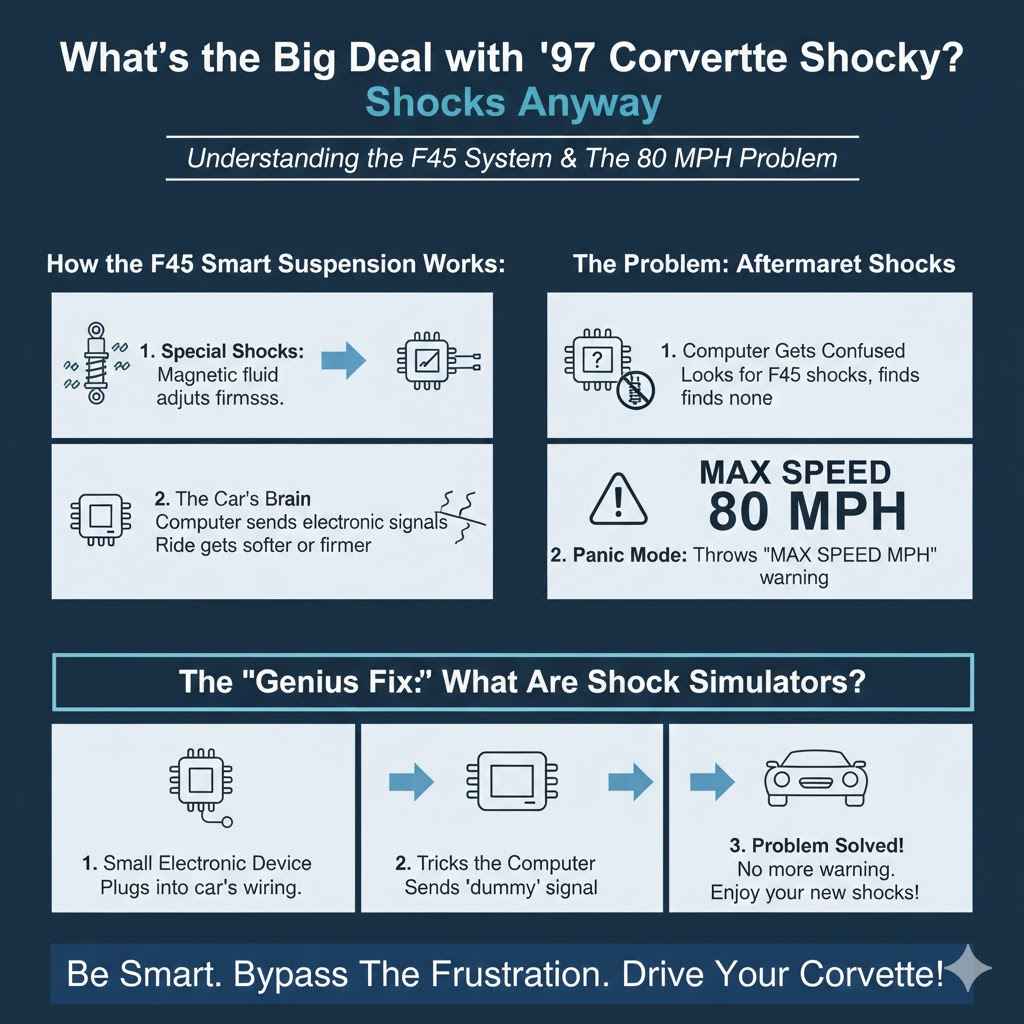
So, you want to upgrade your C5’s ride. That’s a fantastic idea! But the 1997 Corvette isn’t just any car. Some of them came from the factory with a very clever system called the F45 Selective Real Time Damping Suspension. Think of it as “smart” suspension.
Here’s how it works in simple terms:
- The original shocks have special fluid inside with tiny magnetic particles.
- The car’s computer (the Body Control Module, or BCM) sends an electric current to each shock.
- This current changes how thick the fluid is, making the ride softer or firmer in milliseconds.
It was amazing technology for its time! The problem starts when you remove these special electronic shocks and replace them with standard aftermarket shocks. The car’s computer gets confused. It sends out a signal looking for the F45 shocks, but it gets no reply. Panicked, it thinks something is seriously wrong with the suspension and throws a warning on your dash: “MAX SPEED 80 MPH.”
That’s right. Your powerful Corvette is suddenly limited to 80 miles per hour, all because of a simple shock change. It’s frustrating, but it’s just the car’s safety system doing what it was programmed to do.
The “Genius Fix”: What Are Shock Simulators?
This is where our simple, genius fix comes in. The solution is a small electronic device called a shock simulator or ride control bypass module. You might hear people call it a “magnetized delete,” but its real job is to trick the computer.
Each simulator is basically a little resistor that plugs into the car’s wiring harness right where the old electronic shock was connected. It sends a “dummy” signal back to the computer that says, “Hey, everything’s fine here! The electronic shock is working perfectly!” The computer is happy, the warning light stays off, and your speed limiter is gone. You are now free to enjoy the smooth ride of your new aftermarket shocks.
First Things First: Does Your Corvette Have F45 Suspension?
Before you buy a single part, you need to be 100% sure your Corvette has this F45 system. If it doesn’t, you can swap the shocks without any simulators or electronic worries! This one simple check can save you time and money.
Here’s how to find out:
- Find the RPO Code Sticker: RPO stands for Regular Production Option. It’s a list of all the features your car was built with. You can usually find this sticker inside the glove box door or on the underside of the center console lid.
- Look for the Code: Scan the list of three-character codes for F45.
- Confirm Your System: If you see “F45” on that sticker, your car has the electronic suspension, and you will absolutely need the shock simulators for your upgrade. If you don’t see F45, you’re in the clear!
Another clue is the ride control switch. If your car has a switch on the center console that lets you select between “Tour,” “Sport,” and “Perf” modes, you almost certainly have the F45 system.
Gathering Your Tools and Parts for the Job
Okay, you’ve confirmed you have the F45 system. Now it’s time to get everything you need for a smooth and successful installation. Having the right tools makes any job easier and safer.
Essential Tools:
Floor Jack: To lift your car safely.
Jack Stands (4): Never work under a car supported only by a jack. Safety is your number one priority.
- Lug Wrench or Impact Wrench: To remove the wheel lug nuts.
- Socket and Wrench Set (Metric): You’ll need various sizes, but 18mm, 21mm, and 24mm are common for this job.
- Torque Wrench: For tightening your lug nuts to the correct specification when you’re done.
- Wheel Chocks: To keep the car from rolling while you jack it up.
- Zip Ties: For securing the new shock simulators so they don’t rattle around.
- Safety Glasses and Gloves: Protect yourself!
Essential Parts:
- New Aftermarket Shocks (Set of 4): Choose shocks that fit your driving style and budget. We’ll discuss options in a moment.
- Shock Simulators (Set of 4): Make sure you buy a kit specifically for the C5 Corvette F45 system. One simulator is needed for each corner of the car.
Choosing the Right Aftermarket Shocks
With the electronic system bypassed, you are free to choose from a wide world of amazing aftermarket shocks. The right choice depends on how you use your Corvette. Are you a daily driver, a weekend warrior, or a track day enthusiast?
Here is a table to help you decide:
| Shock Type | Best For | Pros | Cons |
|---|---|---|---|
| Twin-Tube (e.g., KYB Gas-a-Just) | Daily driving & comfortable cruising | Affordable, smooth ride, good replacement for worn-out stock shocks. | Can fade with very aggressive or track driving. |
| Monotube (e.g., Bilstein B6/B8) | Spirited street driving & occasional track days | Excellent handling response, better heat dissipation, very durable. | Can feel firmer than twin-tube shocks; more expensive. |
| Adjustable / Coilovers (e.g., QA1, Viking) | Serious enthusiasts & track use | Allows you to fine-tune ride height and stiffness (damping/rebound). | Most expensive option, can be complex to set up correctly. |
For most 97 Corvette owners who just want a better-than-new ride for the street, a quality monotube shock like the Bilstein B6 Performance is a fantastic, no-fuss upgrade.
Installing Your New Shocks and Simulators
Alright, you have your tools, your new shocks, and your all-important simulators. Let’s get to work! Take your time, follow the steps, and you’ll do great.
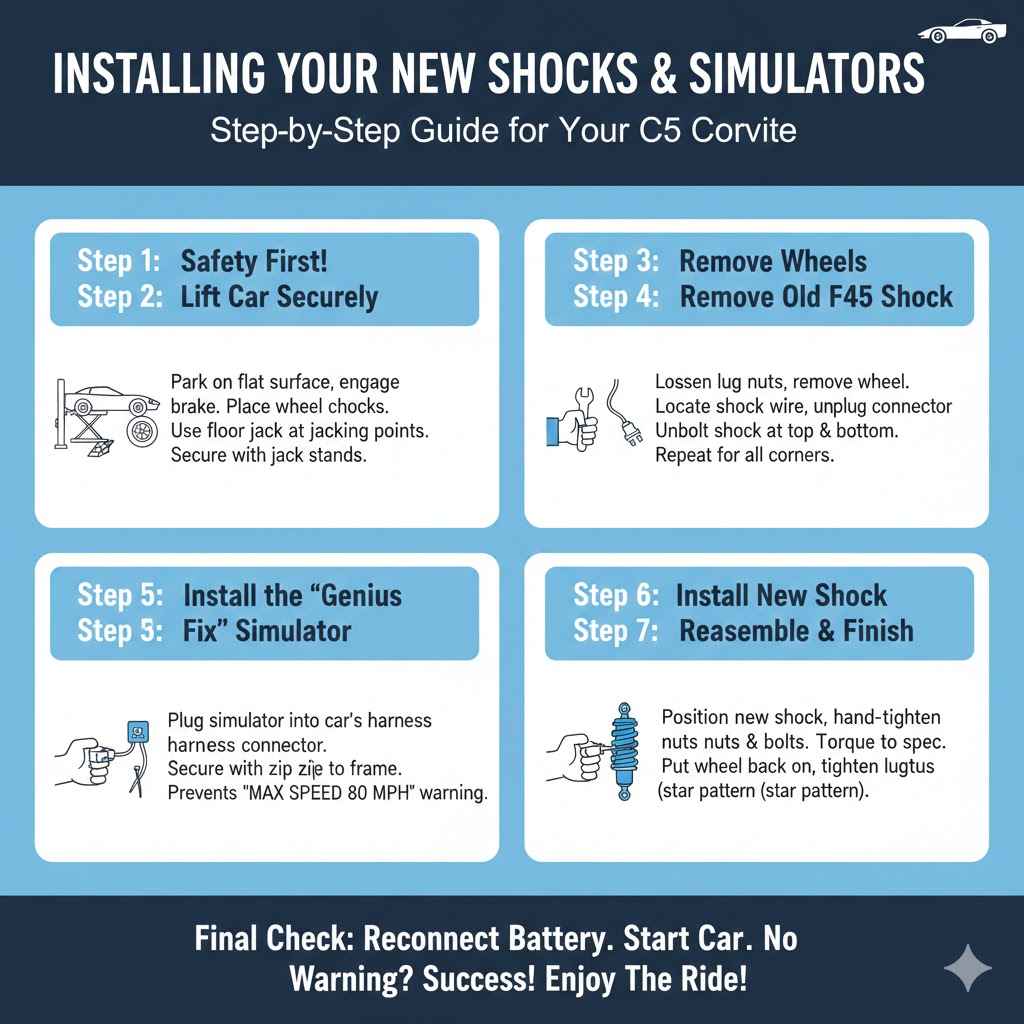
Step 1: Safety First!
Park your Corvette on a flat, level surface like a garage floor or driveway. Put the car in gear (or Park if it’s an automatic) and engage the parking brake. Place wheel chocks behind the rear wheels if you are lifting the front first, or in front of the front wheels if you are lifting the rear first. For added safety, it’s always a good idea to disconnect the negative terminal on your car’s battery.
Step 2: Lift the Car Securely
Using your floor jack, lift the car at the manufacturer’s recommended jacking points. You can find these in your owner’s manual. Once the car is high enough, place jack stands securely under the frame on both sides. Slowly lower the car onto the jack stands. Double-check that they are stable before proceeding. According to the National Highway Traffic Safety Administration (NHTSA), using jack stands correctly is a critical safety step for any DIY auto repair.
Step 3: Remove the Wheels
Using your lug wrench, loosen the lug nuts on the wheel you’re starting with. Once they are loose, you can finish jacking the car up. When the wheel is off the ground and the car is on jack stands, finish removing the lug nuts and take the wheel off. Set it aside.
Step 4: Remove the Old F45 Shock
Now you’ll see the old shock absorber. Look closely and you’ll see a wire coming out of the top.
- Unplug the Connector: Follow the wire to its connector on the car’s frame. Carefully unplug it. There is a small tab you may need to press to release it. Don’t just yank on the wire!
- Unbolt the Shock: The shock is typically held in place by two bolts at the bottom (connecting to the lower control arm) and two nuts at the top (on the upper shock mount). Use your wrenches to remove these. Once the bolts are out, the old shock will come right out.
- Repeat for Each Corner: The process is very similar for the front and rear shocks, though the bolt locations might differ slightly.
Step 5: The “Genius Fix” – Install the Shock Simulator
This is the magic moment! Take one of your new shock simulators. It will have a plug that perfectly matches the car’s wiring harness connector you just unplugged.
- Firmly plug the simulator into the car’s harness connector. You should hear a little click.
- Now, find a secure place on the frame or a nearby wiring loom to attach the simulator using a zip tie. You want it to be snug so it doesn’t bounce around and make noise while you’re driving. Don’t let it hang loose!
Step 6: Install Your New Aftermarket Shock
Now, grab one of your shiny new shocks. Installation is just the reverse of removal.
- Position the new shock in place.
- Hand-tighten the nuts at the top and insert the bolts at the bottom.
- Once everything is aligned, use your wrenches to tighten all the bolts and nuts to the manufacturer’s recommended torque specifications. It’s important not to overtighten them.
Step 7: Reassemble and Finish Up
You’re on the home stretch!
- Put the wheel back on and hand-tighten the lug nuts.
- Repeat steps 4 through 6 for the other three corners of the car.
- Once all four shocks and simulators are installed, carefully jack the car up just enough to remove the jack stands.
- Lower the car back to the ground.
- Use your torque wrench to tighten the lug nuts in a star pattern to the proper spec (usually 100 ft-lbs for a C5 Corvette, but check your manual).
Step 8: The Final Check
Reconnect the negative battery terminal. Clean up your tools, lower the hood, and get in the driver’s seat. Start the car. Look at your dashboard. You should see… nothing! No “MAX SPEED 80 MPH” warning, no service ride control message. Success!
Take your Corvette for a gentle test drive around the block. Listen for any strange noises and feel how much better the ride is. Congratulations, you just completed a major upgrade on your own!
Frequently Asked Questions (FAQ)
1. What is the “MAX SPEED 80 MPH” warning on my Corvette?
This warning appears on C5 Corvettes with the F45 or F55 electronic suspension when the car’s computer can’t detect the original electronic shocks. It’s a safety feature that limits the car’s speed because it thinks there’s a serious suspension fault.
2. Can I just unplug the old F45 shocks without using simulators?
No. If you simply unplug the old shocks or install new shocks without the simulators, the computer will not get the signal it’s looking for. This will immediately trigger the 80 MPH speed limit warning on your dash.
3. How do I know for sure if I have F45 suspension?
The best way is to check the RPO code sticker, located either in your glove box or under the center console lid. If you see the code “F45” on the list, you have the electronic suspension and will need simulators for an aftermarket shock upgrade.
4. Are shock simulators difficult to install?
Not at all! They are designed to be “plug and play.” They simply plug into the existing factory wiring harness where you unplugged the old shock. The hardest part is using a zip tie to secure them so they don’t rattle.
5. What are the best aftermarket shocks for a 97 Corvette?
This depends on your driving style. For a great all-around performance upgrade for street driving, Bilstein B6 or B8 shocks are a very popular and highly recommended choice. For a more comfort-oriented ride, KYB shocks are a solid, affordable option.
6. How long does this job take for a beginner?
For a first-timer, plan for about 3 to 5 hours. Take your time, prioritize safety, and follow the steps carefully. An experienced mechanic could do it in about 2 hours, but there’s no need to rush.
7. Do I need a wheel alignment after changing my shocks?
It is always a good idea to get a four-wheel alignment after replacing your shocks. While changing shocks doesn’t always throw the alignment out of spec, the suspension settles with new components. An alignment will ensure your tires wear evenly and the car handles at its absolute best.
Your Corvette, Your Ride, Your Success
And there you have it! What started as a scary warning light and a confusing problem has been broken down into a simple, manageable project. The key to upgrading your 97 Corvette’s suspension is understanding that one little piece—the shock simulator—is the bridge between old technology and new performance.
By following these steps, you’ve not only improved your car’s ride and handling but you’ve also saved a ton of money over a shop bill and gained the confidence that comes from working on your own car. You took on a challenge, learned something new, and made your Corvette better for it. Now, go out and enjoy that smooth, responsive ride. You’ve earned it!