3 Best Dash Cams for New Drivers: we compared
New drivers should buy a front-only dash cam for low-risk commuting, a front-and-rear model if they park on crowded streets, and a parking-mode model only if street parking is routine and setup is manageable. Bad picks miss plates, miss impacts, or drain a battery after the first few false starts. This guide ranks beginner-friendly dash cams by risk level, then shows the simplest setup that still captures useful evidence.
Quick comparison
| Product | Badge | Best for | Price | ||
|---|---|---|---|---|---|
 |
VIOFO Dual Dash Cam, 2K 1440P 60fps+1080P 30fps Front andVIOFO | Our pick | 2K front · Dual · GPS/WiFi | $170.99
Price as of 29 Sep 2026
|
View |
 |
Garmin Dash Cam™ Mini 3, Ultracompact 1080p HD Dash CamGarmin | Budget pick | 1080p · Ultracompact | $99.99
Price as of 29 Sep 2026
|
View |
 |
70mai 4K Dash Cam Front and Rear with STARVIS, Dashcam with70mai | Also great | 4K dual · 5GHz WiFi | $99.99
Price as of 29 Sep 2026
|
View |
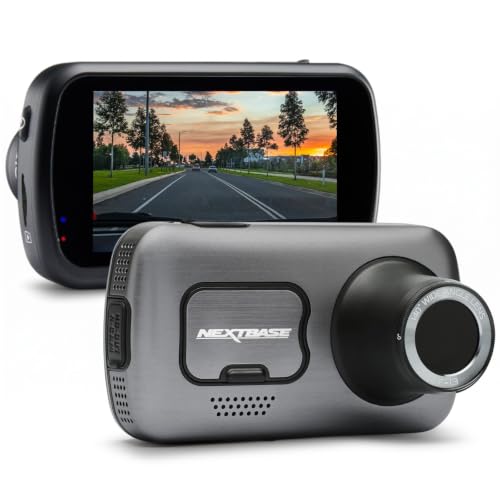 |
Nextbase 622GW Dash Cam Full 4K/30fps UHD Recording in CarNextbase | Upgrade pick | 4K · Slow-mo · GPS | $249.99
Price as of 29 Sep 2026
|
View |
This comparison keeps beginner risk front and center, not spec-sheet bragging rights. A dash cam only helps if it catches the right clip, stays mounted in heat, and does not turn into a setup project the driver quits after a week.
Use it to match the camera to the job: commuting, curb parking, or daily highway miles. That is where buyers usually miss.
How we chose
We compared models on four things that matter for first-time buyers.
- Beginner setup friction: screen, app support, wiring difficulty, and how likely the camera is to confuse a new driver.
- Evidence quality for everyday driving: plate readability in daylight and at night, lane coverage, and how well the camera handles impact clips.
- Parking and installation tradeoffs: whether parking mode needs hardwiring, how much battery risk it adds, and how hard the install is.
- Storage and maintenance cost: microSD endurance, loop recording, and how much footage the camera is likely to chew through.
We also weighed whether a feature helps a new driver or mainly helps a rideshare or fleet driver. Those are not the same buyer.

Best overall for new drivers: Garmin Dash Cam Mini 3
The Garmin Mini 3 can be a simple first purchase for a new driver who wants front-facing evidence without extra clutter. It is ultracompact, records 1080p video with a fairly wide field of view, and keeps setup simple enough that a beginner may be less likely to ignore it after week one.
It fits drivers who want a discreet camera for commuting, college parking lots, or a first car with limited cabin space. The voice control is useful when a driver wants to save a clip without poking at a tiny screen, and the small body is less distracting than a large display hanging in the windshield.
The drawback is plain: 1080p is the minimum comfortable level, not the clearest option. It will not read every plate at speed, and because it is front-only, it does not solve rear impacts or tailgaters.
Why it fits first-time buyers
Front-only is enough for a lot of beginners. It captures most fender-benders, lane-change disputes, and curb hits without adding rear wiring, extra clutter, or a bigger setup burden.
Who should skip this pick
Drivers who street-park every night or want the best chance of capturing rear-end evidence should move to dual-channel. The Mini 3 is simple, not complete.
Best for teen drivers: VIOFO Dual Dash Cam A129 Plus Duo
The VIOFO A129 Plus Duo can be a solid choice when a teen driver needs more coverage and a parent wants fewer surprises. It pairs 2K front recording with 1080p rear coverage, plus Wi‑Fi and GPS, so clips are easier to review and the car’s route is recorded with less guesswork.
This model makes sense when the main risk is a parking-lot bump, a backing incident, or a rear-end claim where front-only footage would be weak. Based on the spec sheet and owner feedback, the dual-channel setup is a good fit for families willing to spend a little more time on install for broader coverage.
The drawback is setup friction. Two cameras mean more wiring, more placement decisions, and more chances to mount something badly if the install is rushed.
Why it lowers distraction
There is no giant screen to stare at during driving, and the app-based review keeps most clip management off the dashboard. That matters for a young driver who should be watching traffic, not menu icons.
When the rear camera is worth the extra work
If the car lives on the street, gets parked near tight traffic, or carries a new driver in dense urban conditions, rear coverage earns its keep. If the car mostly sits in a driveway, the extra work may not pay off.
Best for city parkers: 70mai 4K Dash Cam Front and Rear A800S
The 70mai A800S is the best fit for city parking risk when the driver wants parking mode, dual-channel coverage, and a screen that makes setup less mysterious. It records 4K up front, adds a rear camera, and may include 5GHz Wi‑Fi for faster file transfers when a clip needs to be pulled quickly.
It is aimed at drivers who park on busy streets and want stronger evidence after a bump, scrape, or hit-and-run. Parking mode, time-lapse, and ADAS voice alerts give it a broader feature set than a bare-bones commuter camera, which is useful when the car spends time unattended.
The drawback is that 4K sounds better than it behaves in every scenario. It increases file size, asks more of the microSD card, and can be overkill for a beginner who mostly needs clear day and night evidence rather than marketing numbers.
What parking mode should do
At minimum, it should wake on impact and keep the important clip locked so loop recording does not erase it. Motion detection is useful, but impact recording is the more important safety net for parking damage.
When to avoid hardwiring
If the driver does not park on the street, if the car sits for long periods, or if the owner is not comfortable protecting the battery with a proper hardwire kit, skip parking mode. A 12V adapter is simpler, and simplicity matters more than a feature a beginner will not use correctly.
Best for drivers who want 4K evidence: Nextbase 622GW
The Nextbase 622GW is the best pick here for drivers who want higher-resolution front footage and are willing to pay for it. It records 4K at 30fps, adds stabilization, includes a 140-degree front view, and brings location features that can help when a claim turns into a paperwork problem.
It suits highway commuters and drivers who value detailed front evidence more than simplicity. The stabilization and precise location support can be useful when a clip needs to show where something happened as well as what happened.
The drawback is cost and complexity. A higher-resolution camera can mean larger files, more storage pressure, and a higher chance that a beginner ends up buying a camera that is more capable than necessary for a first car.
Why 4K is not always the right answer
4K can help with detail, but it also fills cards faster and can be less forgiving at night if the sensor and lens are not as balanced as the spec sheet suggests. For many new drivers, 2K is the cleaner compromise.
Who gets the most from it
Highway commuters, drivers who want stronger front-only evidence, and buyers who know they will keep the same camera for years are the best match. A casual city commuter may be paying for more than they need.
Which one should you buy
Pick the camera based on where the car lives, not on the biggest number in the listing. A new driver who mainly commutes on clear roads can stay simple; a driver who parks on crowded streets needs more coverage; a driver who wants parking protection needs a plan for power and battery safety.
- Understated commuter: Garmin Mini 3. Choose this if you want the least distracting install and do not need rear coverage.
- Teen or family car: VIOFO A129 Plus Duo. Choose this if evidence coverage matters more than installation speed.
- City parker: 70mai A800S. Choose this if parking mode matters and you are willing to manage wiring and storage.
- Front-footage priority: Nextbase 622GW. Choose this if you want 4K front video and can tolerate the higher storage load.
For a first purchase, front-only is usually enough unless the car is parked on the street. Rear cameras help most when impacts can happen behind the vehicle, not when the car spends most nights in a garage.
What should a first-time buyer actually choose?
A first-time buyer should choose the simplest camera that still captures the likely claim. Teen drivers usually benefit from front-and-rear coverage, college commuters often do fine with front-only 1080p or 2K, city parkers should prioritize parking mode and strong impact locking, and highway commuters can justify a better front camera with a wider, cleaner image.
Teen driver
Choose dual-channel if the car is shared or parked in public lots. It gives more proof in rear-end disputes and parking scrapes, which are common claim types for new drivers.
College commuter
Front-only is usually enough unless the car lives on the street. Keep the setup simple so the camera actually stays mounted and recording.
City parker
Choose a model with parking mode, but only if the installation plan includes battery protection. Without that, the feature can create more problems than it solves.
Highway commuter
Prioritize a cleaner front image, a sensible field of view, and easy clip saving. Long highway drives are where plate clarity and stable footage matter most.
Do you need front and rear dash cams as a new driver?
Most new drivers do not need front and rear dash cams on day one. Front-only is enough for many commuting situations, but rear coverage becomes worthwhile when the car is parked on the street, the driver often backs into tight spaces, or the local traffic pattern makes rear-end claims more likely.
When front-only is enough
If the car lives in a driveway, the driver mostly commutes in daylight, and the budget is tight, a front-facing camera does the core job. That keeps installation easier and lowers the chance of a bad mount or loose rear cable.
When rear coverage earns its keep
If the car parks curbside, spends time in apartment lots, or carries a new driver through dense city traffic, rear coverage gives useful evidence that front-only footage cannot. It is most useful when another vehicle hits from behind or backs into the car.
What features matter most in a dash cam for beginners?
Beginners should care most about clear footage, easy installation, reliable storage, and a camera they can actually operate without frustration. Screenless or app-heavy models can be fine, but only if the buyer is comfortable using a phone to review clips and change settings.
Resolution and field of view
1080p is the baseline, 2K is the sweet spot for many beginners, and 4K helps only if the camera, storage, and lighting all support it. A field of view around 140° to 170° is usually the useful range; narrower misses lanes, wider can add fisheye distortion that makes plates harder to read.
Parking mode and impact locking
Parking mode should lock clips after motion or impact and should not be treated as free protection. It often needs hardwiring, and that introduces battery drain risk if the driver leaves the car parked for long periods.
Storage and maintenance
Use a high-endurance microSD card. Cheap cards can fail, corrupt footage, or wear out early under loop recording, especially when the camera writes constantly in heat.
How much should a first dash cam cost?
A first dash cam should cost enough to avoid the cheapest storage and mount problems, but not so much that the buyer pays for features they will not use. For most new drivers, the sensible budget is in the middle: enough for reliable 1080p or 2K footage, a proper mount, and a high-endurance microSD card.
Budget logic
Cheaper cameras often cut corners on image quality, app support, or storage reliability. That matters because a dash cam is only useful when the clip survives the event.
Where the extra money should go
Spend on the camera first, then on the card, then on installation parts. A good camera with a bad card still fails.
Is parking mode worth it for a new driver?
Parking mode is worth it only when the car is routinely parked where hits or vandalism are plausible and the owner can support the power setup. For a garage-kept car or a driver who rarely parks on the street, it is usually unnecessary complexity.
What parking mode should record
Motion detection, impact recording, and automatic clip locking are the useful parts. Motion alone can be noisy, because passing headlights and sidewalk movement can trigger it unnecessarily.
Battery drain risk
Parking mode usually needs a hardwire kit or a dedicated power setup. That can drain the battery if the cutoff settings are wrong or the car sits for too long without driving.
Can I install a dash cam myself?
Yes, many new drivers can install a basic dash cam themselves, especially a front-only model powered by the 12V socket. Hardwiring parking mode is more involved, because it requires routing cables carefully and protecting the battery with the right cutoff settings.
Simple self-install
- Mount the camera high on the windshield with a clear forward view.
- Run the cable so it does not hang in the driver’s line of sight.
- Insert a high-endurance microSD card before the first power-up.
- Test loop recording, event locking, and app access before relying on it.
When to get help
If the install needs a hardwire kit, if the car has a crowded fuse box, or if the buyer is unsure about battery cutoff settings, professional installation is the safer route. A bad hardwire job is worse than no parking mode at all.
What resolution and field of view should I look for?
Look for 1080p at minimum, 2K if you want a better balance of clarity and file size, and 4K only if you are willing to manage larger files and more storage wear. For field of view, 140° to 170° is the practical range; 140° is often cleaner, while wider angles capture more of the sides but can distort the image.
Resolution tradeoff
1080p is easier on storage and often fine for basic evidence. 2K usually gives a better chance of reading plates without jumping to the storage burden of 4K.
Night performance note
Higher resolution does not automatically mean better night footage. Sensor quality, lens balance, and exposure handling matter just as much, and a noisy 4K clip can be less useful than a clean 2K one.
Which dash cam is easiest to use for a teen driver?
The easiest dash cam for a teen driver is usually a small front-only model with simple controls, or a screenless model that uses voice control and a phone app for clip review. The goal is less dashboard distraction, fewer settings to learn, and fewer reasons to ignore the camera after setup.
Screen vs screenless
A screen makes setup easier because the driver can confirm framing on the camera itself. A screenless model can be cleaner and less distracting, but it depends more on the app, which can be confusing if the owner is not comfortable with phone-based setup.
App convenience
Wi-Fi and smartphone apps are useful for downloading clips and updating firmware, but they are optional, not mandatory. Beginners should treat app control as a convenience, not as the core reason to buy a camera.
Frequently asked questions
What is the best dash cam for new drivers?
The best dash cam for new drivers is usually a front-only 1080p or 2K model that is easy to mount, easy to power, and reliable in loop recording. If the car is parked on busy streets, a front-and-rear model becomes more appealing because it captures evidence that front-only footage can miss.
Products related to this article
Sponsored / affiliate links. As an Amazon Associate I earn from qualifying purchases. I may earn additional commission from eligible campaigns.