Can I Leave My Car Battery Disconnected Overnight? A Guide to the Proven Risks
Yes, you can safely leave your car battery disconnected overnight. It will not cause any permanent damage. However, it will reset your car’s electronic systems, including your clock, radio presets, and engine computer memory. Be prepared to reset these settings and allow your car’s computer a short “relearning” period after you reconnect it.
Hi, I’m Md Meraj, your friendly guide to all things automotive. Have you ever wondered if it’s okay to leave your car battery disconnected overnight? Maybe you’re trying to stop a mysterious power drain, storing your car for a bit, or getting ready for a repair. It’s a common question, and you’re smart to ask before you start unplugging things.
The good news is, you’ve come to the right place. Many people feel a little nervous about disconnecting the battery, worrying they might break something. But don’t worry! I’m here to walk you through it. In this guide, we’ll cover exactly what happens when you disconnect your battery, the simple steps to do it safely, and how to get everything back to normal afterward. Let’s get you feeling confident about your car care.
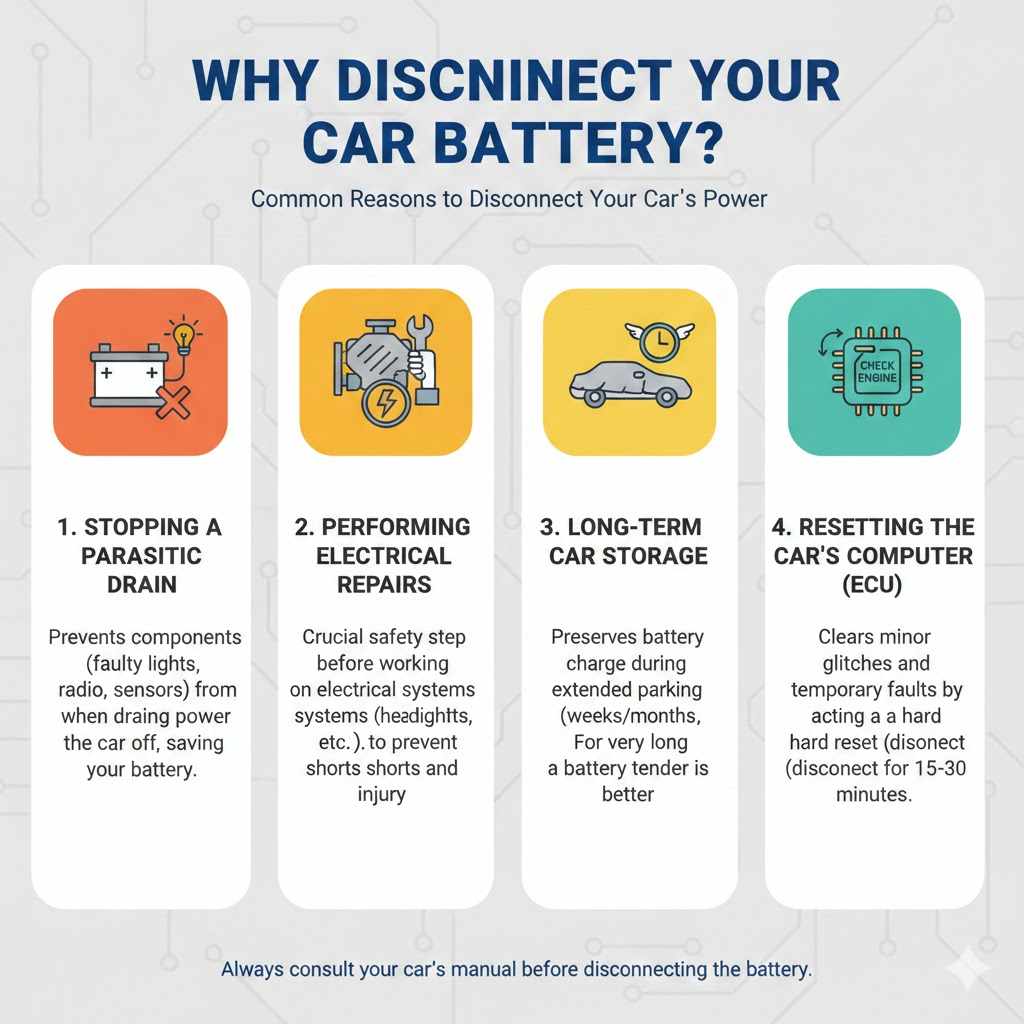
Why Would You Need to Disconnect Your Car Battery?
Before we dive into the “how,” let’s talk about the “why.” There are a few very common reasons you might need to disconnect your car’s battery. Understanding these can help you decide if it’s the right step for your situation.
- Stopping a Parasitic Drain: This is a big one. A parasitic drain is when something in your car continues to draw power even when the car is off. It could be a faulty light, a radio issue, or a bad sensor. Disconnecting the battery overnight stops this drain and ensures you don’t wake up to a dead car.
- Performing Electrical Repairs: If you’re working on any part of your car’s electrical system, from changing a headlight to replacing the alternator, disconnecting the battery is a critical safety step. It prevents accidental shorts that could damage components or, more importantly, cause injury.
- Long-Term Car Storage: If you’re leaving your car parked for several weeks or months, the battery will slowly lose its charge. Disconnecting it helps preserve the charge for much longer. For very long-term storage, a battery tender is an even better option.
- Resetting the Car’s Computer (ECU): Sometimes, a car’s computer can get “stuck” with a minor glitch, causing a check engine light or other strange behavior. Disconnecting the battery for 15-30 minutes can act like a hard reset, often clearing these minor, temporary faults.
The Big Question: Is It Safe to Leave It Disconnected Overnight?
Let’s get straight to it: Yes, it is perfectly safe for your car to leave the battery disconnected for a night, a week, or even a month. You will not cause any permanent damage to your car’s major systems. The battery itself will also be fine.
Think of it like unplugging your desktop computer. The computer isn’t harmed, but it does forget what time it is and might need to re-load a few things when you plug it back in. Your car works in a very similar way. The “proven risks” aren’t about damage; they are about inconvenience and the simple process of resetting things.
What Really Happens When the Battery is Disconnected
Your car has several computers that use a tiny, constant stream of power from the battery to store information. This is called “keep-alive memory.” When you disconnect the battery, this power source is cut, and the memory is erased. Here’s what that means for you in practical terms.
The Proven “Risks”: What Gets Reset and Why It Matters
The word “risk” sounds scary, but in this case, it just means “things you’ll have to deal with afterward.” None of these are difficult to fix, but it’s good to be prepared.
1. Loss of Onboard Computer Memory (ECU)
The Engine Control Unit (ECU) is your car’s main brain. It learns your driving style, fuel quality, and local conditions to optimize engine performance and fuel efficiency. When you disconnect the battery, it resets to its factory default settings.
- What you’ll notice: The car might idle a little rough or shift gears differently for the first 10-20 miles of driving. This is normal! The ECU is simply going through a “relearning” process.
- How to fix it: Just drive your car normally. The computer will quickly adapt and everything will feel smooth again, usually after one or two short trips.
2. Resetting Your Radio, Clock, and Trip Meter
This is the most obvious and common side effect. The settings for your clock, saved radio stations, and equalizer preferences are all stored in keep-alive memory.
- What you’ll notice: Your clock will be flashing “12:00” and your favorite radio stations will be gone.
- How to fix it: This is a simple manual fix. Just take a few minutes to reset the clock and reprogram your go-to radio presets.
3. Anti-Theft System and Radio Codes
Some cars, particularly older models, have an anti-theft feature built into the radio. If power is cut, the radio goes into a locked mode and won’t work until you enter a specific security code.
- What you’ll notice: The radio display might say “CODE” or “LOCKED.”
- How to fix it: You’ll need to find your car’s radio code. It’s often on a card in your owner’s manual packet or sometimes on a sticker in the glove box. If you can’t find it, a dealership can retrieve it for you using your car’s Vehicle Identification Number (VIN).
4. Emissions System “Readiness Monitors”
This is an important one if you have a smog check or emissions test coming up soon. Your car’s computer runs a series of self-tests on the emissions system called “readiness monitors.” Disconnecting the battery erases the results of these tests.
- What you’ll notice: You won’t notice anything while driving, but if you take your car for an emissions test, it will fail because the monitors are not “ready.”
- How to fix it: You need to perform a “drive cycle” to get the monitors ready again. This typically involves a mix of city and highway driving. Your owner’s manual may have a specific procedure, or you can check a resource like the U.S. Environmental Protection Agency (EPA) site for general guidelines. It usually takes 50-100 miles of driving to complete.
Pros and Cons at a Glance
To make it even clearer, here is a simple table summarizing the benefits and drawbacks.
| Pros of Disconnecting Overnight | Cons of Disconnecting Overnight |
|---|---|
| Stops parasitic power drains completely. | Resets your radio presets and clock. |
| Essential safety step for electrical work. | The car’s computer (ECU) needs to “relearn.” |
| Helps preserve battery charge during short-term storage. | You might need a security code for your radio. |
| Can clear minor electronic glitches. | Emissions readiness monitors are erased. |
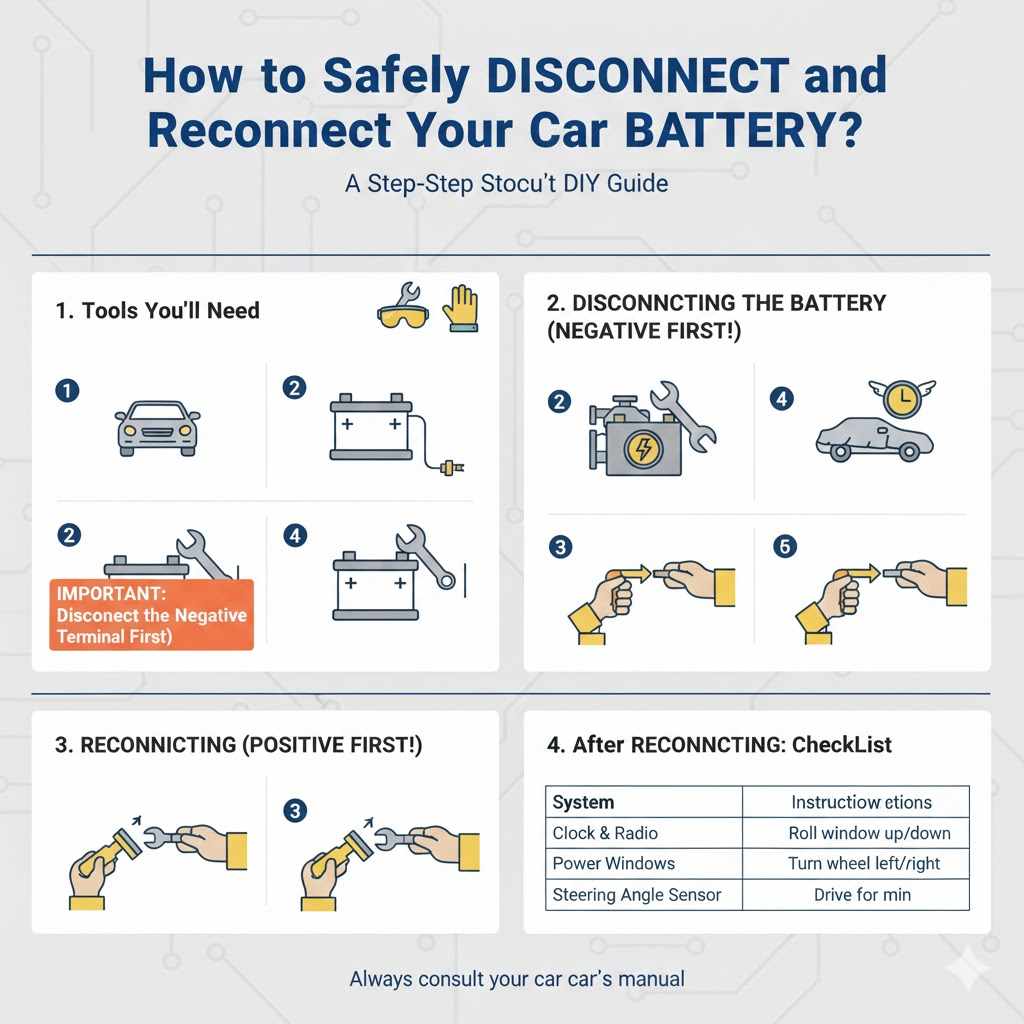
How to Safely Disconnect and Reconnect Your Car Battery
Feeling ready to do it yourself? Great! Following these steps will make the process safe and simple. Safety first, always.
Tools You’ll Need:
- A wrench that fits your battery terminals (usually 10mm, but can vary)
- Safety glasses
- Work gloves
Step-by-Step Guide to Disconnecting:
- Park Safely: Park your car on a level surface and turn off the engine. Make sure all accessories (lights, radio) are off.
- Locate the Battery: Open the hood and find your battery. It’s usually a black box with two connection points, or “terminals,” on top.
- Identify the Terminals: The terminals will be marked with a plus sign (+) for positive and a minus sign (-) for negative. The negative terminal often has a black cover, and the positive has a red one.
- IMPORTANT: Disconnect the Negative Terminal First: Use your wrench to loosen the nut on the negative (-) terminal clamp. You don’t need to remove the nut completely, just loosen it enough to wiggle the cable off the post. Always disconnect the negative first to prevent accidental sparks.
- Tuck the Cable Away: Move the negative cable away from the battery so it can’t accidentally touch the terminal again.
- Disconnect the Positive Terminal: Now, you can safely loosen the nut on the positive (+) terminal and remove that cable.
Step-by-Step Guide to Reconnecting:
When you’re ready to reconnect, you’ll simply reverse the process. This order is also very important for safety.
- Clean if Necessary: If you see any fuzzy, white, or blue corrosion on the terminals or cable clamps, now is a great time to clean it off with a wire brush.
- IMPORTANT: Connect the Positive Terminal First: Place the positive (+) cable clamp back onto the positive terminal post and tighten the nut with your wrench until it’s snug. Don’t overtighten it.
- Connect the Negative Terminal Last: Now, connect the negative (-) cable to the negative terminal post and tighten it. Connecting the negative terminal last is the final step and completes the circuit safely.
- Check Your Work: Gently tug on both cables to make sure they are secure and don’t move.
- Start Your Car: Close the hood, start your car, and let it run for a few minutes.
Checklist: What to Do After Reconnecting
Your car is running again! Now for the final, easy part: resetting everything that was erased. This table can be your quick guide.
| System to Reset | Simple “How-To” Instructions |
|---|---|
| Clock and Radio | Manually set the time and reprogram your favorite radio stations. |
| Power Windows | Your windows may need to be “re-initialized.” For most cars, roll the window all the way down and hold the button for 5 seconds, then roll it all the way up and hold the button for 5 seconds. Repeat for each window. |
| Engine Computer (ECU) | Drive the car for 10-15 minutes, mixing in some stop-and-go with some steady cruising. The computer will handle the rest on its own. |
| Steering Angle Sensor | On some cars, you may need to reset this. Start the engine and turn the steering wheel all the way to the left, then all the way to the right, then back to center. |
Frequently Asked Questions (FAQ)
1. How long can a car battery stay disconnected?
A car battery can remain disconnected for months without any problem. The battery itself will slowly lose charge over time, but it won’t harm the car. For storage longer than a month or two, it’s best to use a battery tender or trickle charger to keep it healthy.
2. Will disconnecting the battery reset the check engine light?
Yes, disconnecting the battery will usually turn off the check engine light because it erases the computer’s temporary fault codes. However, if the underlying problem that caused the light to turn on still exists, the light will come back on after you drive for a while.
3. Do I need any special tools to reconnect my battery?
No, you typically only need a basic wrench (often a 10mm) to loosen and tighten the terminal clamps. Some people like to use a terminal cleaning brush to remove corrosion, but it’s not always necessary. Wearing safety glasses and gloves from a trusted brand like Grainger is always a good idea.
4. How do I know if I’ll need a code for my radio?
The best way to know is to check your owner’s manual. It will mention if a security code is required. Generally, cars made after the mid-2000s are less likely to require a manual code, as the radio often syncs with the car’s main computer automatically.
5. What if my car won’t start after reconnecting the battery?
First, double-check that the cable clamps are tight and making good contact with the terminals. If they are, the issue might be that your battery was already weak or dead before you disconnected it. You may need to jump-start the car or have the battery tested at an auto parts store.
6. Is it better to use a battery tender instead of disconnecting?
For long-term storage (more than a few weeks), a battery tender (or maintainer) is the best option. It provides a small, steady charge that keeps the battery in optimal condition without you having to disconnect it and reset all your electronics.
Conclusion: You Can Do This with Confidence
So, can you leave your car battery disconnected overnight? Absolutely. While it might seem a bit daunting, it’s a completely safe and manageable task for any car owner. The “risks” are nothing more than a few minor inconveniences that are easy to fix, like resetting your clock and radio stations.
The most important things to remember are the safety steps: disconnect the negative terminal first, and reconnect it last. By following the simple guides we’ve outlined here, you can confidently handle this task, whether you’re fixing a problem, storing your vehicle, or working on a repair. Taking charge of these small maintenance jobs is a huge step toward saving money and feeling more connected to your car. You’ve got this!