Best Car Security Cameras for Parking (2026): We Compared
The best two aftermarket car camera security systems here are the VIOFO A229 Pro for parked-car evidence and the Garmin Dash Cam 67W for compact, discreet coverage; choose the VIOFO when you want the strongest all-around parking protection, and the Garmin when you want a smaller footprint with app-friendly convenience. Weak parking coverage can miss a break-in, create a false sense of safety, and leave you facing costly repairs. Below, you’ll get a two-pick comparison and a use-case matrix for apartment parking versus remote monitoring.
Quick comparison
| Product | Badge | Best for | Price | ||
|---|---|---|---|---|---|
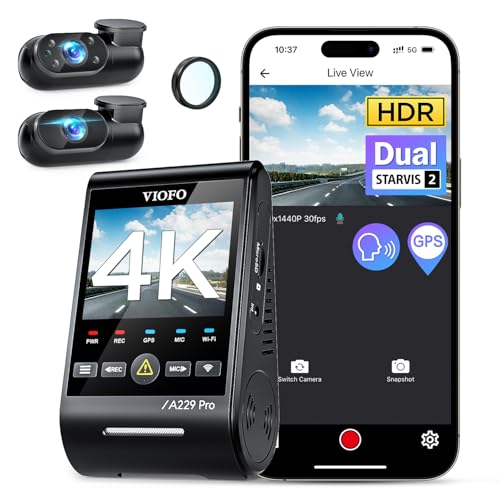 |
VIOFO A229 Pro 4K 3CH Dash Cam HDR for Front & Rear &VIOFO | Our pick | 4K · 3-Channel · STARVIS 2 | $309.99
Price as of 17 Oct 2026
|
View |
 |
Garmin Dash Cam 67W, 1440p and Extra-Wide 180-degree FOV,Garmin | Also great | 1440p · 180-degree FOV · Compact | $179.95
Price as of 17 Oct 2026
|
View |
This comparison focuses on parked-car security, not just driving video. The main tradeoff is coverage: the VIOFO leans toward full front, rear, and cabin recording, while the Garmin leans toward a smaller, more discreet windshield setup with a wide field of view.
How we chose
Parking protection matters most when the car is off. Standard dash cams often stop when the ignition is off, so the first filter here was parking mode, buffered recording, and a clear path to hardwired operation.
Night performance came next. STARVIS 2 sensors matter because many incidents happen in dim garages, on unlit streets, or after dark in apartment lots.
We also weighed coverage and power use. A system that sees only the front of the car can miss a side-window break-in, a rear approach, or a tailgate theft attempt, while a higher-power system can create battery-drain concerns if it is not managed well.
Finally, we looked at app control, GPS tagging, and whether the camera offers live-view style convenience. Those features help with incident review, but they do not replace true remote monitoring if the camera lacks LTE.
 As an Amazon Associate we earn from qualifying purchases. Prices and availability are accurate as of the date shown and are subject to change.
VIOFO A229 Pro: best overall parked-car protection
The VIOFO A229 Pro is the stronger choice for drivers who want the most complete parked-car coverage from this pair. It records front, rear, and inside views, and the published specs list 4K front and 2K rear recording with STARVIS 2 sensors. That makes it the better fit for apartment parking, street parking, and any setting where you want more than a front-only view.
Its parking value is not just about resolution. The A229 Pro is built around parking modes, and The Auto Wire says it has three parking modes. In practical terms, that matters because parked-car security usually mixes motion-activated recording, impact detection, and buffered clips that preserve a short lead-up before the event.
The drawback is complexity. A triple-channel system is harder to install than a basic front-only dash cam, and parking mode usually depends on a hardwire kit or another power-management solution. It also has more capacity demands than a simple windshield camera, so storage planning matters if you want long parking surveillance windows.
Why it fits most drivers
This is the better all-around pick for someone who wants evidence from the front, rear, and cabin. If a break-in starts at a side window and the impact never reaches the front of the car, a wider system gives you a better chance of capturing the sequence and the person involved.
It also fits drivers who leave cars in apartment lots or on public streets, where the threat is often less about one obvious collision and more about glancing impacts, theft attempts, or people approaching from angles the front camera cannot see.
Coverage, parking mode, and night performance
The A229 Pro’s 4K front and 2K rear setup gives you a useful split between detail and coverage. The front camera can preserve plates, faces, and vehicle motion more cleanly than lower-resolution units, while the rear channel helps document backing incidents, tailgaters, and rear-window interference. The inside channel adds another layer for ride-hail or fleet use.
STARVIS 2 sensors matter because parking footage often has bad light and high contrast. A bright headlight in a dark garage, a person moving under a streetlamp, or a vehicle reflecting light off a wet curb can all reduce visibility. Better low-light sensors help hold detail in those conditions.
What it needs to install and power
This is not a plug-and-forget accessory. Parking mode usually means hardwiring, and hardwiring means you need to think about battery draw, voltage cutoff, and how long you want the camera active after the engine is off.
A common mistake is assuming parking mode is free. It is not. Motion detection, buffered recording, and multi-channel recording all use power and storage, so the right setup depends on how long the car sits, how often it is driven, and whether you park in a place with repeated activity.
As an Amazon Associate we earn from qualifying purchases. Prices and availability are accurate as of the date shown and are subject to change.
Garmin Dash Cam 67W: best for compact windshield coverage
The Garmin Dash Cam 67W is the better choice if you want a small, low-profile unit that is easy to live with day to day. Garmin lists a 1440p camera with an extra-wide 180-degree field of view, and the compact design makes it easier to hide on the windshield than a bulkier multi-channel system.
That smaller footprint is the point. For drivers who want a camera that is less obvious to passersby, the Garmin is the more discreet option. It also includes voice control, which is convenient when you want quick hands-free operation or easier video access through the app side of the experience.
The tradeoff is parked-car depth. Compared with the VIOFO, this is a simpler coverage story. It does not offer the same front, rear, and inside coverage, so it is weaker for full perimeter security and less suited to scenarios where a rear or side approach is likely.
Why it suits lower-profile installations
This camera fits drivers who want a camera that blends into the windshield and does not dominate the cabin visually. That matters if you park in public areas and want to reduce attention to the camera itself.
It also works for buyers who value simplicity more than full parking surveillance. If your main concern is getting a clear forward record with a broad view of the roadway and curb area, the Garmin is easier to live with than a larger multi-camera package.
Coverage, convenience, and limits
The 180-degree lens is the main strength here. A wider angle can help catch side activity that a narrow front camera might miss, but it still is not the same as true perimeter coverage. A side-window break-in or rear approach can fall outside the best recorded zone.
Its honest limitation is obvious: it is not the answer for buyers who want three-channel coverage or a dedicated parked-car security system. The wider field of view helps, but it does not replace rear and cabin recording.
Which car security camera fits your parking risk?
Use the parking location first, then the threat level. A street parker usually needs the most coverage and the strongest evidence trail; an apartment garage user often needs motion and impact capture; a driveway parker may care more about nuisance damage; and fleet or road-trip use often calls for all-around recording and easier review.
| Parking location | Theft risk | Live-view need | Install difficulty | Power requirement | Best pick |
|---|---|---|---|---|---|
| Street parking | High | Low to moderate | Higher | Hardwire recommended | VIOFO A229 Pro |
| Apartment garage | Moderate to high | Low | Moderate | Hardwire recommended | VIOFO A229 Pro |
| Driveway | Moderate | Low | Low to moderate | Hardwire helpful | Garmin Dash Cam 67W |
| Fleet and road-trip use | Moderate | Moderate | Moderate to higher | Hardwire recommended | VIOFO A229 Pro |
If you park on the street, coverage matters more than convenience. A rear camera can capture a reverse hit, and an inside channel can help if you also want cabin documentation while the vehicle is parked or in service.
If your car sits in a garage at home, the biggest question is whether you need evidence from all sides or just a clear front record. That is where the VIOFO’s broader setup usually makes more sense. The Garmin is the lighter-duty answer when you care more about discreet hardware than perimeter coverage.
Yes/no checklist for core features
| Feature | Need it for parking security? | Why it matters |
|---|---|---|
| LTE | No for most buyers | Needed only if you want remote live view, real-time alerts, and cloud uploads |
| Hardwire kit | Yes for parking mode | Lets the camera stay powered after ignition off and supports battery management |
| Buffered recording | Yes | Captures the moments before a motion or impact trigger |
| Rear camera coverage | Usually yes | Helps catch rear-end hits, backing incidents, and tailgate approaches |
Do you need LTE for live view?
Most drivers do not need LTE for parking protection. LTE matters when you want true remote live view, real-time alerts, or cloud uploads from the car while you are away. For ordinary apartment or driveway parking, buffered local recording and a hardwired parking mode usually solve the main problem at lower cost and lower complexity.
When remote monitoring matters
LTE makes sense when you cannot see the vehicle easily, when the car sits far from you, or when you want live verification after an alert. It is the answer for higher-risk situations where stolen or tampered-with footage must be accessible immediately.
The Auto Wire says the FOCUWAY L7 offers 4G LTE remote live view and automatically uploads evidence to the cloud. That is the feature set to look for if remote monitoring is the priority. Neither of the two reviewed products here is a true LTE security system.
When LTE is unnecessary
If you mainly need evidence after the fact, LTE is usually overkill. Parking mode with buffered clips can record the important seconds without streaming data all day, and that avoids recurring subscription or data-plan costs.
Picture a sedan parked in an apartment garage where the issue is occasional door dings and a rare window break. A local recording system is often enough, because the goal is evidence, not live intervention.
Data-plan and subscription tradeoffs
LTE changes total ownership cost. The camera itself is only part of the bill; you also need a data plan, and cloud features can add ongoing expense. That is worth paying for only if remote access is truly part of your security plan.
Suppose a compact SUV sits at a trailhead lot during a long hike. If you only need to review clips later, a hardwired camera with parking mode is usually the better financial choice than paying for always-on connectivity.
What features matter most for parking protection?
Parking protection starts with how the camera records after shutdown. Continuous recording is for driving. Parking mode is for the time after you leave the car, and that is when motion triggers, impact detection, and buffered clips become the real security features.
Parking mode versus continuous recording
Continuous recording stops being useful the moment the ignition is off, unless the camera has a parking function and power source to keep going. Parking mode changes that by switching the camera into a low-power state that can wake on motion or impact.
The hard truth is that a camera without parking mode is a drive recorder, not a parked-car security system. That is why parking mode should be treated as a must-have feature for security use.
Radar parking mode versus standard motion detection
Radar parking mode can wake on approach, which reduces the chance of constant false triggers from passing traffic, rain, or swaying shadows. The Auto Wire says the Thinkware U3000 PRO uses radar parking mode to wake on approach and saves a 20-second clip on approach, which also reduces storage use because the camera does not have to record continuously.
Standard motion detection can still work well, but it is often noisier. In a lot with people walking by all night, better trigger control matters because too many false clips eat storage and make important footage harder to find.
Front/rear coverage versus 360-degree coverage
Front and rear coverage is the common sweet spot. It documents a lot of parking incidents, including rear taps, forward roll-ins, and many hit-and-run events. It is also easier to power and install than a more complex multi-camera setup.
A 360-degree multi-channel system makes more sense when side coverage matters as much as front and rear coverage. That is useful for larger vehicles, fleets, and situations where someone may approach the side doors or cargo area from an angle the front and rear cameras cannot fully catch.
GPS tagging and Wi-Fi app control
GPS tagging adds location data to a clip, which helps when you need to prove where the incident happened or sort out a route and time sequence later. It is a review feature, but a useful one.
Wi-Fi app control is about convenience. It makes settings changes, clip review, and firmware management easier without removing the card or connecting the camera to a computer. Voice control can help too, especially in cameras that support it.
A common first-timer mistake is buying a front-only camera because the windshield view looks clear on a product page. A rear strike in a parking lot, or a side-window break-in at an apartment garage, can happen outside that camera’s useful frame.
Say your car is parked nose-in against a wall in a garage. A front-only camera may still record some activity, but rear and cabin coverage are far more useful if the goal is to document who approached and from which side.
What is the best car security camera system for parking mode?
The best parking-mode choice here is the VIOFO A229 Pro because it combines front, rear, and inside recording with STARVIS 2 sensors and three parking modes. That makes it better suited to parked-car evidence than a simple windshield camera, especially when the vehicle sits in a garage or on the street overnight.
Parking mode is the key feature, but the useful version is buffered parking mode with a hardwire kit. That is what gives you pre-event footage, motion or impact triggering, and enough power to keep recording after the ignition is off.
Can a car security camera protect against break-ins and theft?
Yes, but only if it records while the car is parked. A parked car camera can document hit-and-runs, break-ins, and theft attempts, which is often enough to help police, insurers, or a fleet manager identify what happened. It cannot physically stop the crime, but evidence is still a real deterrent.
The limit is coverage. A front-only unit may miss a side-window entry or rear approach, and a camera without buffered recording may miss the start of the incident. That is why multi-channel coverage and parking mode matter more than simple resolution claims.
What’s the difference between parking mode and continuous recording?
Continuous recording captures everything while the car is running. Parking mode is the low-power surveillance state used after shutdown. The difference matters because the typical security event happens when the car is unattended, not while you are driving.
Parking mode may trigger on motion, impact, or radar approach, and it usually depends on a hardwire kit or other dedicated power source. Continuous recording does not solve the parked-car problem by itself.
Do car security camera systems need hardwiring?
For parking mode, usually yes. Hardwiring is what lets the camera stay alive after ignition off, and it also ties into battery-management settings so the car battery is not drained too far. Without that power path, most cameras are just driving cameras.
That does not mean every camera must be hardwired for basic use. It means parked-car security is where hardwiring becomes important, especially if you want motion-activated recording, buffered clips, or long idle protection.
Which front and rear dash cam is best for night parking surveillance?
The VIOFO A229 Pro is the better night-parking choice because The Auto Wire says it records 4K front and 2K rear, and it uses STARVIS 2 sensors. That combination is stronger for low-light detail than a simpler front-only setup, especially in garages and on unlit streets.
Night surveillance is not only about brightness. It is about keeping detail when light is uneven, when headlights flare, and when the scene changes quickly. Better sensor performance helps the camera keep useful evidence in those conditions.
Frequently asked questions
What features matter most in a car security camera system?
Parking mode, coverage, and power management matter most. Start with a camera that can record after shutdown, then look for buffered clips, impact detection, and enough front/rear coverage to catch the approach that matters in your parking setup. App control and GPS are useful, but secondary.
Which dash cam has the best live view for car security?
For true live view, you need an LTE-enabled system. A local Wi-Fi app can help you review clips and change settings nearby, but it is not the same as remote live monitoring. The reviewed pair here focuses on parked-car recording rather than always-on remote access.
Do I need LTE for a car security camera system?
Not usually. LTE is worth paying for only if you need real-time alerts, cloud uploads, or live access while you are away from the car. If your main goal is evidence after a break-in or hit-and-run, a hardwired parking-mode system is usually enough.
Products related to this article
Sponsored / affiliate links. As an Amazon Associate I earn from qualifying purchases. I may earn additional commission from eligible campaigns.