How Does Gearing Work In Pixel Car Racer: Essential Guide
In Pixel Car Racer, gearing dictates how your engine’s power is transferred to the wheels. Adjusting gears lets you balance acceleration and top speed. Setting them correctly means getting the most speed out of your car for races and drag events, making it a crucial tuning element for winning.
Ever felt like your car in Pixel Car Racer just isn’t performing as it should, even after upgrades? You might be overlooking a key secret weapon: gearing. It sounds technical, but it’s actually a straightforward concept that can make a world of difference. Getting your gears right is like finding the perfect rhythm for your engine, allowing you to accelerate faster and reach higher speeds. This guide will break down how gearing works in Pixel Car Racer in a way that’s easy to grasp, helping you tune your ride for victory.
We’ll cover everything from the basics of what gears do to how you can fine-tune them for your specific car and racing style. You’ll learn why those numbers on the gear tuning screen matter and how a few simple adjustments can unlock your car’s true potential. Ready to take control of your engine’s power and dominate the track? Let’s dive in!
Understanding the Basics: What Are Gears and Why Do They Matter?
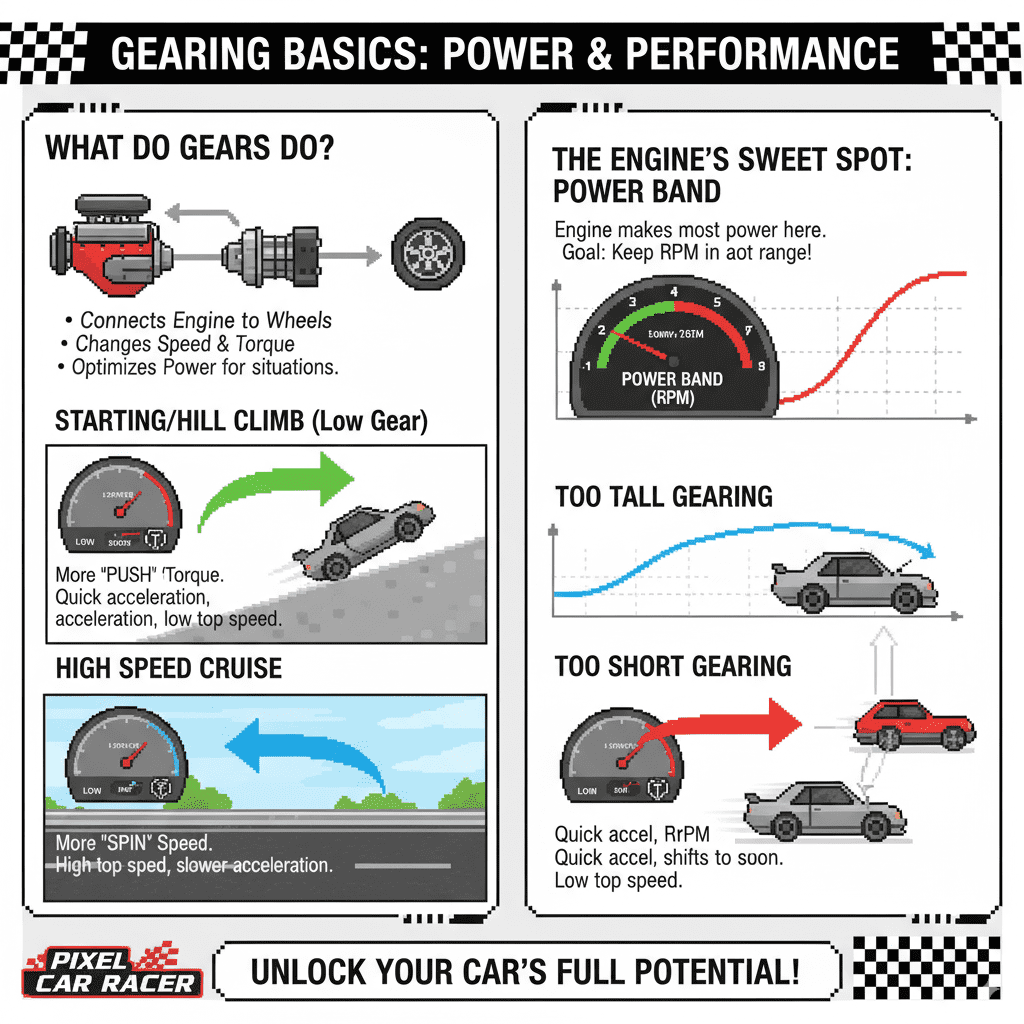
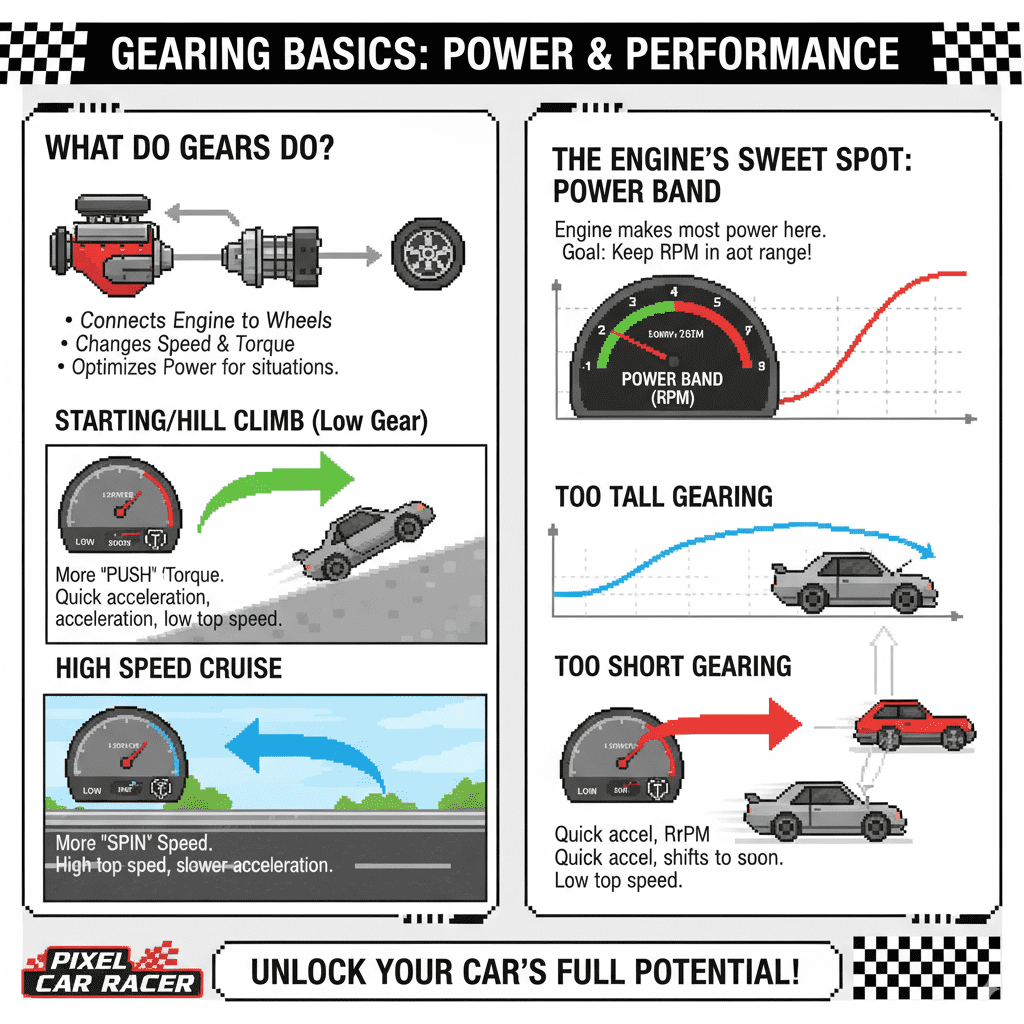
Think about your car’s engine. It’s designed to spin within a certain range to produce power efficiently. However, a car needs to overcome inertia to move (getting it from a standstill) and then maintain speed. A single gear ratio wouldn’t be able to do both effectively. This is where gears come in. They act like a mechanical transmission, changing the speed and torque sent from the engine to the wheels.
In simpler terms, gears help your engine work at its best for different situations. When you’re starting from a stop or going uphill, you need more “push” (torque) to get moving. This is achieved with a lower gear. When you’re cruising at high speeds, you need less “push” but more “spin” to keep going fast. This is where higher gears shine.
In Pixel Car Racer, this translates directly to your car’s performance. The right gear settings can mean the difference between a win and a loss. They directly influence how quickly your car accelerates and what its maximum possible speed is.
The Engine’s Sweet Spot: Power Bands and RPM
Every engine has a “power band” – a range of Revolutions Per Minute (RPM) where it produces the most force (torque) and horsepower. RPM is simply how fast the engine’s crankshaft is spinning. When you tune your gears, you are essentially trying to keep your engine within this power band as much as possible during acceleration.
If your gears are too high (tall gearing), your engine might not reach the higher RPMs needed for quick acceleration, leaving you feeling sluggish off the line. If your gears are too low (short gearing), your engine might be screaming at very high RPMs very quickly, forcing you to shift too soon and limiting your top speed. Finding the sweet spot is key, and that’s what gear tuning is all about.
Gearing Mechanics in Pixel Car Racer: The Tuning Screen Explained
When you visit the “Tuning” section of your garage in Pixel Car Racer, you’ll find a dedicated “Gearing” tab. This is where the magic happens. You’ll typically see a few key settings:
- Final Drive (FD): This is the overall ratio of your transmission. It’s a single number that affects all your gears. A higher FD number means shorter gearing, and a lower FD number means longer gearing.
- Gear Ratios (1st, 2nd, 3rd, etc.): These are the individual ratios for each gear your car has. Adjusting these allows for more fine-tuned control over how your engine’s power is distributed through the gears.
The game often presents these values as fractions or decimal numbers. For beginners, it’s important to understand how changing these numbers impacts your car’s behavior.
Final Drive (FD) – The Big Picture
The Final Drive is like the master control for your gearing. It sets the baseline for how much the transmission multiplies engine speed. In many racing games, including Pixel Car Racer, it’s often the easiest and most impactful gear setting to adjust for immediate results.
- Higher FD Number (e.g., 4.50, 5.00): This means shorter gearing. Your engine will rev higher for every turn of the wheels. This results in stronger acceleration off the line and through the lower gears but will limit your top speed because you’ll hit your engine’s RPM limit in a shorter distance. Think of it like riding a bicycle in a low gear – easy to get moving, but you’ll spin your legs very fast if you try to go fast.
- Lower FD Number (e.g., 3.00, 3.50): This means longer gearing. Your engine will rev lower for every turn of the wheels. This provides less aggressive acceleration initially but allows for a much higher top speed because the engine can keep spinning at higher speeds for longer. Think of a high gear on a bicycle – harder to start, but you can cover a lot of ground with each pedal stroke.
Individual Gear Ratios – Fine-Tuning Your Power Delivery
Once you’ve got a handle on the Final Drive, you can dive into individual gear ratios. This is where you can really optimize your car for a specific track type or racing style.
- 1st Gear: This is your launch gear. A lower numbered ratio (e.g., 3.0) here will give you stronger initial acceleration.
- Subsequent Gears (2nd, 3rd, etc.): These ratios are typically set progressively higher (meaning the numbers get smaller, e.g., 2.5, 2.0, 1.8) to keep the engine within its power band as you accelerate through the gears.
- Rethinking Ratios for Specific Tracks: For drag racing, you might want very aggressive ratios in the lower gears to get off the line fast. For a road course where you need to maintain high speeds, you might lengthen the later gears to prevent hitting the rev limiter too early on the straights.
The goal with individual gear tuning is to create smooth, consistent jumps in RPM between shifts, keeping your engine in its most powerful range. You want to avoid large drops in RPM when you shift, which signifies losing all your hard-earned acceleration.
Common Gearing Mistakes Beginners Make
It’s easy to get lost in the numbers. Here are some common pitfalls to watch out for:
- Ignoring the Power Band: Not understanding your engine’s RPM range means you can’t effectively set gears to stay within it.
- Too Short Overall: Setting all gears too low (high FD number) will make your car extremely fast off the line but quickly become useless as you redline in every gear before reaching a decent speed.
- Too Long Overall: Setting all gears too high (low FD number) will give you a good top speed, but your car will feel sluggish and slow to accelerate, struggling to get moving.
- Uneven Gear Spacing: Large gaps between RPMs when shifting means you’re losing acceleration. Imagine shifting from 3rd gear and the engine RPM drops way down – you’ve lost momentum!
- Not Testing: Gear tuning is not a “set it and forget it” task. It requires testing on the track to see how it feels and performs.
How to Tune Your Gears in Pixel Car Racer: A Step-by-Step Approach
Tuning gears might seem intimidating, but with a methodical approach, you can achieve great results. Here’s a beginner-friendly breakdown:
Step 1: Understand Your Car and Its Needs
Before touching any settings, consider what you want this car to do. Is it a drag car built for 1/4 mile sprints? Or a road race car meant for sustained speed and handling? Different goals require different gearing strategies.
- Drag Racing: Focus on powerful acceleration. You’ll want shorter gearing in the initial gears to get off the line quickly.
- Road Racing/Circuit: Focus on maintaining high speeds and avoiding the rev limiter on long straights. You’ll likely want longer gearing in the later gears.
Step 2: Start with the Final Drive (FD)
The Final Drive is your starting point. It sets the general character of your gearing.
- For Acceleration (Drag): Experiment with higher FD numbers. Think about starting around 4.0 to 4.5 and see how it feels.
- For Top Speed (Road): Experiment with lower FD numbers. Try starting around 3.0 to 3.5.
Remember, these are just starting points. The best FD for your car will depend on its engine power, weight, and tire size.
Step 3: Adjust Individual Gears for Smooth Power Delivery
Once you have a ballpark FD, you can fine-tune the individual gears. The goal is to keep the RPM drop between shifts relatively consistent and ideally within your engine’s power band.
Here’s a common strategy:
- Set your 1st Gear: This is your launch gear. Make it aggressive enough to get moving swiftly but not so aggressive that it immediately redlines.
- Set your 2nd Gear: Adjust it so the RPM drop from 1st to 2nd is manageable. You want the engine to stay in a healthy RPM range.
- Continue for Higher Gears: For each subsequent gear, set its ratio so the RPM drop from the previous gear provides good acceleration without too much of a loss.
- Consider the Top Gear: For your highest gear (e.g., 5th or 6th), set it so you can reach your desired top speed without hitting the rev limiter too early on the longest straight.
You can often find online resources or community discussions for recommended gear ratios for specific cars in Pixel Car Racer, which can be helpful starting points. However, always test and tune further based on your in-game experience.
Step 4: Test, Test, Test!
This is the most important step. Take your tuned car out for a spin. Race it. Pay attention to:
- Launch: How quickly does it get off the line?
- Shifts: Do you feel a strong surge after each shift, or does the car bog down?
- Top End: Can you reach high speeds on straights without hitting the rev limiter too soon?
- Overall Feel: Does the car feel responsive and powerful, or sluggish and out of breath?
Use these observations to make further adjustments. If acceleration is still weak, you might need to shorten the gears (increase FD or individual gear numbers). If your top speed is too low, you might need to lengthen the gears (decrease FD or individual gear numbers).
Step 5: Repeat and Refine
Gear tuning is an iterative process. Make a small adjustment, test it, and make another. Keep refining until you achieve the performance you’re looking for. Don’t be afraid to experiment!
Gearing in Different Racing Scenarios
The optimal gear setup can vary significantly based on the type of race you’re participating in within Pixel Car Racer.
Drag Racing
Drag racing is all about explosive acceleration over a short distance. Your goal is to get to the finish line as quickly as possible, which means prioritizing getting the car up to speed fast.
- Aggressive Ratios: You’ll want shorter gears (higher FD number and lower individual gear ratio numbers) in the lower gears. This maximizes torque to the wheels, allowing for a rapid start.
- Tall Top Gear: Your highest gear should be set long enough to reach your target speed (usually around 150-180 mph for 1/4 mile, and higher for 1/2 mile) without hitting the rev limiter before the finish line.
- Focus: Raw acceleration and reaching a specific top speed at the end of the track.
Circuit/Road Racing
Circuit racing involves multiple laps on a track with varying corners and straights. Here, balance is key. You need good acceleration out of corners, but also the ability to maintain high speeds on straights without constantly hitting the rev limiter.
- Smoother Ratios: Individual gear ratios should be spaced more evenly. This prevents huge RPM drops during shifts, maintaining momentum.
- Balanced FD: The Final Drive will be a compromise between acceleration and top speed. It won’t be as extreme as a dedicated drag setup.
- Top Gear: Your top gear needs to be long enough to comfortably achieve high speeds on the longest straights, allowing you to carry momentum.
- Focus: Maintaining speed through corners, efficient acceleration, and efficient use of power on straights.
Understanding Overdrive
Some cars or tuning setups might include an “overdrive” gear. This is essentially a gear ratio where the output shaft spins faster than the engine. This is typically your highest gear and is designed for fuel efficiency and maximizing top speed on the highway by allowing the engine to run at lower RPMs at cruising speeds. In Pixel Car Racer, this translates to allowing you to achieve a higher top speed without the engine screaming at its redline.
Advanced Gearing Concepts (For When You’re Ready!)
Once you’re comfortable with the basics, you might want to explore some more advanced techniques.
Power Band Tuning
The ideal way to tune gears is to log your car’s RPM and speed during a test run. Then, analyze it to see how much RPM you lose when you shift. You want to ensure that after each shift, the engine lands back within its most potent RPM range. Some players use external tools or even simple phone apps to measure this data, but you can also get a good feel for it by observing your RPM gauge.
For instance, if your car makes peak power between 6000-7000 RPM, you want your shifts to result in the engine falling into this range, not dropping below 5000 RPM or staying too high.
Tire Size and Gearing
Did you know that changing your tire size can affect your gearing? Larger tires will effectively make your gearing longer (like a lower FD number), and smaller tires will make it shorter (like a higher FD number). If you’ve tuned your gears perfectly and then change your tire size, you might need to revisit your gear settings!
This is crucial because tire choice significantly impacts grip and handling. A wider tire might provide better grip but could alter your effective gear ratios. It’s a delicate balance to master.
Weight Distribution and Gearing
A lighter car requires less torque to accelerate. This means for a lighter vehicle, you might be able to get away with slightly longer gearing for better top-end speed without sacrificing too much acceleration. Conversely, a heavier car will need shorter gearing (higher FD) to overcome its inertia more effectively.
Helpful Resources for Gearing Information
While this guide provides a solid foundation, the Pixel Car Racer community is a treasure trove of information. Don’t hesitate to explore:
- Official Forums/Discord: Many games have official communities where players share tips, tricks, and specific tuning guides.
- YouTube Tutorials: Search for “Pixel Car Racer gear tuning” on YouTube. You’ll find countless videos demonstrating how to tune specific cars.
- Car Enthusiast Websites: To understand the real-world principles behind gearing, visit reputable automotive sites. For example, Car and Driver often has excellent articles explaining automotive mechanics in an accessible way
Frequently Asked Questions (FAQs)
Q1: What is the most important gear to tune in Pixel Car Racer?
A: The Final Drive (FD) is often the most impactful single gear adjustment for overall performance. It broadly dictates how your car accelerates versus its top speed. However, individual gear ratios allow for fine-tuning once the FD is set.
Q2: How do I know if my gears are too short?
A: If your car accelerates very quickly at first but quickly hits its redline in every gear before reaching a high speed, and feels like it’s “spinning its wheels” without gaining much more speed, your gears are likely too short (FD number too high).
Q3: How do I know if my gears are too long?
A: If your car struggles to accelerate, feels sluggish off the line, and takes a long time to reach higher speeds, with the engine RPM staying relatively low even when you’re accelerating hard, your gears are likely too long (FD number too low).