Android Auto Car Stereos: BOSS Audio Head Units Compared
For many Android drivers, the best BOSS Audio Android Auto head unit is the wired model that fits the install budget after labor. Pay extra for wireless only if you need cable-free startup and can accept the higher price and the chance of dropouts; otherwise, stay wired and keep the install simple. Choose poorly, and you can spend more on installation than on the stereo itself, then live with flaky pairing or weak hands-free calls. This guide compares BOSS Audio head units by wireless support, stability, microphone quality, and total installed cost.
BOSS audio Android Auto comparison

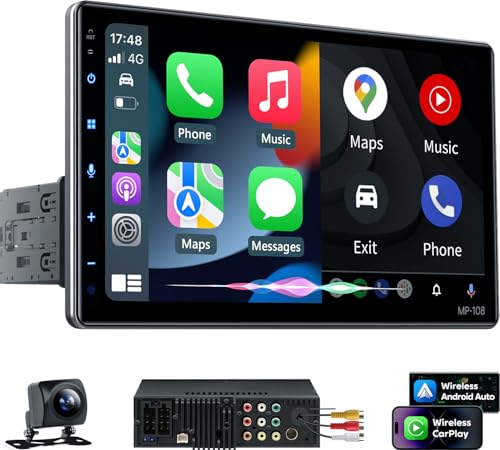
BOSS Audio’s Android Auto head units are best compared by what happens after the box is open: connection stability, phone charging, call quality, fitment, and the real installed bill. A wireless-capable unit costs more up front, but the bigger surprise is often the wiring adapter, trim, steering-wheel module, and labor.
| Head unit class | Best for | What you gain | What you give up | Head-unit price | Typical installed-cost range |
|---|---|---|---|---|---|
| Wired Android Auto BOSS unit | Daily commuting and long drives | More stable connection, phone charging, fewer handoff problems | Cable use every trip, less convenient startup | Varies by model | About $350 to $1,000+ depending on vehicle and labor |
| Wireless Android Auto BOSS unit | Short commutes and drivers who want cable-free startup | No plug-in routine, cleaner dash use | Higher battery drain, more connection instability, startup delay on some units | About $400 for the wireless Android Auto class noted here | About $450 to $1,150+ depending on vehicle and labor |
| Large-screen BOSS unit | Drivers who want easier touch targets and better glanceability | More screen space for maps and menus | Fitment can be harder, fascia and dash kit needs can increase | Varies by model | Often higher once dash parts and labor are added |
How to read the tradeoffs before you buy
Android Auto uses your connected Android phone for apps, maps, messaging, music, and processing. The stereo is the display and control point, not the place where the apps live. That matters because BOSS units that look similar on the shelf can behave very differently once the phone, cable, camera, and steering-wheel controls are added.
One common mistake is buying for screen size first. A 10-inch screen can look appealing, but if it needs extra fascia work or a more complicated wiring path, the installed cost can jump fast. A smaller unit with a clean fit and solid wired connection can be the better buy.
How Android Auto works in BOSS units
Android Auto on a BOSS head unit mirrors the phone experience for supported apps and functions. Google Maps and Waze are common navigation apps, and Google Assistant handles voice commands, calls, texts, and many media requests through the connected phone.
Phone-dependent navigation, music, calls, and messages
Android Auto uses the phone for all maps, apps, and processing, and that is the right mental model here. The BOSS stereo does not replace the phone; it extends it. If the phone is missing, dead, or struggling with data, the head unit cannot create those functions on its own.
That is why phone quality and cable quality matter. If the phone is slow to wake, has a weak battery, or keeps losing connection, the stereo will look like the problem even when the bottleneck is upstream.
Google assistant, maps, and waze support
Android Auto’s strongest value is hands-free control. You get route guidance, voice replies, calls, and music without building a separate app library into the dash. That keeps BOSS units simple, but it also means the phone has to stay healthy and connected.
Picture a driver who leaves work with a 12% phone battery and a 40-minute commute. A wired setup keeps the phone charging while the map is up. A wireless setup may feel cleaner, but it can drain the battery before the trip ends if the charging pad or cable is not part of the routine.
Wireless Android Auto: convenience vs stability
Wireless Android Auto is more convenient than wired Android Auto, but the tradeoff is real: more power use, more connection instability, and a short startup wait on some units.
Startup delay and connection handoff
That roughly 15-second delay is not huge, but it is noticeable when you start the car often. Wireless systems also depend on clean handoff behavior between phone and stereo. If the connection drops after a stop, the unit may need manual reactivation rather than recovering instantly.
Suppose your car is used for school drop-off, a quick gas stop, and another start within ten minutes. Wireless convenience helps if the connection is reliable. If the phone keeps asking to reconnect, the no-cable advantage disappears quickly.
Battery drain and charging tradeoff
Wireless Android Auto increases power consumption and connection instability. That is the core downside. Without a cable, the phone may drain faster, and the connection can be more prone to hiccups than a wired setup.
Wired Android Auto keeps the phone charged and is usually the safer bet for longer trips and daily commuting. Wireless makes more sense when cable-free use matters more than absolute stability.
When wireless is worth the extra cost
Wireless is worth considering if you make many short trips, hate plugging in every time, and can tolerate a little startup lag. It is less attractive if you spend more time driving than parking, or if your phone battery already struggles through the day.
For a buyer who wants the cleanest daily routine, wireless can be a luxury worth paying for. For a buyer who wants the fewest glitches, it is harder to justify.
Wired Android Auto: the safer daily driver?
Yes, wired Android Auto is usually the safer daily-driver choice on a BOSS stereo. It is more stable, it charges the phone, and it tends to avoid the connection drops that can show up with wireless setups. If you value consistency over convenience, wired is the better default.
Why wired is usually more stable
A physical cable reduces the chances of pairing drift, startup delay, and handoff failures. That matters on the commute, where the goal is a clean connect every time, not a clever one.
Wired also gives the phone a direct charging path. That is a practical benefit on long highway drives, where navigation, music streaming, and calls can chew through battery life faster than expected.
Who should skip wireless?
Skip wireless if you do long drives, drive every day, or use your phone as the main map and music source for hours at a time. Skip it too if you want to minimize troubleshooting after installation. Wired systems are simpler to live with.
Wireless can still make sense for light use, but it should be treated as a convenience feature, not the core reason to buy the stereo.
Screen size and interface differences
Screen size changes how easy the stereo is to use, but it does not erase the fitment problem. Halfords lists Android Auto stereo touchscreen sizes from 6.8 inches to 10 inches. In BOSS’s case, a 6.75-inch capacitive display is one example supplied here. That is enough to show maps and media clearly, but not every dash will accept a larger unit without extra parts.
6.75-inch capacitive touchscreen details
The 6.75-inch capacitive touchscreen is the most concrete BOSS example in the supplied facts. Capacitive touch should feel more responsive than older resistive screens, which matters when you are tapping quick targets in traffic.
For many drivers, this size is the practical middle ground. It is large enough for Android Auto navigation without turning the dash into a science project.
7-inch versus 10-inch fitment tradeoffs
Seven-inch units sit close to the middle of the aftermarket sweet spot. They usually fit more vehicles cleanly than a larger floating-style screen. A 10-inch unit gives more map area and larger touch targets, but it can also demand more fascia work and more careful dash planning.
The bigger the screen, the more you should check the manufacturer’s listing for your model and dash opening. Size alone does not guarantee a clean install.
Touch response, resolution, and glanceability
Resolution matters because maps and menus depend on readable text and clear icons. The panel on the 6.75-inch BOSS unit is usable. The bigger issue is whether the layout stays readable in sunlight and whether the stereo reacts quickly enough when you change apps or zoom the map.
A common first-timer mistake is assuming the biggest screen is automatically the easiest to use. A smaller screen with better fit and quicker response can be less distracting than a larger one that sits awkwardly in the dash.
Will it fit your vehicle?
Fitment depends on your dash opening, wiring, trim shape, and whether your vehicle uses single-DIN or double-DIN space. Many BOSS units can work in either category with the correct kit, but the required parts vary by vehicle. Always check the manufacturer’s listing for your model before buying accessories.
Single-DIN and double-DIN fitment
Single-DIN openings usually need different support pieces than double-DIN openings, especially when the stereo has a larger display. Some installs need a dash kit or fascia plate to make the unit sit flush and look factory-correct.
If the dash shape is unusual, compatibility can turn into the deciding factor. A stereo that seems cheap online may not be cheap after the right trim parts are added.
Dash kits, fascia plates, and harnesses
Vehicle-specific wiring adapters reduce splicing and make the job cleaner. Dash kits and fascia plates fill the gaps around the stereo and help it mount properly. Those parts are routine, but they are not free, and they can move the total install cost far above the head-unit price.
The same goes for steering-wheel control support. If your vehicle has those buttons, check whether the chosen BOSS unit needs an add-on interface module to keep them working.
Installed cost breakdown
The head-unit sticker price is only part of the bill. The installed cost often depends more on vehicle-specific parts and labor than on the stereo itself. That is where budget buyers get surprised.
| Cost item | DIY estimate | Professional-install estimate | Notes |
|---|---|---|---|
| Head unit | $250 to $400 | $250 to $400 | Wireless Android Auto class noted here is around $400 |
| Vehicle-specific harness | $15 to $60 | $15 to $60 | Needed for clean integration in many vehicles |
| Dash kit / fascia plate | $15 to $80 | $15 to $80 | Often required for proper fit and appearance |
| Steering wheel control interface | $40 to $120 | $40 to $120 | May be required if your vehicle has steering-wheel buttons |
| Backup camera integration | $20 to $150 | $50 to $250 | Depends on camera, adapters, and routing work |
| Professional labor | $0 | $150 to $400 | Higher in vehicles with tighter dash access or more modules |
| Total | $330 to $810 | $490 to $1,310 | Totals vary by vehicle and feature retention |
| DIY versus pro-install decision | Choose DIY only if you can handle trim removal, wiring, and module setup; choose professional installation if you want steering-wheel controls, camera integration, and a cleaner final fit. | Labor can cost more than the stereo itself | |
The numbers above are estimates, not a quote. Even a basic BOSS Android Auto install can grow once the wiring adapter, dash kit, steering-wheel module, and camera work are added. That is why the best comparison is total installed cost, not the box price alone.
Choose wireless if… / Choose wired if…
Choose wireless if you want cable-free startup, make short trips, and can tolerate a little delay or the occasional reconnect issue. Choose wired if you value a steadier connection, want the phone charged, or use Android Auto for long commutes and road trips. That is the cleanest split for most BOSS buyers.
Choose wireless if…
- You make short trips and hate plugging in every time.
- You want a cleaner dash routine more than perfect stability.
- Your phone battery use is modest, or you do not mind charging elsewhere.
- You accept that some units may take about 15 seconds to appear after startup.
Choose wired if…
- You drive daily and want the most reliable connection.
- You need the phone to charge during navigation and streaming.
- You want fewer pairing problems after ignition cycles.
- You would rather spend less on the stereo and more on fitment parts only when needed.
Which BOSS Audio head unit is best for Android Auto?
For most buyers, the best BOSS Audio Android Auto head unit is the wired one that fits the vehicle cleanly and keeps total installed cost under control. If you want the cleaner setup, a wireless-capable model makes sense, but only if the extra cost is worth the convenience and possible startup lag.
Short-commute drivers
Short-commute drivers are the best match for wireless. The convenience is easier to appreciate when the trip is brief and the phone does not need to stay connected for hours. Even then, check whether the vehicle needs extra modules before you commit.
Daily commuters and road-trippers
Daily commuters and road-trippers should lean wired. The steadier connection and built-in charging matter more than the convenience of going cable-free. If your commute includes frequent starts or long map sessions, wired is the safer buy.
DIY installers versus pro installs
DIY installers can save money if the dash is simple and the vehicle uses straightforward wiring. Professional installation makes more sense if you want camera support, steering-wheel controls, and a finished look without trial and error. The more features you keep, the more labor starts to matter.
Frequently asked questions
Is wireless Android Auto worth it on a BOSS stereo?
Wireless is worth it if you value convenience more than rock-solid stability. It can be the right call for short trips and quick starts, but wireless Android Auto increases power consumption and connection instability. For long commutes, wired is usually the better tradeoff.
Do BOSS head units support steering wheel controls and backup cameras?
Often, yes, but support depends on the vehicle and the install parts. Steering-wheel controls may need an add-on interface module, and camera use can require extra integration pieces. Check the manufacturer’s listing for your model and the vehicle-specific wiring adapter before you buy.
What costs extra when installing a BOSS Android Auto head unit?
The usual extras are the wiring adapter, dash kit or fascia plate, steering-wheel control interface, backup camera integration parts, and labor if you do not install it yourself. Those items can easily move the project cost beyond the head unit price.
How long does wireless Android Auto take to connect?
Wireless Android Auto timing can vary by phone and setup, but a short delay and occasional reconnect behavior are part of the wireless tradeoff.
Do BOSS car stereos need a phone for maps and music?
Yes. Android Auto uses the connected Android phone for maps, apps, processing, music, calls, and messages. The BOSS stereo is the display and control interface, not a standalone app store or navigation computer.
Which screen size is better: 6.75-inch, 7-inch, or 10-inch?
For most installs, 6.75-inch or 7-inch units are easier to fit and still work well for Android Auto. A 10-inch screen offers more visual space, but it can create fitment and fascia complications. Pick the size that matches your dash first, then your comfort with touch targets.
Are BOSS Audio Android Auto stereos compatible with my vehicle?
Maybe, but not by screen size alone. Compatibility depends on your dash opening, wiring, camera needs, and whether your vehicle requires a single-DIN or double-DIN solution. Check the manufacturer’s listing for your model and confirm the needed wiring adapter and trim parts before buying.
Products related to this article
Sponsored / affiliate links. As an Amazon Associate I earn from qualifying purchases. I may earn additional commission from eligible campaigns.