Chevy Key Fob Battery Replacement: The Complete DIY Guide
It’s 7:45 AM, you’re running late, and your Chevy Silverado won’t unlock when you press the button. You press it again, harder. Nothing. You dig out the physical key, get in, and the dash reads “No Remote Detected.” This is the classic dead key fob battery moment, and it happens to every Chevy owner eventually.
Here’s the good news: replacing the battery in a Chevy key fob takes about five minutes, costs a few dollars, and requires zero technical skill. You don’t need to visit a dealership, and you definitely don’t need to pay someone $80 to do it for you. This guide walks you through the entire process, from figuring out which fob you have to troubleshooting the problem when things don’t work right after the swap.

Deluxe Batteries
Key Fob Replacement Batteries for Chevy &…
- **Please confirm compatibility using the fitment guide located in the product images**
- Avoid expensive dealer service charges and easily replace your key fob battery yourself - only takes a few minutes - no programmin…
- Compatible with most Chevy & GMC models/years including ✔ Silverado (1999-2021), ✔ Equinox (2005-2023), ✔ Malibu (1997-2024), ✔ Tr…
You’ll also learn a few things most guides skip, like how to test the old battery with a multimeter, what to do when the fob works but the car still says “No Remote Detected,” and why a flathead screwdriver is the worst tool for this job.
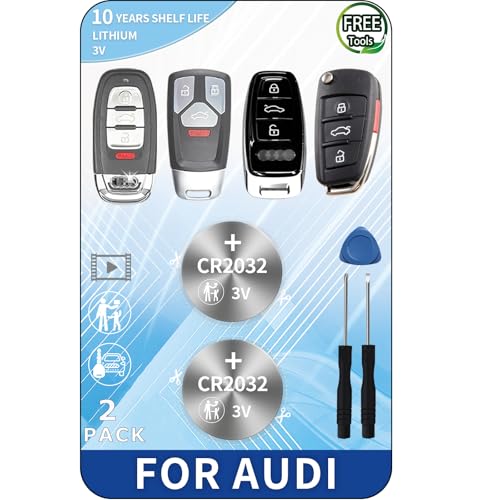
If you need a new battery before you start, a two-pack of CR2032 batteries designed for Chevy and GMC fobs covers most models from the late 90s through the mid-2020s. It includes two batteries, so you’ll have a spare ready for the next time.
Identify Your Chevy Key Fob Type
Chevy has used three main fob styles over the years, and each one opens differently. Knowing which you have saves you from prying at the wrong seam and cracking the plastic.
Smart Key (Push-Button Start) – This is the fob for vehicles with push-button ignition. It’s a solid, rectangular unit with no flip-out blade. There’s a small button on the side or back that releases a hidden emergency key. You’ll find this on most 2026-and-newer models like the Equinox, Malibu, Traverse, and newer Silverado trims.
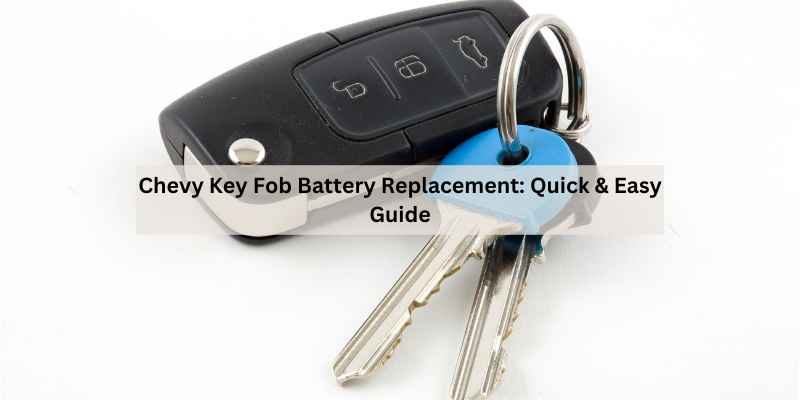
Flip Key (2026–2026) – This one has a mechanical key blade that folds out from the fob body. You press a button, the key flips out, and the fob itself is the remote. Common on the Cruze, Sonic, and some mid-year Silverado and Colorado models. The battery sits under the key blade mechanism.
Standard Remote (1998–2026) – The classic separate fob with lock, unlock, and panic buttons. No key blade at all, just a plastic shell that splits in half. You’ll see these on older Silverados, Tahoes, Suburbans, and Impalas.
What Battery Does Your Chevy Key Fob Need?
Almost every Chevy key fob uses a CR2032 3-volt lithium coin cell. It’s the same battery used in most computer motherboards, car remotes, and small electronics. You can buy them anywhere, but quality matters more than you’d think.
Some older fobs, particularly certain models from the early 2000s, use a CR2025 instead. The CR2025 is thinner (2.5mm vs 3.2mm), so it won’t fit snugly in a fob designed for a CR2032. Check the old battery’s printed code before you buy a replacement, or check your owner’s manual.
| Chevy Model | Typical Years | Battery Type | Fob Style |
|---|---|---|---|
| Silverado 1500/2500 | 1999–2026 | CR2032 | Smart key (2026+) / Standard remote (older) |
| Equinox | 2026–2026 | CR2032 | Smart key (2026+) / Standard remote (older) |
| Malibu | 1997–2026 | CR2032 | Smart key (2026+) / Flip key (2026–2026) |
| Traverse | 2026–2026 | CR2032 | Smart key |
| Cruze | 2026–2026 | CR2032 | Flip key (2026–2026) / Smart key (2026+) |
| Corvette | 1998–2026 | CR2032 | Standard remote (older) / Smart key (newer) |
| Tahoe / Yukon / Suburban | 1997–2026 | CR2032 | Standard remote (older) / Smart key (newer) |
| Colorado / Canyon | 2026–2026 | CR2032 | Smart key (2026+) / Flip key (older) |
If the fob takes a CR2032, the Deluxe Batteries two-pack is a solid choice. It covers the vast majority of Chevy and GMC models, and having a spare on hand means you won’t be stuck in a parking lot next time.
Tools You Need (And Why a Flathead Screwdriver Is a Bad Idea)
Here’s the honest truth: you need almost nothing for this job. A plastic pry tool, a small flathead screwdriver, or even a coin will do the trick. But the flathead screwdriver is the fastest way to scratch your fob’s plastic and bend the internal clips.
The plastic casing on Chevy fobs is held together by small tabs. A metal screwdriver slips, gouges the seam, and sometimes snaps the tab clean off. Then your fob won’t close properly, and you’ll be taping it shut for the rest of its life.
Use a plastic pry tool instead. They cost a few dollars and come in most phone repair kits. If you don’t have one, a US quarter or a guitar pick works surprisingly well. The goal is to apply pressure at the seam without marring the plastic.
You’ll also want a clean, flat surface and good lighting. The batteries are small, and the fob’s internal spring can launch one across the room if you’re not paying attention.
How to Replace the Battery in a Chevy Smart Key (Push-Button Start)
This is the most common fob type on modern Chevys. The process is straightforward, but the emergency key blade needs to come out first.
Removing the Emergency Key Blade
Look for a small button or slide switch on the side or back of the fob. On most Chevys, it’s on the side near the key ring. Press it, and the metal key blade slides out partway. Pull it the rest of the way by hand.
With the blade out, you’ll see a small slot or notch where the blade was seated. This is your access point.
- Insert the plastic pry tool into the notch and gently twist to separate the two halves of the fob shell.
- Work the tool around the seam, popping the clips one at a time. Don’t force it—if it resists, check for a hidden screw or clip you missed.
- Once the shell is open, you’ll see the circuit board and the battery. The battery is a shiny silver disc, usually held in place by a metal clip or seated in a recess.
- Note the battery orientation. There’s a + sign on one side. Use the pry tool to lift the battery out from one edge. Don’t use a metal tool if you can avoid it—shorting the battery against the circuit board can cause issues.
- Drop in the new CR2032 with the + side facing the same direction as the old one.
- Press the battery down until it’s snug. It should not rattle.
- Line up the two halves of the fob and press them together until you hear the clips click.
- Slide the emergency key blade back in until it locks.
Test the fob immediately by pressing the lock and unlock buttons. If the red LED blinks, you’re good.
How to Replace the Battery in a Chevy Flip Key (2026–2026)
Flip keys are a bit trickier because the battery sits under the key mechanism.
- Press the button to flip the key blade out to its fully extended position.
- Look at the side of the key head. You’ll see a seam running around the middle. There’s often a small notch near the base of the blade.
- Insert the plastic pry tool into the notch and twist gently. The two halves of the key head will start to separate.
- Work the tool around the seam until the shell splits. The internal mechanism, including the spring for the flip action, may come loose. Set it aside carefully.
- The battery is underneath, usually a CR2032. Note the orientation, then pop it out with the pry tool.
- Insert the new battery in the same orientation.
- Reassemble the shell. Make sure the spring and flip mechanism are seated correctly before pressing the halves together.
- Test the flip action and the remote buttons.
The spring is the tricky part. If it pops out, it’s easy to lose. Work over a tray or a light-colored surface so you can see it if it drops.
How to Replace the Battery in a Chevy Standard Remote (1998–2026)
This is the easiest of the three.
- Find the seam running around the edge of the fob. There’s usually a small notch at the bottom or top.
- Insert the plastic pry tool into the notch and twist. The two halves will separate.
- Lift the circuit board out carefully. The battery is underneath or attached to the board.
- Note the orientation, then pry the old battery out.
- Insert the new CR2032 in the same position.
- Snap the shell back together. It should click shut with firm pressure.
That’s it. No hidden screws, no springs, no fuss.
Does Replacing the Battery Erase the Programming?
No. The fob’s programming is stored in non-volatile memory on the circuit board. It survives battery removal, battery drain, and even years of sitting in a drawer. Replacing the battery will not unpair the fob from your truck.
That said, if the fob has been dead for a long time—weeks or months—the vehicle may need a quick resync. This is not reprogramming. It’s just waking the fob up and telling the car to listen again.
To resync most Chevy models, get in the car, press the Start button with the fob nearby, and hold the fob’s lock and unlock buttons simultaneously for about 15 seconds. Or, touch the fob to the push-button start while pressing the brake. The exact method varies by model year, so check your owner’s manual. In most cases, simply using the fob once after a battery change is enough.
Troubleshooting: Fob Still Not Working After the Swap
You put in a fresh battery, and the fob still won’t unlock the doors. Before you throw the fob at the wall, run through these checks.
Check Battery Orientation and Contacts
It happens more often than you’d think. The battery is in upside down, or it’s not seated fully, so the contacts aren’t touching. Open the fob and verify the + side faces the correct direction. Also check the metal contacts inside. If they’re bent or corroded, clean them with a cotton swab and a little rubbing alcohol. Let them dry completely before reassembling.
Use a multimeter to test the new battery’s voltage. A fresh CR2032 should read about 3.2 volts. If it reads below 3.0, it’s a dud. Test the old battery too, just to confirm it was actually dead. This is the diagnosis-before-disassembly approach, and it saves you from replacing a perfectly good battery.
Test the Spare Remote vs. the Car Battery
If the fob still doesn’t work, try the spare remote. If the spare works, the problem is the first fob, not the car. If neither works, the issue might be the vehicle, not the fob.
Here’s a scenario most people miss: the fob works fine, but the dashboard still says “No Remote Detected.” This usually means the car’s battery is weak, not the fob’s. A low car battery can cause the vehicle’s receiver to lose sensitivity. Check the car’s battery voltage with a multimeter. It should be around 12.6 volts with the engine off. If it’s below 12.2, charge it or replace it.
Signal interference is another possibility. If you’re standing near power lines, a cell tower, or another vehicle with a strong signal, the fob might not communicate with the car. Move a few feet away and try again.
How Often Should You Replace the Battery? (And Signs It’s Dying)
A CR2032 in a Chevy fob typically lasts 3 to 5 years. That’s under normal use—a few dozen presses a day. If you have remote start and use it frequently in winter, expect closer to 2 to 3 years.
Signs the battery is dying:
- The fob only works when you’re standing right next to the car. Range drops from 30 feet to 10 feet.
- You have to press the button multiple times before the doors respond.
- The fob’s LED is dim or doesn’t light up at all.
- The car intermittently says “No Remote Detected” when you’re trying to start it.
Don’t wait until the fob dies completely. The moment you notice reduced range, order a new battery. It’s a $5 fix that prevents a $200 locksmith visit.
When to Replace the Entire Key Fob (Not Just the Battery)
Battery replacement fixes 95% of fob issues. But sometimes the fob itself is worn out. If the buttons are cracked, the internal contacts are corroded from a leaking battery, or the fob has been through the washing machine, it’s time for a new one.
A new OEM fob from the dealer costs anywhere from $150 to $400, plus programming. Aftermarket fobs are cheaper but may require a locksmith to program them. Before you buy, check if your car has a self-programming procedure. Many GM vehicles allow you to program a new fob yourself using the ignition key and the door lock button.
If you’re handy, you can often find a used fob on eBay and program it yourself. Just make sure it’s the correct part number for your model and year.
Three Common Mistakes (And How to Avoid Them)
I’ve seen these three mistakes ruin otherwise simple battery swaps. Avoid them and you’ll be fine.
Mistake 1: Using a metal screwdriver. You’ll scratch the plastic, bend the contacts, or short the circuit board. Use a plastic pry tool or a coin.
Mistake 2: Installing the battery upside down. The + sign faces up on almost every Chevy fob, but check the old battery’s position before you remove it. If you put it in wrong, the fob won’t work, and you’ll think you bought a bad battery.
Mistake 3: Throwing the old battery in the trash. CR2032 batteries contain lithium and other materials that shouldn’t go in a landfill. Most auto parts stores, electronics retailers, and municipal recycling centers accept them. Check with your local waste management for drop-off locations. It takes 30 seconds, and it keeps heavy metals out of the ground.
Disposing of the Old Battery Properly
This deserves its own mention because it’s so often ignored. CR2032 batteries are not regular household waste. They contain lithium, which can react with other metals in a landfill and release toxic compounds over time.
Your options:
- Take them to an auto parts store like AutoZone or O’Reilly. They have recycling bins at the counter.
- Check big-box retailers like Best Buy or Home Depot. Many have battery recycling kiosks.
- Search Earth911.com for a local drop-off point.
Keep old batteries in a small container until you have a few, then drop them off in one trip. Don’t store them loose in a drawer where they can short against coins or keys.
Final Thoughts
Replacing the battery in your Chevy key fob is one of the easiest maintenance tasks you’ll ever do. You don’t need a dealership, you don’t need a locksmith, and you don’t need any special skills. Just a fresh CR2032, a plastic pry tool, and five minutes.
- Identify your fob type first: smart key, flip key, or standard remote. Each opens differently.
- Use a CR2032 battery for almost all Chevy models. Check the old battery’s code to be sure.
- Never use a metal screwdriver. A plastic pry tool or a coin is safer and won’t damage the fob.
- Note the battery orientation before you remove the old one. The + side faces up on most fobs.
- Replacing the battery won’t erase the programming. If the fob doesn’t work after the swap, check the contacts, test the car battery, or try the spare remote.
- Replace the battery every 3 to 5 years, or sooner if the fob’s range starts dropping.
- Recycle the old battery. Auto parts stores and electronics retailers accept them.
If you’re still having trouble after a fresh battery, it might be time to check the fob’s internal components or look into how the fob interacts with your car’s ignition system. And if the fob itself is dead, a locksmith may be able to cut and program a replacement without the original. Most of the time, though, it’s just a $5 battery.
Products related to this article
Sponsored / affiliate links. As an Amazon Associate I earn from qualifying purchases. I may earn additional commission from eligible campaigns.