Does Apple CarPlay WiFi Drain an EV Battery
Are you wondering if using Apple CarPlay’s WiFi connection uses up your electric car’s battery faster? It’s a good question, especially when you’re new to electric vehicles and all their features. Many people find this topic a bit confusing, but don’t worry.
We’ll break it down simply and show you exactly what’s happening, step by step. Get ready to find out the real impact.
Does Apple CarPlay WiFi Drain an EV Battery
This section will look at the core question of whether the WiFi used by Apple CarPlay has a noticeable effect on an electric vehicle’s battery life. It’s a common concern for drivers who rely on CarPlay for navigation, music, and communication while on the go. Understanding this can help you manage your car’s power more effectively.
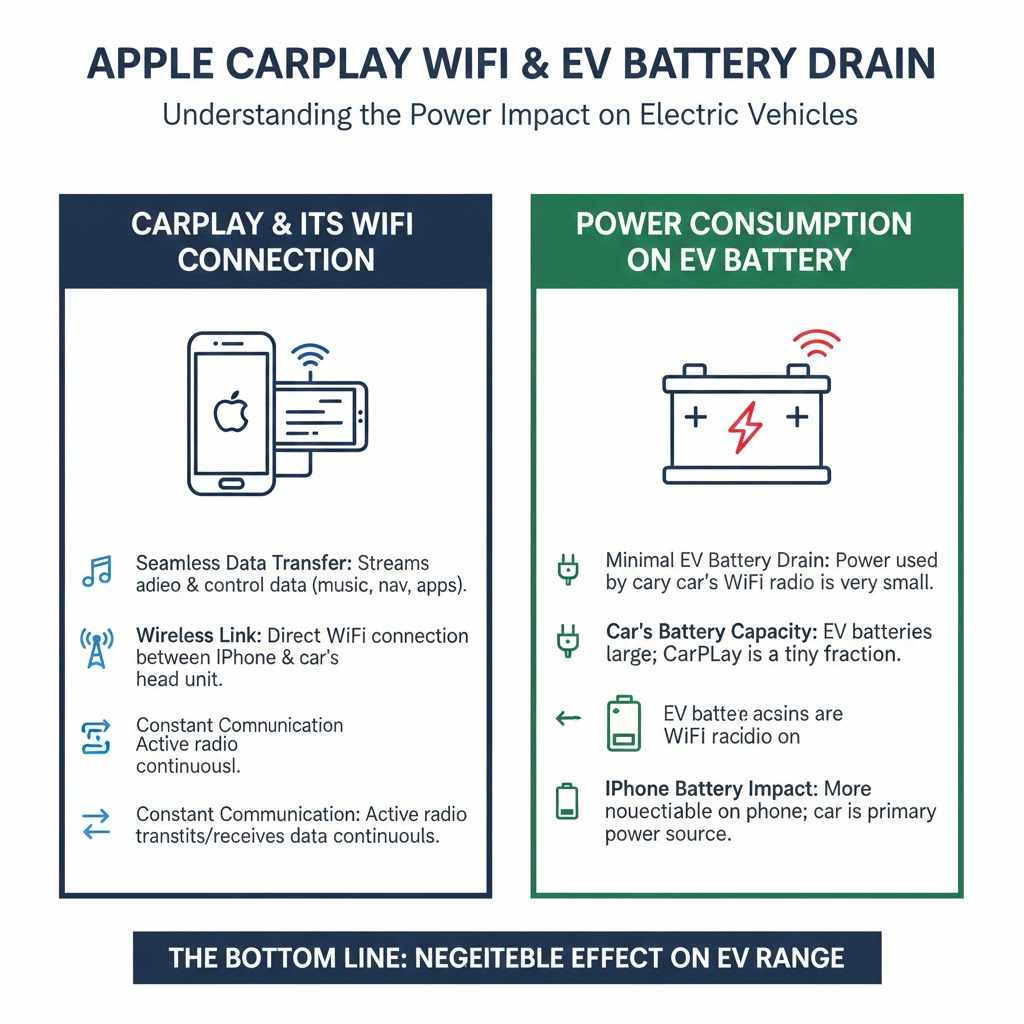
CarPlay and Its WiFi Connection
Apple CarPlay connects your iPhone to your car’s infotainment system. It uses your phone’s processing power and data. To do this, it often relies on a wireless connection.
This wireless link is similar to how your home WiFi works, but it’s a direct connection between your iPhone and the car’s head unit.
The primary function of this WiFi connection is to enable the seamless transfer of audio, visual, and control data. When you select a song, get navigation directions, or use an app like Spotify, the information needs to travel between your phone and the car’s screen. The WiFi protocol is designed for this quick exchange.
This connection is typically established automatically when you start your car and have your iPhone nearby. It’s what allows you to see and interact with your familiar iPhone apps on your car’s display. For most users, this wireless setup is very convenient, eliminating the need for a physical cable.
- Data Exchange: The WiFi connection facilitates the streaming of audio and video from your phone to your car’s speakers and display. This includes music, podcasts, and even video if supported by the car.
- Command and Control Signals: It also allows your car’s touch screen and physical buttons to send commands back to your iPhone. For example, when you tap to skip a song or select a navigation destination.
- Constant Communication: The connection is generally active whenever CarPlay is in use, meaning there’s ongoing communication between the two devices. This continuous exchange is key to the system’s responsiveness.
The constant stream of data and commands, while small on a per-packet basis, can add up over time. The WiFi radio on both your iPhone and in the car’s head unit is actively transmitting and receiving. This radio activity requires power.
For a smartphone, this is a minor drain, but for an electric car’s battery, even small consumptions are worth noting.
Understanding EV Battery Power Consumption
Electric vehicles (EVs) have a large battery pack that powers everything from the wheels to the car’s internal systems. This includes the infotainment system, climate control, lights, and all the electronics. The car’s main traction battery is the source for all these demands.
When we talk about EV battery drain, we’re referring to how quickly the total stored energy is used up. Factors like driving speed, acceleration, temperature, and the use of accessories all contribute. Accessories include things like the air conditioning, heating, and the stereo system.
The infotainment system, which includes the screen, speakers, and the processing power behind it, draws power from this main battery. This is similar to how a gasoline car’s alternator powers its radio. In an EV, it’s all coming from the same large battery.
- Traction Battery: This is the primary battery that powers the electric motor(s) to move the car. It’s usually a large lithium-ion battery pack.
- Accessory Power: A separate, smaller 12-volt battery often powers the car’s electronics, lights, and infotainment system. This 12-volt battery is recharged by the main traction battery. So, in essence, any power used by accessories ultimately comes from the main battery.
- Power Demands: Every electronic component, from the headlights to the navigation system and the display screen, requires energy to function. The sum of these demands determines the overall power draw.
The efficiency of how the car uses power is crucial. Modern EVs are designed to be very efficient, but every watt counts, especially on longer journeys. The more power-hungry the systems, the more the battery will be depleted.
The WiFi radio in your car, like any electronic component, consumes power when it’s active. While the car’s infotainment system is designed to be energy-efficient, the WiFi radio needs to be powered on to establish and maintain the connection with your iPhone for CarPlay. This power draw is generally small but continuous.
Does Apple CarPlay WiFi Drain an EV Battery Noticeably
The short answer is that the WiFi used by Apple CarPlay can drain an EV battery, but typically not in a way that most drivers would find significantly problematic for daily use. The amount of power consumed is usually quite small compared to the energy needed to propel the car.
Think of it like this: the WiFi radio is a tiny consumer of energy compared to the massive battery that powers your car’s motor. While it does draw power, it’s one of the least demanding functions in your vehicle. The car’s display screen itself, its brightness, and the audio system are usually larger power draws than the CarPlay WiFi signal.
For a typical commute or a few hours of driving, the impact is likely to be minimal, perhaps adding only a mile or two to your overall energy consumption. However, over very long distances or in situations where you are already closely monitoring your range, every bit of energy saved becomes more important.
- Minimal Impact on Range: For the vast majority of EV owners, the battery drain from CarPlay’s WiFi is negligible. It won’t significantly cut into your driving range for daily commutes or typical road trips.
- Cumulative Effect: While small, the drain is continuous when CarPlay is active and using WiFi. Over many hours of driving, this small drain can add up.
- Comparison to Other Systems: The power consumed by the CarPlay WiFi is far less than that used by climate control (heating or cooling) or aggressive driving styles.
It’s important to remember that the car’s entire infotainment system draws power. CarPlay is just one part of that. The screen, the operating system running the car’s interface, and any other apps you might use also consume energy from the battery.
The specific amount of drain can also depend on the car model and how its systems are engineered. Some cars might have more energy-efficient infotainment systems than others. Additionally, the specific generation and model of your iPhone can play a small role in its WiFi power consumption.
If you’re concerned about maximizing your EV’s range, especially in extreme conditions or on very long trips, it’s always good practice to be mindful of all accessory power usage. This includes not just CarPlay but also screen brightness, audio volume, and climate control settings.
Factors Influencing CarPlay WiFi Power Draw
Several elements can affect precisely how much power the Apple CarPlay WiFi connection uses. Understanding these can help you make informed decisions about your driving habits and settings.
One of the biggest factors is the duration of use. The longer your iPhone is connected to CarPlay via WiFi, the more energy the WiFi radios will consume. If CarPlay is active for your entire commute each day, the cumulative effect will be greater than using it only for short periods.
The strength of the WiFi signal can also play a role. Just like with home WiFi, if the signal between your iPhone and your car’s system is weak, the devices might have to work harder, using more power to maintain a stable connection. This is because they need to boost their transmission power.
- Connection Quality: A strong and stable WiFi connection requires less power than a weak or intermittent one. Your car’s and phone’s WiFi radios will automatically adjust their power output to maintain a connection, and a weaker signal often means higher power usage to compensate.
- iPhone Model and Settings: Newer iPhones might have more power-efficient WiFi hardware. Also, your iPhone’s own WiFi settings, such as whether it’s set to scan for networks aggressively, can influence its power draw.
- Car’s Infotainment System Design: The energy efficiency of the car’s built-in WiFi receiver and the software managing the CarPlay connection can vary between vehicle manufacturers and models. Some systems are simply better optimized than others.
Another factor is the amount of data being transferred. While CarPlay’s primary function is not massive data streaming like a movie, continuous map updates, audio streaming, and app interactions all contribute to the data traffic. More data generally means more WiFi activity and thus more power consumption.
For example, if you are constantly streaming high-quality audio or using navigation apps that frequently update traffic data, this will involve more data packets being sent and received over the WiFi link. This increased activity translates to a slightly higher power draw from both your iPhone and the car’s system.
Consider also the environmental conditions. Extreme temperatures can affect battery performance in general, and while the WiFi draw itself is small, its relative impact might be perceived differently in very cold or very hot weather when other systems are working harder.
Comparing Wired vs. Wireless CarPlay
Apple CarPlay can be used in two main ways: wirelessly via WiFi or a Bluetooth connection, and wired via a USB cable. Each method has its own power implications, and understanding the differences can be helpful for EV owners.
When you use a USB cable, your iPhone is directly connected to the car’s infotainment system. This connection not only transfers data for CarPlay but also charges your iPhone simultaneously. This means that any power drawn from the car’s battery to run CarPlay via USB is offset by the charging current being supplied to your phone.
In this wired scenario, the net power drain on the EV’s main battery for running CarPlay is often very close to zero, or even slightly positive if the charging rate is higher than the operational draw. This is because the energy used by the car’s system to run CarPlay is effectively being replenished by the charging process.
| Feature | Wired CarPlay (USB) | Wireless CarPlay (WiFi/Bluetooth) |
|---|---|---|
| iPhone Charging | Yes, actively charges iPhone. | No, does not charge iPhone. |
| Power Draw on EV Battery | Very low to negligible (offset by charging). | Slight, due to active WiFi/Bluetooth radios. |
| Convenience | Requires cable connection. | Very convenient, automatic connection. |
| Initial Setup | Plug in and approve. | Initial pairing required, then automatic. |
| Potential for Interference | Less prone to wireless interference. | Can be subject to WiFi/Bluetooth interference. |
Wireless CarPlay, on the other hand, relies on the WiFi and Bluetooth radios. As discussed, these radios consume a small amount of power to operate. There is no simultaneous charging of your iPhone.
Therefore, the energy used by the WiFi and Bluetooth components for CarPlay does represent a small net draw on the EV’s battery.
For drivers particularly concerned about maximizing every bit of range, especially on long trips where charging opportunities might be scarce, opting for a wired USB connection can be a wise choice. It ensures that the power used to run CarPlay is either minimal or completely negated by iPhone charging.
However, for most everyday driving, the convenience of wireless CarPlay often outweighs the very small power difference. The ease of simply getting into your car and having your phone instantly connected and functional is a major benefit for many users. The negligible impact on overall EV range for most drivers makes wireless CarPlay a perfectly viable and popular option.
Optimizing Your EV Battery While Using CarPlay
While the impact of CarPlay’s WiFi on your EV battery is small, there are always ways to be more efficient. These tips focus on managing your car’s power usage effectively, whether you use CarPlay or not.
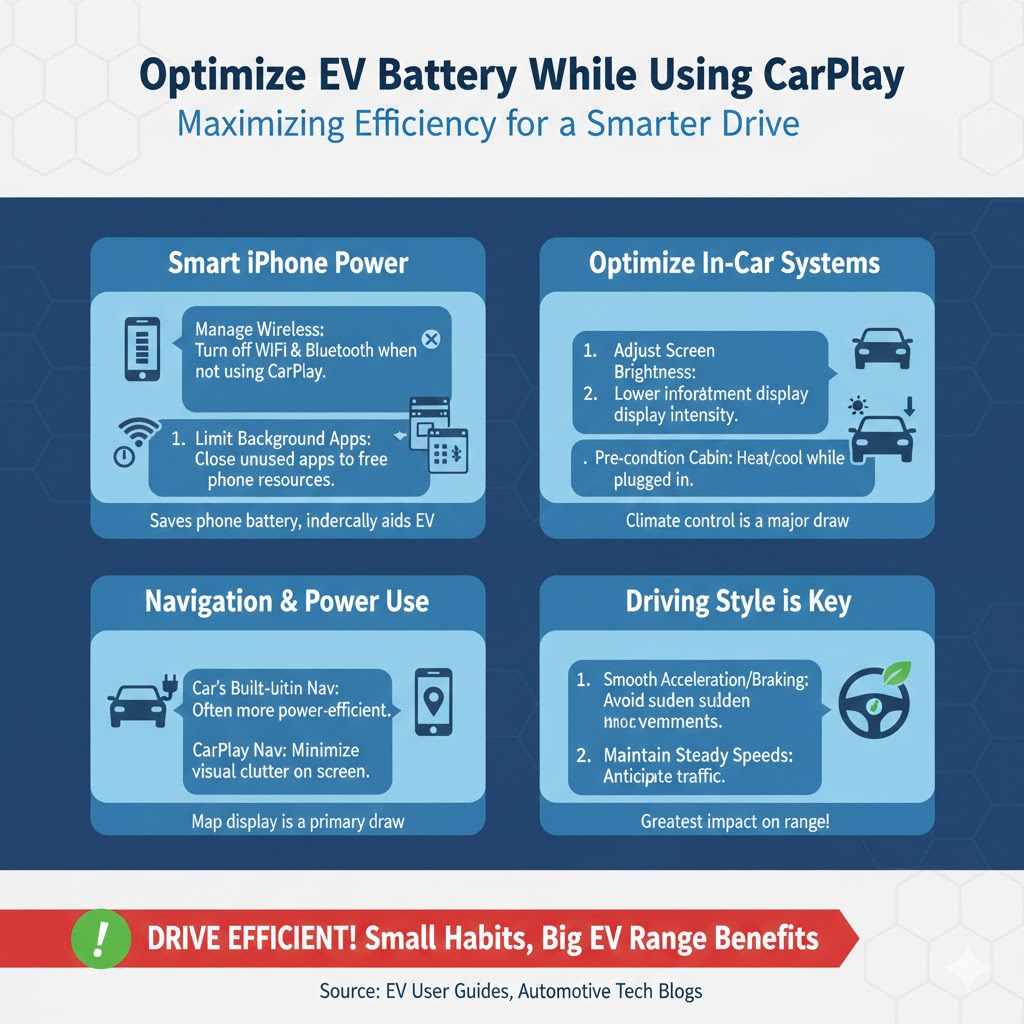
One simple step is to manage your iPhone’s own power settings. Ensure your iPhone’s WiFi and Bluetooth are only on when needed. When you’re not using CarPlay or other wireless features, turning them off can save your phone’s battery, which indirectly helps your car’s battery since your phone is the source for CarPlay’s demands.
Another strategy involves the settings within your car’s infotainment system and CarPlay itself. For instance, if your car allows it, you can reduce the brightness of the screen when CarPlay is active. A brighter screen consumes more power.
- Manage iPhone Power Settings: Keep your iPhone’s WiFi and Bluetooth off when not actively using CarPlay or other wireless features. This minimizes your phone’s own power consumption.
- Adjust Screen Brightness: Lower the brightness of your car’s infotainment screen, especially at night or when it’s not needed at maximum intensity. The display is a significant power draw.
- Limit Background Apps on iPhone: Close any unnecessary apps running on your iPhone in the background. This frees up your phone’s resources and can indirectly reduce the processing load shared with CarPlay.
Consider the overall power demands of your vehicle. Climate control, like heating and air conditioning, is one of the largest consumers of energy in an EV. Pre-conditioning your car’s cabin while it’s plugged in can help save battery power for driving.
This means setting your desired temperature before you start your journey.
When using CarPlay for navigation, relying on the car’s built-in navigation system if it has one can sometimes be more efficient. This is because the car’s system is optimized to draw power directly from the main battery without the added layer of wireless communication with your phone.
However, the convenience and familiarity of using iPhone navigation apps often make them the preferred choice. If you do use CarPlay for navigation, remember that the map display and data updates are the primary power draws. Minimizing unnecessary visual distractions on the screen can help a little.
Finally, remember that driving style is paramount. Smooth acceleration and braking, maintaining steady speeds, and anticipating traffic are the most effective ways to conserve EV battery power. While CarPlay’s WiFi is a minor factor, optimizing your driving habits yields the most significant range benefits.
Frequently Asked Questions
Question: Does Apple CarPlay WiFi use a lot of battery in an EV
Answer: No, the WiFi used by Apple CarPlay uses a very small amount of battery power in an EV. It is generally considered negligible for most daily driving situations.
Question: Is wireless CarPlay worse for EV battery than wired CarPlay
Answer: Yes, wireless CarPlay uses slightly more battery power than wired CarPlay because the WiFi and Bluetooth radios need to be active without charging your phone. Wired CarPlay charges your phone while running, often resulting in a net zero or even positive power exchange.
Question: Should I turn off CarPlay WiFi to save EV battery
Answer: For most drivers, turning off CarPlay WiFi is not necessary to save EV battery. The power savings are minimal. If you are on a very long trip and need to maximize range, using wired CarPlay or turning it off is an option.
Question: What other features drain an EV battery more than CarPlay
Answer: Climate control (heating and air conditioning), aggressive driving, high speeds, and keeping the infotainment screen at maximum brightness are much larger drains on an EV battery than Apple CarPlay’s WiFi connection.
Question: Can my iPhone battery drain faster when using wireless CarPlay
Answer: Yes, your iPhone’s battery will drain faster when using wireless CarPlay because it is actively using its WiFi and Bluetooth radios, and it is not being charged by the car.
Conclusion
Using Apple CarPlay’s WiFi in your electric vehicle has a very minimal impact on the main battery. The power consumed by the WiFi radios is small compared to other car systems. For most drivers, this drain is not noticeable and doesn’t significantly affect range.
If you want to save every bit of power, using a wired USB connection for CarPlay is more efficient as it also charges your phone.