
How Car Rental Companies Verify Driver’s License
Car rental companies usually verify a driver’s license by checking the physical card, scanning the barcode or magnetic stripe, and matching the name, photo, expiration date, and state records, with extra ID checks for some rentals. If that step fails, you can lose the car, miss your booking, or get sent to a counter agent for manual review. This guide explains the workflow, the data they check, and the most common reasons a license is rejected.
What rental companies check first
At pickup, the first screen is simple: is the license valid, readable, and tied to the person standing there? The license usually must be unexpired and cover the full rental period, and many counters also want a photo. Some locations also ask for a passport or national ID so the name and face can be matched against the booking and the license.
License validity and rental-period coverage
An unexpired license is the baseline. A license may be rejected if it expires before the rental return date, since some companies will not accept a rental that extends past the document’s end date. That rule is common at airport counters and with higher-risk bookings.
Name, photo, and age match
The agent compares the license to the reservation and to the person at the counter. The name has to align closely enough for the system and staff to treat it as the same renter, and the photo has to look like the person standing there. Age checks matter too, because many rental policies set minimum ages and extra fees for younger drivers.
ID documents they may ask
Government-issued identification often comes next. A passport or national ID can support the match, especially when the license is foreign, the name format differs from local records, or the counter agent needs a second document for identity confirmation. Which extra ID is accepted depends on the company and the market.
How the counter check works
The workflow usually has three layers: visual inspection, machine capture, and exception handling. Some rentals stop after a quick manual look. Others scan the license barcode or magnetic stripe, extract data, and run authenticity checks or real-time verification before approving the pickup.
Visual inspection at pickup
The agent looks for obvious problems first. Bent corners, broken laminations, altered birth dates, mismatched fonts, and signs of tampering can trigger a review. A license that looks physically damaged may still be accepted if the key data remains readable, but the decision is company-specific.
Barcode, MRZ, and data extraction
Many systems read the barcode on the back of a driver’s license. Some also capture the machine-readable zone, or MRZ, on documents that use it. The scan can pull in name, date of birth, license number, and expiry details, then compare them against the reservation and the counter record. Some vendors also run real-time verification during that step; 365id says it verifies identities and driving licenses in real time, while Sumsub says its average verification time is 20 seconds.
Manual review when the scan fails
A scan failure does not always mean rejection. It may mean the barcode is worn, the printer is low quality, the document is from an unsupported jurisdiction, or the system cannot parse the data cleanly. Staff may key in the details manually, ask for a second document, or route the case for review before releasing the car.
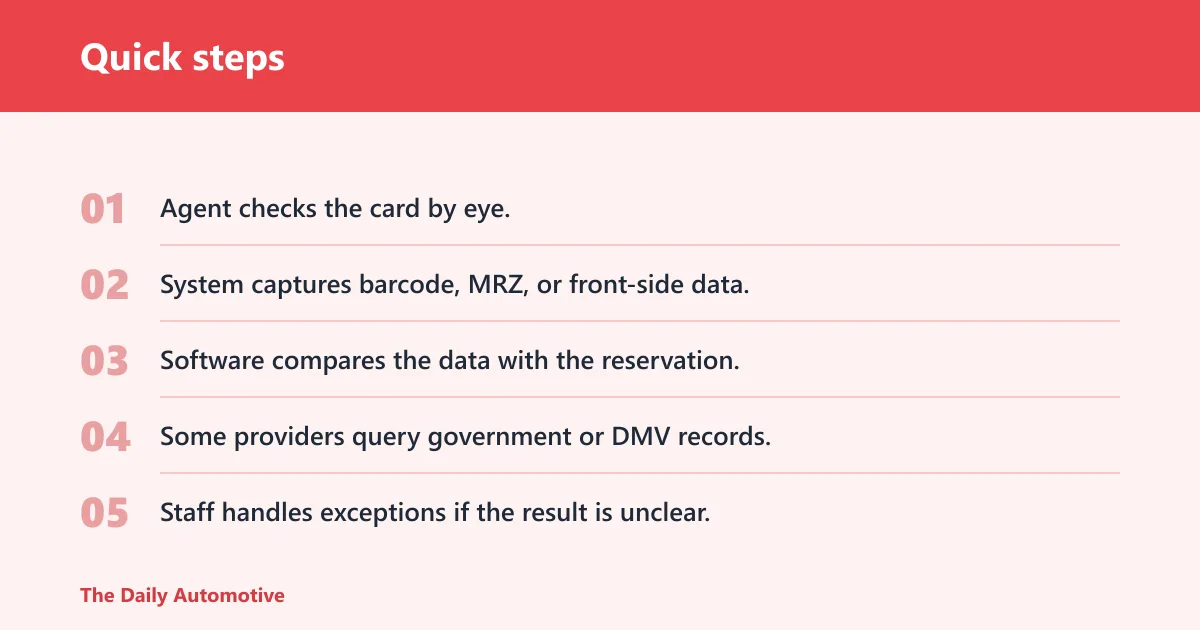
- Agent checks the card by eye.
- System captures barcode, MRZ, or front-side data.
- Software compares the data with the reservation.
- Some providers query government or DMV records.
- Staff handles exceptions if the result is unclear.
Why a rental license passes or fails verification
| Signal checked | Common failure reason | Who sees it | Likely outcome |
|---|---|---|---|
| Expired license | End date is past, or the license expires before the rental return date | Counter agent, verification system | Rental refused or manual exception request |
| Unreadable barcode | Barcode is damaged, faded, scratched, or poorly printed | Scan system, counter agent | Manual entry, secondary ID, or review |
| Mismatched name/photo | Name order, legal name change, or photo does not match the renter | Counter agent, identity verification tool | Hold for review, ask for passport or national ID |
| Unsupported foreign license | Provider does not support that country, script, or document type | Counter agent, international rules engine | May need passport, translation, or denial |
| Digital driver’s license not accepted | Location, device, or provider policy does not allow mobile ID | Counter agent, mobile-ID checker | Ask for physical license or refuse pickup |
| Suspected tampering | Altered laminate, changed photo, scratched text, or inconsistent data | Counter agent, fraud review team | Manual review, extra ID request, or rejection |
Say your license expires three days after pickup and the rental runs for a week. The counter agent may flag it even though it is still valid that morning, because the document will not cover the full booking. That is a common reason for a last-minute denial.
Suppose the barcode on the back is scuffed from carrying the card in a wallet for years. The scanner may fail to read the data, which does not automatically mean the license is fake. The agent may then ask for the front-side details, a passport, or a manual check.
Do rental companies verify with the DMV?
Some rental companies and verification vendors do match license data against DMV or other government records, but not every counter does it for every booking. When it is used, the check can confirm validity, support an auditable decision, and help flag a record that is suspended, revoked, or otherwise inconsistent with the card.
What the system confirms
A government record match can compare the license number, name, birth date, and status with an official record. It does not mean the rental company has full access to every DMV detail. The point is usually confirmation, not deep record review, and the exact data fields vary by vendor and jurisdiction.
Why some checks still need staff review
Database hits can still leave edge cases. A legal name change, a hyphenated surname, a recent renewal not yet reflected in the record, or a mismatch in address formatting can trigger manual review. The company may approve the rental after an agent confirms the document set.
Can you use a digital driver’s license?
The guide says some providers accept digital or mobile driver’s licenses, but acceptance is not universal. It depends on the company, the country or state, the airport or city branch, and the identity system that supports the check. Enterprise Truck Rental says it does not accept digital licenses generally, which is a reminder that policy can differ sharply by brand and location.
Where digital IDs are accepted
Digital driver’s licenses are an emerging standard, not a universal one. Some systems can verify them in supported jurisdictions, while others still require the physical card. If the provider’s counter or app cannot read the mobile ID format, the digital version will not help you at pickup.
Why acceptance varies by company
The limitation is often operational, not theoretical. A rental company may have to support different state formats, device checks, and verification vendors, and not every branch has that setup. 365id says it integrates via API and SDK and works with 20+ rental management systems, but that kind of integration still depends on the company choosing to enable it.
What to bring if digital ID is refused
Bring the physical license if you have it. If digital ID is refused, the agent may ask for a passport, national ID, or a second acceptable document, depending on policy. If the rental is time-sensitive, carrying both the mobile ID and the physical card is the safer choice.
International license rules
International licenses can be accepted, but the rules are country-specific and provider-specific. Some verification systems support more than 220 countries and territories, while others cover fewer markets; Incode says its ID coverage spans 190+ countries. The rental company may still require a passport or secondary ID to confirm identity and match the booking.
Foreign license acceptance limits
A foreign license may be accepted in one branch and refused in another, especially if the document uses an unsupported script or the system cannot verify it cleanly. For tourists, the issue is often not whether the license exists, but whether the local rental policy and the verification vendor can process it.
Passport or secondary ID
A passport is often the backup document because it gives staff a second government-issued identity source. That helps when the driver’s license format differs from local standards, when the name order does not match the reservation, or when the agent needs to confirm that the person standing there is the booked renter.
Country-specific exceptions
Some locations require an international driving permit in addition to the home-country license. Others accept a license only from certain countries or only for a limited rental class. Do not assume the rule from one airport applies everywhere in the same company.
Integration into rental workflows and systems
Rental management system integration is what makes the check feel instant at some counters and slower at others. An API or SDK can move data from the scan tool into the rental management system, reduce manual entry, and trigger a decision workflow. But automation does not remove all human review.
What integration changes
When a scan result flows into the rental management system, staff can see the identity decision, document data, and any flags in one screen. That cuts down on retyping and reduces mismatch errors. Some providers also log the decision for audit purposes, which matters when a rental is later disputed.
Why manual review still matters
Automation can approve clean cases quickly, but edge cases still need judgment. A worn barcode, a name change, a foreign license, or a device that fails the selfie check can all push the file to a person. Sumsub says it supports 14,000+ document types and claims a 75% reduction in manual verification effort, but that still leaves exceptions for staff.
Liveness and selfie checks in digital onboarding
In digital onboarding, the company may ask for a selfie or a short liveness check to prove a live person is present and to match the face to the ID. These checks can run in milliseconds, but only within the company’s supported flow. They are more common before pickup than at a paper counter.
Frequently asked questions
How do rental car companies check your license?
They usually inspect the card, compare the name and photo to the renter, check the expiration date, and scan the barcode or other machine-readable data. Some providers also compare the information with government records or ask for a second ID if the first document is incomplete, damaged, or unsupported.
Do car rental companies check drivers license?
Yes. The license is one of the main pickup documents, and the company uses it to confirm identity, eligibility, and rental-period validity. The exact process varies, but the check often happens at the counter and may include a scan, a visual review, or a database match.
What do rental companies look for on a driver’s license?
They look for an unexpired date, a readable license number, a matching name, a matching photo, and, in some cases, a barcode or MRZ that can be scanned. Some companies also want the license to cover the entire rental period and may reject cards that look altered or damaged.
What happens if your driver’s license is expired at pickup?
Many companies will refuse the rental if the license is expired at pickup, and some will also refuse it if the card expires before you return the vehicle. A staff member may offer to rebook after you renew, but there is no guarantee of a same-day exception.
Can car rental companies verify international driver’s licenses?
Yes, but only within the company’s country and document-support rules. Some systems cover 220+ countries and territories, while others support fewer. A passport or second ID is often requested, and some branches may ask for additional documents or decline the license if it is not supported locally.
What documents do I need besides a driver’s license at the counter?
That depends on the company and the market, but a passport or national ID is the most common extra document. Bring the payment card, reservation details, and any required travel documents if you are renting internationally. If your license is digital, foreign, or close to expiry, carrying a physical backup is the safer move.
Products related to this article
Sponsored / affiliate links. As an Amazon Associate I earn from qualifying purchases. I may earn additional commission from eligible campaigns.