How to Play Music from Phone to Bluetooth in Car: A Step-by-Step Guide
Hey there! So, you want to play music from your phone through your car’s Bluetooth? I get it—there’s nothing like cruising down the road with your favorite tunes blasting through the speakers. I remember the first time I tried to connect my phone to my car’s Bluetooth system; it felt like solving a puzzle, but once I got it working, it was pure magic.
I’ve spent years tweaking my setup, helping friends get their music flowing, and figuring out all the tricks to make it seamless. In this guide, I’ll walk you through every step to play music from your phone to your car’s Bluetooth, troubleshoot common issues, and share tips to make your driving playlist perfect. It’s like we’re sitting in your car together, setting it up step by step. Let’s dive in and get those tunes rolling!
Why Use Bluetooth to Play Music in Your Car?
Let’s start with why Bluetooth is such a great way to play music. It’s wireless, which means no messy cables dangling across your dashboard. I used to deal with a tangled aux cord, and it was such a hassle. Bluetooth lets you control your music right from your phone, whether you’re using Spotify, Apple Music, or your own MP3s. Plus, it’s safe—you can keep your phone in your pocket or a holder and still switch songs or adjust the volume. I love how it frees me up to focus on driving while enjoying my playlist. It’s also super common in modern cars, so chances are your vehicle is ready to go.
Checking If Your Car Has Bluetooth
Before you start, you need to make sure your car has Bluetooth. Most cars made after 2010 have it built into the stereo system, but older models might not. I learned this when I tried to connect my phone to my buddy’s 2005 truck—it just didn’t have the tech. Check your car’s manual or look for a Bluetooth symbol (a stylized “B”) on your stereo or dashboard controls. In my SUV, the Bluetooth option pops up on the infotainment screen when I turn on the car.
If your car doesn’t have Bluetooth, don’t worry! You can add it with an adapter. I’ll cover that later, but first, let’s assume your car has built-in Bluetooth and get it connected.
Step-by-Step Guide to Connecting Your Phone to Your Car’s Bluetooth
Connecting your phone to your car’s Bluetooth is easier than it looks. I’ve done this with my iPhone and Android phones in different cars, and the process is pretty similar. Here’s how I do it:
Step 1: Turn On Bluetooth on Your Phone
First, make sure your phone’s Bluetooth is on. On my iPhone, I go to Settings, then Bluetooth, and toggle it on. For Android, I swipe down from the top of the screen and tap the Bluetooth icon, or go to Settings and find Bluetooth. You’ll see a list of nearby devices. I always make sure my phone is charged, since Bluetooth can drain the battery a bit.
Step 2: Put Your Car in Bluetooth Pairing Mode
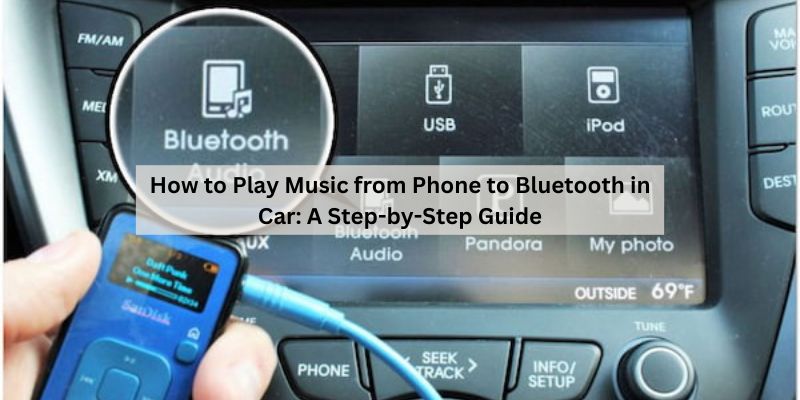
Next, get your car’s Bluetooth ready to pair. In my SUV, I go to the infotainment screen, select “Bluetooth,” then “Pair New Device.” Some cars automatically go into pairing mode when you turn on the stereo. Check your car’s manual if you’re not sure—my friend’s sedan had a hidden menu I wouldn’t have found without it. Your car’s name (like “Toyota Audio” or “Ford Sync”) should appear on your phone’s Bluetooth list.
Step 3: Pair Your Phone with the Car
On your phone, tap your car’s name in the Bluetooth list. You might need to enter a PIN displayed on the car’s screen or confirm a code. I had to do this the first time I connected to my wife’s minivan—it showed a six-digit code on the screen, and I tapped “Pair” on my phone. Once paired, you’ll see a confirmation on both devices. Your phone should now be connected!
Step 4: Select Bluetooth as the Audio Source
Now, tell your car to play audio through Bluetooth. On my car’s stereo, I press the “Source” or “Media” button until “Bluetooth Audio” shows up. Some cars switch automatically after pairing. Then, open your music app—Spotify, Apple Music, or whatever you use—and hit play. I was thrilled the first time my playlist came through the car speakers crystal clear.
Step 5: Test the Connection
Play a song to make sure it’s working. Adjust the volume on both your phone and the car stereo. I like to keep my phone’s volume at about 75% and control the sound from the car’s knobs or steering wheel buttons. If you hear music, you’re good to go! If not, don’t worry—I’ll cover troubleshooting later.
Using a Bluetooth Adapter for Older Cars
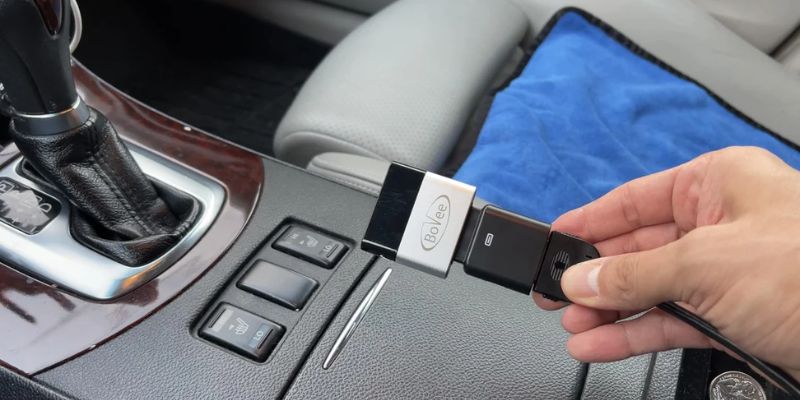
What if your car doesn’t have built-in Bluetooth? I ran into this with my old pickup, and a Bluetooth adapter saved the day. These are small devices you plug into your car’s aux port or cigarette lighter to add Bluetooth capability. Here’s how I set one up:
Choose the Right Adapter
There are two main types: aux adapters and FM transmitters. I used an aux adapter that plugged into my stereo’s 3.5mm port. It cost about $20 online. FM transmitters broadcast your phone’s audio to an empty radio frequency, but I found them less reliable due to static. Pick one that fits your car’s setup—check if you have an aux port or prefer the FM option.
Plug In the Adapter
For an aux adapter, plug it into the aux port and power it (some use a USB or cigarette lighter). For an FM transmitter, plug it into the cigarette lighter and set it to an unused FM frequency. I chose 88.1 FM because it was clear in my area. Turn on your car’s radio and set it to the same frequency.
Pair the Adapter with Your Phone
Turn on the adapter’s Bluetooth (it usually has a button to press). Then, go to your phone’s Bluetooth settings and find the adapter’s name (like “BT-Audio” or “Car Kit”). Tap to pair. I had to press a button on my adapter until it blinked to enter pairing mode. Once connected, play music on your phone, and it should come through the car’s speakers.
Troubleshooting Common Bluetooth Issues
Sometimes, things don’t go smoothly. I’ve hit a few snags connecting my phone, so let me share what I do when Bluetooth acts up:
Connection Won’t Pair
If your phone doesn’t see the car, make sure both devices are in pairing mode. I had this issue once because my car wasn’t discoverable. Restart your phone’s Bluetooth and try again. Also, check that no other devices are interfering—I forgot my tablet was connected once, and it blocked the pairing.
Poor Sound Quality
If the music sounds choppy or muffled, check your phone’s volume and the car’s audio settings. I fixed this in my SUV by turning up the phone’s volume to 80%. Also, make sure you’re not too far from the car—Bluetooth range is about 30 feet. If you’re using an adapter, static could mean a bad connection or a weak FM frequency.
Music Won’t Play
If you don’t hear sound, ensure “Bluetooth Audio” is selected as the source on your car’s stereo. I made the mistake of leaving my radio on FM once, and no music came through. Also, check that your music app is playing and not paused. If it’s still not working, unpair and repair the devices.
Dropped Connections
Bluetooth can drop if there’s interference, like other electronics or a weak signal. I had this happen in a busy parking lot. Move your phone closer to the stereo or adapter, and turn off nearby Bluetooth devices. Restarting both devices can also help.
Tools and Accessories You Might Need
You don’t need much to get Bluetooth working, but a few items make it easier. Here’s what I keep handy:
| Item | Purpose |
|---|---|
| Bluetooth adapter | For cars without built-in Bluetooth. |
| Aux cable | To connect an adapter to your car’s aux port. |
| USB charger | To power the adapter or keep your phone charged. |
| Phone holder | To keep your phone safe and accessible while controlling music. |
I got a $10 phone holder that sticks to my dashboard—it’s great for switching songs safely. A USB charger is also a must, since Bluetooth can eat up your phone’s battery.
Safety Tips for Using Bluetooth While Driving
Playing music is awesome, but safety comes first. I’ve learned a few tricks to keep things safe:
- Set up before driving: Pair your phone and start your playlist before you hit the road. I always pick my music while parked to avoid distractions.
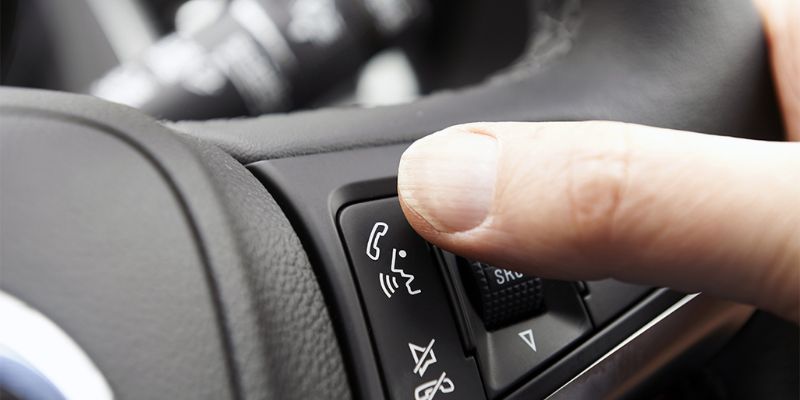
- Use steering wheel controls: If your car has buttons for volume or track skipping, use them. My SUV’s steering wheel controls make it easy to change songs without looking away.
- Avoid texting or browsing: Don’t mess with your phone while driving. I use voice commands on my iPhone to switch playlists—it’s safer and hands-free.
- Keep volume reasonable: Loud music can drown out horns or sirens. I keep my volume low enough to hear what’s around me.
Enhancing Your Bluetooth Music Experience
Once you’ve got Bluetooth working, you can make it even better. Here are some tips I’ve picked up:
- Use a high-quality music app: Apps like Spotify or Apple Music stream at higher bitrates for better sound. I switched to Spotify Premium, and the difference was noticeable.
- Adjust equalizer settings: Some car stereos let you tweak the sound. I boosted the bass in my SUV for a richer sound.
- Keep your phone updated: New phone updates can improve Bluetooth performance. I noticed smoother connections after updating my Android phone.
- Clean up your Bluetooth list: Delete old devices from your phone’s Bluetooth settings to avoid confusion. I had to do this when my car kept trying to connect to an old speaker.
Alternative Ways to Play Music
If Bluetooth isn’t working for you, there are other options. I’ve tried these when Bluetooth wasn’t an option:
- Aux Cable: Plug your phone directly into the car’s aux port. It’s simple but means dealing with a cord. I used this before getting a Bluetooth adapter.
- USB Connection: Some cars let you connect via USB for music. My wife’s minivan plays my iPhone’s music through a USB cable, and it charges at the same time.
- CDs or USB Drives: If all else fails, burn a CD or load music onto a USB drive. I keep a USB stick with my favorite songs in my glovebox for emergencies.
Costs of Setting Up Bluetooth
Setting up Bluetooth is usually cheap or free if your car has it built in. Here’s what I’ve spent:
| Item | Cost Range |
|---|---|
| Bluetooth adapter | $10-$40 |
| Aux cable | $5-$15 |
| USB charger | $10-$20 |
| Phone holder | $10-$30 |
I got a reliable Bluetooth adapter for $20, and it’s lasted years. If you’re hiring a pro to install an aftermarket stereo with Bluetooth, expect to pay $100-$300.
Why Bluetooth Is Worth It
Playing music through Bluetooth is a game-changer. It’s convenient, wireless, and lets you enjoy your music without fuss. I love how I can hop in my car, connect in seconds, and have my playlist ready. It’s also safer than fumbling with cables or CDs. Plus, it works with calls and navigation, so you’re not just limited to music. I’ve used it to take hands-free calls, which is a lifesaver on long drives.
Conclusion
There you go—you’re now ready to play music from your phone to your car’s Bluetooth like a pro! I hope this guide has made the process clear and fun, whether you’re using your car’s built-in system or adding an adapter. From pairing your phone to troubleshooting hiccups, you’ve got all the steps to enjoy your favorite tunes on the road. I still get a kick out of hearing my playlist through my car’s speakers, and I know you will too. So, grab your phone, fire up that Bluetooth, and hit the road with your music blasting. Got more questions? Check out the FAQs below, or leave a comment on the blog—I’d love to hear how it went!
FAQs
Why won’t my phone connect to my car’s Bluetooth?
Make sure both your phone and car are in pairing mode. I had this issue when my car wasn’t discoverable. Restart Bluetooth on both devices and check for interfering devices, like a tablet or speaker.
Can I use Bluetooth in a car without built-in Bluetooth?
Yes! A Bluetooth adapter can add it. I used an aux adapter in my old truck, and it worked great. You can also try an FM transmitter, but pick a clear frequency to avoid static.
Why is my Bluetooth music choppy?
Choppy sound usually means low phone volume or interference. I fixed this by turning my phone’s volume to 80% and moving it closer to the stereo. Also, check that your car’s audio source is set to Bluetooth.
Is it safe to use Bluetooth while driving?
Yes, if you set it up before driving. I always start my music while parked to stay focused. Use steering wheel controls or voice commands to change songs, and keep the volume low enough to hear traffic.
How much does a Bluetooth adapter cost?
A good adapter costs $10-$40. I got a reliable aux adapter for $20, and it’s been perfect for years. FM transmitters are similar but can be less clear in busy areas.