Ford Edge TPMS Reset: Does It Have a Button? (By Model Year)
Most Ford Edge models don’t have a dedicated TPMS reset button — the system self-calibrates after you inflate every tire to the door-jamb spec and drive above 20 mph for 2 to 5 minutes. Only some 2015–2018 trims have a physical reset switch, and 2019+ Edges reset through the instrument cluster’s Settings menu instead. This guide covers all three methods by generation, troubleshooting a light that won’t clear, and when a relearn tool is worth buying.
Let’s dive in to get a better understanding of this essential component in your Ford Edge, and how it compares to TPMS handling on other Ford models like the disable-vs-reset guide for Ford TPMS.
Understanding TPMS in the Ford Edge
The Tire Pressure Monitoring System (TPMS) is a safety feature required on every new US vehicle since 2007, including the Ford Edge. It monitors air pressure in each tire and warns the driver when pressure drops significantly below the recommended level, which helps prevent blowouts, improve fuel efficiency, and keep handling predictable.

What Is TPMS?
TPMS is a system that monitors tire air pressure and alerts the driver when any tire’s pressure is significantly low. It consists of pressure sensors mounted inside each wheel, a receiver module, and a warning light on the dashboard shaped like a horseshoe with an exclamation point.
Why TPMS Matters in the Ford Edge
Properly inflated tires improve traction, steering response, and braking distance. Correct pressure also extends tire life and saves fuel — which is why the TPMS light staying on (or coming back after a “reset”) is worth fixing rather than ignoring.
Does the Ford Edge Actually Have a TPMS Reset Button?
Searches for this exact question turn up conflicting answers — glove box, steering column, center console — because the honest answer depends on which generation of Edge you own. A 2016 Edge SEL owner asking this exact question on the Ford Edge Forum ran into the same confusion after replacing sensors. Here’s the breakdown by generation:
| Generation | Physical Reset Button? | How It Actually Resets |
|---|---|---|
| 1st Gen (2007–2014) | No | Auto-relearn: inflate tires correctly, then drive |
| 2nd Gen (2015–2018) | Some trims only | Small switch near the steering column, or auto-relearn |
| Facelift (2019–2023) | No physical button | Instrument cluster Settings menu |
1st Generation (2007–2014): No Button — Drive to Relearn
Most first-generation Edge models have no dedicated TPMS reset button anywhere in the cabin. Instead, the system relearns automatically: once every tire is inflated to the pressure listed on the driver’s door jamb, driving above 20 mph for a few minutes causes the sensors to recalibrate and the warning light to turn off on its own.
2nd Generation (2015–2018): Some Trims Have a Physical Switch
This is the generation responsible for most of the conflicting answers online. A handful of 2015–2018 trims do have a small recessed reset switch (often near the steering column or fuse panel), but many others rely on the same drive-to-relearn process as the 1st generation. Check your owner’s manual glovebox insert for “Tire Pressure Monitoring System” to confirm which type your specific trim uses.
Facelift (2019–2023): Reset via the Instrument Cluster Menu
Later Edge models with the digital instrument cluster and SYNC infotainment drop the physical switch entirely. Reset is done through the on-screen Settings menu, navigated with the steering-wheel-mounted arrow buttons — no button on the dash or in the glove box to look for.
📊 The auto-relearn process on non-button Edge models typically takes 2–5 minutes of driving above 20 mph once tires are correctly inflated. — Source: ATEQ TPMS Diagnostic Information, Ford Edge 2007–2019
How to Reset TPMS on a Ford Edge (Step-by-Step)
Method 1: Drive to Relearn (No Button Needed)
- Check every tire: inflate all four (plus the spare, if it has a sensor) to the PSI listed on the driver’s door jamb sticker, not the number on the tire’s sidewall.
- Start the vehicle: turn the ignition to “on” without immediately driving off.
- Drive normally: stay above 20 mph for 2–5 minutes on a road with light traffic.
- Confirm the light is off: the TPMS warning icon should clear on its own once all sensors relearn.
Method 2: Instrument Cluster Menu (2019+ Edge)
- Inflate tires first: set all four to the door-jamb spec before starting the reset.
- Turn the key to “on”: without starting the engine.
- Open Settings: use the steering wheel arrow buttons to navigate the instrument cluster display to “Settings.”
- Select Vehicle > Tire Pressure Monitor: choose “Calibrate” or “Reset” and confirm.
- Drive to finish: drive above 20 mph for a few minutes so the system finishes relearning.
Method 3: Professional OBD Relearn Tool (Any Year)
If driving doesn’t clear the light after 10–15 minutes, or a sensor was just replaced, a handheld TPMS relearn tool held next to each valve stem can activate the sensors directly — the same tool shops use, at a fraction of the ~$100+ dealer visit cost.
Best Ford TPMS Relearn Tool Pick
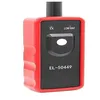
EL-50449 Ford TPMS Relearn Tool
A dedicated Ford/Lincoln activation tool that triggers each sensor by holding it near the valve stem, in the correct front-left, front-right, rear-right, rear-left sequence.
- Best for: Ford/Lincoln owners whose light won’t clear after driving
- Why we picked it: purpose-built for Ford’s sensor protocol, one-button activation
- Main drawback: only activates sensors — can’t program a brand-new sensor’s ID
Compare more TPMS reset options
 Option 1 Arozk TPMS19 Ford/Lincoln Tool
|
 Option 2 ETENWOLF Digital Tire Gauge
|
 Option 3 BlueDriver Pro OBD2 Scanner
|
As an Amazon Associate we earn from qualifying purchases.
Common Issues and Troubleshooting
The TPMS on your Ford Edge is designed to warn you when pressure drops significantly, but the system itself can run into a few common problems.
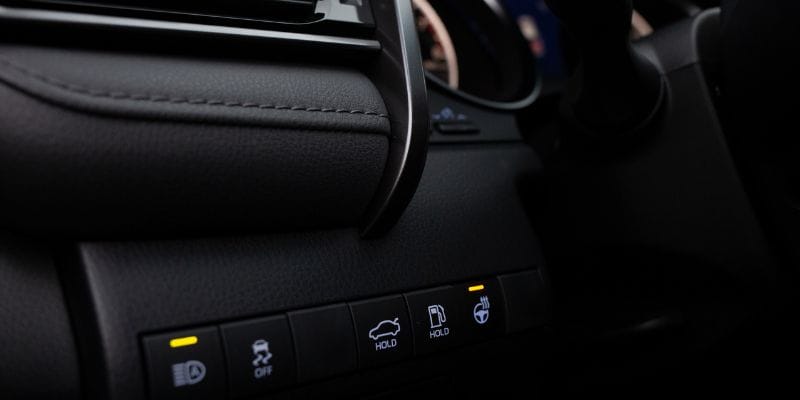
TPMS Light Won’t Turn Off After Reset
- Double-check every tire’s pressure with a gauge — a single tire even 3–4 PSI off can keep the light on.
- Give the drive-to-relearn method a full 10–15 minutes before assuming it failed.
- A damaged or dead sensor won’t relearn no matter how long you drive — it needs replacing.
- If a sensor was just replaced, it may need to be activated with a relearn tool before driving will finish the process.
Other Related TPMS Concerns
- Inaccurate readings: a sensor reporting the wrong pressure usually means it’s failing or losing battery charge, not a software glitch.
- Light stays on solid vs. flashing: a solid light means low pressure; a light that flashes for about a minute at startup then stays on usually means a sensor fault, not a pressure problem.
Expert Tips for TPMS Maintenance
Regular TPMS Checks and Maintenance
- Check tire pressure monthly with a gauge, not just by watching the dashboard light
- Inspect sensors for corrosion whenever tires are removed for rotation or replacement
- Relearn the system after every tire rotation, even if the light didn’t come on
Best Practices for TPMS Care
- Check your specific trim’s owner’s manual insert to confirm whether it has a physical reset switch
- Recalibrate after every tire rotation or replacement, not just when the light comes on
- Replace sensor batteries (typically 5–10 years) proactively rather than waiting for a failure
- Use a relearn tool or a shop visit if the drive-to-relearn method hasn’t cleared the light after 15 minutes
Frequently Asked Questions
Does the Ford Edge have a TPMS reset button?
Most Ford Edge models do not have a dedicated TPMS reset button. 1st-generation Edges (2007–2014) and most 2019+ models relearn either by driving or through the instrument cluster Settings menu. Only some 2015–2018 trims have a small physical reset switch.
Where is the TPMS reset button located on a Ford Edge?
If your specific trim has one, it’s usually a small recessed switch near the steering column or fuse panel on 2015–2018 models. Check your owner’s manual first, since most Edges have no button at all and reset by driving instead.
How do I reset the TPMS on my Ford Edge?
Inflate every tire to the pressure listed on the driver’s door jamb, then drive above 20 mph for 2–5 minutes. On 2019+ models, you can also reset through Settings > Vehicle > Tire Pressure Monitor on the instrument cluster display.
Why is it important to reset TPMS on a Ford Edge?
Resetting after a tire rotation, repair, or sensor replacement lets the system relearn each sensor’s correct position and current pressure, which keeps warnings accurate and avoids a false light staying on.
Can I reset the TPMS on my Ford Edge without a button?
Yes — this is actually the normal method for most Edge model years. Inflate all tires correctly and drive above 20 mph for a few minutes; the system relearns automatically without any button.
Why won’t my TPMS light turn off after I reset it?
The most common causes are one tire still slightly under or over the recommended PSI, not driving long enough (give it 10–15 minutes), or a failing sensor that needs replacement rather than another reset attempt.
Conclusion
Whether your Ford Edge resets its TPMS by driving, a hidden switch, or the instrument cluster menu comes down to which generation you own — check the table above before hunting through the glove box for a button that may not exist. If a proper drive-to-relearn attempt doesn’t clear the light within 15 minutes, a relearn tool or a quick shop visit will confirm whether a sensor needs replacing.
Products related to this article
Sponsored / affiliate links. As an Amazon Associate I earn from qualifying purchases. I may earn additional commission from eligible campaigns.
 EL-50449 Ford TPMS Relearn Tool TPMS Reset Tool Tire Pressure Sensor Reset, TPMS relearn, tire Rotation, tire Replacement, clearing TPMS Warning Light
 Arozk TPMS19 TPMS Reset Tool Sensor Relearn Reset Tool for Ford Lincoln Tire Pressure Monitor System Sensor Programming Training Activation Tool TPMS Trigger Tool Tire Sensors Reset Tool