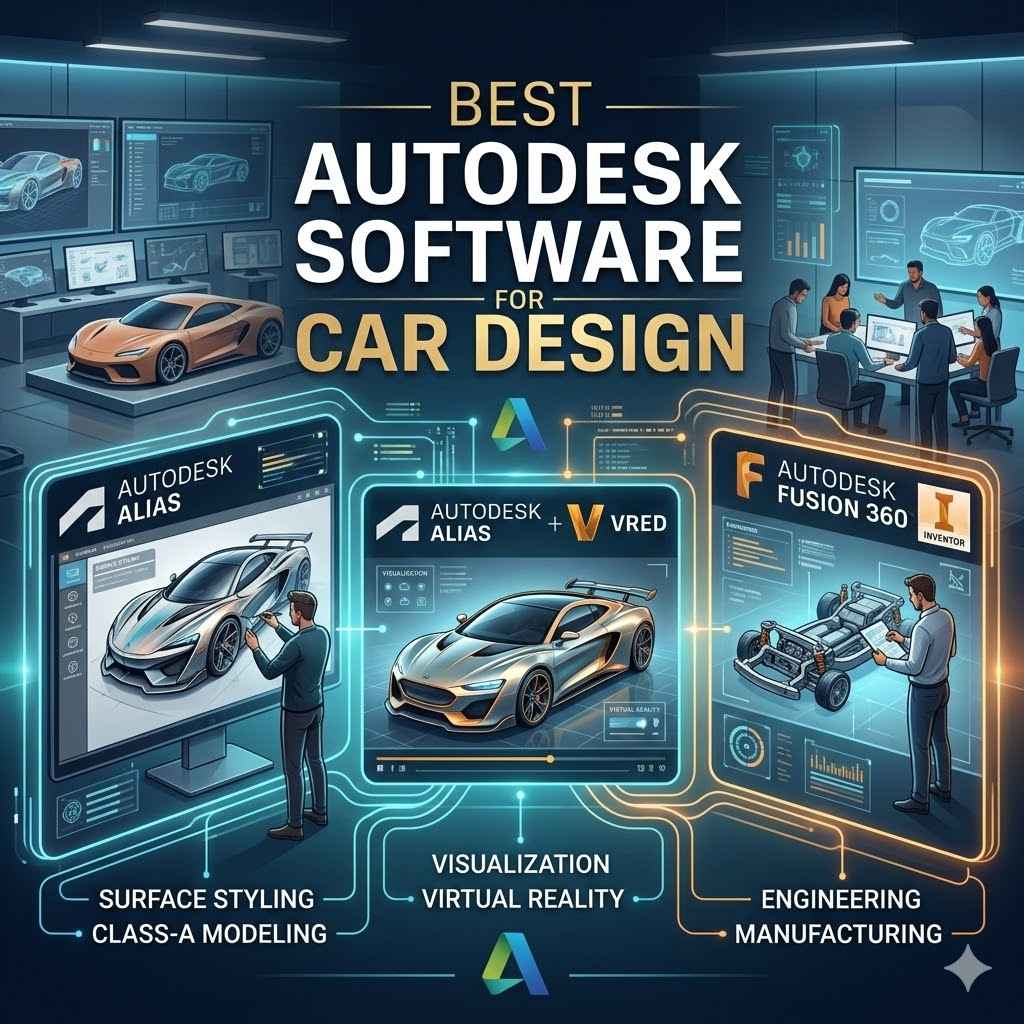
Best Autodesk Software for Car Design
Finding the Best Autodesk Software for Car Design can seem tricky when you’re just starting out. There are many options, and it’s easy to get confused about which tool does what. Don’t worry!
We’re here to make it super simple. This guide will walk you through everything step-by-step. You’ll learn exactly which Autodesk programs are perfect for bringing your car ideas to life, from sketching to final models.
Autodesk Alias For Car Design
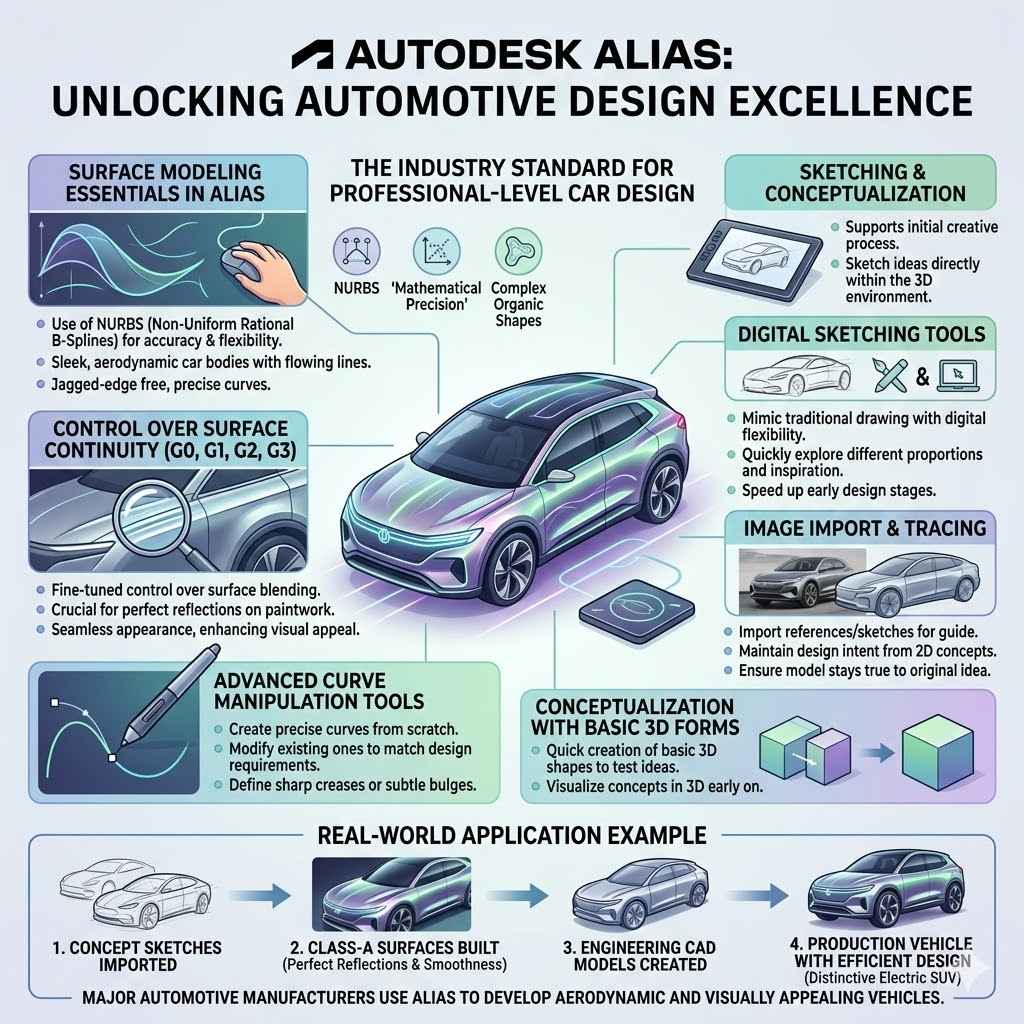
Autodesk Alias is a top-tier software specifically built for industrial design and automotive styling. It is renowned for its powerful surface modeling capabilities, allowing designers to create exceptionally smooth and precise curves, which are essential for vehicle aesthetics. For those aiming for professional-level car design, Alias is often considered the industry standard.
It provides tools that bridge the gap between creative concept sketching and detailed engineering models, making it a comprehensive solution for the entire design process.
Surface Modeling Essentials in Alias
Surface modeling is the heart of automotive design, and Alias excels here. It uses NURBS (Non-Uniform Rational B-Splines) to create highly accurate and flexible surfaces. These are mathematical representations that can define complex curves and shapes with great control.
NURBS surfaces allow for complex and organic shapes. This means designers can sculpt flowing lines for car bodies that look sleek and aerodynamic. The math behind NURBS lets designers adjust curves very precisely without creating jagged edges. This is vital for achieving the polished look of a production vehicle.
Control over surface continuity (G0, G1, G2, G3). Continuity refers to how smoothly one surface blends into another. For car design, achieving high continuity (like G2 or G3) is crucial for reflections on the car’s paintwork to look perfect. This software gives designers fine-tuned control over these connections, ensuring a seamless appearance that enhances the vehicle’s visual appeal.
Advanced curve manipulation tools. These include tools for creating precise curves from scratch, modifying existing ones, and ensuring they meet specific design requirements. Designers can use these tools to define the sharp creases or subtle bulges that characterize a car’s form, ensuring every element aligns with the overall aesthetic vision.
Sketching and Conceptualization
Before diving into complex 3D modeling, Alias supports the initial creative process. It allows designers to sketch ideas directly within the software, incorporating them into the 3D environment.
- Digital sketching tools. Alias offers tools that mimic traditional drawing, but with the flexibility of digital media. Designers can quickly draw concepts, explore different proportions, and capture initial inspiration. This speeds up the early stages of design exploration.
- Image import and tracing. Designers can import reference images or sketches and use them as a guide for building 3D models. This helps maintain design intent and proportions from 2D concepts into the 3D space, ensuring the final model stays true to the original idea.
- Conceptualization with basic 3D forms. While Alias is a powerful modeling tool, it also allows for quick creation of basic 3D shapes to test ideas. This helps designers visualize their concepts in three dimensions early on.
Real-World Application Example
Many major automotive manufacturers use Autodesk Alias. For instance, the design studio of a leading electric vehicle company used Alias to develop the aerodynamic body panels of their latest SUV. They leveraged its precise surface control to create a silhouette that minimized drag and maximized battery range.
- Designers started with concept sketches that were imported into Alias.
- They then built Class-A surfaces, ensuring perfect reflections and smoothness.
- These surfaces were used to create detailed engineering CAD models.
- The result was a production vehicle with a distinctive and highly efficient design.
Autodesk Fusion 360 for Car Prototyping
Autodesk Fusion 360 is a cloud-based 3D modeling, CAD, CAM, CAE, and PCB software platform. It’s known for its integrated workflow, combining design, engineering, and manufacturing into one application. While not as specialized for pure styling as Alias, Fusion 360 is excellent for creating functional prototypes, engineering components, and exploring design variations, especially for smaller projects or for individuals and smaller teams.
Parametric and Direct Modeling
Fusion 360 offers both parametric and direct modeling approaches, giving designers flexibility. Parametric modeling allows designs to be easily modified by changing parameters, while direct modeling offers more freedom for pushing and pulling geometry.
- Parametric modeling. This method involves building a design with a history of features. If you need to change a dimension later, the software updates the entire model automatically. This is great for iterating on designs quickly.
- Direct modeling. This approach lets you manipulate geometry directly, like pushing and pulling faces. It’s very intuitive for quick edits and concept exploration without worrying about a feature history.
- T-splines. Fusion 360 includes T-spline modeling, which is a form of freeform modeling that allows for organic shapes. This is useful for creating custom interior parts or unique exterior elements that don’t need the extreme precision of Alias surfaces.
Simulation and Analysis
For functional car parts, understanding how they will perform is key. Fusion 360 includes tools for simulation to test stress, motion, and thermal properties.
- Structural analysis. You can test how a part will hold up under different loads. This helps ensure parts like suspension components or chassis elements are strong enough.
- Motion analysis. This feature allows you to simulate moving parts, like door hinges or steering mechanisms. It helps identify potential interferences or range of motion issues.
- Thermal analysis. For components that generate heat, like battery packs or engine parts, thermal analysis can predict temperature distribution and prevent overheating.
Manufacturing and CAM Integration
One of Fusion 360’s biggest strengths is its integrated CAM (Computer-Aided Manufacturing) capabilities. This means you can design a part and then directly generate toolpaths for CNC machines.
- Design to manufacturing workflow. This seamless transition saves time and reduces errors. You can design a custom grille or a bracket, and then immediately prepare it for 3D printing or CNC machining.
- Various CAM strategies. Fusion 360 supports multiple manufacturing processes, including milling, turning, and additive manufacturing (3D printing). This makes it versatile for creating prototypes and custom parts.
- Toolpath simulation. Before machining, you can simulate the toolpaths to check for collisions and optimize the machining process. This helps prevent damage to your machine and workpiece.
Sample Scenario
Imagine you want to design a custom spoiler for a sports car.
- You start by sketching the shape of the spoiler in Fusion 360.
- You then use T-splines to model the complex, aerodynamic curves of the spoiler.
- Next, you run a structural analysis to ensure it can withstand wind forces at high speeds.
- Finally, you use the CAM tools to generate the instructions for a CNC machine to cut the spoiler from aluminum or a durable plastic.
Autodesk Inventor for Engineering Design
Autodesk Inventor is a professional-grade 3D mechanical design and simulation software. It is particularly strong in product design and engineering, focusing on detailed part design, assembly, and documentation. For creating the functional, mechanical aspects of a car, such as chassis components, engine parts, or interior mechanisms, Inventor is a powerful choice.
It offers robust tools for creating precise models and ensuring parts fit together perfectly.
Part Design and Features
Inventor uses a feature-based, parametric modeling approach. This means designs are built up from a series of features like extrusions, revolves, and cuts, with parameters that can be easily adjusted.
- Parametric modeling with feature history. This allows for easy design changes. For example, if you need to make a bolt hole larger, changing the dimension will automatically update the hole and related features. This is crucial for iterative design processes in automotive engineering.
- Direct modeling tools. Similar to Fusion 360, Inventor also offers direct modeling capabilities for quick edits or when working with imported geometry. This provides flexibility for different design workflows.
- Sheet metal design tools. For components like car bodies or structural frames that are made from folded metal, Inventor has specialized tools to design and flatten sheet metal parts, simplifying manufacturing.
Assembly Modeling
Creating a car involves assembling many individual parts. Inventor’s assembly environment is designed to handle complex assemblies with ease.
- Constraints and joints. You can define how parts relate to each other using constraints (like aligning faces or edges) and joints (which simulate physical connections like hinges or ball joints). This ensures that the assembled model accurately represents the real-world product.
- Large assembly management. Inventor provides tools to help manage and navigate very large and complex assemblies, which is essential for a car that has thousands of parts. This includes simplified representations and visibility controls.
- Interference detection. Inventor can automatically check for collisions between parts in an assembly. This is vital for preventing errors in manufacturing, ensuring that moving parts do not clash and that components fit together without unexpected conflicts.
Drafting and Documentation
Creating detailed manufacturing drawings from 3D models is a critical step. Inventor excels at generating professional engineering documentation.
- Automated drawing creation. From a 3D model or assembly, you can quickly generate 2D orthographic views, section views, and detail views. This significantly speeds up the documentation process.
- Bill of Materials (BOM). Inventor can automatically generate a Bill of Materials that lists all the components in an assembly, along with quantities and other relevant information. This is crucial for procurement and assembly planning.
- Model-Based Definition (MBD). This advanced feature allows you to embed manufacturing and engineering information directly within the 3D model, reducing the need for separate 2D drawings in some cases.
Case Study: Chassis Design
A company designing a new lightweight sports car chassis used Autodesk Inventor. They modeled the entire chassis structure, including suspension mounting points and engine cradles.
- The design team used Inventor’s parametric features to quickly iterate on different chassis configurations.
- They then created detailed assemblies, defining the precise relationships between all welded and bolted components.
- Interference checks ensured that the exhaust system and other underbody components would fit without issue.
- Finally, comprehensive manufacturing drawings were generated for fabrication, detailing all dimensions, tolerances, and welding specifications.
Autodesk Maya for Car Visualization
Autodesk Maya is a professional 3D computer graphics application used for modeling, animation, simulation, and rendering. While it’s heavily used in film and games, Maya is also a powerful tool for creating photorealistic visualizations of cars. It allows for highly detailed modeling and advanced rendering techniques to create stunning images and animations of car designs that can be used for marketing, presentations, or even virtual showrooms.
Advanced Polygonal Modeling
Maya’s polygonal modeling tools are incredibly flexible for creating intricate shapes. While Alias excels at NURBS for automotive surfaces, Maya’s polygon modeling is excellent for creating highly detailed forms and unique design elements.
- Edge loops and polygon manipulation. Maya provides detailed control over polygon meshes. Designers can add or remove edges, move vertices, and extrude faces to sculpt complex forms with fine details. This is perfect for creating intricate grille patterns or custom body kits.
- Subdivision surfaces. This technique allows for the creation of smooth, organic-looking surfaces from low-resolution polygon cages. It’s a powerful way to achieve flowing car bodies that have a refined, sculpted appearance.
- Modeling workflows for detail. Maya supports workflows that allow artists to create incredibly detailed models, often by combining different modeling techniques and then optimizing the mesh for rendering.
Rendering and Lighting
The ability to create realistic visuals is Maya’s strong suit. Its rendering engines can produce photorealistic images that make car designs come alive.
- Arnold Renderer integration. Maya includes the Arnold renderer, which is known for its physically accurate lighting and material simulations. This means light bounces realistically, and materials like chrome and paint look incredibly lifelike.
- Advanced material shaders. Maya supports complex shaders that can mimic the look of car paint, glass, metal, rubber, and more with high fidelity. You can control reflectivity, glossiness, and even subtle paint effects like metallic flakes.
- Lighting setups. Creating realistic lighting is key to showcasing a car. Maya provides tools for setting up studio lighting, environmental lighting (like HDRIs), and other effects to highlight the car’s design from every angle.
Animation for Showcasing
Beyond static images, Maya can bring car designs to life through animation. This is invaluable for marketing and presentations.
- Camera animation. You can create dynamic camera paths that smoothly move around the car, revealing its design from different perspectives. This creates engaging visual stories.
- Transform animations. Parts of the car can be animated, such as doors opening, wheels turning, or even suspension working. This helps demonstrate functionality and the car’s engineering.
- Visual effects (VFX). For more advanced presentations, Maya can incorporate visual effects like motion blur, lens flares, or even environmental effects like rain or dust to create a more immersive experience.
Marketing Visualization Example
An automotive marketing team used Maya to create a full 3D animation for a new concept car. They built a highly detailed model of the car and then animated it driving through a scenic environment.
- The car model was created with intricate details, showcasing every curve and feature.
- Photorealistic materials were applied, making the paint gleam and the chrome sparkle under realistic lighting.
- Camera paths were animated to sweep around the car, highlighting its design from all angles.
- The final rendered animation provided a stunning visual preview of the car before its physical debut.
Choosing the Right Autodesk Software for You
Selecting the best Autodesk software depends on your specific goals and where you are in the design process. Each tool offers unique strengths for different aspects of car design.
When to Use Alias
Autodesk Alias is the go-to for professional automotive designers focused on styling and aesthetics. If your primary aim is to create beautiful, smooth, and production-ready exterior surfaces that will be used for manufacturing, Alias is your best bet. It’s designed for creating Class-A surfaces, which are the highest standard for automotive surfacing.
- If you’re working at a design studio or aiming for a career in automotive styling, learning Alias is essential.
- It’s ideal for creating the flowing lines, sharp creases, and overall shape of a car’s body.
- It requires a strong understanding of surface modeling principles and can have a steeper learning curve than other software.
When to Use Fusion 360
Fusion 360 is a fantastic all-around tool, especially for individuals, hobbyists, or small teams. It’s great for rapid prototyping, creating functional parts, and exploring design ideas quickly. If you need to design custom components, 3D print parts, or work on less complex mechanical designs, Fusion 360 offers a lot of power in one package.
- Perfect for creating custom accessories, aftermarket parts, or for educational projects.
- Its integrated CAD/CAM makes it easy to go from design to a physical part.
- The cloud-based nature allows for easy collaboration.
When to Use Inventor
Autodesk Inventor is built for detailed mechanical engineering and product design. If you are focused on the engineering aspects of a car – how parts fit together, the structural integrity, and creating detailed manufacturing documentation for production – Inventor is a superior choice. It’s ideal for designing chassis, engine components, and complex mechanical assemblies.
- Best for engineers working on the functional and structural aspects of vehicles.
- It provides robust tools for creating precise mechanical designs and detailed technical drawings.
- It integrates well with other Autodesk products used in manufacturing.
When to Use Maya
Autodesk Maya is your tool if your focus is on creating stunning visuals, animations, and marketing materials for car designs. While it can be used for modeling, its real strength lies in rendering photorealistic images and creating dynamic animations that showcase a car’s beauty and features.
- Ideal for automotive visualization artists, marketing departments, or those in game development.
- It excels at creating the final polished look for presentations and promotional content.
- It offers immense creative freedom for visual storytelling.
Comparison of Key Features
To help you decide, here’s a quick look at how these software options stack up against each other for car design tasks.
| Feature | Autodesk Alias | Autodesk Fusion 360 | Autodesk Inventor | Autodesk Maya |
|---|---|---|---|---|
| Primary Focus | Automotive Styling & Surface Modeling | Integrated CAD CAM CAE PCB | Mechanical Engineering & Product Design | 3D Animation & Rendering Visualization |
| Surface Modeling | Expert (Class-A NURBS) | Good (T-Splines, Direct) | Good (Parametric, Direct) | Excellent (Polygon, Subdivision) |
| Mechanical Design | Limited | Good | Excellent | Limited |
| Rendering | Basic/Integrated | Good | Good | Excellent |
| Animation | Limited | Limited | Limited | Excellent |
| Manufacturing Integration | N/A | Excellent | Good | N/A |
| Learning Curve | Steep | Moderate | Moderate | Steep |
Common Car Design Workflow
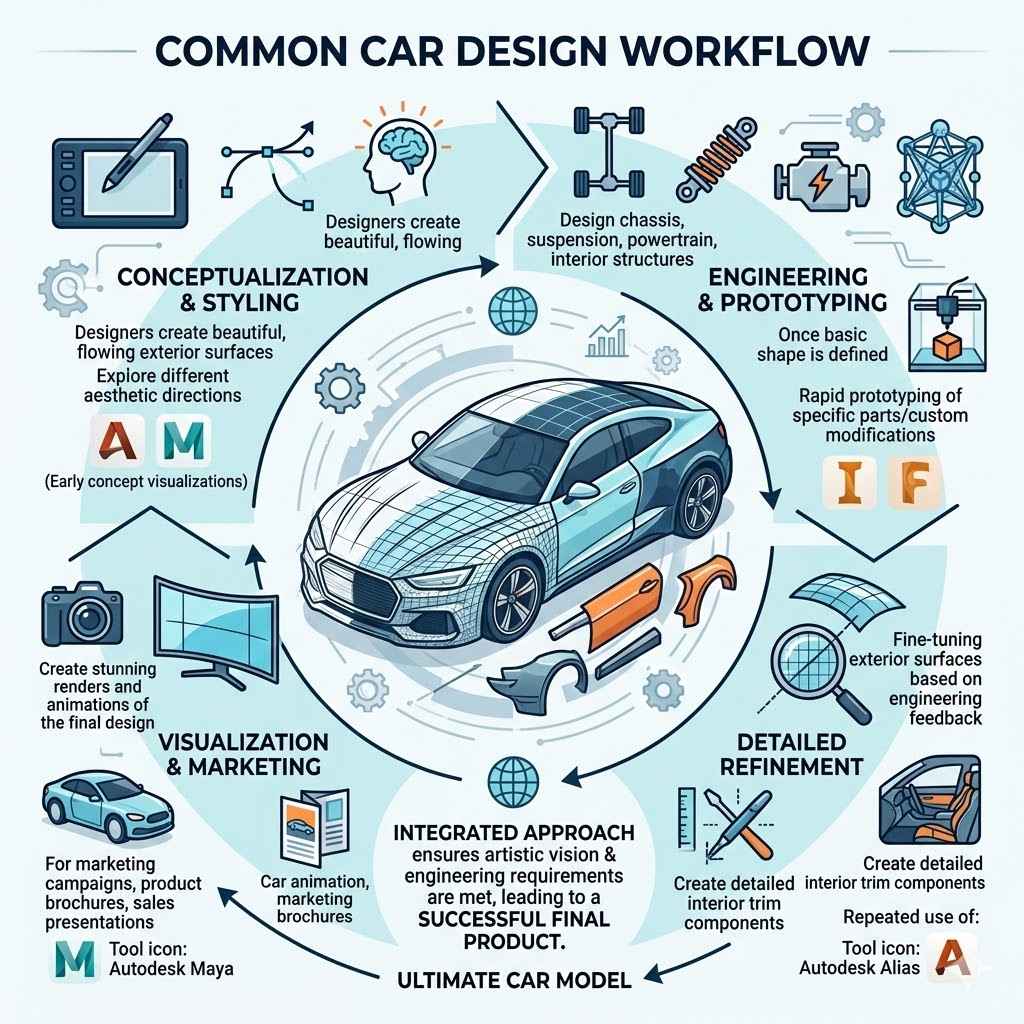
Often, a car design project involves using a combination of these tools to leverage their specific strengths. A typical workflow might look like this:
- Conceptualization and Styling: Designers use Alias to create beautiful, flowing exterior surfaces and explore different aesthetic directions. They might also use Maya for early concept visualizations.
- Engineering and Prototyping: Once the basic shape is defined, engineers use Inventor to design the chassis, suspension, powertrain components, and interior structures. Fusion 360 might be used for rapid prototyping of specific parts or custom modifications.
- Detailed Refinement: Alias might be used again for fine-tuning exterior surfaces based on engineering feedback or for creating detailed interior trim components.
- Visualization and Marketing: Maya is used to create stunning renders and animations of the final car design for marketing campaigns, product brochures, and sales presentations.
This integrated approach ensures that both the artistic vision and the engineering requirements are met, leading to a successful final product.
Frequently Asked Questions
Question: What is the best Autodesk software for a beginner wanting to design car concepts?
Answer: For beginners focusing on concept design and quick visualization, Fusion 360 can be a good starting point due to its user-friendly interface and integrated capabilities. Maya is also an option for pure visualization if the focus is on rendering. However, for serious automotive styling, learning Alias is a longer-term goal.
Question: Can I use Autodesk software to create 3D printable car models?
Answer: Yes, Fusion 360 is excellent for creating 3D printable models. Its modeling tools and integrated CAM features make it easy to design parts and prepare them for 3D printing. Inventor can also be used for this purpose.
Question: Which Autodesk software is used by professional car designers for styling?
Answer: Professional car designers primarily use Autodesk Alias for styling and creating production-ready exterior surfaces. It is considered the industry standard for automotive Class-A surfacing.
Question: Is it possible to design the entire mechanical system of a car with Autodesk software?
Answer: Yes, Autodesk Inventor is specifically designed for detailed mechanical design and can be used to model complex assemblies like a car’s chassis, suspension, and powertrain. Fusion 360 also offers strong mechanical design capabilities.
Question: Which software is best for creating realistic car renders for marketing?
Answer: Autodesk Maya is the top choice for creating photorealistic renders and animations of cars for marketing purposes. Its advanced rendering engine, Arnold, and sophisticated material controls produce highly impressive visuals.
Summary
Choosing the Best Autodesk Software for Car Design depends on your needs. For professional styling, Alias is key. For engineering and mechanical parts, Inventor shines.
Fusion 360 offers a versatile, integrated solution for prototyping and smaller projects. Maya is your tool for stunning visualizations and animations. Together, they cover the entire automotive design spectrum.