How to Change a Mercedes Car Key Battery: A Step-by-Step Guide
Hey there! If you’re reading this, chances are your Mercedes key fob isn’t working as smoothly as it used to. Maybe the doors aren’t unlocking from a distance, or your car’s dashboard is flashing a “Replace Key Battery” warning. Don’t worry—I’ve been there, and I’m excited to share my experience to help you get your key fob back in action. Changing the battery in a Mercedes car key is easier than you might think, and with a little guidance, you can do it yourself without a trip to the dealership. In this article, I’ll walk you through everything you need to know, from spotting the signs of a dying battery to replacing it step-by-step. I’ve done this a few times with my own Mercedes, and I’m here to make the process simple and stress-free for you. Let’s dive in!
Why Your Mercedes Key Fob Battery Matters
Your Mercedes key fob is more than just a fancy remote—it’s your ticket to seamless driving. It locks and unlocks your doors, starts the engine, and even triggers the panic alarm in emergencies. But when the battery starts to fade, things can get frustrating fast. I remember the first time my key fob stopped working properly. I had to stand right next to my car to unlock it, and even then, it took a few tries. That’s when I realized the battery was the culprit.
A dead or dying battery can cause all sorts of issues, like reduced range, unresponsive buttons, or even a complete failure to start your car. The good news? Replacing the battery is a quick fix that you can do at home. Most Mercedes key fobs use a CR2025 or CR2032 battery, and the process takes just a few minutes. By keeping your key fob in top shape, you’ll avoid getting stranded or dealing with unnecessary headaches.
Signs Your Mercedes Key Fob Battery Needs Replacing
Before we get to the how-to, let’s talk about how to know when it’s time to change the battery. I learned this the hard way after ignoring some early warning signs. Here are the most common clues that your key fob battery is running low:
- Reduced Range: If you need to be closer to your car than usual to lock or unlock it, the battery is likely weakening. I used to unlock my Mercedes from across the parking lot, but when the range dropped to a few feet, I knew something was up.
- Unresponsive Buttons: Pressing the lock or unlock button and getting no response—or having to press it multiple times—is a big red flag.
- Dashboard Warnings: Many newer Mercedes models will display a “Replace Key Battery” message on the dashboard. Trust me, don’t ignore this!
- Intermittent Functionality: If your key works one minute and not the next, it’s probably the battery acting up.
- Difficulty Starting the Car: If your push-button start takes multiple tries or feels sluggish, the battery might be to blame.
If you’re noticing any of these signs, it’s time to act. Replacing the battery sooner rather than later can save you from being locked out of your car at the worst possible moment.
Types of Mercedes Key Fobs and Their Batteries
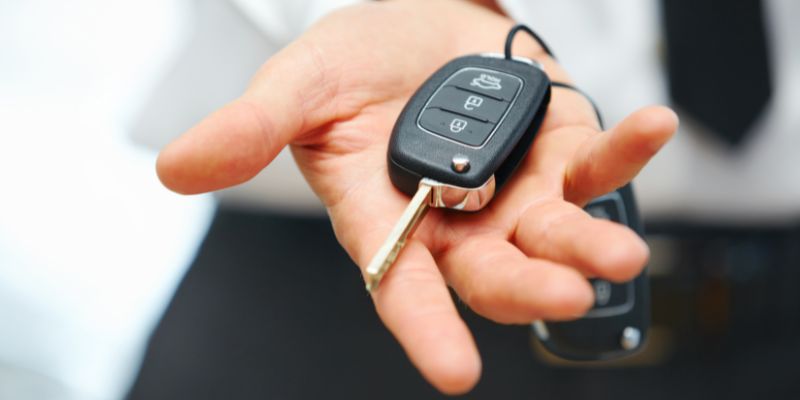
Mercedes key fobs come in two main types: the SmartKey and the Chrome SmartKey. Knowing which one you have is crucial because it affects the battery type and the replacement process. Here’s what I’ve learned about each:
- SmartKey: This is the older version, usually made of plastic, and it’s common in Mercedes models from the early 2000s to mid-2010s. It typically requires two CR2025 batteries.
- Chrome SmartKey: This is the newer, sleeker version with a metal casing, found in models from 2017 and later. It usually needs one CR2032 battery, though older Chrome SmartKeys (with a circular panic button) might use one or two CR2025 batteries.
To figure out which key you have, check the design. If it’s plastic and bulkier, it’s likely a SmartKey. If it’s metallic with a triangular panic button, it’s a newer Chrome SmartKey. If it has a circular panic button, it’s an older Chrome SmartKey. I made the mistake of buying the wrong battery once, so double-check your key type before heading to the store.
Here’s a quick table to summarize:
| Key Type | Battery Type | Number of Batteries |
|---|---|---|
| SmartKey (Older) | CR2025 | 2 |
| Chrome SmartKey (Newer, Triangular Panic Button) | CR2032 | 1 |
| Chrome SmartKey (Older, Circular Panic Button) | CR2025 | 1 or 2 |
Tools You’ll Need to Change the Battery
One thing I love about this process is how simple the tool list is. You don’t need a toolbox full of gadgets—just a few basics. Here’s what I use:
- Replacement Battery: Either CR2025 or CR2032, depending on your key type. I recommend brands like Panasonic, Duracell, or Energizer for reliability.
- Small Flathead Screwdriver: This helps pry open the key fob. A key tool or even a sturdy coin can work in a pinch.
- Clean Cloth or Gloves: To avoid touching the battery with bare hands, which can reduce its lifespan.
- A Steady Hand: Trust me, patience is key when handling small parts!
I always keep a couple of spare batteries in my glove compartment, just in case. It’s a small investment that can save you a lot of trouble.
Step-by-Step Guide to Changing a Mercedes SmartKey Battery
Let’s start with the older SmartKey, as that’s what I had to deal with on my first Mercedes. Here’s how I replaced the battery:
- Remove the Emergency Key: Find the latch or sliding tab at the end of the key fob. Pull it to release the metal emergency key. I found this part tricky the first time—give it a gentle tug, and it should pop out.
- Open the Battery Compartment: Insert the emergency key horizontally into the slot where it came from. Push it in and lift gently to pop open the battery compartment. It might take a bit of wiggling, but don’t force it.
- Remove the Old Batteries: You’ll see two CR2025 batteries inside. Carefully lift them out with your screwdriver or fingernail. Note which side is facing up—this is important for the new batteries.
- Insert the New Batteries: Place two new CR2025 batteries in the same orientation as the old ones. I always make sure the positive (+) side matches what I saw before.
- Close the Compartment: Snap the battery cover back into place. You should hear a click when it’s secure.
- Reinsert the Emergency Key: Slide the metal key back into its slot until it clicks.
- Test the Key Fob: Stand near your car and press the lock or unlock button. If it works, you’re good to go! If not, double-check the battery orientation or try a new battery.
The first time I did this, I was nervous about breaking something, but it was surprisingly straightforward. Just take your time, and you’ll be fine.
Step-by-Step Guide to Changing a Chrome SmartKey Battery
If you have a newer Mercedes with a Chrome SmartKey, the process is slightly different. I upgraded to a newer model a couple of years ago, so I’ve done this one too. Here’s how it goes:
- Release the Emergency Key: Look for the silver, square-shaped tab at the bottom of the fob. Pull it down to release the emergency key. It should slide out easily.
- Open the Key Fob: Once the key is out, you’ll see a small gap. Insert the emergency key into the narrow end of this gap and gently push to pop off the cover. I found this part smoother than the SmartKey process.
- Remove the Old Battery: You’ll see either one CR2032 or one/two CR2025 batteries, depending on your model. Carefully remove the old battery, noting its orientation.
- Insert the New Battery: Place the new battery in the same position as the old one. For a CR2032, the positive (+) side usually faces up.
- Reassemble the Fob: Snap the cover back on and slide the emergency key back into place.
- Test the Key Fob: Press a button to check if it locks or unlocks your car. If it doesn’t work, try flipping the battery or using a fresh one.
This process feels a bit more modern, just like the Chrome SmartKey itself. It’s quick, and the sleek design makes it easy to handle.
Tips for a Successful Battery Replacement
Over the years, I’ve picked up a few tricks to make this process even smoother. Here are my top tips:
- Use High-Quality Batteries: Cheap batteries might save you a few bucks, but they don’t last as long. I stick with trusted brands to avoid replacing them too often.
- Check Battery Orientation: If your key fob doesn’t work after the replacement, you might have inserted the battery upside down. It’s an easy fix, but it’s frustrating if you don’t catch it early.
- Avoid Sharp Tools: A flathead screwdriver works, but be gentle. I scratched my key fob once by using too much force.
- Replace Both Batteries (SmartKey): If your SmartKey uses two batteries, replace both at the same time. Mixing an old and new battery can cause issues.
- Keep It Clean: Use a cloth or gloves to handle the battery. Oils from your fingers can reduce its lifespan.
- Test Immediately: Always test your key fob right after replacing the battery. If it doesn’t work, you can troubleshoot before reassembling everything.
These little habits have saved me time and frustration, and I hope they help you too.
What to Do If the Key Fob Still Doesn’t Work
Sometimes, replacing the battery doesn’t fix the problem. I ran into this once, and it was a bit of a puzzle. Here’s what to check if your key fob is still acting up:
- Double-Check Battery Installation: Make sure the battery is seated properly and facing the right way. I flipped a battery once by mistake, and it caused all sorts of issues.
- Try a New Battery: Sometimes, even brand-new batteries can be duds. I always keep an extra one handy just in case.
- Inspect for Damage: If your key fob has been dropped or exposed to water, it might be damaged. Look for cracks or corrosion inside the battery compartment.
- Reprogram the Key: In rare cases, the key fob might need to be resynced with your car. This happened to me with an older model, and I had to follow a specific sequence in the owner’s manual (usually involving leaving the key in the ignition for a set time).
- Visit a Dealership: If nothing works, it’s time to call in the pros. Your key fob might need reprogramming or replacement. I had to do this once, and the dealership was able to diagnose the issue quickly.
Don’t panic if you hit a snag—just take it one step at a time, and you’ll figure it out.
How to Extend the Life of Your Key Fob Battery
Once you’ve replaced the battery, you’ll want to make it last as long as possible. I’ve found a few simple habits that can stretch the battery life to three or four years:
- Store It Properly: Keep your key fob in a cool, dry place. Extreme heat or cold can drain the battery faster. I learned this after leaving my key in a hot car one summer.
- Avoid Constant Button Presses: If you’re like me and fidget with your key fob, try to stop! Every press uses a bit of battery power.
- Turn Off Keyless Entry: If you don’t use keyless entry often, disable it in your car’s settings. This reduces how often the fob communicates with the car.
- Use a Key Case: A silicone or leather case can protect your key fob from drops and moisture, which can indirectly help the battery stay functional.
These small changes can make a big difference, and they’ve worked wonders for me.
Why I Love Doing This Myself
Changing my Mercedes key fob battery has become one of those small victories that make me feel like a car pro. Not only does it save me a trip to the dealership (and the $150+ they might charge for a new key), but it’s also empowering to handle something like this on my own. Plus, it’s a great way to get to know your car better. Every time I pop open the fob and swap out the battery, I feel a little more connected to my Mercedes.
Conclusion
There you have it—everything I’ve learned about changing a Mercedes car key battery, laid out step-by-step. From spotting the warning signs to picking the right battery and avoiding common pitfalls, I hope this guide makes the process as smooth for you as it has been for me. There’s something satisfying about fixing a small issue like this yourself, and with just a few minutes and a couple of tools, you can have your key fob working like new again. So, grab those CR2025 or CR2032 batteries, take a deep breath, and give it a try. You’ve got this! And if you run into any trouble, don’t hesitate to reach out to your local Mercedes dealership—they’re always there to help. Happy driving, and here’s to keeping your Mercedes key fob in top shape!
FAQs
How Often Should I Replace My Mercedes Key Fob Battery?
In my experience, a Mercedes key fob battery lasts about three to four years, but it depends on how often you use the fob. If you’re constantly locking and unlocking your car or using keyless entry, it might wear out faster. Keep an eye out for warning signs like reduced range or dashboard alerts, and replace it as soon as you notice issues.
Can I Use Any Brand of Battery for My Mercedes Key Fob?
I always recommend sticking with high-quality brands like Panasonic, Duracell, or Energizer. Cheap batteries might not last as long, and I’ve had a generic one fail on me within a year. It’s worth spending a little extra for reliability.
What Happens If I Don’t Replace the Battery in Time?
If the battery dies completely, your key fob won’t lock or unlock your car, and you might not be able to use the push-button start. I’ve been lucky enough to avoid this, but you can still use the emergency metal key to unlock the door and start the car manually. It’s a hassle, though, so try to replace the battery before it gets to that point.
Can I Change the Battery Myself, or Should I Go to a Dealership?
You can definitely change the battery yourself—it’s quick and easy once you know the steps. I’ve done it multiple times with no issues. But if you’re not comfortable or the fob still doesn’t work after a battery change, a dealership can help. They can also reprogram the key if needed.
How Do I Know If My Key Fob Is Damaged and Not Just the Battery?
If you replace the battery and the fob still doesn’t work, check for physical damage like cracks or water exposure. I had a friend drop their key fob, and it stopped working even with a new battery. In that case, you might need to visit a dealership to diagnose or replace the fob.