How to Install a Car Stereo
Hey there! Ever turned on your car’s radio and wished for better sound, more features, or just something that doesn’t sound like it’s stuck in the ‘90s? I’ve been there. My old sedan had a factory stereo that skipped CDs and had no Bluetooth, so I decided to install a new one myself.
Let me tell you, it was a game-changer! Upgrading your car stereo can make every drive more enjoyable, whether you’re jamming to music or catching up on podcasts. I’ve done this a couple of times now, made some mistakes, and learned a ton along the way. So, grab a coffee, sit down with me, and let’s walk through how to install a car stereo step by step. I’ll share what I’ve learned to make it easy, even if you’re not a car expert.
This guide is for anyone in the USA looking to upgrade their car’s audio system. I’ll cover everything from choosing the right stereo to wiring it up safely. Whether you’re a beginner or a DIY enthusiast, I’ve got you covered with simple, clear advice. Let’s get started!
Why Upgrade Your Car Stereo?
I used to think my factory stereo was fine—until it wasn’t. The sound was tinny, the buttons were glitchy, and I couldn’t connect my phone to music. A new stereo can give you crisp sound, Bluetooth, USB ports, or even Apple CarPlay and Android Auto. I upgraded to a touchscreen stereo with Bluetooth, and now I stream music without fuss. It’s not just about music, though. A good stereo makes phone calls clearer and can even improve your car’s resale value.
Upgrading also lets you customize. Want booming bass? Add a subwoofer. Love podcasts? Get a stereo with a clear display. I spent hours researching stereos to find one that fit my budget and needs, and it was worth it. Plus, installing it yourself saves money—professional installs can cost $100 or more.
Choosing the Right Car Stereo
Picking a stereo can feel overwhelming with all the options out there. I made the mistake of buying a cheap one online once, and it died in six months. Here’s what I learned to look for:
- Compatibility: Check your car’s make, model, and year. Some cars need a single-DIN stereo (2 inches tall), while others fit a double-DIN (4 inches tall). I used an online fit guide from a retailer like Crutchfield to confirm mine.
- Features: Decide what you want—Bluetooth, USB, AUX, or smartphone integration. I went for Bluetooth and a USB port for charging. Touchscreens are great, but pricier.
- Power Output: Look at the RMS wattage, not peak power. My stereo has 20 watts RMS per channel, which is plenty for clear sound without distortion.
- Budget: Stereos range from $50 to $500. I spent $150 on a solid mid-range model with Bluetooth and a clear display.
- Brand: I stuck with trusted brands like Pioneer, Kenwood, or Alpine. They’re reliable and have good customer support.
Before buying, measure your car’s stereo slot and check if you need a wiring harness or a dash kit. I’ll explain those later.
Tools and Materials You’ll Need
When I did my first install, I was halfway through before realizing I was missing a tool. Don’t make that mistake! Here’s what I use:
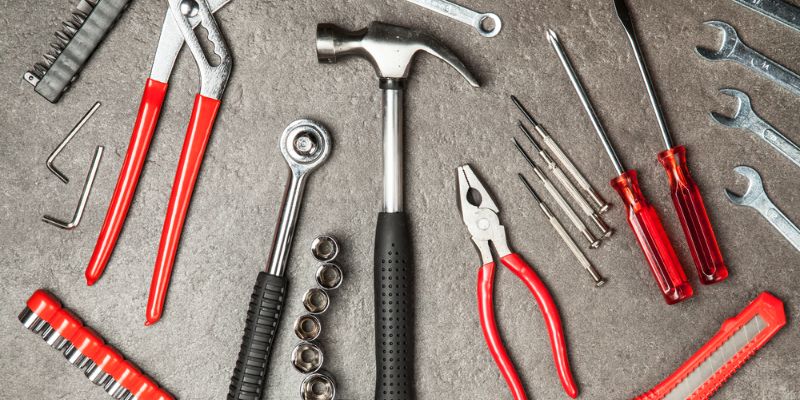
- Screwdrivers (Phillips and flathead): For removing panels and screws.
- Socket wrench set: Some cars have bolts holding the stereo.
- Wire cutters and strippers: For trimming and preparing wires.
- Crimp tool and connectors: To secure wire connections.
- Electrical tape: For insulating wires.
- Wiring harness adapter: Matches your car’s wiring to the new stereo.
- Dash kit: If the new stereo doesn’t fit your car’s dashboard perfectly.
- Antenna adapter: For connecting the car’s antenna to the stereo.
- Torx or Allen keys: Some cars use these for the dash panels.
I got most of these at a hardware store for under $30. The wiring harness and dash kit were specific to my car, so I ordered them with the stereo. Check your car’s manual or an online guide to know exactly what you need.
Preparing for the Installation
Before you start, prep is everything. I learned this after yanking out my old stereo and realizing I didn’t know what to do next. Here’s how to set up:
- Park Safely: Park on a flat surface and engage the parking brake. I did this in my garage for good lighting.
- Disconnect the Battery: Unhook the negative battery terminal to avoid shocks or short circuits. I forgot this once and got a small zap—don’t skip it!
- Read the Manual: Your new stereo comes with instructions. I skimmed mine first to understand the wiring.
- Gather Parts: Lay out your tools, stereo, wiring harness, and dash kit. I double-checked everything to avoid mid-install trips to the store.
- Check Fitment: Make sure the dash kit and stereo fit your car’s slot. I test-fitted my double-DIN stereo to avoid surprises.
Taking 10 minutes to prep saves hours of frustration. Trust me, I’ve been there.
Removing the Old Stereo
Getting the old stereo out can be tricky, but it’s doable. My first car had a stereo bolted in tight, and I struggled until I figured it out. Here’s what to do:
- Remove Dash Panels: Use a screwdriver or panel removal tool to pry off the trim around the stereo. Go slow to avoid breaking clips. My car had two screws and plastic clips holding the panel.
- Unscrew the Stereo: Most stereos are held by screws or bolts. I used a socket wrench for the bolts on mine. Keep screws in a safe spot—you might need them.
- Pull Out the Stereo: Gently slide the stereo out. It might be snug. I wiggled mine carefully to avoid pulling wires.
- Disconnect Wires: Unplug the wiring harness and antenna cable. I labeled the wires with tape to remember what went where.
If your car has a factory amp or steering wheel controls, you might need special adapters. I had to buy one for my steering wheel audio buttons to work with the new stereo.
Wiring the New Stereo
Wiring was the part I was most nervous about, but it’s not as scary as it looks. The key is matching the wires correctly. Here’s how I did it:
- Use a Wiring Harness Adapter: This connects your car’s wiring to the new stereo. I got one specific to my car, and it made things plug-and-play.
- Match Wires: The stereo’s wires are color-coded (e.g., red for power, black for ground). The harness adapter has a diagram. I matched each wire—red to red, black to black, etc.
- Crimp Connections: Use a crimp tool to secure wires. I twisted the wires together, crimped them, and wrapped them in electrical tape for safety.
- Connect the Antenna: Plug the antenna cable into the new stereo. I needed an adapter for my car’s antenna to fit.
- Double-Check: Before plugging everything in, I checked each connection. A loose wire can cause static or no sound.
If your car has complex wiring, like for a premium sound system, you might need a professional. My sedan was simple, so the harness made it easy.
Installing the New Stereo
Now comes the fun part—putting in the new stereo! Here’s how I got mine in place:
- Attach the Dash Kit: If your stereo doesn’t fit the dashboard slot, use a dash kit. I snapped mine onto the stereo, and it fit my car’s double-DIN slot perfectly.
- Plug in Wires: Connect the wiring harness and antenna to the stereo. I pushed them in firmly to avoid loose connections.
- Slide in the Stereo: Gently slide the stereo into the dashboard. I had to wiggle it a bit to align it. Don’t force it—check for obstructions.
- Secure the Stereo: Use the screws or bolts from the old stereo or ones provided with the new one. I tightened mine just enough to hold it steady.
- Reattach Panels: Snap the dash trim back in place. I pressed gently to avoid breaking clips.
Turn on your car (after reconnecting the battery) to test the stereo. I was thrilled when mine powered up and played music through Bluetooth!
Testing and Troubleshooting
Before celebrating, test everything. I had a moment of panic when my speakers didn’t work, but I fixed it. Here’s what to check:
- Power: If the stereo doesn’t turn on, check the battery connection and the red power wire. I forgot to reconnect the battery once—oops!
- Sound: No sound? Check speaker wires. My issue was a loose crimp on the speaker wire.
- Features: Test Bluetooth, USB, radio, and any extras like steering wheel controls. I paired my phone to make sure Bluetooth worked.
- Fitment: Ensure the stereo doesn’t wobble. I tightened a loose screw to fix mine.
If something’s wrong, double-check connections or consult the manual. I had to redo one crimp to get all speakers working.
Table of Common Installation Steps and Tips
Here’s a quick table summarizing the process and tips I learned:
| Step | What to Do | Tips |
|---|---|---|
| Choose Stereo | Pick one that fits your car and needs | Use an online fit guide; check RMS wattage |
| Gather Tools | Get screwdrivers, crimp tool, harness, etc. | Buy car-specific harness and dash kit |
| Disconnect Battery | Connect the harness and antenna | Prevents shocks; use a wrench |
| Remove Old Stereo | Unscrew and unplug | Label wires; go slow to avoid breaking clips |
| Wire New Stereo | Buy a car-specific harness and dash kit | Crimp securely; wrap with electrical tape |
| Install Stereo | Slide in, secure, reattach panels | Test fitment; don’t overtighten screws |
| Test System | Check power, sound, and features | Redo loose connections if needed |
This table is my cheat sheet for installs. Keep it handy for your project.
Common Mistakes to Avoid
I made plenty of mistakes my first time. Here’s what to watch out for:
- Skipping the Battery Disconnect: I got a small shock once. Always disconnect the negative terminal.
- Wrong Wiring Harness: A generic harness caused me headaches. Get one specific to your car.
- Forcing the Stereo: I almost cracked a dash panel by pushing too hard. Be gentle.
- Not Testing: I buttoned everything up once, then had to reopen it because the radio didn’t work. Test first.
- Cheap Stereo: My first budget stereo failed fast. Spend a bit more for quality.
Learning from these saved me time and money on my second install.
Enhancing Your Audio System
Once your stereo is in, you might want more. I added a few upgrades to make my system awesome:
- Speakers: Factory speakers can be weak. I swapped mine for aftermarket ones for $100, and the sound improved tenfold.
- Subwoofer: For bass lovers, a small subwoofer adds thump. I installed one in my trunk for $200.
- Amplifier: If you want louder sound, an amp boosts power. I skipped this, but it’s great for big systems.
- Sound Deadening: I added foam mats under my doors to reduce road noise. It made the music clearer.
These are optional, but they take your stereo to the next level. I started with just the head unit and added speakers later.
Maintaining Your New Stereo
A new stereo needs care to last. Here’s what I do:
- Clean the Screen: Dust touchscreen stereos with a microfiber cloth. I use a screen cleaner for smudges.
- Check Connections: Every few months, I make sure wires are secure. A loose wire caused static once.
- Update Firmware: Some stereos have software updates. I updated mine via USB for better Bluetooth.
- Avoid Extreme Heat: Park in shade to protect the stereo’s electronics. My car’s interior got toasty one summer, and the screen lagged.
Simple maintenance keeps your stereo working like new.
When to Call a Professional
I love DIY, but some installs are tough. If your car has a complex audio system—like a factory amp or navigation integration—you might need a pro. I tried installing a stereo in a friend’s luxury SUV, and the wiring was a nightmare. A professional install costs $50-$150, but it’s worth it for tricky setups. If you’re stuck or nervous about wiring, call a shop. I did this for my friend, and it saved us hours.
Emotional Highs and Lows of Installing a Stereo
I’ll be honest—installing a stereo is exciting but stressful. When my first install worked, I felt like a rockstar blasting my favorite song. But when the wires didn’t connect right, I was frustrated. Take breaks if you get stuck, and don’t rush. The feeling of upgrading your car yourself is worth the effort.
Conclusion
Installing a car stereo is a rewarding project that transforms your driving experience. From picking the right stereo to wiring it up, every step is a chance to make your car yours. I’ve shared my journey—mistakes and all—to help you avoid pitfalls and get it right. Disconnect the battery, use the right tools, and test everything before you finish. Whether you want better sound, Bluetooth, or a sleek touchscreen, a new stereo is a game-changer. It’s not just about music—it’s about making every drive more fun.
I hope this guide gives you the confidence to tackle your own install. With patience and care, you’ll be cruising with your favorite tunes in no time. So, grab your tools, pick a great stereo, and enjoy the ride!
FAQs
Do I need to be an expert to install a car stereo?
No, you don’t! Basic tools and patience are enough for most cars. Follow instructions and take your time. Complex systems might need a pro.
How long does it take to install a car stereo?
It takes 1-3 hours, depending on your car and experience. My first install took 2 hours, but now I can do it in about an hour.
Can I install a stereo without a wiring harness?
It’s possible, but harder. A harness makes it plug-and-play. Without one, you’ll need to splice wires, which risks mistakes.
Will installing a new stereo void my car’s warranty?
Usually not, as long as you don’t damage anything. I checked with my dealer, and aftermarket stereos didn’t affect my warranty.
What if my new stereo doesn’t fit my car’s dashboard?
Use a dash kit to make it fit. I needed one for my double-DIN stereo to match my car’s slot.
Can I keep my steering wheel controls with a new stereo?
Yes, with a steering wheel control adapter. I got one for $20, and it let my buttons work with the new stereo.