How To Start A Car With Key Fob: Essential Guide
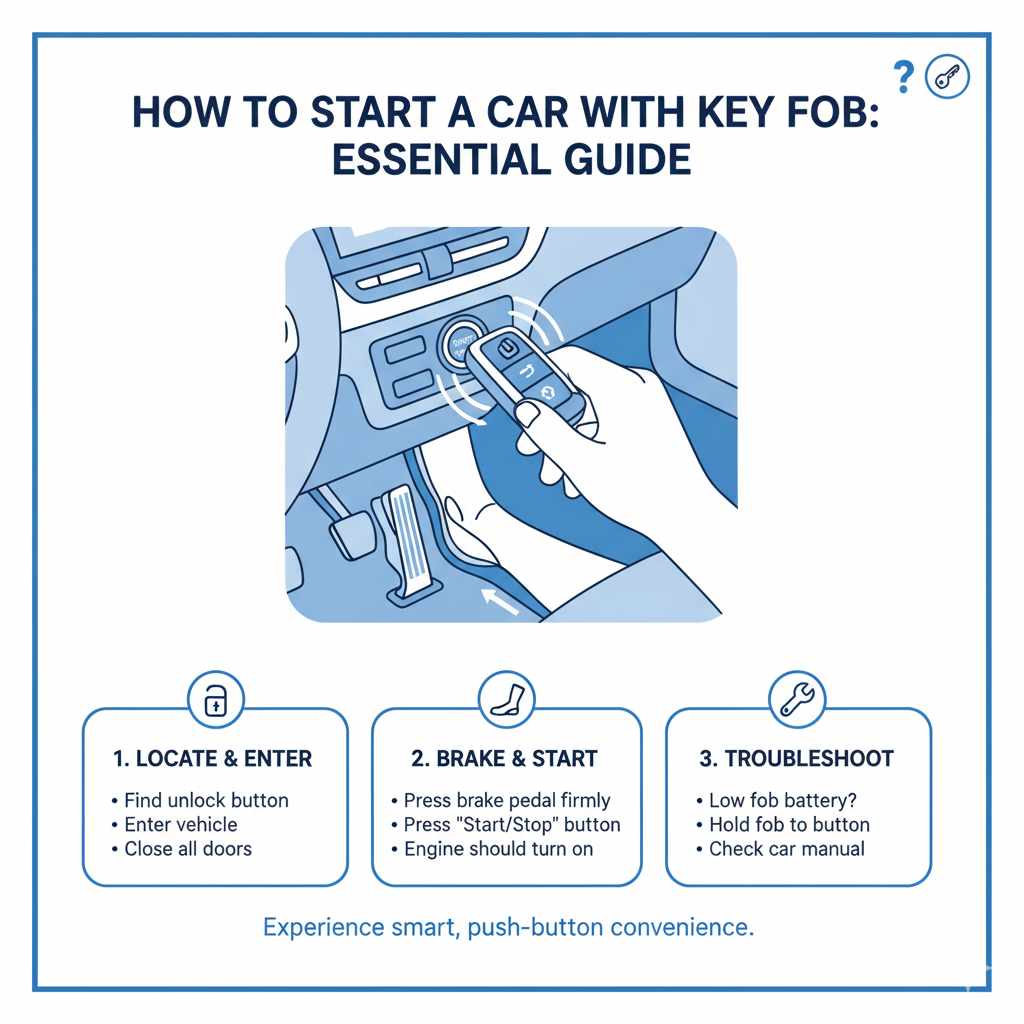
Starting a car with a key fob is usually straightforward! Simply press the unlock button, get in, press the brake pedal, and then push the start button. If it doesn’t work, check the fob battery, ensure the fob is close to the start button, or try the hidden physical key.
Hey there, car owners! Md Meraj here, your friendly guide to keeping your vehicle running smoothly without the fuss. Ever stood by your car, fob in hand, and wondered, “How exactly do I start this thing?” If modern car keys with their fancy buttons feel a bit baffling, you’re not alone! Many drivers find themselves scratching their heads when faced with a key fob instead of a traditional ignition. It can be a bit frustrating, especially when you’re in a hurry. But don’t worry, it’s simpler than it looks! This guide will walk you through the easy steps to get your car started using your key fob, so you can drive off with confidence.
We’ll cover everything from the basic button push to what to do if things don’t go as planned. Think of us as your personal car-starting tutor, breaking down the process into easy-to-digest steps. Get ready to master your key fob and make your daily drives a breeze!
Understanding Your Key Fob
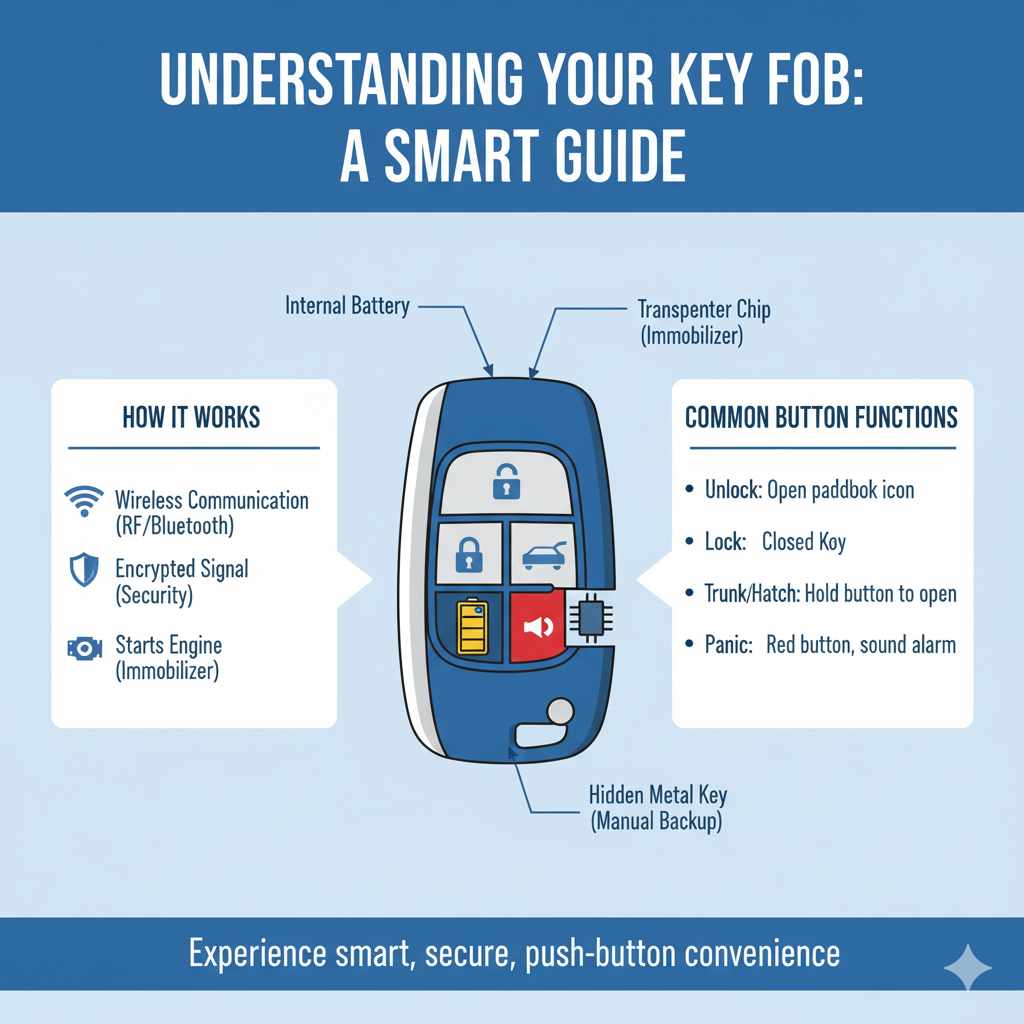
Your car’s key fob is more than just a way to lock and unlock doors; it’s a sophisticated piece of technology that communicates wirelessly with your vehicle. Most modern key fobs use radio frequency (RF) signals or Bluetooth technology to send commands to your car. These signals are encrypted to ensure that only your fob can operate your specific vehicle, adding a layer of security.
Inside the fob, you’ll find a small battery that powers the transmitter. There’s also a tiny transponder chip that the car’s immobilizer system recognizes, allowing it to start. Some fobs also contain a hidden, traditional metal key inside, which is a crucial backup in case the fob’s battery dies or it malfunctions.
The primary buttons you’ll typically find on a key fob include:
- Unlock Button: Usually represented by an open padlock icon. Pressing this once or twice (depending on settings) disarms the car’s alarm and unlocks the doors.
- Lock Button: Typically shown as a closed padlock icon. Pressing this arms the alarm and locks all doors.
- Trunk/Hatch Release Button: Often depicted as a car trunk or hatchback. Pressing and holding this button will electronically open your trunk or rear hatch.
- Panic Button: Usually a red button with a horn or exclamation mark icon. Pressing this will sound your car’s alarm and flash its lights to attract attention.
- Start Button (on some fobs): Some advanced fobs have a dedicated button for starting the engine, though more commonly, the car starts once all other conditions are met after unlocking.
Knowing what each button does is the first step to confidently using your key fob. It’s a simple system designed for convenience, and once you understand its role, starting your car becomes almost automatic.
How to Start a Car with a Key Fob: Step-by-Step
Starting your car with a key fob is designed to be effortless. Here’s a breakdown of the typical process, suitable for most vehicles with push-to-start systems.
Step 1: Unlock Your Car
First things first, you need to get inside your car. Locate your key fob and press the unlock button. You’ll usually hear a chirping sound or see the lights flash, confirming that the doors are unlocked. If your car has a “walk-up” unlock feature, simply having the fob in your pocket or bag as you approach the door might automatically unlock it.
Step 2: Get Inside and Ensure Fob Presence
Once the doors are unlocked, open the driver’s side door and get in. It’s crucial that the key fob remains inside the vehicle. For most push-to-start systems, the car needs to detect the fob within a certain range (usually within the cabin) for the engine to start. So, keep it in your pocket, purse, or a designated console spot.
Step 3: Prepare for Starting
Before hitting the start button, you need to ensure a couple of things are in order:
- Engage the Parking Brake: For safety, make sure your parking brake is engaged. This is often a manual lever between the seats or a button on the dashboard.
- Ensure Transmission is in Park (or Neutral): If your car has an automatic transmission, ensure it’s in the “Park” (P) position. For manual transmissions, it should be in “Neutral” (N).
Step 4: Press the Brake Pedal
This is a critical safety step. You MUST press and hold down the brake pedal. Your car’s system requires this input to confirm you intend to start the engine and prevent accidental starting. Keep your foot firmly on the brake throughout the starting process.
Step 5: Press the Start/Stop Button
Locate the “Start/Stop” or “Engine Start” button on your dashboard. It’s usually a prominent button, often near the steering column or center console. With your foot firmly on the brake pedal, press this button once.
You should hear the engine crank and then start. The dashboard lights will illuminate, and various system indicators will appear before going out if all is well. If your car has an auto start/stop feature, it might briefly turn off the engine after starting; this is normal and can usually be toggled off if you prefer. Some systems might require holding the button for a couple of seconds, especially in colder weather or if the battery is low.
What to Do if Your Car Doesn’t Start
If pressing the start button doesn’t bring your engine to life, don’t panic! Here are a few common reasons and solutions:
- Check the Key Fob Battery: A dead battery in your key fob is the most frequent culprit. Most cars will alert you with a dashboard warning light if the fob battery is low. If you see such a warning, it’s time for a replacement.
- Ensure Fob is Close Enough: While the fob only needs to be inside the car, sometimes it might be too far from the ignition area or buried deep within bags. Try moving it closer to the dashboard or the start button.
- Try the Hidden Physical Key: Most key fobs contain a small, traditional metal key. There’s usually a release switch on the side or back of the fob to slide this key out. This key often fits into a hidden ignition slot or a small cover near the start button. Consult your car’s manual for its exact location.
- Check the 12-Volt Battery: If the dashboard lights don’t come on at all, or are very dim, your car’s 12-volt battery might be dead. This is the battery that powers the car’s electronics and starter motor.
- Brake Pedal Not Pressed Enough: Double-check that you are pressing the brake pedal down sufficiently. Some systems are quite sensitive.
- Transmission Not in Park/Neutral: Ensure the gear selector is firmly in Park (P) for automatics or Neutral (N) for manuals.
Troubleshooting Common Key Fob Issues
Key fobs are generally reliable, but like any electronic device, they can encounter problems. Understanding these common issues and their solutions can save you a lot of stress.
Dead Fob Battery
This is by far the most common issue. The small coin-cell battery inside your fob needs replacing every few years. Symptoms include the car not unlocking/locking, or the dashboard displaying a warning about the key fob battery.
Solution:
- Identify the Battery Type: Check your car’s manual or open the fob (see below) to determine the correct battery model (e.g., CR2032, CR2025).
- Purchase a Replacement: You can buy these batteries at most grocery stores, pharmacies, or electronics retailers. Reputable brands like Duracell or Energizer are good choices.
- Replace the Battery: Open the fob carefully – often there’s a small slot where you can insert a flathead screwdriver or a coin to gently pry it open. Note the orientation of the old battery before removing it, and insert the new one the same way. Snap the fob back together.
For guidance on how to open your specific fob, a quick search online for “[Your Car Make and Model] key fob battery replacement” will usually yield helpful videos or diagrams.
Key Fob Not Recognized
Sometimes your car might fail to recognize the key fob, even with a good battery. This can happen if the fob is too far away, if there’s interference, or if there’s an issue with the car’s receiver.
Solution:
- Move Fob Closer: Ensure the fob is inside the passenger compartment. Try holding it directly against the start button for a moment or placing it in the designated fob slot (if your car has one, typically in the center console or near the steering wheel).
- Check for Interference: Other electronic devices, like smartphones or portable chargers, can sometimes interfere with the fob’s signal. Move such devices away from the fob and the car’s ignition area.
- Try the Hidden Key Method: As mentioned, if your car has a push-to-start button, placing a low-battery or unrecognized fob directly on the start button while pressing the brake pedal often allows the car to start. This bypasses the need for a strong RF signal and relies on the chip’s proximity.
Physical Damage to the Fob
Key fobs can be dropped, stepped on, or exposed to moisture, leading to physical damage that can affect their functionality.
Solution:
- Assess the Damage: If the fob is cracked or buttons are unresponsive, it might need repair or replacement.
- Use the Physical Key: Always rely on the hidden physical key to unlock your doors and start the car if the fob is severely damaged. Follow your car’s manual for how to use the physical key in the ignition if it’s not a push-to-start.
- Contact a Dealer or Locksmith: For repair or replacement of a damaged fob, you’ll likely need to contact your car dealership or a reputable automotive locksmith. They can program a new fob to your vehicle, though this can be costly.
Car Alarm Won’t Turn Off
If your car’s alarm suddenly goes off and you can’t stop it with the fob, it can be quite alarming! Sometimes the fob signal just doesn’t reach the car properly.
Solution:
- Press the Lock/Unlock Button Firmly: Try pressing the lock or unlock button on your fob several times, holding it down for a few seconds each time.
- Use the Physical Key: Inserting the physical key into the driver’s side door lock and turning it should disarm the alarm.
- Start the Car: In many vehicles, inserting the key fob into a designated slot (if available) or simply pressing the brake pedal and the start button while the fob is inside the car will silence the alarm.
For more in-depth troubleshooting, resources like NHTSA’s vehicle safety information can sometimes offer general guidance on vehicle systems, though specific fob issues are best addressed by your owner’s manual or a professional.
The Importance of the Physical Key and Backup Methods
While the key fob offers immense convenience, it’s essential to remember the physical key hidden within it and understand that there are always backup methods to start your car. Relying solely on the electronic fob without knowing these backups can leave you stranded.
Locating and Using the Physical Key
Almost every modern key fob, even those for push-to-start vehicles, conceals a physical metal key. This key serves two primary purposes:
- Manual Door Unlocking: In the event of a dead fob battery or complete fob failure, this key is your only way to get into your car if the doors are locked. You’ll typically insert it into a small, often hidden, keyhole on the driver’s door handle.
- Ignition Starting: For older vehicles or specific situations where the push-to-start button can’t be used, this physical key fits into a traditional ignition cylinder, usually located on the steering column.
How to reveal the physical key:
- Look for a small sliding switch or button on the side or back of your key fob.
- Slide or press this mechanism, and a portion of the fob will slide or pop off, revealing the metal key.
Situations Requiring Backup Methods
Here are scenarios where you might need to resort to the physical key or other backup methods:
- Dead Key Fob Battery: As discussed, this is the most common reason.
- Key Fob Malfunction: Electronic components can fail, rendering the fob useless.
- Extreme Cold: Very low temperatures can sometimes affect battery performance and electronic signals.
- Water Damage: If the fob has been submerged or exposed to significant moisture.
- Lost or Damaged Fob: If you’ve lost your primary fob or it’s been physically damaged beyond repair.
- Interference: Strong radio frequency or electromagnetic interference can disrupt the fob’s signal.
The Hidden Key Slot for Push-to-Start Vehicles
Many modern cars with push-to-start ignitions have a specific slot or location designed to read the key fob even when its battery is critically low or dead. This slot bypasses the need for a strong RF signal, often using induction to power the fob’s transponder chip sufficiently for the car to recognize it.
Where to find it:
- Center Console: Look for a small cutout or slot in the armrest compartment or dashboard console.
- Steering Column: Some vehicles have a specific key fob-shaped depression near the start button or on the steering column.
- Near the Start Button: Occasionally, the car’s manual will instruct you to place the fob directly against the start/stop button itself if it fails to start normally.
Always refer to your vehicle’s owner’s manual to locate this specific slot, as its placement varies significantly between car manufacturers and models. This is a lifesaver when your fob battery is on its last legs.
Key Fob vs. Traditional Keys: Pros and Cons
The transition from traditional metal keys to sophisticated key fobs has brought significant changes to how we interact with our cars. Each system has its advantages and disadvantages.
Key Fob Advantages
- Convenience: Keyless entry and push-to-start ignition offer ultimate ease of use. No more fumbling for keys in the dark or in bad weather.
- Security Features: Modern key fobs incorporate advanced rolling codes and transponder technology, making them much harder to duplicate than traditional keys.
- Remote Functions: Beyond starting, fobs often control remote start, power liftgates, and may even integrate with smartphone apps for remote vehicle management.
- Passive Entry: Many cars now allow you to unlock doors simply by touching the handle while the fob is in your pocket or bag.
Key Fob Disadvantages
- Battery Dependence: The primary drawback is reliance on the fob’s battery. A dead battery can render your car inoperable if you don’t know the backup procedures.
- Cost of Replacement: Replacing a lost or broken key fob can be significantly more expensive than a traditional key, often costing hundreds of dollars, especially if it needs dealership programming.
- Signal Interference/Range Issues: Fobs can sometimes fail to work due to electronic interference or if they are too far from the vehicle.
- Complexity: While convenient, the underlying technology is complex, making DIY repairs difficult and often requiring specialized tools and knowledge.
Traditional Key Advantages
- Simplicity and Reliability: Traditional metal keys are mechanically operated and don’t rely on batteries for basic operation (though some remote keyless entry systems have integrated fobs).
- Durability: They are generally more robust and less susceptible to electronic failure or damage from moisture.
- Lower Replacement Cost: Standard car keys are far cheaper to cut and program than electronic fobs.
- No Battery Worries: You never have to worry about a dead battery preventing you from unlocking or starting your car.
Traditional Key Disadvantages
- Less Convenient: You need to physically insert and turn the key in the ignition and door locks.
- Security Vulnerabilities: Older, simpler key designs can be more susceptible to lock-picking or duplication.
- Limited Functionality: They typically only serve to unlock doors and start the engine, lacking the remote features of fobs.
The trend is clearly moving towards key fobs and even smartphone-based access, offering enhanced security and convenience. However, understanding the strengths and weaknesses of both systems ensures you’re prepared for any situation.
Ensuring Your Key Fob Works Reliably
To keep your key fob functioning smoothly and avoid unexpected issues, a little proactive care goes a long way. Think of it as maintaining any other important tool.
Regularly Check Fob Battery Life
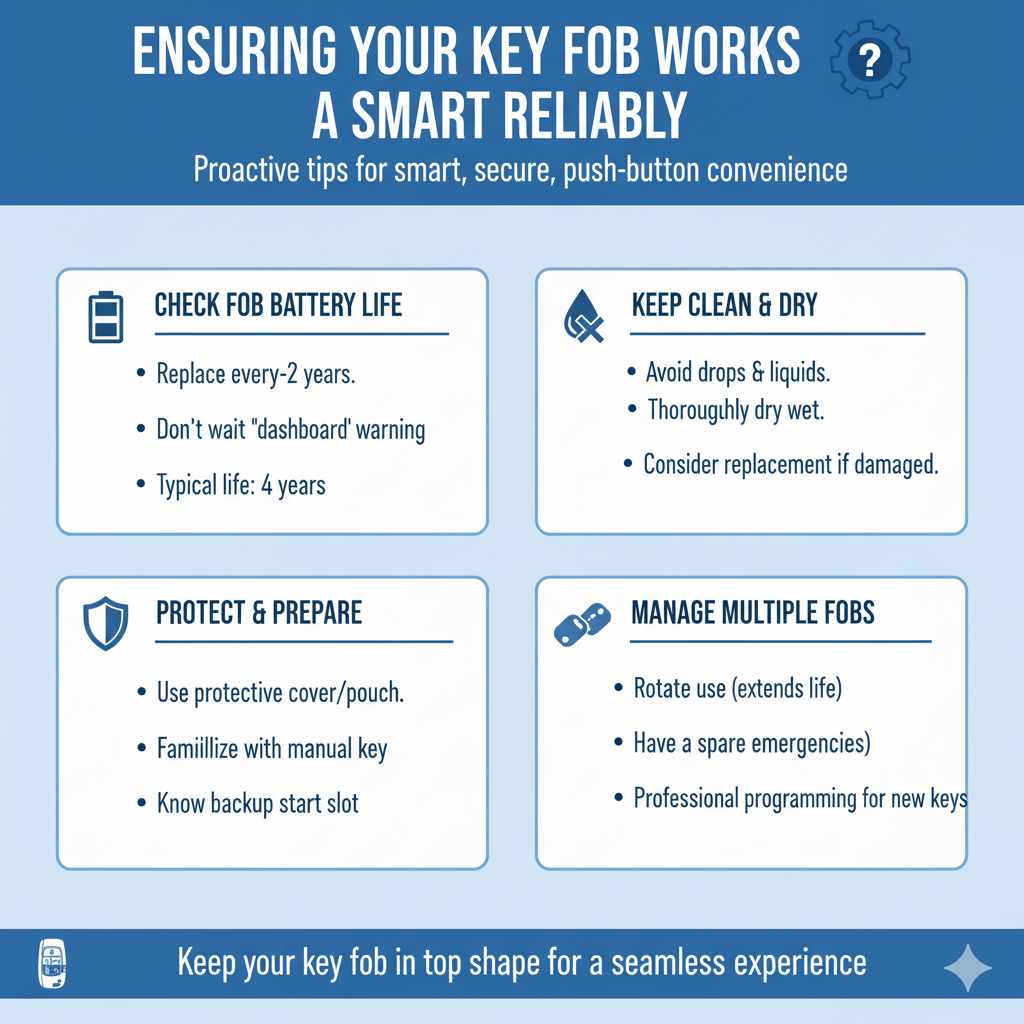
Don’t wait until your car displays a warning light. If your fob is starting to feel “sluggish” – meaning unlocks or locks take a second longer – it’s a good sign the battery is weakening. Most fob batteries last between 2 to 4 years, depending on usage and battery quality. Consider replacing the battery every 2-3 years as part of your vehicle’s routine maintenance.
Keep Fob Clean and Dry
Protect your key fob from accidents. Avoid dropping it unnecessarily, and keep it away from liquids. If it does get wet, try to dry it thoroughly immediately. If you suspect internal moisture damage, it’s best to replace the battery and see if it recovers. If not, consider professional repair or replacement.
Protect Against Physical Damage
Invest in a protective fob cover or a small pouch if you’re prone to dropping things. These can absorb impacts and prevent cracks or broken buttons, which can be costly to repair.
Familiarize Yourself with Backup Procedures
Don’t let the first time you need the physical key or the hidden slot be when you’re in a rush. Read your owner’s manual and practice these backup methods when you have plenty of time and are at home. Knowing exactly how to remove the physical key and where to insert it, or where the hidden slot is for your specific car, is invaluable.
Use Multiple Fobs if Available
If your car came with two fobs, use them both intermittently. This ensures that both batteries remain somewhat fresh and that you have a spare if one is lost, damaged, or simply out of battery power. Rotating their use can also help extend the life of each individual fob.
Programming New or Additional Fobs
If you lose a fob or need an extra, you’ll need to get a new one programmed. This is often a job for a dealership or an automotive locksmith. While some simpler fobs might have DIY programming procedures (check your manual!), many require specialized equipment to sync with your car’s immobilizer system. Get a quote from both your dealer and an independent locksmith, as locksmiths can often be more affordable.
By following these simple tips, you can significantly increase the reliability and lifespan of your car’s key fob, ensuring you can start your car and get on the road whenever you need to.
When to Seek Professional Help
While many key fob issues can be resolved with simple troubleshooting or battery replacement, there are times when it’s best to call in the experts. Don’t hesitate to seek professional assistance if:
- You’ve tried all basic troubleshooting steps: If replacing the battery, checking distances, and using backup methods haven’t worked, there might be a deeper issue with the fob or the car’s receiver system.
- The physical key is damaged or the ignition won’t turn: If the hidden metal key itself is broken or doesn’t operate the door lock or ignition cylinder properly, a locksmith will be needed.
- Multiple fobs are malfunctioning: If both fobs suddenly stop working, it could point to a problem with the car’s internal keyless entry system or immobilizer module.
- The car’s dashboard indicates a serious system error: Beyond a “low battery” warning, any other error codes related to the security or starting system should be investigated by a professional.
- You need to program a new fob: As mentioned, getting a new key fob programmed to your vehicle typically requires specialized equipment and expertise. While some DIY options exist for certain models, it’s often safer and more reliable to let a professional handle it.
When seeking professional help, you have a couple of primary options:
- Car Dealership: The dealership will undoubtedly be able to help, as they have direct access to manufacturer-specific tools and knowledge. However, they are often the most expensive option.
- Automotive Locksmith: Reputable automotive locksmiths are highly skilled in dealing with car keys, fobs, and ignition systems. They can often cut, program, and repair fobs at a more competitive price than dealerships. Look for a locksmith with good reviews and experience with your car’s make and model.
- Mobile Auto Repair Service: Some mobile services specialize in key fob issues and can come to your location, offering a convenient solution.
Always get a quote upfront and ask about their experience with your specific vehicle before proceeding. A qualified professional can diagnose the problem accurately and provide the most effective solution, saving you time and money in the long run.
| Problem | Likely Cause | Quick Solution | When to Seek Help |
|---|---|---|---|
| Car won’t unlock/locked | Dead fob battery, fob out of range, interference | Press unlock button multiple times, move fob closer, use physical key | If physical key also fails, or multiple fobs are dead |
| Car won’t start (no crank) | Dead fob battery, fob not detected, brake pedal not pressed | Press brake firmly, use physical key, place fob on start button, try hidden slot | If physical key doesn’t work, persistent ‘key not detected’ message |
| Dashboard warning light related to key fob | Low fob battery | Replace fob battery | If new battery doesn’t resolve the issue |
| Key fob buttons unresponsive | Dead fob battery, damaged internal component | Replace fob battery, try physical key for entry/start | If replacing battery doesn’t help, or fob is physically damaged |
| Car alarm won’t disarm | Fob signal issue, car system glitch | Press lock/unlock repeatedly, start car with fob inside | If car doesn’t recognize fob to disarm, or alarm keeps re-triggering |
Frequently Asked Questions (FAQs)
Q1: How far away can my key fob be to start the car?
For most push-to-start systems, the key fob needs to be inside the passenger cabin of your car. While the exact range can vary slightly between manufacturers, think of it as needing to be detected within a few feet of the ignition system. Keeping it in your pocket, purse, or on the console is usually sufficient.
Q2: What should I do if my key fob gets wet?
If your key fob gets wet, your first step should be to remove the battery immediately. Then, open the fob housing (if possible) and let all components air dry completely for at least 48 hours. You can place it in a bowl of uncooked rice to help absorb residual moisture. Once completely dry, replace the battery. If it still doesn’t work, it may have sustained internal damage.
Q3: Can I start my car if the key fob battery is completely dead?
Yes, most cars with push-to-start ignitions are designed with a backup. You can usually start the car by finding the hidden slot or place to put the key fob (check your owner’s manual for its location) or sometimes by pressing the start button with the dead fob directly against it while holding the brake pedal. You can also use the physical key hidden inside the fob to unlock the door and then start the car if your vehicle has a traditional ignition slot.
Q4: My car says “Key Not Detected,” but I have the fob. What’s wrong?
This usually means the car’s system can’t “see” the fob. Common reasons include the fob battery being too weak, the fob being too far from the ignition area, or interference from other electronic devices. Try moving the fob closer to the start button, ensure your brake pedal is pressed firmly, and temporarily move your phone or other devices away. If it persists, try the hidden slot or the physical key method.
Q5: How do I replace the battery in my key fob?
Most key fobs have a small release switch or a slot where you can insert a small flathead screwdriver or even a coin to gently pry the two halves of the fob apart. Once open, you’ll see a coin-cell battery. Note its orientation (which side is up) before removing the old one and inserting the new one the same way. Snap the fob back together. Always refer to your car’s owner’s manual for specific instructions for your model.
Q6: What if I lose my key fob?
Losing a key fob can be stressful, but it’s manageable. Your best course of action is to contact your car dealership or a qualified automotive locksmith as soon as possible. They can disable the lost fob remotely (if possible) and program a new one for your vehicle. It’s crucial to do this to prevent theft. If you have a spare fob, you can still drive your car until you get the lost one replaced.
Q7: Is it safe to use a cheap, aftermarket key fob battery?
While cheaper batteries might seem appealing, it’s generally better to use reputable brands (like Duracell, Energizer, Panasonic, or Sony) for your key fob battery. Cheaper, unbranded batteries may not last as long, may be less reliable, or could even leak and damage the fob’s internal components. Investing a few extra dollars in a quality battery can save you potential headaches down the line.
Conclusion
Navigating the world of modern car keys can sometimes feel like learning a new language, but as we’ve explored, starting your car with a key fob is a remarkably simple process designed for everyday convenience. By understanding the basic functions of your fob, following the straightforward steps of unlocking, entering, and pressing the start button, and knowing how to troubleshoot common issues like a dead battery or a “key not detected” message, you can confidently get your car running.
Remember the crucial role of the hidden physical key and the backup starting methods for those unexpected moments. Regular maintenance of your fob, such as battery replacement and protection from damage, will ensure its reliability. For more complex problems or when you need to program a new fob, don’t hesitate to reach out to a professional. You’ve got this! With this guide, you’re well-equipped to handle your key fob and enjoy a smooth, stress-free driving experience every day.