Proven Ways to Pay for Tesla Supercharger Rentals
Summary: Easily pay for your Tesla Supercharger rental car using your linked payment method in the Tesla app, a credit card, or Tesla account funds. Learn simple ways to manage costs and enjoy your electric drive.
Owning a Tesla is exciting, and renting one for a trip or to try out the experience can be even more fun! When you rent a Tesla, you’ll want to know how to handle the charging, especially at Supercharger stations. It’s not as complicated as it might sound. Many people wonder about the best ways to pay for these Supercharger sessions when it’s not their own car. We’ll walk you through the straightforward methods available to make sure your Tesla adventure goes smoothly without any unexpected charges or confusion about how to keep your battery topped up. Let’s explore the simple payment options!
Understanding Tesla Supercharger Rental Payments
When you rent a Tesla, the charging costs, including those at Supercharger stations, are usually handled in a few clear ways. It’s designed to be as convenient as possible, so you can focus on enjoying the drive. Most rental companies integrate the Supercharger costs into your rental agreement or provide specific instructions on how to settle them. The key is knowing what to expect and how your rental company manages these charges. Let’s break down the most common and proven methods.
Your Tesla Account & The Mobile App
The Tesla mobile app is central to managing your Tesla experience, and this extends to rentals. If the rental company has linked the car to your Tesla account, or if you set it up to do so, Supercharging costs will typically be billed directly to the payment method you have on file in your Tesla account.
Steps to Link or Verify Your Payment Method:
Download the Tesla App: If you don’t already have it, download the official Tesla app from your smartphone’s app store.
Create or Log In: Create a new Tesla account or log into your existing one.
Add a Payment Method: Navigate to the “Account” or “Payments” section within the app. Here, you can add your preferred credit card or debit card.
Link the Rental Tesla: The rental company might provide a VIN (Vehicle Identification Number) or prompt you to add the rental car to your app. This usually associates the car’s charging with your account.
Automatic Billing: Once linked, any Supercharging sessions will automatically be charged to the payment method saved in your Tesla account. You’ll receive a notification and an invoice through the app.
This method is popular because it’s seamless. You plug in, charge up, and Tesla handles the billing without you needing to do anything extra at the charging station. It’s a good idea to check with your rental agency to confirm if they utilize this method and how they facilitate the linking process.

Direct Billing Through Rental Companies
Many rental agencies have a partnership with Tesla or a system in place to manage Supercharger costs for their customers. This often means the costs are added to your final rental bill.
How Direct Billing Works:
Rental Agreement: Your rental agreement will usually outline how charging costs are handled. It might specify a flat fee for charging, a per-kWh rate, or be billed based on actual Supercharger usage.
Post-Rental Charges: After you return the car, the rental company will review the vehicle’s charging history. They will then charge your original payment method (the one used for the rental deposit and base fee) for any Supercharger usage.
Itemized Invoice: You should receive an itemized invoice from the rental company detailing the charging costs. It’s wise to keep a record of your charging sessions to compare with their billing.
It’s important to understand the specific policy of the rental company you are using. Some might have a daily charging limit or a cap on how much they will charge for Supercharging. Always ask for clarification on their policy before you start your rental.
Using a Credit Card Directly at the Supercharger
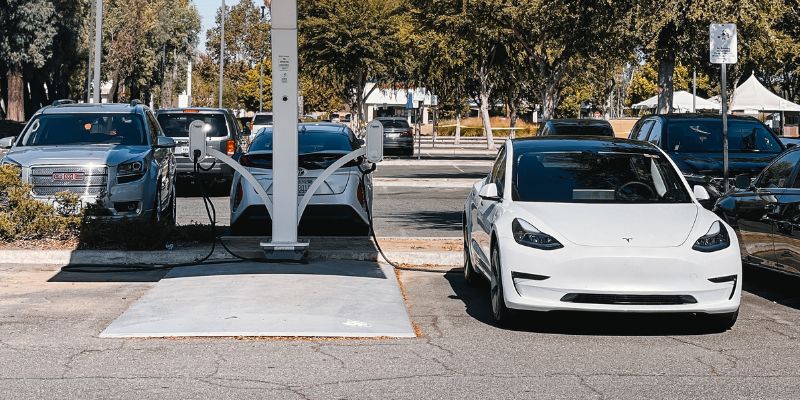
In some instances, Tesla Superchargers are set up to accept direct credit card payments, much like a traditional gas pump. While this is becoming more common, it’s not guaranteed for every Supercharger station, and rental companies may have their own policies on using this method.
Paying with Your Card:
Check the Screen: Look at the Supercharger station’s screen. If it displays options for payment, including a card reader, you can likely use your credit card.
Follow Prompts: The screen will guide you through selecting your vehicle (often by proximity, or sometimes you might need to input your Tesla account info if it’s a shared station) and inserting or tapping your credit card.
Authorization: A temporary hold might be placed on your card for an estimated charging cost. The final charge reflects the actual energy dispensed.
Rental Company Caveats: Be aware that your rental company might prefer or require you to use their system for billing Supercharging. Using your own card directly might violate their terms, leading to additional fees. Confirm this with your rental provider.
This method offers flexibility but requires you to be mindful of the rental company’s specific instructions. It’s always best to confirm whether direct card payments are permitted for rental vehicles.
Tesla Account Funds or Credits
If you already own a Tesla or frequently use Tesla services, you might have funds or credits stored in your Tesla account. These can sometimes be used to cover Supercharging costs for a rental, provided the car is properly linked to your account.
Utilizing Account Funds:
Check Your Balance: Log into your Tesla account on the app or website and check your current balance.
Link Car to Account: As mentioned earlier, ensure the rental Tesla is linked to your account.
Automatic Deduction: If your account has sufficient funds, Supercharging costs will typically be deducted from this balance before resorting to charging your linked credit card.
This is a convenient way to use existing credit, and it ensures your Supercharging costs are covered without immediate charges to your bank or another credit card.
Comparing Payment Methods
To help you make the best choice for your Tesla rental, here’s a quick comparison of the common payment methods:
| Payment Method | Pros | Cons | Best For |
|---|---|---|---|
| Tesla App / Account | Seamless, automatic billing, easy record-keeping via app. | Requires setting up account and linking car, relies on rental company’s integration. | Convenience, hassle-free charging experience. |
| Direct Billing by Rental Company | Included in rental cost, no need for separate setup, simple overall billing. | Less control over specific billing details, potential for less transparency, may have added service fees. | Those who prefer a single point of contact for all rental charges. |
| Credit Card at Supercharger | Direct payment method, widely accessible on newer Superchargers. | May violate rental agreements, potential transaction fees, less convenient if multiple transactions. | When explicitly permitted by the rental company and available at the station. |
| Tesla Account Funds/Credits | Uses existing balance, can help manage cash flow. | Requires existing Tesla account with funds, car must be linked. | Existing Tesla owners or those with pre-paid Tesla credits. |
Tips for Managing Supercharger Costs While Renting
Renting a Tesla is a fantastic way to experience electric driving. Being mindful of charging costs can make the experience even more enjoyable and budget-friendly. Here are some practical tips to help you manage your Supercharger expenses.
Understand Your Rental Agreement: This is the most crucial step. Every rental company has different policies. Read yours carefully. Does it include free charging? Is there a daily limit? Are Supercharger fees separate? Knowing this upfront prevents surprises.
Check Supercharger Pricing: Supercharger costs vary by location and time of day. You can check the real-time pricing in your Tesla’s navigation screen or the Tesla mobile app by selecting a Supercharger station. This helps you plan your charging stops efficiently. Many stations have peak and off-peak pricing.
Charge Conveniently: If your rental agreement allows it, and your Tesla account is linked, using Superchargers is a great option. For daily driving or shorter trips, consider charging overnight at your accommodation if it offers Level 2 charging. This is often cheaper or even free and maximizes convenience.
Locate Free Charging Options: Many destinations, like shopping centers, hotels, and parking garages, offer free public charging. While these are typically Level 2 chargers and charge slower than Superchargers, they can top up your battery significantly without cost, especially if you’re parked for a few hours.
Plan Your Route: Use the Tesla’s built-in navigation system. It automatically plans Supercharger stops when needed and shows estimated charging times and costs. This intelligent routing helps you make the most efficient charging decisions. You can learn more about Tesla’s navigation and charging planning on the official Tesla Supercharger locator.
Monitor Your Charging: Keep an eye on your charging progress through the Tesla app. Overstaying at a Supercharger after charging is complete can incur “idle fees.” As per Tesla’s official policy, idle fees apply at a rate of $0.40/minute if the vehicle is moved within five minutes of the charging session ending and are waived if the vehicle is moved promptly. This policy is in place to ensure Supercharger availability for others. Always check the app or vehicle screen for idle fee warnings.
Ask the Rental Company: Don’t hesitate to ask the rental agency staff about their charging policies and any tips they might have for using Superchargers with their vehicles. They are the best source of information for their specific fleet.
By following these tips, you can enjoy the power and convenience of Tesla Supercharging without worrying about unexpected expenses.
Frequently Asked Questions (FAQ)
Q1: How do I know if my rental Tesla is linked to my Tesla account for Supercharging?
A1: The rental company will typically inform you, or you will be prompted to link the vehicle when you first use the Tesla app with the rental car. If unsure, check the Tesla app under your vehicle list or ask the rental agency for confirmation.
Q2: Can I use my personal Tesla account to pay if the rental company doesn’t link the car?
A2: Some rental companies may allow you to link the car temporarily to your personal account for charging. However, this is not always permitted, and they might have a different billing process. Always confirm with the rental company first to avoid any potential issues or fees.
Q3: What happens if I charge the Tesla more than the rental company allows?
A3: If your rental agreement has limits on charging or specific policies, exceeding them could result in extra charges from the rental company. Carefully review your agreement for any such stipulations, such as daily mileage limits that could indirectly affect charging needs.
Q4: Are there any fees for using a Supercharger with a rental Tesla?
A4: Yes, Supercharging typically incurs a per-kilowatt-hour (kWh) fee, which varies by location. Rental companies may pass this cost directly to you, add a service fee, or include a certain amount of charging as part of the rental package. Your rental agreement will detail these costs.
Q5: Can I use Superchargers that have a credit card reader installed?
A5: While many newer Superchargers have credit card readers, it’s essential to check your rental agreement. Some rental companies may require all charging costs to be processed through their system to ensure consistent billing and policy adherence. If permitted, you can use your credit card by following the on-screen prompts.
Q6: How will I be billed for Supercharging if I don’t use the Tesla app?
A6: If you don’t use the Tesla app and the rental company handles billing directly, they will typically add the Supercharger costs to your final rental bill. This charge will be applied to the payment method you used for the rental itself. You should receive an itemized invoice.
Q7: What should I do if I have a dispute about my Supercharger charges?
A7: If you believe there’s an error in your Supercharger billing, your first step should be to contact the rental company directly. Have your rental agreement, any receipts from charging sessions, and your Tesla app history (if applicable) available to provide them.
Conclusion
Renting a Tesla and utilizing its Supercharger network is a fantastic way to experience electric vehicle travel. By understanding the established payment methods—linking your Tesla account via the app, direct billing from the rental company, or using a credit card at compatible stations—you can ensure a smooth and enjoyable charging experience. Always prioritize reading your rental agreement thoroughly, as it holds the key to your specific charging costs and procedures. With a little preparation and by staying informed about your rental company’s policies, you’ll be navigating charging stops like a pro and making the most of your Tesla rental adventure. Happy driving and charging!