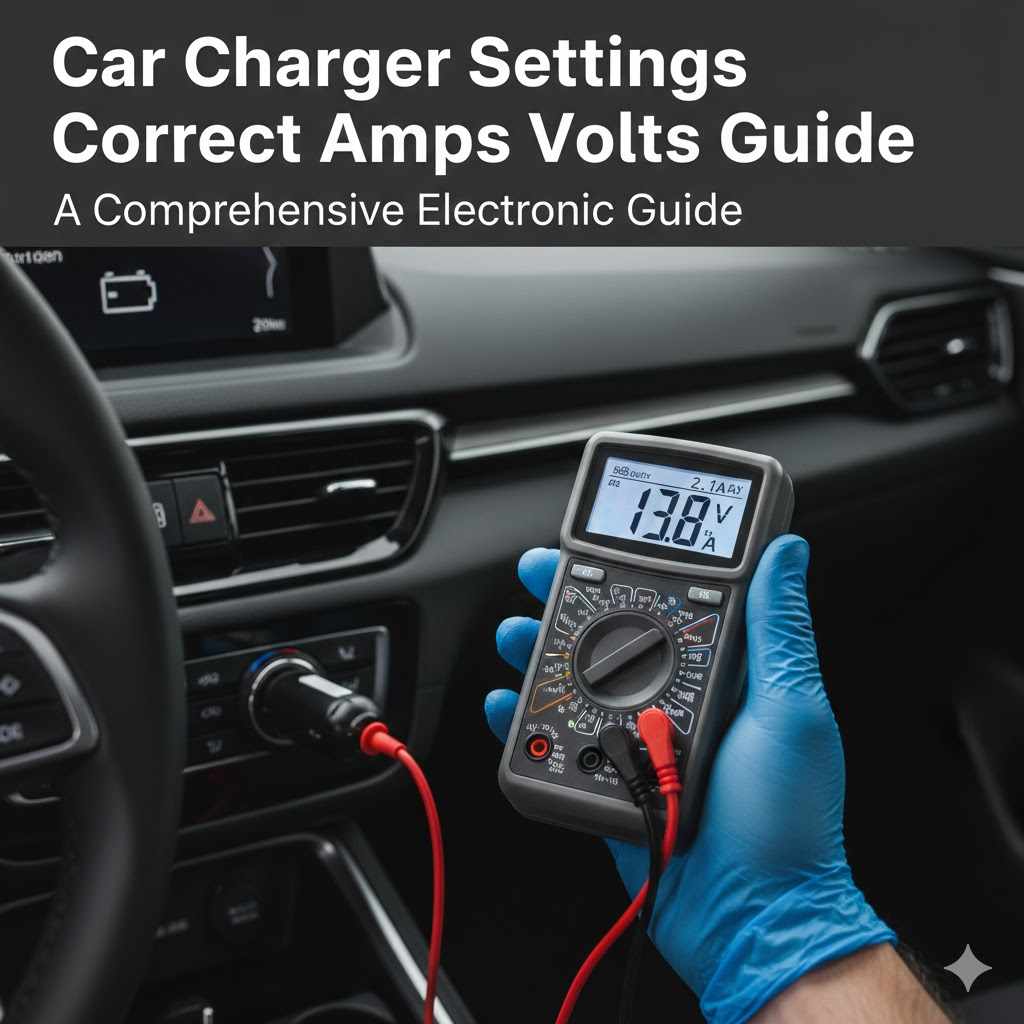
Car Charger Settings Correct Amps Volts Guide
Figuring out the right settings for your car charger can seem tricky at first. Many people wonder about the correct amps and volts needed for their devices. This guide is here to make it super simple.
We will walk you through everything step by step, so you can charge your gadgets with confidence. Let’s clear up any confusion about your Car Charger Settings: Correct Amps and Volts Guide.
Understanding Car Charger Amps and Volts
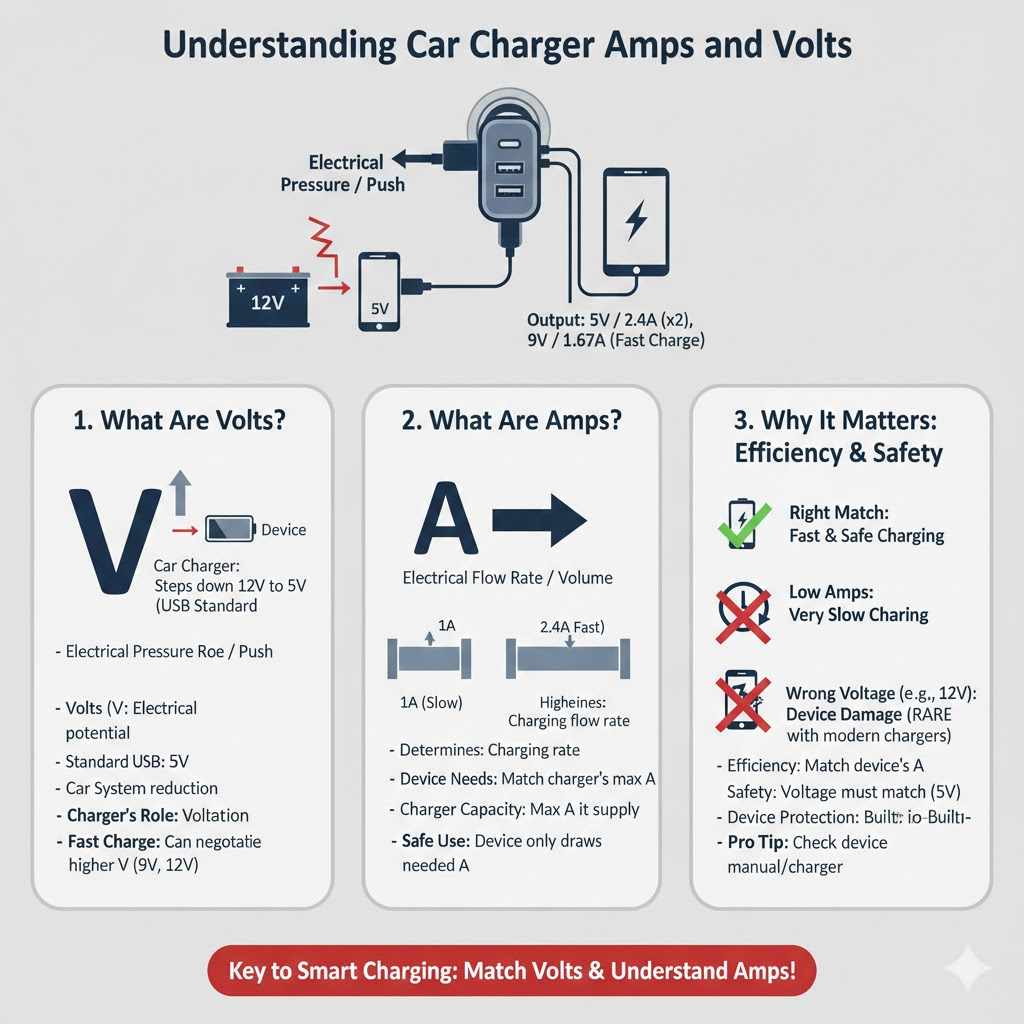
When you look at a car charger, you’ll often see numbers for voltage and amperage. These numbers tell you how much power the charger can provide. It’s like knowing the speed limit and how many lanes a road has.
Voltage is like the pressure pushing the electricity, and amperage is like how much electricity can flow at once. Getting these right is key to charging your devices safely and efficiently. Overcharging or undercharging can harm your gadgets or make them charge very slowly.
Voltage is usually measured in volts (V), and it’s pretty standard for most car chargers. Most cars operate at a 12-volt system, and car chargers typically output around 5 volts to USB devices. This is a safe level for phones, tablets, and other small electronics.
The amperage, measured in amperes or amps (A), is where things can vary more. This number indicates how quickly your device can charge. A higher amperage means a faster charge, assuming your device can handle it.
Many car chargers come with multiple ports, and these ports might offer different amp ratings. Some might be standard 1A or 2.4A ports, while others could be higher, supporting fast-charging technologies like Quick Charge or Power Delivery. It’s important to match the charger’s output with your device’s input needs.
For example, if your phone supports fast charging at 3A, using a charger with only 1A will result in very slow charging.
A common point of confusion is the difference between the charger’s rating and the device’s requirement. Always check your device’s original charger or its manual for the recommended input. You’ll usually find a specification like “Input: 5V/2A” or “Input: 9V/1.67A”.
This tells you what your device expects. Using a charger that provides less amperage than needed will lead to slow charging. Conversely, using a charger with an extremely high amperage that your device cannot regulate might cause damage, though most modern devices have built-in protection.
Car chargers are designed with safety in mind. They usually step down the car’s 12V supply to a more usable 5V for USB devices. The amperage rating on the charger then indicates its capacity.
For instance, a charger might be rated “5V/2.4A”. This means it can provide up to 2.4 amps at 5 volts. If your phone needs 5V/1A, this charger is perfectly safe and will provide only what’s needed.
If your phone needs 5V/2A, it will draw that much, and the charger can supply it.
What Are Volts in a Car Charger
Volts (V) represent the electrical potential difference, or the “push” of electricity. In the context of car chargers, the voltage is the primary output level provided to your device. Most USB devices, including smartphones, tablets, and power banks, are designed to operate at a 5-volt standard when connected via USB.
This is a universal standard that ensures compatibility across a wide range of electronics. Your car’s electrical system runs at a higher voltage, typically 12V, so the car charger contains circuitry to reduce this voltage down to the 5V required by your gadgets.
This voltage reduction is critical for preventing damage. Imagine trying to fill a small water bottle with a fire hose; it would be overwhelming. Similarly, applying the car’s 12V directly to a device designed for 5V would likely destroy it instantly.
The car charger acts as an adapter, converting the higher voltage to the lower, safe voltage. While some newer fast-charging technologies can adjust voltage (like 9V or 12V), this is done in a controlled manner according to established protocols that both the charger and the device understand.
The stability of the voltage is also important. A good car charger will provide a consistent 5V output. Fluctuations in voltage can cause charging issues or even harm sensitive electronics.
Reputable brands usually invest in quality components to ensure stable voltage delivery. When looking at a car charger, you’ll see its output voltage clearly marked, usually as 5V. This is the standard for most USB charging.
This constant 5V output is what makes USB charging so widespread. It creates a reliable power source for a vast array of portable devices. Without this standardization, you’d need a different charger for every single gadget, and they’d all need to be compatible with varying car electrical systems.
The 5V standard simplifies this greatly, making it easy to charge multiple types of devices from the same charger.
While 5V is the most common output voltage for standard USB charging, it’s worth noting that some fast-charging standards can negotiate higher voltages. For example, Qualcomm’s Quick Charge 3.0 can adjust the voltage in increments from 3.6V to 20V. Similarly, USB Power Delivery (USB PD) can support voltages up to 20V.
However, these higher voltages are only used when both the charger and the device support them and agree to them through a handshake process. For everyday charging of most devices, 5V is the fundamental voltage you’ll encounter.
What Are Amps in a Car Charger
Amps, short for amperes, measure the rate at which electrical current flows. In simpler terms, it tells you how much power can be delivered at any given moment. Think of it like the width of a pipe carrying water.
A wider pipe (higher amperage) can carry more water (electricity) at the same time compared to a narrower pipe (lower amperage).
The amperage rating on a car charger is crucial because it dictates how quickly your device can charge. A charger with a higher amperage can deliver more current, allowing your device to charge faster, provided your device can accept that higher current. For example, a charger rated at 2.4A can supply more power than a charger rated at 1A.
This means a device that supports 2.4A charging will fill up its battery more quickly with the 2.4A charger.
Many modern smartphones and tablets come with fast-charging capabilities. These devices can often accept 1.5A, 2A, or even higher amperages. Using a charger that meets or exceeds your device’s charging needs will result in the fastest possible charging speed.
If you plug a device that can handle 2A into a charger that only provides 1A, it will charge at 1A, meaning it will take twice as long to charge.
It’s important to understand that a charger’s amperage rating is its maximum capacity. Your device will only draw the amount of amperage it needs and can safely handle. So, if you plug a device that requires 1A into a charger that can supply 3A, the device will only pull 1A.
This prevents overcharging and damage. Therefore, having a charger with a higher amperage than your device requires is generally safe and offers the benefit of faster charging for other devices that might need it.
When choosing a car charger, look for one that has a sufficient amperage for your primary devices. For basic phone charging, 1A or 2.4A is usually fine. For faster charging of smartphones, tablets, or even some laptops, you might need chargers with higher amperage ratings, often found in dedicated fast-charging chargers that support technologies like Quick Charge or USB Power Delivery.
Some chargers even have multiple ports with different amperage ratings, allowing you to charge different devices simultaneously at their optimal speeds.
Matching Charger Settings to Your Devices
The most important step in using a car charger correctly is to match its settings to what your devices need. This ensures your gadgets charge safely and at the best possible speed. It’s not about finding the highest numbers; it’s about finding the right balance.
First, always check the label on your device’s original charger or consult its user manual. This information will tell you the required voltage and amperage. For example, you might see “Output: 5V ⎓ 2A”.
This means the device needs 5 volts and can accept up to 2 amps. If your car charger has an output of “5V ⎓ 2.4A”, it’s a perfect match and can even handle another device drawing 0.4A if it’s a multi-port charger.
If the car charger’s amperage is lower than what your device needs, it will charge, but it will be very slow. For instance, if your device needs 2A and you use a 1A charger, it might take twice as long to fully charge. This isn’t harmful, just inefficient.
On the other hand, it’s generally safe to use a charger with a higher amperage than your device requires. As mentioned before, devices are smart enough to only draw the current they need. So, plugging a phone that needs 1A into a 3A charger is fine; it will only pull 1A.
This is why many modern chargers boast high total amperages or specific fast-charging ports.
However, it’s crucial that the voltage matches. For standard USB charging, this means 5V. If a charger incorrectly outputs a higher voltage (like 12V, the car’s system voltage), it can severely damage your device.
Reputable car chargers are designed to regulate this and output the safe 5V. Be wary of unbranded or suspiciously cheap chargers that might lack proper voltage regulation.
Checking Your Device’s Charging Needs
Every electronic device has specific power requirements for charging. You can usually find this information in a few places. The most common is on the original power adapter that came with your device.
Look for a small label, often on the back or bottom of the adapter. It will list “Output” specifications, usually showing voltage (V) and amperage (A).
For example, an older smartphone might say “Output: 5V ⎓ 1A”. This means it needs 5 volts and can charge at a maximum of 1 amp. A newer tablet might say “Output: 5V ⎓ 2.4A”, indicating it can handle up to 2.4 amps for faster charging.
Some devices, especially those supporting fast charging, might list multiple output options, like “Output: 5V ⎓ 2A or 9V ⎓ 1.67A”. This means it can charge at 5V/2A, or use a higher voltage (9V) with a specific amperage (1.67A) for quicker charging.
If you can’t find the original charger, your device’s user manual or the manufacturer’s website is the next best place to look. Search for your device model online, followed by terms like “specifications,” “charging requirements,” or “power adapter.” You’ll often find detailed charts or product pages listing the optimal charging parameters.
Understanding these requirements helps you select the right car charger. For instance, if your phone needs 5V/2A, a car charger with at least a 2A output at 5V will provide optimal charging speed. If you choose a charger with a lower amperage, like 1A, your phone will still charge, but much slower.
Conversely, a charger with a higher amperage (e.g., 3A) is usually safe, as your phone will only draw the 2A it needs.
It’s also good to know if your device supports specific fast-charging technologies like Qualcomm Quick Charge or USB Power Delivery. If it does, look for a car charger that explicitly mentions support for these technologies. This ensures you can take full advantage of your device’s fast-charging capabilities.
Understanding Charger Ratings vs. Device Needs
The ratings on a car charger and the needs of your device are like a lock and its key. The charger’s rating tells you what it can offer, and your device’s need tells you what it requires. For safe and efficient charging, these two need to align correctly.
Let’s break down a typical car charger rating: “Output: 5V ⎓ 2.4A”. This means the charger can supply a stable 5 volts of electricity, and it has the capacity to deliver up to 2.4 amps of current. If your phone requires “Input: 5V ⎓ 1.5A”, the charger is more than capable.
It will provide the 5 volts and only draw the 1.5 amps that the phone can handle and needs.
What happens if the charger’s amperage is lower than the device’s need? Say your device needs 5V ⎓ 2A, but your charger only offers 5V ⎓ 1A. In this case, the device will charge at the slower rate of 1A.
It won’t damage the device, but it will take significantly longer to reach a full charge. This is a common reason for slow charging when using older or less powerful car chargers.
Now, what if the charger’s amperage is higher? If your device needs 5V ⎓ 1A and you use a charger rated at 5V ⎓ 3A, the device will still only pull 1A. This is because modern electronics have built-in circuitry to regulate the amount of power they draw.
They won’t overload themselves. So, a charger with a higher amperage is generally safe and even beneficial, as it can support faster charging for devices that are designed for it.
The critical factor is voltage. Standard USB charging is 5V. If a charger outputs a significantly different voltage without proper negotiation (as in fast-charging protocols), it can cause serious damage.
Therefore, always ensure the voltage matches, which for most USB devices is 5V. Most reputable car chargers are designed to maintain this stable 5V output. When in doubt, always consult your device’s manual or the manufacturer’s website for accurate charging specifications.
Using Fast Charging Features
Many newer smartphones and tablets come with fast-charging capabilities. This means they can accept a higher rate of power than standard charging, significantly reducing the time it takes to charge their batteries. Technologies like Qualcomm Quick Charge (QC) and USB Power Delivery (USB PD) are the most common standards for this.
For fast charging to work, you need three things to be compatible: your device, your charging cable, and your car charger. If any one of these doesn’t support the same fast-charging standard, you’ll revert to standard charging speeds. For example, if you have a phone that supports Quick Charge 3.0 and a charger that supports Quick Charge 3.0, but you use a standard, non-fast-charging USB cable, the charging will likely be slow.
Car chargers that support fast charging often advertise specific technologies, like “Quick Charge 3.0 Compatible” or “USB PD Fast Charging.” These chargers may also offer multiple ports, with some ports designated for standard charging and others for fast charging. Some fast-charging chargers can also automatically detect the optimal charging speed for your device, adjusting voltage and amperage accordingly.
It’s important to note that fast charging often involves higher voltages than the standard 5V. For example, Quick Charge 3.0 can adjust voltage in increments from 3.6V to 20V. USB PD can support up to 20V.
This is safe because the charger and the device communicate to agree on the appropriate voltage and amperage. If your device doesn’t support these higher voltages or protocols, the charger will default to a standard 5V output, ensuring compatibility and safety.
When selecting a fast-charging car charger, verify that it explicitly supports the fast-charging standard used by your device. Check your phone’s specifications to see if it uses Quick Charge (and which version), USB PD, or another proprietary fast-charging technology. Investing in a charger and cable combination that supports your device’s fast-charging standard will ensure you get the quickest possible charge on the go.
Types of Car Chargers and Their Settings
Car chargers aren’t one-size-fits-all. They come in various forms, each with different capabilities regarding amperage and voltage output. Understanding these types helps you choose the best one for your needs.
The most basic car chargers are single-port chargers. These typically offer a standard 5V output, with amperage ratings varying from 1A to 2.4A. They are suitable for charging older phones, basic feature phones, or when you only need to charge one device slowly.
Next are multi-port car chargers. These are very popular because they allow you to charge multiple devices at once. Often, one port might be a standard 1A or 2.4A port, while another might be a higher-amperage port for faster charging.
Some multi-port chargers have a combined maximum amperage output, meaning if you use all ports, the total current is shared. Always check the specifications for how the total amperage is distributed.
Fast-charging car chargers are designed to deliver power much quicker. They support technologies like Quick Charge or USB PD. These chargers might have specific ports labeled “QC” or “PD,” or they might offer a broad range of voltage and amperage outputs that automatically adjust to your device.
Chargers supporting USB PD are particularly versatile, as they can charge not only phones and tablets but also some laptops and other higher-power devices.
Wireless car chargers are another type. These often have built-in fast-charging capabilities and come with an integrated stand or mount. The charging pad itself receives power from a USB port (usually a fast-charging capable USB-C port), and then wirelessly charges your compatible smartphone.
The actual power delivered wirelessly is determined by the charger’s internal circuitry and the receiving coil in your phone, typically ranging from 5W to 15W or more.
When choosing a charger, consider the total amperage it can provide, especially for multi-port chargers. If a charger is rated “5V ⎓ 4.8A Max,” and it has two ports, each port might be able to deliver up to 2.4A simultaneously, or one could deliver more if the other is used less. Some chargers will clearly state the output for each port, like “Port 1: 5V/2.4A, Port 2: 5V/3A Quick Charge.”
Standard Single-Port Chargers
These are the simplest and often most affordable type of car charger. A standard single-port charger has one USB port, usually a USB-A type, and plugs directly into your car’s cigarette lighter or 12V accessory socket. Its primary function is to convert the car’s 12V power to the 5V needed by most USB devices.
The amperage output on these chargers typically ranges from 1 amp (1A) to 2.4 amps (2.4A). A 1A charger is quite basic and will charge devices slowly. It’s generally suitable for older phones, smartwatches, or for maintaining a charge rather than rapid charging.
A 2.4A charger is more common and provides a decent charging speed for most smartphones and tablets.
While these chargers are straightforward, it’s still important to check their specifications. Ensure they are clearly marked with a 5V output. A charger rated “5V ⎓ 2.4A” is a good, versatile option for many common devices.
They are reliable for consistent, albeit not the fastest, charging while you’re on the road.
These chargers are a good entry-level choice for anyone who needs a basic way to keep their phone powered up in the car. They are often made by well-known electronics accessory brands and are widely available. Their simplicity means there’s less to go wrong, making them a dependable option for everyday use.
It’s worth noting that even within single-port chargers, quality can vary. Cheaper, unbranded models might not provide a stable 5V output or could have lower actual amperage than advertised. For this reason, it’s advisable to purchase from reputable brands to ensure safety and performance.
Multi-Port Car Chargers
Multi-port car chargers are designed to cater to the modern need to charge multiple gadgets simultaneously. They typically feature two or more USB ports, allowing you to power up your smartphone, your passenger’s phone, a tablet, or a GPS device all at once. This convenience is invaluable for road trips or when you have multiple people in the car.
The key consideration with multi-port chargers is their total power output. A charger might be advertised with a high total amperage, for example, “4.8A total output.” This means the sum of the amperage drawn by all connected devices cannot exceed 4.8A. If the charger has two 2.4A ports, it can deliver 2.4A to each port simultaneously.
However, if one port is drawing 2.4A, the other port might have less available if the total is limited.
Some multi-port chargers differentiate their ports. You might find one port offering standard 5V/2.4A, while another offers a faster charging standard like Quick Charge 3.0 (which can adjust voltage and amperage) or a higher fixed amperage like 5V/3A. This allows you to prioritize faster charging for a specific device while still providing adequate power to others.
When choosing a multi-port charger, always check the specifications for each port and the total maximum output. Reading reviews can also be helpful to see how well the charger performs when multiple devices are connected. A well-designed multi-port charger will distribute power intelligently, ensuring each device gets a suitable charge without significant speed degradation.
For families or groups traveling together, a multi-port charger is almost essential. It eliminates the need for multiple separate chargers and ensures everyone’s devices stay powered. Just be mindful of the charger’s overall capacity to avoid bottlenecks, especially if all devices are power-hungry.
Fast Charging Enabled Chargers
Fast charging enabled car chargers are a game-changer for anyone who spends a lot of time on the road and needs to keep their devices topped up quickly. These chargers utilize advanced technologies like Qualcomm Quick Charge (QC) and USB Power Delivery (USB PD) to significantly accelerate charging speeds compared to standard 5V/1A chargers.
How they work is by intelligently adjusting the voltage and amperage delivered to the device. For example, a Quick Charge 3.0 charger can communicate with a compatible device and vary its output voltage in precise increments from 3.6V up to 20V. This allows the device to draw the maximum power it can safely handle, leading to much faster charging cycles.
USB PD works similarly, supporting up to 20V and higher amperages, making it suitable for charging even laptops.
To benefit from fast charging, your device must also support the same fast-charging technology. If your phone supports QC 3.0, you need a QC 3.0 car charger and ideally a compatible cable. If your phone supports USB PD, you’ll need a USB PD charger and cable.
When looking at these chargers, you’ll often see specifications like “QC 3.0 Output: 5V/3A, 9V/2A, 12V/1.5A” or “USB PD Output: 5V/3A, 9V/2.22A, 12V/1.67A.” These figures indicate the different voltage and amperage combinations the charger can provide for fast charging. If your device doesn’t support fast charging, the charger will default to a standard 5V output.
These chargers are excellent investments for users with modern smartphones, tablets, and other power-hungry gadgets. They can dramatically reduce charging times, meaning you can get a significant battery boost during a short drive. Always check your device’s specifications to confirm its fast-charging capabilities and choose a car charger that matches.
Troubleshooting Common Car Charger Issues
Even with the right settings, you might sometimes run into problems with car chargers. Most issues are quite common and have simple solutions. Let’s look at some frequent problems and how to fix them.
One of the most common complaints is that a device isn’t charging at all. The first thing to check is if the charger is properly plugged into the car’s 12V socket. Sometimes, the socket itself might not be receiving power.
You can test this by trying another accessory or checking if the socket works when the car is in the accessory or ignition position.
Another issue is slow charging. If you’re using a charger with adequate amperage, but your device is still charging very slowly, the culprit might be the USB cable. Older, damaged, or low-quality cables can restrict the amount of power that flows through them.
Trying a different, high-quality cable, especially one rated for fast charging if your device supports it, can often resolve this.
Sometimes, a device might charge intermittently, meaning it connects and disconnects. This can also be caused by a faulty cable or a loose connection at either the charger port or the device’s charging port. Ensure all connections are snug and free of debris.
Overheating of the charger or the device during charging can be a sign of a problem. While chargers and devices can get warm during fast charging, excessive heat could indicate an issue with the charger’s internal components or a compatibility problem. In such cases, it’s best to stop using the charger and consult the manufacturer or consider a replacement.
Finally, if a charger simply stops working, it might have failed due to wear and tear or a power surge. Most reputable brands offer warranties, so check if your charger is eligible for a replacement.
Device Not Charging at All
When your device stubbornly refuses to charge, it can be frustrating. The first step is to ensure a solid connection. Make sure the car charger is pushed all the way into your car’s 12V accessory socket.
Sometimes, a slightly loose fit can prevent it from making proper contact.
Next, check the power source. Your car’s 12V socket needs to be active. In some cars, these sockets only work when the ignition is turned on or in the accessory position.
Try turning your car’s key to the ignition position and see if the charger lights up (if it has an indicator light). If not, test the socket with another known working accessory, like a tire inflator or a different charger, to confirm the socket is providing power.
The USB cable is another common point of failure. Even if it looks fine, the internal wires could be damaged, or the connectors might be worn. Try a different USB cable that you know works with other devices.
If your device supports fast charging, use a cable specifically designed for fast charging, as some older or cheaper cables can’t handle the higher power flow.
Also, inspect the charging port on your device and the USB port on the charger for any visible debris, lint, or damage. Gently clean them with compressed air or a soft, dry brush if necessary. A blocked port can prevent a proper connection.
If you’ve tried a different cable and confirmed the 12V socket is working, and your device still isn’t charging, the car charger itself might be faulty. If it’s a multi-port charger, try plugging your device into a different port to rule out a specific port failure.
Slow Charging Issues
Slow charging is a common complaint, and it can happen even when your charger’s amperage rating seems sufficient. Several factors can contribute to this. One of the most frequent culprits is the USB cable itself.
Not all USB cables are created equal. Basic, unbranded cables might not be able to carry the amount of current (amps) that your device needs for optimal charging. They might be designed for data transfer rather than high-power charging.
Look for cables that are specifically rated for fast charging or are from reputable brands. A cable rated for 2.4A or higher is generally recommended for modern devices.
The amperage rating of the charger port you are using is also critical. If your device requires 2A for fast charging and you plug it into a port that only provides 1A, it will charge at that slower 1A rate. Always ensure you’re using a port on the charger that can supply at least the amperage your device needs.
Some chargers have one fast-charging port and others that are slower.
The device itself can also influence charging speed. If your device’s battery is very low, it might initially charge at a slower rate to protect the battery. As the battery fills up, it typically speeds up.
Also, if your device is performing intensive tasks while charging (like playing games or streaming video), it may consume power as quickly as it’s being charged, leading to very slow or no net gain in battery percentage.
Finally, environmental factors can play a minor role. Charging in extremely hot conditions can cause a device’s battery management system to slow down charging to prevent overheating. Ensure your device and charger are in a reasonably cool environment.
Intermittent Charging or Connection Drops
Experiencing charging that cuts in and out can be incredibly annoying. This “intermittent charging” usually points to a loose or faulty connection somewhere in the charging chain. The most common cause is the USB cable.
The connectors on USB cables can wear out over time, especially with frequent plugging and unplugging. If the connector is bent, damaged, or simply not making a secure contact in either the charger’s port or your device’s port, the power flow can be interrupted. This might manifest as the charging icon appearing and disappearing on your device’s screen.
Try wiggling the cable gently at both ends while it’s plugged in. If the charging status changes when you move the cable, it’s a strong indicator that the cable is the problem. In this case, the best solution is to
Another possibility is a problem with the car charger’s USB port itself. If the port is loose, damaged, or has debris inside, it might not maintain a consistent connection. If you have a multi-port charger, try plugging your cable into a different port to see if the issue persists.
This helps isolate whether the problem is with a specific port or the charger as a whole.
Less commonly, the device’s charging port could be the issue. If it’s dirty, damaged, or has loose pins, it can cause connection problems. Carefully inspect the port and clean it if necessary.
If the port appears damaged, you may need to have your device repaired.
If you’ve tried multiple known-good cables and different ports on the charger and still experience intermittent charging, the car charger unit itself might be malfunctioning internally, leading to an unstable power supply.
Car Charger Settings: Correct Amps and Volts Guide for Safety
Using the correct car charger settings is not just about speed; it’s fundamentally about safety. Applying incorrect voltage or amperage can lead to serious damage to your electronic devices, and in rare cases, could even pose a fire risk.
The voltage (V) is the electrical pressure. Most USB-powered devices, like smartphones and tablets, are designed to operate at a standard 5-volt supply. Your car’s electrical system operates at 12 volts.
A car charger’s primary role is to step down this 12V to a safe 5V. This conversion is crucial. Applying 12V directly to a 5V device would instantly destroy it.
Reputable car chargers have built-in voltage regulators to ensure they output a stable and safe 5V. Always ensure your charger is designed for this conversion and outputs the correct voltage.
Amperage (A), on the other hand, is the rate of electrical flow. It determines how quickly power can be delivered. While it’s generally safe for a device to receive less amperage than it requires (it just charges slower), and it’s usually safe for a device to receive more amperage than it needs (as it will only draw what it can handle), there are nuances.
Using very low amperage chargers for devices that require higher rates can lead to prolonged charging times and potentially stress the charging circuitry if it’s constantly trying to draw more than available. Conversely, using a charger with an amperage rating that significantly exceeds the device’s input, especially without proper smart charging technology, could theoretically lead to overheating, although modern devices are built with safeguards.
The rise of fast-charging technologies adds another layer. Standards like Quick Charge and USB Power Delivery involve communication between the charger and the device to negotiate higher voltages (e.g., 9V, 12V, 20V) and amperages. These are safe when both the charger and device support the same standard and communicate correctly.
Using a fast charger with a non-fast-charging device will simply result in standard 5V charging. However, using a fast charger that is incompatible or malfunctioning could potentially deliver the wrong voltage.
Therefore, always:
1. Check your device’s required input specifications (usually found on the original charger or in the manual). 2.
Ensure the car charger provides the correct standard voltage (typically 5V for USB). 3. Select a charger with an amperage rating that meets or exceeds your device’s needs for optimal charging speed.
4. If using fast charging, ensure both your device and the charger support the same technology and use a compatible cable.
Sticking to reputable brands and checking for clear, accurate specifications on the charger itself are the best ways to ensure safe and effective charging. Your electronic devices are an investment, and proper charging is key to their longevity and performance.
Importance of Correct Voltage
The voltage (V) of a power source is its electrical “pressure.” For virtually all standard USB devices—smartphones, tablets, power banks, e-readers, and many accessories—the required input voltage is a stable 5 volts. This is a universal standard that ensures interoperability.
Your car’s electrical system typically runs at 12 volts. If you were to connect a device designed for 5V directly to a 12V source, the higher voltage would overwhelm the device’s internal components, likely causing immediate and permanent damage. It’s akin to trying to pour water from a high-pressure fire hose into a delicate teacup – it would be disastrous.
This is where the car charger plays a vital role. A car charger acts as a voltage converter. It takes the 12V from your car’s battery and safely reduces it down to the 5V required by your electronic gadgets.
This conversion process is managed by sophisticated internal circuitry within the charger.
When you’re looking at a car charger, the output voltage should always be clearly stated. For standard USB charging, you will almost always see “Output: 5V”. If a charger claims to offer a different output voltage for standard USB use without specific fast-charging protocols being engaged, it is likely either misrepresented or potentially dangerous.
Modern fast-charging technologies (like Quick Charge and USB Power Delivery) can negotiate higher voltages (e.g., 9V, 12V, 20V). However, this is a controlled process. The charger and device communicate to agree on a specific voltage and amperage level that both can handle.
If your device does not support these higher voltages, the charger will default to the standard 5V. Therefore, always ensure the charger and device are compatible when engaging in fast charging. For standard charging, however, 5V is the non-negotiable benchmark.
Understanding Amperage Limits and Needs
Amperage (A), or current, is the measure of how much electrical charge flows per second. Think of it as the “width” of the electrical pipe. A higher amperage rating on a charger means it can supply more current, allowing your device to charge faster, provided the device can accept that higher current.
Your device has an input amperage requirement. This is usually specified as “Input: X Amps”. For example, a phone might require “Input: 1.5A” for standard charging, while a tablet might need “Input: 2.4A”.
Here’s how charger amperage ratings interact with device needs:
- Charger Amperage ≥ Device Need: This is the ideal scenario for fast charging. If your device needs 1.5A and you use a charger port rated at 2.4A, the device will draw the 1.5A it needs, and the charger can easily supply it. The excess capacity (2.4A – 1.5A = 0.9A) is there if needed or for another device.
- Charger Amperage < Device Need: If your device needs 2A and your charger port only provides 1A, the device will charge, but at the slower rate of 1A. It won’t damage the device, but it will take longer to charge. This is a common cause of perceived “slow charging.”
It’s important to note that devices are designed to only draw the amperage they require and can safely handle. Therefore, using a charger with a higher amperage rating than your device needs is generally safe. The device’s internal charging circuitry manages how much current it pulls.
However, extreme mismatches or very low-quality chargers can sometimes cause issues. Overly cheap chargers might not maintain their rated amperage consistently, or they might overheat if constantly pushed to their limit by a demanding device. For best results and safety, choose a car charger with amperage ratings that meet or exceed the requirements of the devices you plan to charge.
Consider multi-port chargers carefully. If a charger has a total maximum output of 4.8A across two ports, and you plug in two devices that both try to draw 3A each, the total demand (6A) exceeds the charger’s capacity. In such cases, the charger might limit the output to both ports, or one port might get priority, resulting in slower charging for both.
Fast Charging Safety Protocols
Fast charging technologies, while incredibly convenient, rely on precise communication and controlled power delivery to remain safe. Technologies like Qualcomm Quick Charge (QC) and USB Power Delivery (USB PD) are designed with safety mechanisms at their core.
Device-Charger Handshake: At the heart of fast charging safety is the handshake protocol. When you plug a compatible device into a compatible charger, they communicate with each other. This isn’t just a simple connection; it’s a negotiation.
The device tells the charger what its power capabilities are (e.g., “I can handle 9V at 2A”). The charger then responds by adjusting its output voltage and amperage to match the device’s request, as long as the charger can also provide that power.
Voltage and Amperage Regulation: Fast chargers are equipped with sophisticated chips that constantly monitor and regulate the voltage and amperage being delivered. This prevents over-voltage or over-current situations that could damage the device. If at any point the communication fails, or if a device is plugged in that doesn’t support the fast-charging standard, the charger will default to a safe, standard 5V output.
Cable Quality: The USB cable plays a critical role in fast charging safety. Fast charging involves higher currents and sometimes higher voltages. A substandard cable might not be able to handle these demands.
It could overheat, melt, or fail to transmit power effectively, leading to slow charging or even damage. Therefore, using a high-quality USB cable that is specifically rated for fast charging (often indicated by thicker wires or a specific e-marker chip in USB-C cables) is essential for safe and efficient fast charging.
Overheat Protection: Most modern fast-charging systems include thermal monitoring. If the charger or the device starts to overheat during the charging process, the system will automatically reduce the charging speed or stop charging altogether to prevent damage. This is why devices might charge slower in hot environments.
When using fast charging, always ensure you are using certified chargers and cables from reputable manufacturers. This minimizes the risk of encountering issues related to incompatible technologies or faulty components, ensuring a safe and efficient charging experience.
Choosing the Right Car Charger
Selecting the perfect car charger involves considering your devices, your charging needs, and the types of chargers available. It’s about finding a balance between speed, compatibility, and safety.
First, identify your primary devices and their charging requirements. Do you mainly need to charge a basic smartphone, or do you have multiple devices like a tablet, a laptop, and headphones? Check the input specifications of these devices.
Note if they support fast-charging technologies like Quick Charge or USB PD.
Next, consider how many devices you typically need to charge at once. If it’s just one, a simple single-port charger might suffice. If you often have passengers or multiple gadgets, a multi-port charger is a much better option.
Look at the total amperage output of multi-port chargers and how it’s distributed among the ports.
For speed, if your devices support fast charging, invest in a charger that offers these capabilities. Make sure the charger explicitly states support for the same fast-charging technology your devices use (e.g., QC 3.0, QC 4+, USB PD). Remember that you’ll also need a compatible fast-charging cable.
Safety is paramount. Always choose chargers from reputable brands. These brands invest in quality components and adhere to safety standards, ensuring stable voltage output and proper regulation.
Avoid unbranded or suspiciously cheap chargers, as they might lack essential safety features and could damage your devices.
Finally, think about any extra features you might want. Some car chargers offer LED indicators, smart power distribution, or even built-in charging cables. Wireless charging car mounts are also a popular option for convenience.
By carefully assessing your needs and understanding charger specifications, you can confidently choose a car charger that keeps your devices powered up safely and efficiently.
Assessing Your Device’s Charging Needs
Before you even look at car chargers, the most crucial step is to understand what your devices need. This sounds simple, but many people overlook it. What voltage and amperage does your smartphone, tablet, or GPS unit require?
You can usually find this information in a few key places. The most direct source is the original charger that came with your device. Look for a label on the charger itself, typically on the back or side.
It will list “Output” specifications. For example, you might see “Output: 5V ⎓ 2A”. This means the device needs 5 volts and can accept up to 2 amps for charging.
If you don’t have the original charger handy, check your device’s user manual. Manufacturers always include charging specifications in their documentation. Alternatively, a quick online search for your device model along with “specifications” or “charging requirements” should bring up the necessary information on the manufacturer’s website or tech review sites.
Pay close attention to whether your device supports fast charging. This will often be indicated by multiple output options on the charger label, such as “5V ⎓ 2A / 9V ⎓ 1.67A”. This means the device can charge at a standard 5V/2A, or it can use a faster protocol with a higher voltage (9V) and a specific amperage (1.67A).
If your device supports fast charging, you’ll want a car charger that can accommodate these higher power demands.
Understanding these requirements allows you to select a car charger that not only works but also charges your devices at their optimal speed and safely. It helps you avoid underpowered chargers that lead to slow charging and helps you ensure compatibility with fast-charging technologies.
Number of Ports Needed
The number of USB ports you need on a car charger depends entirely on your typical usage and how many devices you regularly need to power simultaneously. It’s a practical consideration that can greatly improve convenience during commutes or road trips.
Single-Port Chargers: If you are the only one in the car and only ever need to charge your smartphone, a single-port charger is usually sufficient. These are often the most compact and least expensive options. They are great for basic charging needs.
Dual-Port Chargers: This is a very popular choice for many people. A dual-port charger allows you to charge your phone and, for instance, your passenger’s phone, or your phone and a GPS device at the same time. Many dual-port chargers offer a good balance of functionality and size.
Triple-Port or More: If you often travel with multiple passengers, or if you regularly need to charge several devices (e.g., phone, tablet, portable speaker, e-reader), a charger with three or more ports might be necessary. These are typically larger and might have a higher overall power output to support all ports effectively.
When considering multi-port chargers, it’s essential to look at the charger’s total amperage output and how it’s distributed. A charger might have, for example, a total of 4.8A. If it has two ports, each could potentially deliver 2.4A simultaneously.
However, if one port is used for a high-demand device, the other port might have less available power. Some chargers explicitly state the output for each individual port.
For families or groups, a charger with at least two ports is highly recommended. It eliminates the need for multiple chargers and ensures everyone’s devices stay charged, preventing potential arguments or running out of power.
Reputable Brands and Safety Certifications
When selecting a car charger, choosing from reputable brands is one of the most important factors for ensuring safety and reliable performance. These companies have a track record of producing quality electronics and adhere to industry safety standards.
Brands like Anker, RAVPower, Belkin, Aukey, and Scosche are well-known for their car chargers. They generally use better quality components, which leads to more stable voltage and amperage output, and better heat dissipation. This reduces the risk of damaging your devices or, in extreme cases, creating a hazard.
Beyond brand reputation, look for safety certifications. While specific certifications can vary by region, common ones include:
- CE (Conformité Européenne): Indicates compliance with health, safety, and environmental protection standards for products sold within the European Economic Area.
- FCC (Federal Communications Commission): For products sold in the United States, this certification ensures that the device does not cause harmful interference with other electronic devices.
- RoHS (Restriction of Hazardous Substances): This directive restricts the use of certain hazardous materials in electronic equipment.
- UL Listed (Underwriters Laboratories): A widely recognized safety certification, especially in North America, indicating that the product has met specific safety requirements.
While not all car chargers will display all these certifications, looking for at least one or two from a trusted brand significantly increases the likelihood that the charger is safe to use. These certifications provide an extra layer of assurance that the product has been tested and meets specific safety benchmarks.
Avoid unbranded, generic chargers often found at discount stores or online marketplaces with vague specifications and no clear indication of safety standards. While they might be cheaper, the potential risk to your expensive electronic devices is often not worth the savings.
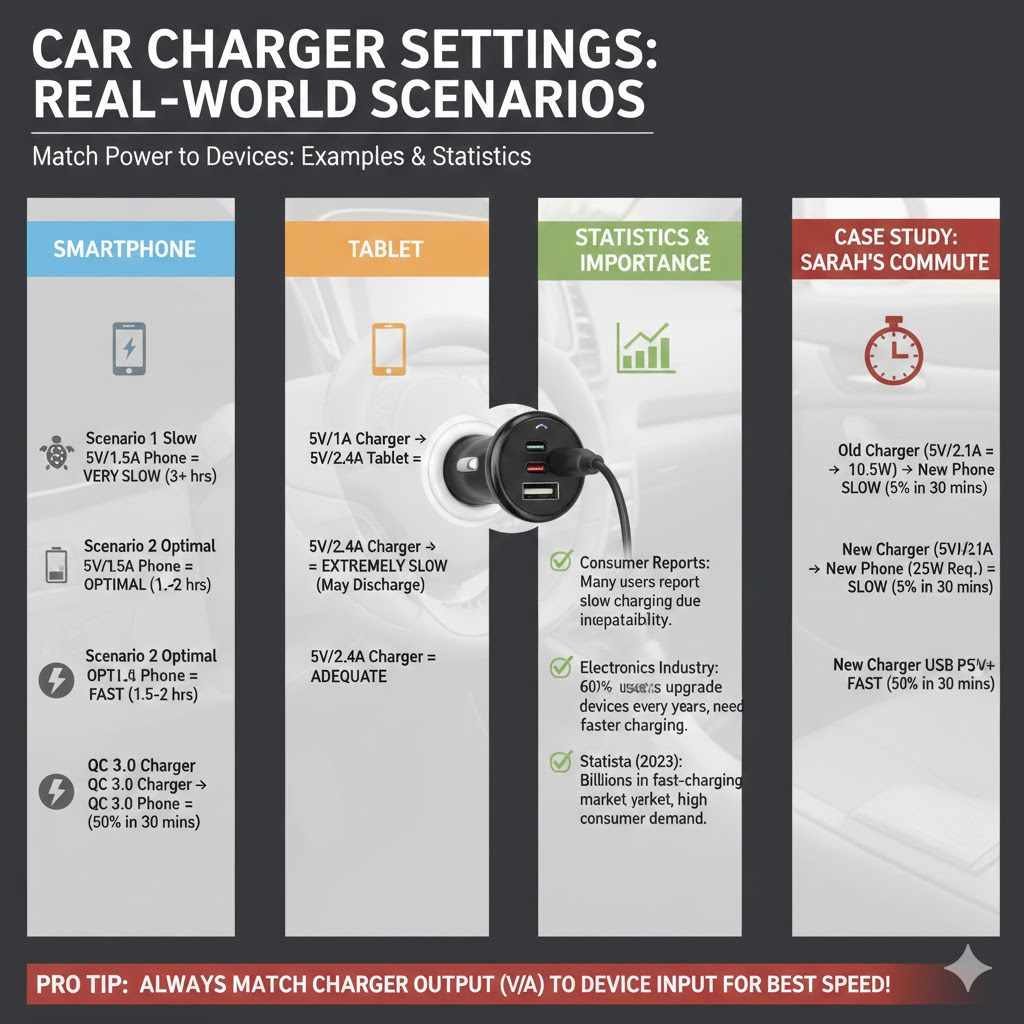
Example Scenarios and Statistics
Let’s illustrate how different car charger settings work in real-world situations. Understanding these examples can help solidify the concepts of voltage, amperage, and compatibility.
Imagine you have a smartphone that requires “Input: 5V ⎓ 1.5A”.
Scenario 1: You use a single-port car charger rated “Output: 5V ⎓ 1A”. Your phone will charge, but very slowly, as the charger cannot provide the full 1.5A. It might take over 3 hours to charge fully from empty.
Scenario 2: You use a dual-port car charger where one port is rated “5V ⎓ 2.4A”. Your phone will charge at its optimal speed of 1.5A because the port can easily supply that amount. It might take around 1.5 to 2 hours to charge fully.
Scenario 3: Your phone also supports Quick Charge 3.0 (e.g., 9V ⎓ 1.67A), and you use a car charger that supports QC 3.0 with a QC 3.0 compatible cable. Your phone will negotiate with the charger and charge much faster, potentially reaching 50-60% in about 30 minutes. If you used a standard 5V/2.4A port on the same charger, it would charge at 5V/1.5A, not at the fastest possible speed.
Consider a tablet that requires “Input: 5V ⎓ 2.4A”.
Using a 1A charger will result in extremely slow charging, perhaps even discharging slightly if the screen is in use. Using a 2.4A charger is essential for a reasonable charging experience. If you plug it into a charger with only 1A output, the tablet might show “charging slowly” or not charge at all if it’s being used heavily.
Statistics highlight the importance of these settings. According to a survey by Consumer Reports, a significant percentage of users report slow charging issues, with many attributing it to incorrect charger or cable compatibility. Another study by an electronics industry research firm indicated that over 60% of smartphone users upgrade their devices every two years, and newer devices often come with faster charging requirements.
For example, a report by Statista found that by 2023, the global market for smartphone chargers was valued at billions of dollars, with a growing segment dedicated to fast-charging solutions. This indicates a clear consumer demand for faster and more efficient charging, underscoring the relevance of understanding charger specifications.
These scenarios and statistics emphasize that choosing the correct car charger settings is not just a technical detail but a practical necessity for efficient and safe device operation on the go.
Case Study Charging a New Smartphone
Sarah recently bought the latest smartphone, which boasts support for 25W fast charging. Her old car charger only had a single USB port rated at 5V/2.1A, which equals about 10.5W (5V * 2.1A). She plugged her new phone into it, hoping for a quick top-up during her commute.
To her dismay, the phone charged very slowly. The battery percentage increased by only about 5% during her 30-minute drive. The phone’s screen even displayed a message indicating “Slow charging.” Sarah realized that her old charger, while functional for older devices, couldn’t meet the power demands of her new smartphone.
She then purchased a new car charger that explicitly supported USB Power Delivery (USB PD) and offered an output of 5V/3A, 9V/2.77A, or 12V/2.08A (which translates to wattage up to about 25W or more). She also made sure to use a USB-C to USB-C cable that was rated for high-power delivery.
During her next commute, Sarah used the new charger and cable. Within 30 minutes, her phone’s battery had increased by an impressive 50%. The phone’s display indicated “Fast charging.” This real-world example clearly demonstrates how matching the charger’s output (both voltage and amperage, especially through fast-charging protocols) to the device’s input requirements makes a significant difference in charging speed and user experience.
Sample Scenario 1 A Commuter’s Needs
Mark is a daily commuter who relies heavily on his smartphone for navigation, music, and taking calls. He often leaves home with his phone battery around 40-50%.
His smartphone requires “Input: 5V ⎓ 2A” for standard charging and supports “Quick Charge 3.0” (e.g., 9V ⎓ 1.67A).
Mark needs a car charger that can effectively power his phone during his 45-minute commute.
Option A: Single-Port 5V/1A Charger. This would provide very slow charging. Mark might only gain 10-15% battery during his commute, which is not ideal.
Option B: Dual-Port 5V/2.4A Charger. This would provide adequate charging. His phone would charge at 5V/2A, gaining about 25-30% during his commute, which is a good improvement.
Option C: Dual-Port Fast Charger (QC 3.0 Compatible) with one QC 3.0 port (e.g., 9V/1.67A) and another standard 5V/2.4A port. If Mark uses the QC 3.0 port with a compatible cable, his phone would charge much faster, potentially gaining 40-50% during his commute. He could also charge a passenger’s device on the second port at a standard speed.
For Mark, Option C offers the best combination of speed for his primary device and flexibility for other needs, making his commute more productive and less worrying about battery life.
Sample Scenario 2 A Family Road Trip
The Chen family is heading out on a weekend road trip. They have three active devices: Mom’s smartphone, Dad’s tablet, and their child’s portable gaming device.
Mom’s smartphone: Requires 5V ⎓ 2A, supports Quick Charge 3.0.
Dad’s tablet: Requires 5V ⎓ 2.4A.
Child’s gaming device: Requires 5V ⎓ 1.5A.
They need a car charger that can handle these simultaneous needs without slowing down too much.
Option A: A basic dual-port charger rated 5V/2.4A total. This charger can only supply a maximum of 2.4A total. If Mom uses the QC port (which defaults to 5V/2A for non-QC devices), and the child uses the other 0.4A, it’s insufficient. If the tablet uses 2.4A, and the phone uses 2A, the total is 4.4A, which exceeds the 2.4A limit, leading to slow charging for all.
Option B: A high-output multi-port charger. For example, a charger with three ports: Port 1: QC 3.0 (9V/1.67A, 5V/2A), Port 2: 5V/2.4A, Port 3: 5V/1A, with a total output of 6A.
With Option B, Mom could use the QC port and get fast charging. The tablet could use the 5V/2.4A port. The gaming device could use the 5V/1A port.
The total amperage drawn (2A from Mom, 2.4A from tablet, 1A from gaming device = 5.4A) is within the charger’s 6A capacity. This setup ensures all devices charge effectively and at good speeds, making the road trip more enjoyable without battery anxieties.
Frequently Asked Questions
Question: What happens if I use a car charger with lower amperage than my device needs
Answer: If your car charger provides less amperage than your device requires, your device will charge, but much slower than it could. It won’t damage your device, but it will take significantly longer to reach a full charge.
Question: Can I use a car charger with higher amperage than my device needs
Answer: Yes, it is generally safe. Your device will only draw the amperage it needs and can handle. A charger with a higher amperage rating simply has more capacity, allowing for faster charging if your device supports it.
Question: Do I need a special cable for fast charging car chargers
Answer: Yes, for most fast charging technologies, you will need a compatible cable that is rated to handle the higher power output. Using a standard cable may limit charging speed or prevent fast charging altogether.
Question: How do I know if my car’s 12V socket is working
Answer: You can test your car’s 12V socket by plugging in another known working accessory, like a tire inflator or a different car charger. Also, ensure your car’s ignition is turned to the accessory or ON position, as some sockets only receive power then.
Question: Can a car charger damage my phone if it’s not the right voltage
Answer: Yes, using a car charger with the incorrect voltage, especially a higher voltage than your device is designed for, can cause severe and permanent damage to your phone or other electronic device.
Summary
Choosing the right car charger settings, specifically correct amps and volts, is vital for safe and efficient charging. Always match your charger’s output to your device’s input needs, paying close attention to voltage (typically 5V for USB) and amperage. Opt for reputable brands and check for safety certifications to protect your electronics.
Understanding fast-charging technologies and selecting compatible chargers and cables will ensure your devices stay powered up quickly and reliably on the go.