Best Cool Gadgets for Car: Dash Cam vs Wireless CarPlay
The better first buy for most drivers is a wireless CarPlay adapter. A dash cam may be the first buy only if crash evidence, parking hits, or insurance disputes matter more than phone convenience. Skip the wrong one and you either live with cable clutter every day or have no footage when a traffic dispute turns into a claim. This guide compares both gadgets by the problem each solves and ranks them by everyday usefulness.
Quick comparison table

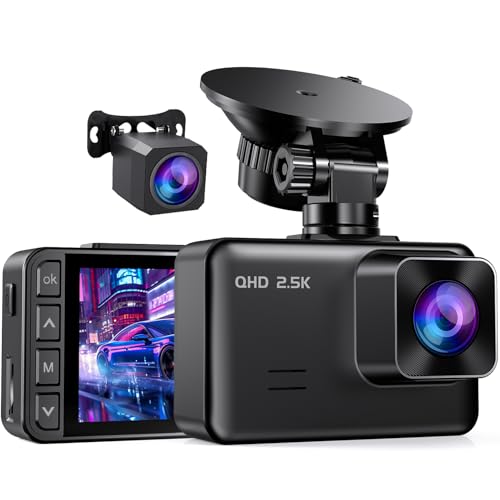
If you want one gadget that removes a daily annoyance, the wireless CarPlay adapter wins. If you want one that may matter most after a fender-bender or parking scrape, the dash cam has the edge. The right pick depends on whether your bigger headache is cable clutter or missing evidence.
| Gadget | Best for | Install effort | Hidden costs | Compatibility checks |
|---|---|---|---|---|
| Dash cam | Drivers who want incident video, parking coverage, and a record of what happened | Low to moderate; parking mode may need a hardwire kit | Memory card, possible hardwire kit, occasional mount or cable accessories | Mount fit, windshield placement, power source, parking mode support |
| Wireless CarPlay adapter | Drivers who already use wired CarPlay and want cleaner, cable-free daily use | Low; usually plug-in setup | Possible firmware updates, compatibility swaps, and occasional connection lag frustration | Existing wired CarPlay system, model compatibility, phone behavior, update support |
Dash cam vs wireless CarPlay adapter: the core trade-off
The dash cam solves missing proof. The wireless CarPlay adapter solves the daily plug-in routine. Both are useful, but they remove different annoyances, and that matters more than raw feature counts.
A dash cam is about evidence and security. A wireless CarPlay adapter is about convenience and cleaner daily use. The first pays off when an incident happens; the second pays off every time you start the car.
What problem each gadget solves
A dash cam records the road, and some models add parking mode, loop recording, and incident detection so a hit-and-run or parking bump is more likely to be documented. A wireless CarPlay adapter converts wired CarPlay to wireless, which cuts cable clutter and keeps navigation, calls, and music in the same factory-style interface you already use.
That is the real split. One gadget reduces risk after a bad event. The other removes a small but constant annoyance.
Why everyday usefulness matters more than novelty
Spec sheets can make the wrong device look attractive. A gadget that works once a month may matter less than one that improves every commute. That is why the wireless CarPlay adapter ranks first for most shoppers, while the dash cam ranks first for drivers who want protection before convenience.
Say your commute involves two short trips a day and a phone that always needs a cable. A wireless adapter changes that routine immediately. Say your street has tight parking and door dings are common. A dash cam with parking mode is the smarter first buy.
Which gadget should you buy first?
Start with the gadget that removes your most frequent annoyance. For most drivers that is the wireless CarPlay adapter, because it cleans up every drive. The dash cam moves ahead only when evidence, parking protection, or insurance disputes are the bigger concern.
| Situation | Winner | Why it wins | Skip if |
|---|---|---|---|
| Commute | Wireless CarPlay adapter | It removes the daily cable plug-in and keeps navigation and calls ready as soon as you start driving | You do not have wired CarPlay already |
| Road trip | Dash cam | Long highway hours raise the odds of an incident where video helps document what happened | You only want phone convenience and already trust your routing setup |
| Older car | Wireless CarPlay adapter | It upgrades a wired CarPlay setup without changing the rest of the cabin | Your vehicle lacks CarPlay entirely |
| Hands-free navigation | Wireless CarPlay adapter | It keeps maps and voice prompts available without a cable dangling from the console | You rarely use your phone for directions |
| Emergency readiness | Dash cam | It can capture the event before, during, and after a collision or parking impact | You only want convenience, not evidence |
| Install difficulty | Wireless CarPlay adapter | It is usually the easier setup because it plugs into an existing CarPlay system | Your car’s infotainment compatibility is uncertain |
| Hidden costs | Wireless CarPlay adapter | It usually needs fewer add-ons than a dash cam with parking mode | You mind compatibility checks and firmware updates more than extra accessories |
How a dash cam earns its keep
A dash cam is worth buying when you want a factual record of driving events. The practical value comes from video quality, a wide enough view to catch adjacent lanes, and features that keep recording without user input. It is less about novelty and more about having proof when something goes wrong.
Resolution, lens, and low-light basics
For most buyers, 1080p is the floor and 4K sits at the higher end. Garmin’s Dash Cam Mini 2 records at 1080p with a 140° lens, which is enough to show a useful forward view without turning the cabin into a gadget showroom. Low-light performance matters too, because many claims and parking incidents happen after dark.
A discreet mount and fit also matter. A dash cam that hangs low or blocks part of the windshield can become an everyday nuisance, especially in a small car.
Loop recording, parking mode, and incident detection
Loop recording overwrites old footage when storage fills up, so the camera keeps working without constant file management. Incident detection can save a clip when the car detects an impact or sudden movement. Parking mode may require a hardwire kit, so do not buy assuming every camera will protect the car while parked right out of the box.
The hidden cost is not huge, but it is real. Memory card, hardwire kit, and install time can push the total above the sticker price.
Fitment and hardwire kit checks
Before buying, check where the camera will sit, how power will reach it, and whether the chosen mount fits the windshield shape. A compact body helps on cramped dashboards. A hardwire kit is the common step-up if you want parking mode to stay active after shutdown.
- Confirm the camera’s power method.
- Check whether parking mode needs a hardwire kit.
- Choose a memory card rated for continuous recording.
- Plan a mount location that does not block your view.
- Verify low-light performance if you park outside at night.
How a wireless CarPlay adapter changes daily driving
A wireless CarPlay adapter is the cleaner daily-use gadget for drivers who already rely on CarPlay. It converts wired CarPlay to wireless, which reduces cable clutter and makes the cabin feel less fussy every time you get in. If your phone is always connected anyway, this is the simpler quality-of-life upgrade.
Wireless conversion and cable clutter
The main payoff is obvious: no more plugging in a cable before navigation starts. That matters in short trips, stop-and-go commutes, and any car where the USB port is awkwardly placed. The cabin looks cleaner too, which is part of why this gadget gets ranked first for everyday use.
CarlinKit 4.0 converts wired CarPlay to wireless. That kind of adapter is for a car that already supports CarPlay by cable; it is not a replacement for a missing infotainment system.
Connection quality and app or firmware caveats
Wireless convenience can come with connection lag, startup delay, or occasional reconnect trouble. Firmware updates may be needed, and app quality varies by product line. That is why cheap options can be a mixed bag: the hardware may work, but the software support can make the experience uneven.
A budget Bluetooth upgrade like Anker Roav SmartCharge T2 is a different class of gadget, aimed at older stereos. It uses two USB ports with up to 2.4A each and is positioned as a budget Bluetooth upgrade, which makes it useful when factory stereo compatibility matters more than CarPlay.
Compatibility checks before you buy
Do not assume every adapter works with every car. Check that your vehicle already has wired CarPlay, that your phone plays nicely with the adapter, and that the unit supports your infotainment version. A common first-timer mistake is buying an adapter for a car that never had wired CarPlay in the first place.
If your car has no CarPlay at all, a Bluetooth FM transmitter is the cheaper route. It can add hands-free calls and dual USB charging, but it does not turn the factory screen into CarPlay.
Which car gadget is actually worth buying first?
For most drivers, the wireless CarPlay adapter is the better first buy because it pays off on every trip, not only during emergencies. The dash cam becomes the better first buy when parking damage, road-rage disputes, or insurance claims are the real concern. Everyday usefulness wins unless proof matters more than convenience.
Best pick for commuters
Commuters usually benefit most from the wireless CarPlay adapter. It removes the cable routine, keeps navigation and calls ready, and fits the way most daily driving actually happens: short trips, repeated starts, and a lot of phone use. A dash cam is still useful, but it is less visible in the day-to-day routine.
Best pick for road trips
Road-trippers should lean toward the dash cam if long-distance driving and parking in unfamiliar places are part of the plan. A forward-facing record can matter more when you are far from home, and parking mode may help if the car sits in public lots overnight. If your main need is map access without a cord, the adapter still has value.
Best pick for older vehicles
Older vehicles are a split case. If the car already has wired CarPlay, a wireless adapter can modernize the cabin with minimal fuss. If it lacks CarPlay, a Bluetooth FM transmitter may be the easier, cheaper stopgap, while a dash cam can still add security without changing the stereo at all.
According to a common aftermarket rule of thumb, the average car age in the US is 13 years. That means many shoppers are working around older infotainment hardware, not buying into a brand-new tech stack.
Choose a dash cam if… / Choose a wireless CarPlay adapter if…
Choose a dash cam if your main concern is documenting crashes, parking impacts, or driver disputes. Choose a wireless CarPlay adapter if your main concern is daily convenience, cable clutter, and cleaner navigation use. The better buy is the one that solves the annoyance you deal with most often.
Choose a dash cam
You want video evidence after an incident. You park outside and want parking mode, even if that means a hardwire kit. You care more about incident coverage than screen polish. You are willing to buy a memory card and check fitment before mounting.
Choose a wireless CarPlay adapter
You already use wired CarPlay and want the cable gone. You drive often enough that plugging in each time is a real nuisance. You prefer a cleaner console over video recording. You are comfortable checking compatibility and, if needed, updating firmware.
Frequently asked questions
What gadgets are cool
The coolest car gadgets are usually the ones that remove a repeat annoyance, not the ones with the loudest spec sheet. For many drivers that means a wireless CarPlay adapter for a cleaner cabin or a dash cam for protection and proof. Useful beats flashy when the car is in daily use.
What are the coolest gadgets for a car interior?
For the cabin, the most useful cool gadgets are a wireless CarPlay adapter, a good phone mount, and a Bluetooth FM transmitter for older stereos. A one-touch phone mount with a telescopic arm, like the iOttie Easy One Touch 5, gives you a stable place for the phone without tools or a messy install.
Do cool car gadgets need installation?
Some do, some do not. A dash cam may need only a power cable, or it may need a hardwire kit for parking mode. A wireless CarPlay adapter is usually plug-in simple. A phone mount is often tool-free, while an OBD2 scanner or TPMS monitor needs more setup.
What’s the best car gadget for everyday commuting?
The wireless CarPlay adapter is often a useful commuter gadget because it can reduce setup time and hassle on trips. If your commute involves parking in crowded lots or on the street, a dash cam can be the better protection choice. The commute answer depends on what you want to stop dealing with.
Are cheap car gadgets on Amazon any good?
Some are fine, but cheap car gadgets are most likely to fail on fitment, app support, or long-term reliability. That matters for wireless adapters, dash cams, and OBD2 scanners. Budget buys can work well when the product is simple, but compatibility checks and return policies matter more than flashy claims.
What car gadget solves dead-phone or cable-clutter problems?
A wireless CarPlay adapter is the cleanest fix for cable clutter when your car already has wired CarPlay. For older stereos, a Bluetooth FM transmitter can add hands-free calls and charging without using the cable every trip. If the only problem is charging, a good mount plus a charger may be enough.
Products related to this article
Sponsored / affiliate links. As an Amazon Associate I earn from qualifying purchases. I may earn additional commission from eligible campaigns.