How To Reset Car Computer After Changing The Battery Easy
Ever replaced your car battery and then noticed your car acting a little… off? Maybe the idle is rough, or the transmission shifts weirdly. It’s a common thing people run into.
You swap out that old battery for a shiny new one, expecting everything to be smooth sailing. But then, your car’s computer, the brain of your vehicle, seems a bit confused.
This confusion can lead to minor annoyances or even bigger performance issues. It’s like giving someone a new set of instructions when they’re already halfway through a task. They need a moment to catch up.
Your car’s computer is no different. It needs to relearn some things.
The good news is that it’s usually not a big, scary problem. In most cases, you can help your car’s computer get back on track with a few simple steps. This guide will walk you through exactly why this happens and what you can do about it.
We’ll cover everything so you feel confident.
Resetting your car’s computer after a battery change helps its systems relearn optimal settings for engine performance, idle speed, and transmission shifts. This process is often simple and can prevent rough idling or shifting issues, ensuring your vehicle runs smoothly. Many cars will reset themselves over time, but a manual reset can speed this up.
What Is a Car Computer Reset?
Think of your car’s computer, often called the Engine Control Unit (ECU) or Powertrain Control Module (PCM), as its main brain. It controls many things. This includes how the engine runs, how the fuel is used, and how the transmission shifts gears.
It learns from your driving habits too.
When you disconnect the car battery, the computer loses its memory. It forgets all the learned data. This is called a “hard reset.” When you reconnect the battery, the computer starts fresh.
It goes back to its default factory settings. It doesn’t have any of your driving history anymore.
This reset is necessary because the old data might not be ideal for the new battery. Newer batteries can sometimes have slightly different voltage outputs. The computer needs to adjust to this.
It needs to relearn how to manage things efficiently.
Why Does a Battery Change Cause Issues?
When you disconnect the battery, the ECU loses its stored memory. This memory holds crucial data. This data includes learned parameters for fuel injection, ignition timing, and idle speed.
It also stores information about how your transmission shifts. All these settings are based on the old battery’s performance.
When the new battery is installed, the ECU powers up with a blank slate. It has to start from scratch to gather new data. It uses its base programming.
This base programming is often very conservative. It aims for general reliability, not peak performance for your specific car.
This is why you might notice changes. The engine might idle higher than usual. Or it might feel sluggish when you accelerate.
The transmission might shift at different points. These are all signs the computer is still learning and adapting. It’s trying to find the best settings again.
It needs time and driving to do this.
My Personal Experience: A Confused Idle
I remember one time I changed the battery in my old sedan. It was a chilly Saturday morning. I popped the hood, unhooked the terminals – red first, then black, like you’re supposed to.
I wrestled the old, heavy battery out. The new one slid in easily.
I reconnected the terminals, black first, then red. Everything seemed fine. I turned the key.
The engine fired right up! I felt a little proud, like a car expert. But then, as I let it idle, I noticed something.
The engine sound was… uneven. It wasn’t the smooth hum I was used to. It was more of a lumpy, uneven beat.
My stomach dropped a little. Was something wrong? Had I missed a step?
I put my hand on the steering wheel and felt a slight vibration. It wasn’t alarming, but it was definitely different. I worried I had caused a problem.
That feeling of confusion and slight panic is a common one for car owners.
ECU Learning Process Explained
What it is: The ECU learns by monitoring sensors. It checks things like oxygen levels and engine load. It adjusts fuel and spark to match.
This happens while you drive.
Why it matters: This learning fine-tunes your car. It makes it run better. It can improve gas mileage.
It also reduces emissions. Without it, the car runs on general settings.
How it works: The ECU stores data. It uses this data to predict future needs. It makes small changes constantly.
This is a normal part of car operation.
The “Idle Relearn” Procedure
Many cars have a specific process called “idle relearn.” This helps the computer adjust to new conditions. This includes after a battery change. The goal is to set a stable idle speed.
It makes sure the engine runs smoothly when you’re stopped.
This procedure can vary a lot by car make and model. Some cars do it automatically as you drive. Others need a manual process.
The manual process usually involves letting the car idle for a set time. Sometimes, you need to turn on accessories like the AC.
The idea is to give the computer enough data. It needs to see how the engine behaves under different loads. It learns the correct fuel and air mixture.
It also learns how to manage the engine’s speed. This helps it maintain a steady RPM.
Common Signs of a Confused Computer
After changing a battery, you might see a few tell-tale signs. These are the computer’s way of saying, “I’m still figuring things out!” The most common one is rough idling. The engine might sound unsteady.
You might feel vibrations.
Another sign is hesitation during acceleration. When you press the gas pedal, the car might not respond immediately. It could feel sluggish or jerky.
This happens because the computer hasn’t optimized the fuel delivery yet.
Transmission shifting issues are also common. The gears might shift harder than usual. Or they might shift at unexpected times.
The computer needs to relearn the shift points for optimal comfort and performance.
Sometimes, you might see the check engine light come on. This is usually temporary. It can happen if the computer detects a reading that’s outside its normal range.
Often, this light will go off on its own once the computer resets.
Contrast: Normal vs. Concerning
Normal After Battery Change:
- Slightly higher or lower idle speed initially.
- Minor rough patches during the first few drives.
- Transmission shifts feel a bit different.
- Infotainment system settings reset (radio presets, clock).
Concerning (May Need Professional Check):
- Persistent, severe engine shaking.
- Engine stalling frequently.
- Loud noises coming from the engine.
- Check engine light stays on for extended periods.
- Brakes feel spongy or unresponsive (though rare from battery change alone).
How to Manually Reset Your Car Computer
There are a few ways to encourage your car’s computer to reset itself. The easiest way is often just to drive it. The computer learns as you go.
But sometimes, you want to speed this up. A manual reset can help.
One common method is to disconnect the battery again. Leave it disconnected for about 15-30 minutes. This ensures all residual power is drained.
Then, reconnect it. This forces a full reboot.
Another method is the fuse pull. Check your car’s manual for the location of the fuse box. Find the fuse for the ECU or PCM.
Carefully pull it out. Leave it out for about 10 minutes. Then, put it back in.
This can also clear the computer’s memory.
A third option is to hold the brake pedal down. After reconnecting the battery, get into your car. Put the key in the ignition but don’t start the engine.
Press and hold the brake pedal for about 20-30 seconds. This can sometimes discharge any leftover power in the system.
Quick-Scan Table: Reset Methods
Method | Time Required | Notes
Drive Cycle | Varies (few hours to days) | Easiest, but takes time.
Battery Disconnect | 30-60 mins | Forces a full memory wipe.
Fuse Pull | 15-20 mins | Target ECU/PCM fuse; check manual.
Brake Pedal Hold | 1 min | After battery connect; discharges remaining power.
The Driving Method: Letting Your Car Learn
Honestly, for most people, the simplest and safest way is to just drive your car normally. The ECU is designed to learn and adapt over time. It needs real-world driving data.
This includes various speeds, engine loads, and idle periods.
When you start driving, the car will be in its “limp mode” or default settings. You might notice it feels less responsive. The idle might be a bit rough.
This is normal. Just drive your usual routes.
Pay attention to how the car feels. You’ll likely notice improvements over a few days. The idle will smooth out.
Acceleration will become more responsive. The transmission shifts will feel more natural. This is the computer doing its job.
For some newer vehicles, there might be a specific “drive cycle” recommended by the manufacturer. This involves a sequence of driving. It might include highway speeds, city driving, and idling.
Check your owner’s manual for any specific instructions.
Infographic: Steps to a Smoother Drive After Battery Change
Step 1: Safety First
Ensure the new battery is correctly installed and terminals are tight. Wear safety glasses.
Step 2: Initial Startup
Turn the key and let the engine idle for a few minutes. Listen for unusual noises.
Step 3: Gentle Drive
Take a short, gentle drive. Avoid hard acceleration or braking initially.
Step 4: Normal Driving
Continue with your normal driving routine for several days.
Step 5: Observe Changes
Notice improvements in idle, acceleration, and shifting over time.
When to Seek Professional Help
While most issues resolve themselves after a battery change and a little driving, there are times when you should see a mechanic. If the check engine light stays on for more than a day or two, it’s a sign of a persistent issue. Don’t ignore it.
If your car starts stalling frequently, or if the engine is shaking severely, these are more serious. These symptoms might indicate a problem beyond a simple computer reset. It could be a faulty sensor or another component.
If you notice any strange smells, like burning rubber or sulfur, stop driving immediately. These can indicate serious electrical or battery-related problems. Also, if you’re uncomfortable performing any of the manual reset steps, it’s always best to have a professional do it.
Mechanics have specialized tools called OBD-II scanners. These tools can read error codes from the car’s computer. They can also force specific relearn procedures.
This is useful for complex systems or stubborn issues. They can ensure all systems are functioning correctly.
Common Misconceptions
One common myth is that you must reset the computer after every battery change. This isn’t always true. Many modern cars are very good at adapting.
They can relearn their settings quickly on their own. You don’t always need to do anything special.
Another misconception is that disconnecting the battery erases all your car’s settings permanently. This is generally not the case for vital system data. However, personal settings like radio presets, seat memory, and the clock will be lost.
These are easy to reset.
Some people think they need to perform a complex sequence of button presses or key turns. While some cars do have specific procedures, most don’t require this. The methods described above are generally effective for most vehicles.
Always refer to your owner’s manual for specifics.
How Long Does the Reset Process Take?
The time it takes for your car’s computer to fully relearn its settings can vary. For many cars, you’ll notice improvements within the first 30 minutes to an hour of driving. The idle might smooth out, and acceleration might feel better.
However, a complete relearning process can take longer. Some sources say it can take anywhere from a few hours to several days of normal driving. This depends on how much you drive.
It also depends on the variety of driving conditions you encounter. City driving, highway driving, and idling all provide different data.
Don’t get discouraged if your car doesn’t feel perfect immediately. Give it some time. Continue with your regular driving habits.
Most of the time, the computer will adjust on its own. Patience is key here.
Protecting Your Car’s Electronics
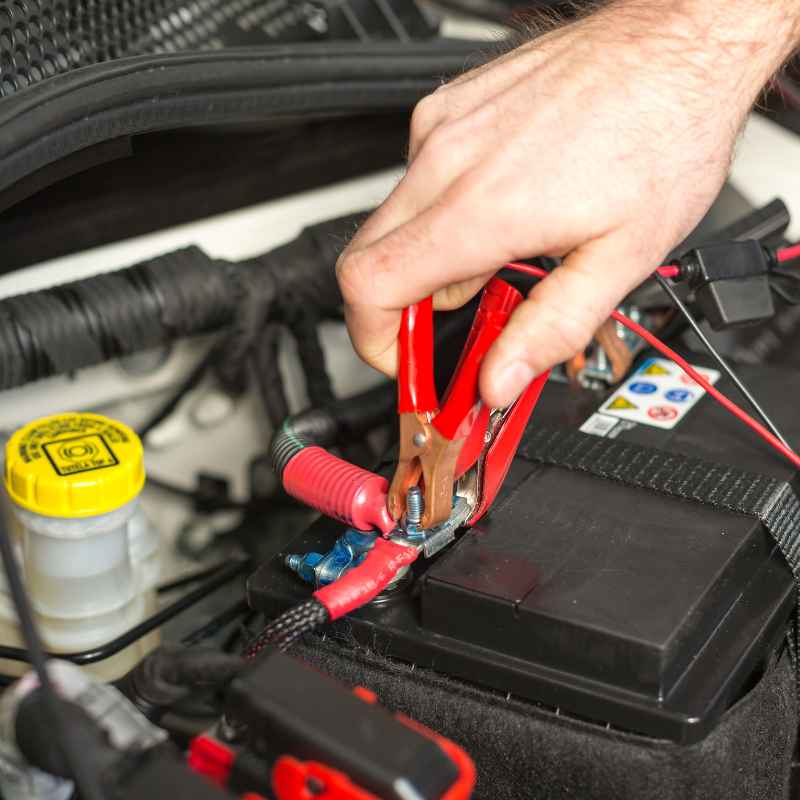
When you’re changing your car battery, it’s crucial to do it correctly. Always disconnect the negative (black) terminal first. Then, disconnect the positive (red) terminal.
When reconnecting, attach the positive terminal first, then the negative terminal.
This order helps prevent accidental short circuits. If you touch a metal tool to the car body while working on the positive terminal, and the negative is still connected, you can create a spark. This could damage sensitive electronics.
Following the correct order is a simple way to protect your car’s computer.
Using a battery tender or memory saver can also help. A memory saver is a small device that plugs into your car’s OBD-II port. It provides a small amount of power.
This keeps the computer’s memory active while the main battery is disconnected. This way, it doesn’t lose its learned settings.
Safety Tip: Battery Terminal Order
Disconnect Order:
1. Negative (-) Terminal (Black Cable)
2. Positive (+) Terminal (Red Cable)
Reconnect Order:
1. Positive (+) Terminal (Red Cable)
2. Negative (-) Terminal (Black Cable)
Why this order? This order prevents accidental sparks that could harm electronics or you.
Understanding Different Car Systems
It’s important to remember that different car systems react differently. Older cars, especially those with simpler electronics, might not show many symptoms at all. Their computers are less sophisticated.
Modern cars, however, have highly complex computer systems. They manage everything from fuel efficiency to emissions. They even control adaptive cruise control and lane keeping assist.
These systems rely heavily on precise data. So, a reset can have a more noticeable impact.
For hybrid or electric vehicles, the battery replacement process is different. It involves high-voltage systems. It’s best left to trained professionals.
These vehicles have very specific protocols for battery service.
What Does the Owner’s Manual Say?
Your car’s owner’s manual is your best friend for this kind of information. It will tell you exactly what to do. It can also explain any specific procedures for your make and model.
Look for sections on battery maintenance or electronic systems.
The manual might describe a specific idle relearn procedure. It could also mention how long it typically takes for systems to recalibrate. Following the manufacturer’s advice is always the safest bet.
It’s tailored to your car’s unique design.
Final Thoughts on a Smooth Transition
Changing a car battery is a common maintenance task. It’s normal for the car’s computer to need a little time to adjust afterward. You might notice some minor oddities in performance initially.
By understanding why this happens and knowing a few simple reset methods, you can ease this transition. Most of the time, a bit of patience and normal driving will get your car running smoothly again. If problems persist, don’t hesitate to seek expert advice.
Frequently Asked Questions
How do I know if my car’s computer needs resetting after a battery change?
You’ll often notice signs like rough idling, engine hesitation during acceleration, or unusual transmission shifting. If your car feels “off” after a battery change, it’s a good indicator the computer might need to relearn.
Can I just drive my car normally after changing the battery?
Yes, for most cars, driving normally is the easiest and most effective way for the computer to reset itself. The car’s systems will adapt to the new battery over time as you drive.
What happens if I don’t reset the car computer?
If you don’t reset it, the computer will eventually relearn on its own. However, you might experience suboptimal performance, like rough idling or poor fuel economy, until it does. A manual reset can speed this up.
Will disconnecting the battery erase my radio presets?
Yes, disconnecting the battery will usually reset your radio presets, clock, and other personal settings. It won’t typically erase critical engine or transmission learning data permanently.
How long should I leave the battery disconnected for a reset?
Leaving the battery disconnected for 15 to 30 minutes is generally sufficient to drain residual power and force a memory reset. Some recommend up to an hour for older vehicles.
Is there a specific tool to reset a car’s computer?
While professional mechanics use OBD-II scanners, you don’t typically need a special tool for a basic reset after a battery change. Simple methods like disconnecting the battery or driving are usually enough.
Products related to this article
Sponsored / affiliate links. As an Amazon Associate I earn from qualifying purchases. I may earn additional commission from eligible campaigns.