How To Unmute Ford Focus Mk3 Sony Audio Volume
Sometimes, your car’s sound system can seem to have a mind of its own, especially with complex electronics. For many Ford Focus Mk3 owners with a Sony head unit, figuring out how to unmute the audio volume can be a tricky puzzle. It’s common to accidentally mute or lower the volume completely and then struggle to get it back.
This guide is here to help! We’ll walk you through the simple steps to get your music playing again in no time. Get ready to hear your favorite tunes loud and clear.
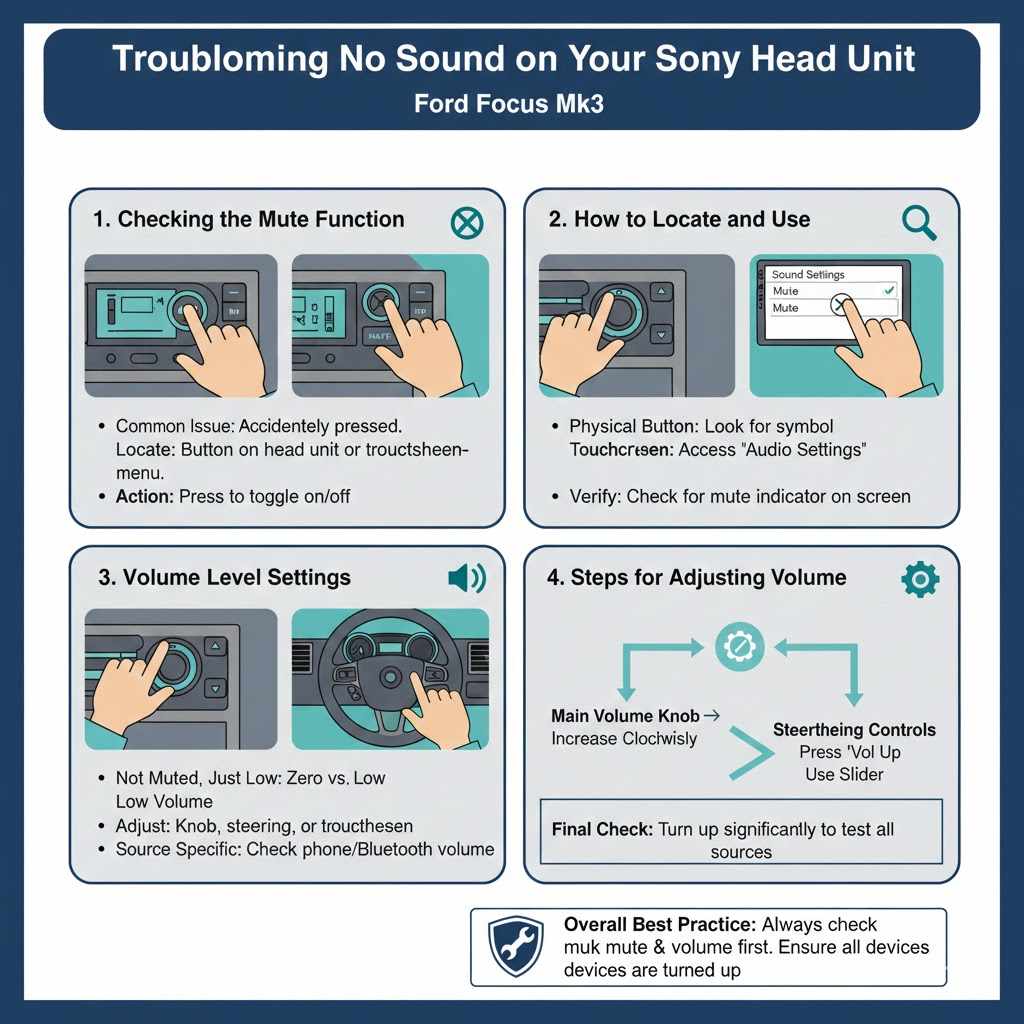
Troubleshooting No Sound on Your Sony Head Unit
This section helps you figure out why your Ford Focus Mk3’s Sony head unit isn’t making any sound. Sometimes the issue is just a simple setting that got changed by accident. Other times, it might be something a little more involved.
We’ll cover the most likely causes of muted audio and guide you toward finding a solution. This is the first step in getting your sound back so you can enjoy your drive.
Checking the Mute Function
The most common reason for no sound is that the mute function has been accidentally activated. Most Sony head units have a dedicated mute button, often represented by a speaker icon with a slash through it or simply labeled “MUTE”. Pressing this button toggles the sound on and off.
If it’s on, pressing it again should bring the sound back.
Locating this button is usually straightforward. Look on the face of your head unit, either on the left or right side of the screen or near the main control knobs. Sometimes, the mute function is accessed through the touchscreen menu.
If you press the mute button and nothing happens, or if you can’t find it, there might be another reason your audio is silent.
How to Locate and Use the Mute Button
- Scan the physical buttons on your head unit. Look for symbols like a crossed-out speaker or a bell icon.
- Press the identified button once. This action is designed to toggle the mute status. If it was muted, this should unmute it.
- If you don’t see a physical button, access the audio settings through the touchscreen. There should be a mute option within the sound or volume menus.
This simple step often resolves the issue of how to unmute the audio volume on a mk3 ford focus with a sony head unit. It’s the quickest fix and doesn’t require any technical knowledge. If you press the mute button and the volume bar appears on the screen with a line through it, it confirms that mute is active.
Pressing it again should remove that line and restore audio output.
Volume Level Settings
Another frequent cause of perceived silence is a volume level set so low that it’s barely audible. While not technically muted, a zero or near-zero volume setting can feel the same. It’s important to differentiate between a “mute” status and a “zero volume” status.
A muted system will often display a specific indicator, whereas zero volume simply means the audio signal is at its lowest possible level.
You can adjust the volume using the physical volume knob on the head unit or the steering wheel controls. If you’re using the touchscreen, you’ll likely find a volume slider or up/down buttons within the audio menu. Make sure this level is turned up sufficiently.
Sometimes, specific audio sources like Bluetooth or radio can have their own independent volume levels that might be set low.
For example, if you’re streaming music via Bluetooth, the volume on both your phone and the head unit needs to be adequate. A common scenario is having the car’s volume high but the phone’s volume low, leading to quiet audio. Always check all potential volume controls involved.
Steps for Adjusting Volume
- Use the main volume knob on the head unit. Turn it clockwise to increase the volume.
- Utilize the steering wheel audio controls. Usually, there’s a button for volume up and down.
- Check the touchscreen display. Look for a volume slider or numerical indicator and adjust it.
It’s crucial to ensure that the volume isn’t just low but that it’s actually set to a noticeable level. Sometimes, you might be so accustomed to a certain volume that you don’t realize it’s been inadvertently lowered. Increasing it significantly can reveal if this was the problem all along.
Understanding the Sony Head Unit Interface
The Sony head unit in your Ford Focus Mk3 uses a specific interface to manage its functions, including audio settings. Understanding this interface is key to troubleshooting issues like muted volume. While it might seem complicated at first, most of the controls are intuitive once you know where to look.
We’ll break down the common elements you’ll encounter when trying to resolve sound problems.
Navigating Audio Menus
Accessing the audio menus on your Sony head unit is usually done through a dedicated button or by selecting an “Audio” or “Sound” option on the main touchscreen. Once inside the audio menu, you’ll find various settings, including volume controls, equalizer (EQ) settings, balance, and fader adjustments. The mute function, if not a physical button, is typically located here as well.
The layout of these menus can vary slightly depending on the specific model of the Sony head unit installed in your Focus. However, the general principle remains the same: locate the main audio control screen. From there, you should be able to see the current volume level and any active mute status.
Many units will show a visual representation of the volume, like a bar graph, which can indicate if it’s set to zero or muted.
For instance, if you find the volume slider at the very bottom of the scale, that’s your issue. Similarly, if there’s an icon indicating “Mute” that is highlighted or active, you’ll know to press it to disable it. Familiarizing yourself with these menus is a valuable skill for any car owner.
It empowers you to manage your car’s entertainment system effectively.
Common Menu Options
- Volume Adjustment: This is where you’ll control the overall loudness.
- Source Selection: Choose between radio, CD, Bluetooth, USB, etc.
- Equalizer (EQ): Fine-tune bass, treble, and mid-range sounds.
- Balance and Fader: Adjust sound distribution between left/right and front/rear speakers.
These options are the building blocks of your car’s audio experience. By understanding how to access and modify them, you can solve many common sound issues. The key is to patiently explore the options available on your specific head unit.
Touchscreen vs. Physical Buttons
Your Ford Focus Mk3’s Sony head unit likely combines both touchscreen controls and physical buttons. Some functions, like volume adjustment or source switching, are often accessible through both. This dual control system offers flexibility, but it can also be a source of confusion when trying to troubleshoot.
For instance, if you’re used to using the volume knob, you might forget that the touchscreen also has a volume control.
When dealing with muted audio, it’s essential to check both types of controls. A physical mute button might be engaged, or a mute setting within the touchscreen menu could be active. Likewise, the volume might be set low via the knob or the touchscreen slider.
It’s best practice to try unmuting and adjusting the volume using both methods to ensure the setting is correctly applied across the system.
Consider a scenario where you might have accidentally activated the mute function through a long press on a physical button, which some systems use for shortcuts. If you then try to adjust the volume via the touchscreen, it might not respond because the mute is still active. This highlights the importance of checking all possible control methods.
If one method doesn’t seem to work, switch to the other. This approach covers all bases and increases the chances of finding and resolving the muted audio issue quickly. It’s a good way to ensure you haven’t overlooked a simple setting.
Advanced Troubleshooting for No Audio
If checking the mute function and volume levels didn’t solve the problem, it’s time to explore some more advanced troubleshooting steps. These might involve checking different audio sources, ensuring connections are secure, and looking at system settings that could be inadvertently affecting sound output. These steps require a bit more attention but can often pinpoint the root cause of persistent audio issues.
Checking Different Audio Sources
Your Sony head unit can play audio from several sources: the radio (AM/FM), CD player, USB drive, and Bluetooth-connected devices like your smartphone. It’s possible that the audio problem is specific to one source rather than the entire system. If your radio works but Bluetooth doesn’t, for example, the issue is likely with your Bluetooth connection or the phone itself.
To test this, cycle through each available audio source. Start by tuning into a clear radio station. If you get sound, the head unit’s core audio output is likely functioning.
Next, try playing a CD if your unit has one. If that also works, then the problem is probably with your digital sources. Connect a USB drive with music files and see if that plays.
Finally, try pairing your phone via Bluetooth and playing music. This systematic approach helps isolate where the sound is failing.
A real-life example: A driver found their car stereo had no sound from Bluetooth, but the radio worked fine. They realized their phone’s media volume was turned all the way down. Once they increased their phone’s media volume, the Bluetooth audio came through the car speakers perfectly.
This highlights how seemingly unrelated settings can affect audio output.
Steps to Test Sources
- Tune into the FM or AM radio.
- Insert a music CD (if applicable) and play a track.
- Connect a USB drive with MP3 files and select it as a source.
- Pair your phone via Bluetooth and play audio.
By confirming which sources work and which don’t, you can narrow down the troubleshooting efforts significantly. This helps you understand if the problem is with the car’s system or an external device.
Rebooting the Head Unit
Like any electronic device, car head units can sometimes experience temporary glitches or software hiccups that cause them to malfunction. A simple reboot can often resolve these issues by resetting the unit’s internal processes. This is similar to restarting a computer or smartphone when it behaves unexpectedly.
There are typically two ways to reboot a car head unit: a soft reboot and a hard reboot. A soft reboot usually involves powering the unit off and on again via its main power button or through a menu option if available. A hard reboot often involves disconnecting the car’s battery for a short period (e.g., 15-30 minutes) to completely discharge the unit’s memory and reset it to its factory default state.
However, be aware that a hard reboot might reset other vehicle settings, such as clock time or saved radio presets.
Before attempting a hard reboot by disconnecting the battery, consult your car’s owner’s manual to understand any potential side effects or procedures for re-entering radio security codes if your head unit requires them. For most issues related to muted audio, a soft reboot is often sufficient and less disruptive.
A user reported their Ford Focus Sony head unit suddenly stopped playing sound after a firmware update. They tried all the usual checks but nothing worked. They then performed a hard reboot by disconnecting the negative battery terminal for 20 minutes.
After reconnecting the battery and starting the car, the audio system worked perfectly, and the mute issue was resolved.
Rebooting Methods
- Soft Reboot: Turn the head unit off and then back on. Look for a power button or menu option.
- Hard Reboot (Battery Disconnect): Disconnect the negative terminal of your car battery for about 15-30 minutes. Reconnect it securely.
This process can clear out temporary software bugs that might be preventing the audio from functioning correctly. It’s a non-invasive step that often brings electronic devices back to normal operation.
Checking Fuses
Fuses are small safety devices that protect your car’s electrical systems from damage due to power surges or short circuits. If a fuse related to the audio system has blown, it can result in a complete loss of sound, even if the head unit appears to be functioning otherwise. This is a less common but possible cause for why you can’t get audio to play.
Your Ford Focus has a fuse box, typically located under the dashboard or in the engine bay. You’ll need to consult your car’s owner’s manual to identify the specific fuse(s) that power the audio system or head unit. The manual will also show you the location of the fuse box and the corresponding fuse numbers or diagrams.
Once you’ve found the correct fuse, you can visually inspect it. A blown fuse will have a broken metal filament inside.
If you find a blown fuse, you’ll need to
A study by AAA found that fuse issues are responsible for about 15% of vehicle electrical problems. For audio systems specifically, a blown fuse can easily lead to silence. Replacing a blown fuse is a relatively simple DIY repair that can restore your car’s sound system.
It’s a good idea to keep a few spare fuses of the correct ratings in your glove compartment for such situations.
Fuse Inspection and Replacement
- Locate your car’s fuse box using the owner’s manual.
- Identify the fuse(s) for the audio system or head unit.
- Carefully remove the suspect fuse using a fuse puller or pliers.
- Visually inspect the fuse for a broken filament.
- If blown,
This is a practical step that can resolve audio problems stemming from an electrical fault. It’s a key part of diagnosing why your audio might be completely unresponsive.
Specific Ford Focus Mk3 Sony Head Unit Features
Your Ford Focus Mk3 with a Sony head unit has certain features that are unique to this combination. Understanding these specific elements can help you pinpoint the reason for muted audio. Sony systems often come with enhanced audio processing and connectivity options that might be configured in ways that could affect sound output.
Understanding Audio Profiles and Settings
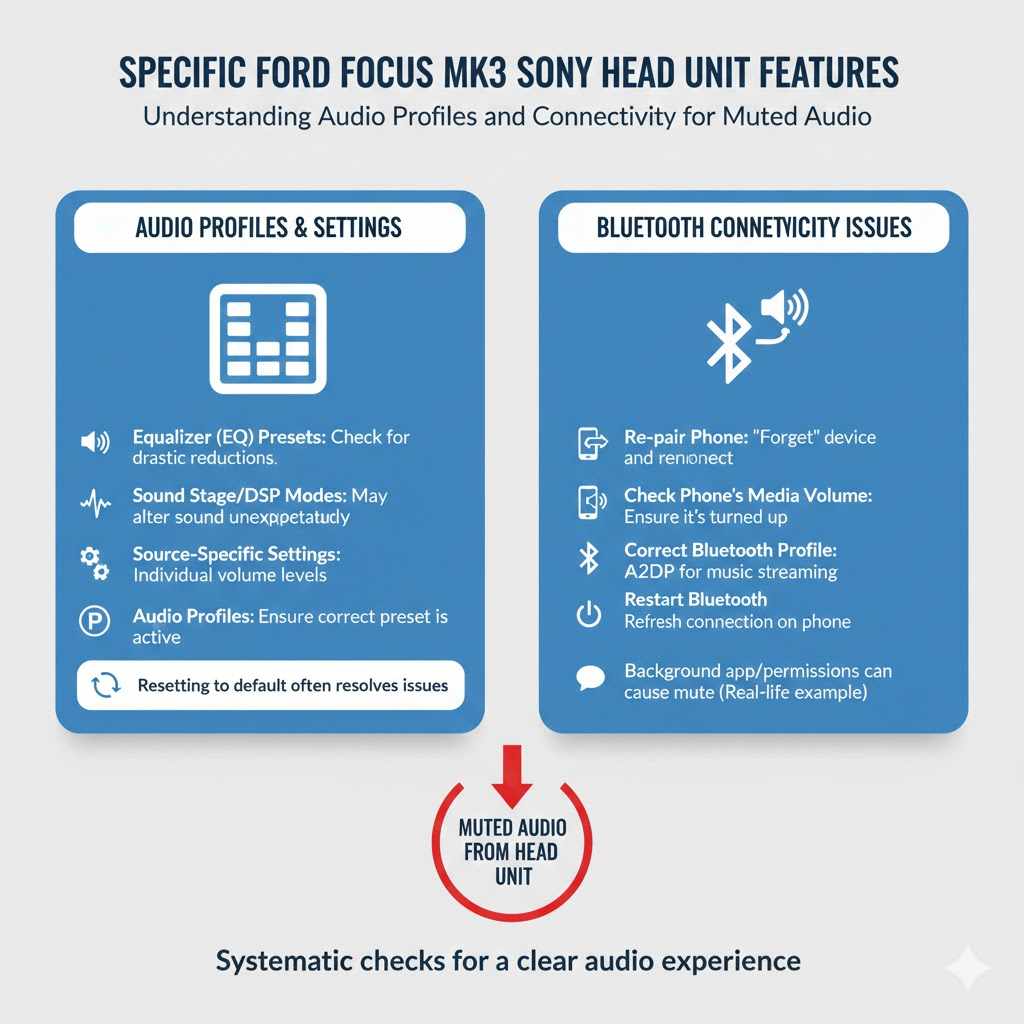
Sony head units are known for their sophisticated audio settings. These can include advanced equalizer presets, sound staging options, and even specific profiles for different audio sources. It’s possible that a particular audio profile or setting has been activated that is causing the sound to be muted or redirected.
For instance, some systems allow you to set a default volume level for each audio source. If your Bluetooth source has a default volume of zero, it would effectively be muted every time you connect your phone. Similarly, advanced equalizer settings or surround sound modes might, in rare cases, cause unexpected audio behavior if not configured correctly.
It’s worth exploring the dedicated “Audio” or “Sound” section of your Sony head unit’s menu. Look for options like “Sound Profiles,” “Equalizer Presets,” or “Advanced Audio Settings.” You might find a setting that’s inadvertently causing the mute. Resetting these to default values can often resolve such issues.
For example, if you accidentally engaged a “Night Mode” that significantly lowers volume, resetting the EQ can help.
Key Audio Settings to Check
- Equalizer (EQ) Presets: Ensure you’re not using a preset that drastically reduces all frequencies.
- Sound Stage/DSP Modes: Some modes might alter sound in ways that make it seem muted.
- Source-Specific Settings: Check if individual sources have their own volume or mute settings.
- Audio Profiles: Look for any pre-configured sound profiles that might be active.
These settings offer a lot of customization but can also be a source of confusion. Understanding their purpose helps you troubleshoot more effectively.
Bluetooth Connectivity Issues
If you primarily use your phone for music or calls via Bluetooth, issues with the Bluetooth connection itself can lead to a lack of sound. Even if the head unit shows that a device is connected, the audio stream might not be transmitting correctly. This is a common point of failure for car audio systems.
First, try disconnecting your phone from the head unit and then re-pairing it. Go to your phone’s Bluetooth settings, “forget” the car’s device, and then scan for new devices. On the head unit, navigate to the Bluetooth menu and initiate a new pairing process.
Ensure that the correct audio profile (usually A2DP for music streaming) is enabled for the connection.
Another quick fix is to ensure that your phone’s media volume is turned up. Sometimes, the car’s volume is high, but the phone’s media volume is set very low, making it seem like there’s no sound. Also, try turning off Bluetooth on your phone for a minute and then turning it back on.
This can refresh the Bluetooth connection and resolve minor glitches.
A user in an online forum for Ford Focus owners described their problem: their phone connected to the Sony head unit via Bluetooth, but no music played. They had tried everything on the car’s end. It turned out their phone had been updated, and a background app had been set to mute media audio.
Once they adjusted their phone’s app permissions, the music started playing.
Troubleshooting Bluetooth
- Re-pair your phone with the head unit.
- Check your phone’s media volume settings.
- Ensure the correct Bluetooth profile is active for audio.
- Restart Bluetooth on your phone.
A stable Bluetooth connection is vital for enjoying wireless audio. Addressing these potential issues can quickly restore sound.
Frequently Asked Questions
Question: Why did my Ford Focus Mk3 audio suddenly stop working?
Answer: Your audio might have stopped working due to the mute function being accidentally activated, the volume being set too low, a blown fuse, a software glitch in the head unit, or an issue with the specific audio source you are trying to use.
Question: Can I reset my Sony head unit to fix the sound problem?
Answer: Yes, you can try rebooting the head unit. A soft reboot involves turning it off and on. A hard reboot involves disconnecting your car battery for a short period, which resets the unit to its default settings.
Question: Is there a physical mute button on the Sony head unit?
Answer: Most Sony head units have a physical mute button, often indicated by a speaker icon with a line through it. It’s usually located on the face of the unit. You can also check the touchscreen menus for a mute option.
Question: What if only one audio source (like Bluetooth) isn’t working?
Answer: If only one source isn’t working, the problem is likely with that specific source. For Bluetooth, try re-pairing your phone or checking your phone’s volume. For USB, try a different drive or file format.
For radio, check antenna connection.
Question: How do I know if a fuse is blown in my Ford Focus?
Answer: You can tell if a fuse is blown by looking at it. A blown fuse has a broken or melted metal filament inside. You’ll need to remove the fuse from its slot to inspect it properly.
Consult your owner’s manual for fuse locations and identification.
Final Thoughts
Getting your Ford Focus Mk3’s Sony head unit to unmute its audio volume is often a simple fix. By systematically checking the mute button, volume levels, audio sources, and performing basic troubleshooting like rebooting, you can usually restore your sound. Don’t forget to consult your owner’s manual for specific fuse locations and head unit features.
Your music should be playing again soon.