Car Wheel for PC: How to Choose the Right Racing Wheel
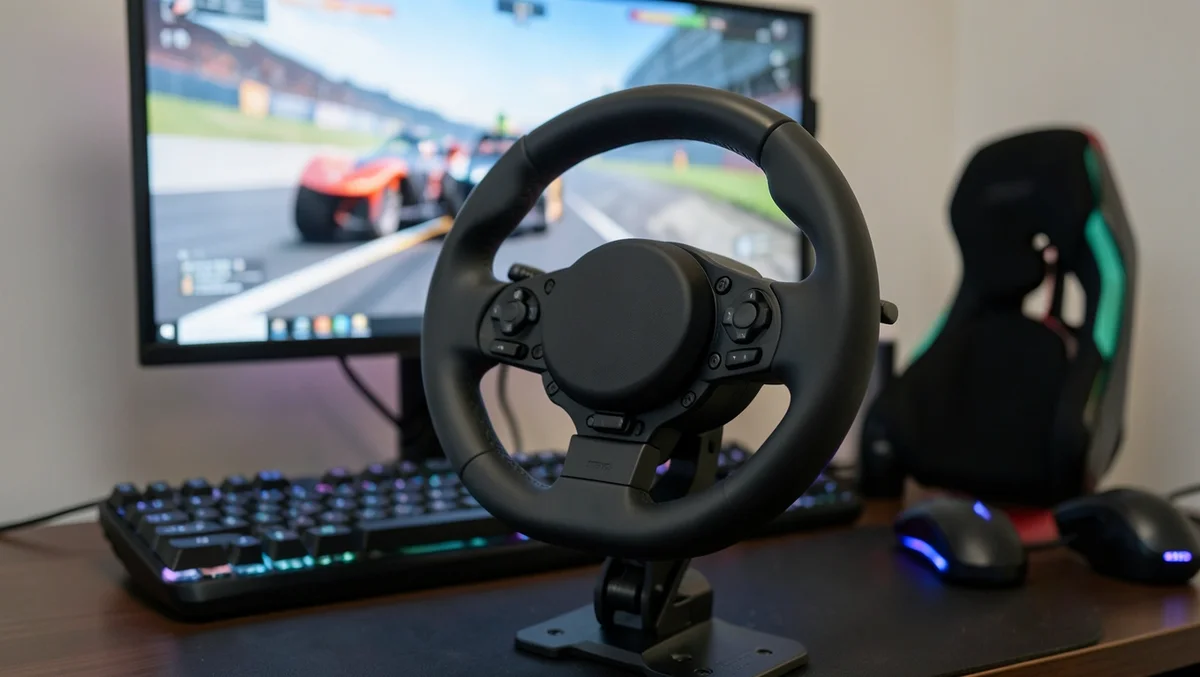
A car wheel for PC, more commonly called a racing wheel or sim racing wheel, is a steering-wheel-and-pedal controller that plugs into your computer so racing games respond to real steering, braking, and throttle input instead of a keyboard or gamepad. The two things that matter most when choosing one are the type of force feedback motor inside it and whether it is actually recognized by the racing games you want to play, not just the degrees of rotation printed on the box.
This guide covers the three drive types you will see on the market, why PC compatibility trips people up more than most buying guides mention, a real comparison of three current wheels, and how to set one up once it arrives.
What Comes in a Car Wheel Setup for PC?
BEST OVERALL CAR WHEEL FOR PC
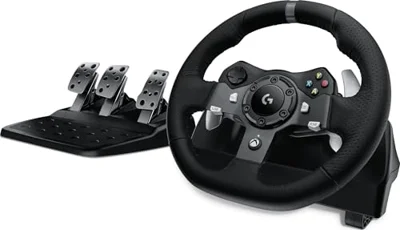 |
Logitech G920 Driving Force Racing Wheel and Pedals – $199.99 A gear-driven, dual-motor force feedback wheel with 900° of rotation and a 3-pedal set, natively supported by nearly every major PC sim racing title.
|
Most car wheels for PC ship as a bundle: the wheel itself (with a motor inside its base), a pedal set with two or three pedals (throttle, brake, and sometimes a clutch), and a USB cable. Higher-end kits add a separate shifter, a quick-release wheel rim, and a table clamp or bolt-on mounting plate. Budget models sometimes skip the clamp and rely on suction cups or a weighted base instead, which is worth checking before you buy if you plan to race hard.
Gear-Driven vs. Belt-Driven vs. Direct Drive: Which Type Do You Need?
Every car wheel for PC uses one of three motor systems to create force feedback, the resistance and vibration you feel through the wheel. The system used has a bigger effect on how the wheel actually feels than almost any other spec on the listing.
| Drive Type | How It Works | Typical Price Range | Best For |
|---|---|---|---|
| Gear-driven | Cog wheels turn the shaft directly, similar to a geared machine | $150 – $300 | Entry-level and mid-range wheels; can feel slightly notchy under hard force changes |
| Belt-driven | A tension belt connects the motor to the shaft instead of gears | $300 – $700 | Quieter, smoother feedback than gear-driven, though belts can lose tension over years of use |
| Direct drive | The wheel rim is coupled straight to the motor shaft with no gears or belt in between | $500 – $2,000+ | Serious sim racers who want the strongest, most detailed force feedback and can drive for long sessions |
Nearly every wheel under $300, including the two Logitech wheels compared below, is gear-driven. Direct drive wheels are the enthusiast tier and cost several times more, so most PC racers start with a gear-driven set and upgrade later if sim racing turns into a serious hobby.
PC Compatibility: Why DirectInput vs. XInput Actually Matters
This is the part most buying guides skip, and it is the single most common reason a car wheel for PC feels broken right out of the box. PC racing games generally expect input through one of two systems:
- DirectInput — the older, more flexible standard most dedicated PC sim racing titles (Assetto Corsa Competizione, iRacing, Automobilista 2, RaceRoom) are built around. It supports analog steering axes, force feedback, and separate pedal inputs the way a real racing wheel needs.
- XInput — the standard built for Xbox controllers. It works fine for many arcade racers and console-style games, but it was not designed with a 900° steering axis or a 3-pedal set in mind, so some PC sim titles either misread the input or reject it outright.
The Logitech G920 and G29 both work as native DirectInput wheels on PC, which is why they show up as a recommended controller in most PC sim racing games. The HORI Racing Wheel Apex, by contrast, connects to a PC as an XInput device rather than DirectInput. It will work with games that accept an Xbox-style controller, but check a specific PC sim title’s controller support page before assuming an XInput wheel will be recognized the same way a DirectInput wheel is.
3 Car Wheels for PC Compared
These three are real, currently in-stock options at three different price points, from an Xbox/PC wheel to a console-first wheel with limited PC input support.
| Wheel | Platforms | Rotation | PC Input | Price |
|---|---|---|---|---|
| Logitech G920 Driving Force | Xbox, PC | 900°, dual-motor force feedback | DirectInput (native) | $199.99 |
| Logitech G29 Driving Force | PS5, PS4, PC | 900°, dual-motor force feedback | DirectInput (native) | $199.99 |
| HORI Racing Wheel Apex | PS5, PS4, PC | Officially licensed by Sony; PC support via HORI Device Manager | XInput only, no DirectInput | $108.49 |
The two Logitech wheels are functionally the same hardware split across two console ecosystems, so pick based on which console (if any) you also own, not which one is objectively better. The HORI Apex is the cheapest of the three and works well for console-style PC racers, but its lack of DirectInput support is worth weighing carefully if your main goal is a dedicated PC sim racing title.
How to Set Up a Car Wheel on Your PC
- Mount the wheel base to your desk with the included clamp or bolt-on plate before connecting anything, so the wheel cannot shift once you start applying force.
- Connect the pedal set to the wheel base, then plug the wheel into a USB port on your PC directly rather than through a hub, since some wheels draw more power than a hub port can reliably supply.
- Install the manufacturer’s driver software (Logitech G HUB for the G920/G29, HORI Device Manager for the Apex) so Windows recognizes the wheel correctly and you can adjust force feedback strength and pedal calibration.
- Open the racing game’s control settings and select the wheel as your input device. Most PC sim racing titles have a dedicated wheel calibration screen; run it once so the game learns your wheel’s full steering range and pedal travel.
- Test force feedback and rotation range in-game before your first race. Games often default to a rotation setting (like 540°) that is lower than the wheel’s physical maximum, so match the in-game setting to the car you are driving for the most realistic feel.
What to Look For Before You Buy
- Confirm DirectInput support if you play dedicated PC sim racing titles, not just console ports.
- Check the pedal count. Two pedals (throttle and brake) cover arcade racers; a clutch pedal matters if you plan to drive manual-transmission cars in a simulator.
- Look at the mounting method. A metal desk clamp holds up far better under hard braking than suction cups or a loose weighted base.
- Match rotation to your budget tier. 900° is standard on gear-driven wheels in this price range; you do not need to pay more for higher rotation unless you are moving up to a belt-driven or direct drive wheel.
- Read the platform compatibility line carefully. A wheel listed as “PS5, PS4, and PC” or “Xbox and PC” usually still works on a PC, but the specific input method (DirectInput vs. XInput) is what actually determines which games recognize it correctly.
Frequently Asked Questions
What Is a Car Wheel for PC?
A car wheel for PC, also called a racing wheel or sim racing wheel, is a steering-wheel-and-pedal controller that plugs into a computer over USB so racing games respond to real steering, braking, and throttle input instead of a keyboard or gamepad.
How Do I Connect a Car Wheel to My PC?
Plug the wheel directly into a USB port (not through a hub), connect the pedal set to the wheel base, then install the manufacturer’s driver software, such as Logitech G HUB, so Windows recognizes the wheel and lets you calibrate force feedback and pedal travel.
Can I Use a Car Wheel for All PC Games?
No. Only games that support wheel input will recognize one, and even among racing games, some are built around DirectInput while others expect XInput. Check a specific game’s controller support page before assuming a wheel will work, especially with XInput-only wheels like the HORI Racing Wheel Apex.
Are Car Wheels Good for Racing Games?
Yes, for most racing games a wheel with pedals gives more precise, realistic control than a keyboard or gamepad, and dedicated PC sim racing titles like Assetto Corsa Competizione and iRacing are specifically designed around wheel and pedal input.
What Is the Difference Between DirectInput and XInput on a Racing Wheel?
DirectInput is the older, more flexible standard that most dedicated PC sim racing titles are built around, supporting a full analog steering axis and separate pedal inputs. XInput is the standard built for Xbox controllers; it works for many arcade-style racers but was not designed for a 900° steering wheel, so some PC sim titles do not fully recognize an XInput-only wheel.
Do I Need a Direct Drive Wheel to Start Sim Racing?
No. Direct drive wheels (roughly $500 and up) offer the strongest, most detailed force feedback, but nearly every PC racer starts with a gear-driven wheel in the $150–$300 range, like the Logitech G920 or G29, and upgrades later if sim racing becomes a serious hobby.
The Bottom Line
A car wheel for PC is worth adding if you play racing games seriously, but the drive type and PC input method matter more than the price tag alone. A gear-driven, DirectInput wheel like the Logitech G920 or G29 covers nearly every PC racing game out of the box, while cheaper XInput-only wheels like the HORI Apex are a fine budget pick as long as you confirm your favorite titles actually support them first. If you also play on Nintendo Switch or want a wheel that follows you across consoles, see our cross-platform steering wheel picks.
Products related to this article
Sponsored / affiliate links. As an Amazon Associate I earn from qualifying purchases. I may earn additional commission from eligible campaigns.