Mercedes Key Fob Battery Replacement: CR2025 & CR2032 Guide
A Mercedes key fob battery swap takes under 5 minutes with the right cell: the older SmartKey (plastic body, pre-2017) needs two CR2025 batteries, while the Chrome SmartKey (metal body, 2017+) uses one CR2025 or CR2032 depending on the panic button shape. Duracell, Energizer, or Panasonic are recommended; the battery lasts 3–4 years and costs $5–$15.
Why Your Mercedes Key Fob Battery Matters
Your Mercedes key fob controls door locks, push-button start, and the panic alarm. A dead or dying battery causes reduced range, unresponsive buttons, or a complete inability to start the car. The fix costs $5–$15 in automotive parts and accessories and takes under 5 minutes — versus $150+ at a dealership.
Signs Your Mercedes Key Fob Battery Needs Replacing
Watch for these warning signs before the battery dies completely:
- Reduced Range: You need to stand closer than usual to lock or unlock the car.
- Unresponsive Buttons: Pressing lock or unlock requires multiple attempts.
- Dashboard Warning: Newer Mercedes models display a “Replace Key Battery” message — this is a Mercedes-Benz digital service alert that should not be ignored.
- Intermittent Functionality: The key works one moment but not the next.
- Difficulty Starting: Push-button start takes multiple attempts or feels sluggish.
Replace the battery at the first sign of weakness — being locked out of your Mercedes unexpectedly is easily avoided.
Types of Mercedes Key Fobs and Their Batteries
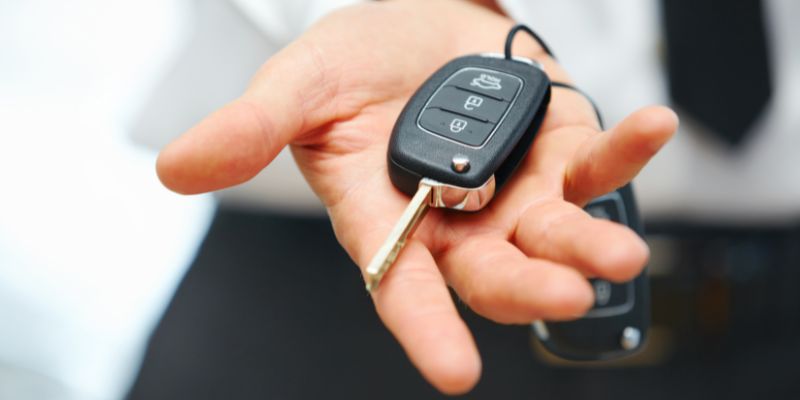
Mercedes key fob battery type is a coin cell — either CR2025 or CR2032 — and which one you need depends entirely on your key design. There are two main types:
- SmartKey (Older, Plastic Body): Found in models roughly 2000–2016. Requires two CR2025 batteries. Bulkier plastic casing with a square-ish shape.
- Chrome SmartKey (Metal Body, Triangular Panic Button): Found in models 2017 and later. Requires one CR2032 battery. Sleeker metal-cased design.
- Chrome SmartKey (Metal Body, Circular Panic Button): Older Chrome variant. Requires one or two CR2025 batteries depending on the specific model.
When in doubt, open the battery compartment and read the cell number printed on the old battery before buying a replacement.
| Key Type | Battery Type | Number of Batteries |
|---|---|---|
| SmartKey (Older, Plastic) | CR2025 | 2 |
| Chrome SmartKey (Triangular Panic Button, 2017+) | CR2032 | 1 |
| Chrome SmartKey (Circular Panic Button) | CR2025 | 1 or 2 |
Best Mercedes Key Fob Battery Pick

Key Fob Replacement Batteries for Mercedes-Benz CR2025
Mercedes-specific CR2025 cells sized and labeled for SmartKey and Chrome SmartKey fobs — no guessing the right fit.
- Best for: Older SmartKey (plastic body) and Chrome SmartKey with circular panic button
- Why we picked it: Mercedes-specific labeling with model fitment list; includes two cells to replace both batteries in the SmartKey at once
- Main drawback: Not compatible with newer Chrome SmartKey models requiring CR2032 — check your panic button shape first
Compare more Mercedes key fob battery options
 Option 1 Key Fob Batteries for Mercedes-Benz CR2032
|
 Option 2 CR2025 Key Fob Battery 2-Pack
|
 Option 3 CR2025 Mercedes Key Fob Batteries (2 Pack)
|
As an Amazon Associate we earn from qualifying purchases.
Tools You’ll Need to Change the Battery
No special tools required — just three items:
- Replacement Battery: CR2025 or CR2032 — confirm your type from the table above (Panasonic, Duracell, or Energizer recommended).
- Small Flathead Screwdriver or Coin: To gently pry open the battery compartment.
- Clean Cloth or Gloves: Skin oils can accelerate battery oxidation — avoid touching the cell directly.
Step-by-Step Guide to Changing a Mercedes SmartKey Battery
The following steps cover the older plastic-body SmartKey that uses two CR2025 batteries:
- Remove the Emergency Key: Find the latch or sliding tab at the end of the key fob. Pull it to release the metal emergency key.
- Open the Battery Compartment: Insert the emergency key horizontally into the open slot. Push in and lift gently to pop open the battery compartment.
- Remove the Old Batteries: Carefully lift out both CR2025 batteries with a screwdriver or fingernail. Note which side faces up.
- Insert the New Batteries: Place two new CR2025 batteries in the same orientation. Positive (+) side must match the original position.
- Close the Compartment: Snap the battery cover back until you hear a click.
- Reinsert the Emergency Key: Slide the metal key back into its slot until it clicks.
- Test the Key Fob: Press lock or unlock near your car. If it doesn’t respond, check battery orientation.
Step-by-Step Guide to Changing a Chrome SmartKey Battery
For the newer metal-body Chrome SmartKey (2017 and later):
- Release the Emergency Key: Press the silver tab at the bottom of the fob to slide out the emergency key.
- Open the Key Fob: Insert the emergency key tip into the narrow gap and push gently to pop off the back cover.
- Remove the Old Battery: Lift out the CR2025 or CR2032 battery, noting that the positive (+) side faces up on most models.
- Insert the New Battery: Place the replacement battery in the same position and orientation.
- Reassemble the Fob: Snap the back cover on and reinsert the emergency key.
- Test the Key Fob: Press a button to confirm the lock or unlock function works.
Tips for a Successful Battery Replacement
- Use High-Quality Batteries: Panasonic, Duracell, or Energizer — generic cells often fail within months.
- Check Orientation First: Wrong polarity is the most common reason a freshly installed battery fails to work.
- Replace Both Batteries Together (SmartKey): Mixing an old and new cell causes uneven voltage and unreliable performance.
- Avoid Bare Fingers on the Battery: Use gloves or a clean cloth — skin oils accelerate oxidation.
- Use Gentle Force Only: A flathead screwdriver works, but excessive force can crack the plastic casing.
- Test Before Closing: Drop in the battery and test before snapping everything shut.
What to Do If the Key Fob Still Doesn’t Work
If the fob fails after a battery swap, work through these checks before visiting a dealership:
- Re-check Battery Orientation: Flip the battery and test again — wrong polarity is the most common culprit.
- Try a Different Battery: Even new batteries can be defective. Swap in a cell from a different pack.
- Inspect for Physical Damage: Look for cracks, corroded contacts, or moisture inside the compartment.
- Resync the Key Fob: Some Mercedes models require a resync sequence after battery replacement — consult your owner’s manual.
- Visit a Dealership: If the fob still fails, the electronic module may need reprogramming or replacement.
How to Extend the Life of Your Key Fob Battery
A CR2025 or CR2032 in a Mercedes key fob typically lasts 3–4 years. These habits help reach the upper end of that range:
- Store in a Cool, Dry Location: Heat above 140°F and humidity both accelerate drain.
- Avoid Constant Button Presses: Every press draws current — pressing unnecessarily shortens lifespan.
- Use a Protective Case: A silicone or leather case prevents moisture and impact damage.
- Keep a Spare Battery: Store a spare CR2025 and CR2032 in your glove compartment for on-the-spot replacement.
FAQs
What battery does a Mercedes key fob use?
Most Mercedes key fobs use a CR2025 lithium coin cell. The older plastic SmartKey requires two CR2025 batteries. The newer Chrome SmartKey (metal body, triangular panic button, 2017+) typically uses one CR2032. Open the battery compartment and read the number printed on the old cell to confirm before buying.
How do you start a Mercedes with a dead key fob battery?
Hold the back of the key fob directly against the push-button start and press the button. Most Mercedes models detect the fob’s passive transponder chip even without battery power, allowing one emergency start. Use the mechanical emergency key hidden inside the fob to physically unlock the driver’s door if the handle sensor doesn’t respond.
How often should I replace my Mercedes key fob battery?
A Mercedes key fob battery lasts approximately 3–4 years under normal use. Replace it as soon as you notice reduced range, slow button response, or a dashboard “Replace Key Battery” alert. Waiting until the battery is completely dead risks being locked out without warning.
Can I use any brand of battery for my Mercedes key fob?
Stick with trusted brands — Panasonic, Duracell, or Energizer CR2025 / CR2032 are the standard recommendations. Generic no-name batteries often have inconsistent voltage and fail in under a year. Premium brands cost $3–$8 per cell and regularly outlast cheaper alternatives by 2–3 years.
What happens if I don’t replace the Mercedes key fob battery in time?
A completely dead key fob battery disables keyless entry, remote lock/unlock, and the panic alarm. Push-button start may also fail. You can still unlock the door with the mechanical emergency key inside the fob, and most Mercedes models allow one emergency start by holding the fob directly against the start button — but it is an inconvenient situation best avoided by replacing the battery early. For other makes and models, see our car key battery replacement guide.
Products related to this article
Sponsored / affiliate links. As an Amazon Associate I earn from qualifying purchases. I may earn additional commission from eligible campaigns.