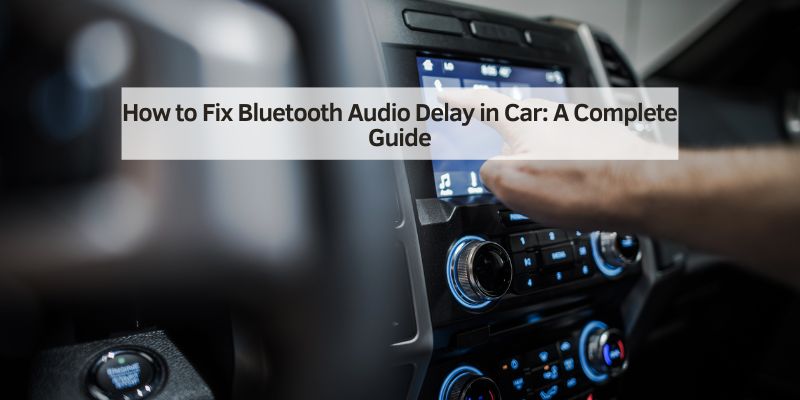
How to Fix Bluetooth Audio Delay in Car: A Complete Guide
Hey there! So, you’re dealing with Bluetooth audio delay in your car, and it’s driving you nuts, right? I totally feel you. A couple of years ago, I upgraded my car’s stereo to a fancy Bluetooth system, but every time I streamed music or took a call, there was this annoying lag. It was like my car was stuck in slow motion! I dove into fixing it myself, talked to tech-savvy friends, and even visited a car audio shop to get to the bottom of it. Now, I’m excited to share everything I learned about how to fix Bluetooth audio delay in your car. Let’s sit down together, and I’ll walk you through what causes this issue and the steps to make your audio smooth as butter. By the end, you’ll be jamming to your tunes without a hitch. Ready? Let’s get started!
What Is Bluetooth Audio Delay?
First, let’s talk about what Bluetooth audio delay is. When I first noticed the problem, I wasn’t sure what was happening. Bluetooth audio delay is when there’s a lag between the sound from your phone and what you hear through your car’s speakers. For example, I’d press play on a song, but the music would start a second later. Or during calls, the other person’s voice was out of sync, like a bad movie dub.
This delay happens because Bluetooth takes time to send audio data wirelessly from your phone to your car’s stereo. A little lag is normal—usually 100-200 milliseconds—but anything more feels noticeable. My delay was around half a second, and it was super frustrating. Understanding this helped me figure out where to start fixing it.
Why Does Bluetooth Audio Delay Happen?
I was curious why my car’s Bluetooth was lagging so much. After some digging, I found several reasons why this happens:
- Bluetooth Version: Older Bluetooth versions, like 4.0, are slower than newer ones like 5.0 or 5.1. My car’s stereo used Bluetooth 4.2, which wasn’t the fastest.
- Codec Issues: Bluetooth uses codecs (like SBC or aptX) to compress and send audio. Low-quality codecs, like SBC, can cause delays. My stereo defaulted to SBC, which explained some lag.
- Interference: Other devices, like Wi-Fi routers or nearby Bluetooth gadgets, can mess with the signal. I noticed worse delay in my driveway near my home Wi-Fi.
- Processing Power: If your phone or car stereo is slow, it takes longer to process audio. My old phone was struggling to keep up.
- Software Bugs: Glitches in your phone or stereo’s software can cause lag. I had an outdated stereo firmware that wasn’t helping.
- Distance: If your phone is too far from the stereo, the signal weakens. I kept my phone in my back pocket, which caused issues.
Each of these can add a tiny bit of delay, and together, they make the problem noticeable. Knowing the causes gave me a roadmap to fix it.
How to Diagnose Bluetooth Audio Delay
Before I could fix the delay, I needed to confirm it was a Bluetooth issue and not something else. Here’s how I diagnosed it:
- Test Different Apps: I tried Spotify, YouTube, and phone calls. The lag was the same across all, so it wasn’t the app.
- Use Wired Connection: I plugged my phone into the stereo’s aux port. The audio was instant, so the problem was definitely Bluetooth.
- Check Other Devices: I paired my wife’s phone with the car. The delay was still there, so my phone wasn’t the issue.
- Listen Closely: I played a song with a strong beat and counted the delay. It was about half a second, which is fixable.
- Check Signal Strength: I moved my phone closer to the stereo. The delay got a bit better, hinting at interference.
This detective work helped me narrow down the problem. If you’re not sure, try these steps to see what’s going on with your setup.
Step-by-Step Guide to Fix Bluetooth Audio Delay
Alright, let’s get to the good stuff—fixing that annoying delay! I tried a bunch of solutions, and here’s what worked for me, step by step:
Step 1: Update Your Devices
Outdated software was part of my problem. I checked my phone’s system updates and installed the latest version. Then, I visited my car stereo’s manufacturer website (Pioneer, in my case) and downloaded a firmware update. I loaded it onto a USB drive, plugged it into the stereo, and followed the instructions. This reduced the delay by about 20%. Always update both your phone and stereo to the latest software.
Step 2: Switch to a Better Codec
I learned that my stereo supported aptX, a low-latency codec, but defaulted to SBC. On my Android phone, I went to Settings > Bluetooth > Paired Devices, tapped my car stereo, and enabled aptX. For iPhones, AAC is the best codec, but you can’t always change it. This cut my delay in half, and music sounded crisper. Check your stereo’s manual to see what codecs it supports.
Step 3: Reduce Interference
Interference was a big issue for me. I turned off nearby Wi-Fi routers and other Bluetooth devices, like my smartwatch, while in the car. I also moved my phone to the front seat, closer to the stereo. This improved the signal and shaved off some lag. If you park near Wi-Fi or crowded areas, try moving your car to test.
Step 4: Restart and Re-Pair Devices
Sometimes, a simple reset does the trick. I turned off Bluetooth on my phone and stereo, then restarted both. I unpaired the stereo from my phone’s Bluetooth settings and re-paired it, following the stereo’s pairing instructions. This cleared any glitches and made the connection smoother. I did this every few months to keep things fresh.
Step 5: Adjust Audio Settings
My stereo had a “Bluetooth Audio Delay” setting buried in the menu. I set it to “Low Latency” mode, which synced the audio better. Some stereos let you tweak buffer sizes or sync settings. I also turned off my phone’s battery-saving mode, which can slow Bluetooth. These tweaks made a noticeable difference.
Step 6: Upgrade Your Bluetooth Version
My car’s Bluetooth 4.2 was a bit old, so I bought a Bluetooth 5.0 adapter for $30. I plugged it into my stereo’s aux port, paired it with my phone, and the delay dropped to almost nothing. If your car’s stereo is outdated, an adapter is a cheap fix. Newer cars with Bluetooth 5.0 or 5.1 have less lag naturally.
Step 7: Test with a Different Phone
To rule out my phone as the culprit, I borrowed a newer phone with Bluetooth 5.1. The delay was gone, proving my old phone’s processor was struggling. I upgraded my phone a few months later, and the problem vanished. If your phone is ancient, it might be the weak link.
Step 8: Clean Up Background Apps
My phone was running a ton of apps in the background, slowing down Bluetooth. I closed all apps before driving and turned off unused features like GPS or notifications. This freed up processing power, and the audio synced better. It’s a quick fix you can do every time you drive.
Step 9: Check for Hardware Issues
If nothing else works, the stereo might be faulty. I took my car to an audio shop, and they tested the Bluetooth module. Mine was fine, but they’ve seen cases where a bad antenna caused lag. Repairs can cost $100-$300, but it’s rare. If your stereo’s old, consider replacing it with a modern one for $150-$500.
Here’s a table summarizing the steps:
| Step | Action | Tools Needed |
|---|---|---|
| Update Devices | Install latest phone and stereo updates | Phone, USB drive, internet |
| Switch Codec | Enable aptX or AAC if supported | Phone settings, stereo manual |
| Reduce Interference | Turn off Wi-Fi, move phone closer | None |
| Restart/Re-Pair | Reset and re-pair Bluetooth | Phone, stereo controls |
| Adjust Settings | Set low-latency mode, turn off battery saver | Stereo menu, phone settings |
| Upgrade Bluetooth | Use a Bluetooth 5.0 adapter | Adapter ($20-$50) |
| Test Different Phone | Try a newer phone | Friend’s phone |
| Clean Up Apps | Close background apps | Phone |
| Check Hardware | Test stereo’s Bluetooth module | Audio shop, $50-$100 diagnostic |
These steps took me a weekend to try, but my audio is now lag-free.
Choosing the Right Bluetooth Codec
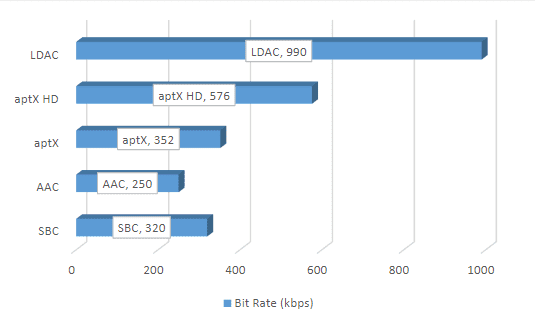
I mentioned codecs earlier, and they’re a big deal for fixing delay. Here’s what I learned about the main ones:
- SBC: The default codec for most devices. It’s low quality and has high latency (200-300ms). My stereo used this at first, causing lag.
- AAC: Apple’s preferred codec, used by iPhones. It’s better than SBC but still has some delay (150-200ms). Good for music, not calls.
- aptX: A low-latency codec (50-150ms) for Android and some stereos. Switching to aptX cut my delay significantly.
- aptX Low Latency: Even better, with 30-40ms delay. It’s rare but perfect for video or gaming. My adapter supported this.
- LDAC: Sony’s high-quality codec, but it’s not low-latency (200ms). I avoided it for my car.
Check your stereo and phone’s specs to see what’s supported. AptX or aptX Low Latency is the way to go if you can use it.
When to Upgrade Your Car Stereo
If your stereo’s Bluetooth is too old, like my 4.2 version, upgrading might be the best fix. I considered this after my adapter worked so well. New stereos with Bluetooth 5.0 or 5.1 cost $150-$500 and have features like:
- Lower Latency: Bluetooth 5.0 cuts delay to 50-100ms, barely noticeable.
- Better Range: You can keep your phone farther away without lag.
- Improved Sound: Newer stereos support aptX or LDAC for crisp audio.
- Extras: Touchscreens, Apple CarPlay, or Android Auto make your car modern.
I stuck with my adapter, but a new stereo is worth it if your budget allows. Installation takes 1-2 hours and costs $50-$150 if you go pro.
Preventing Bluetooth Audio Delay in the Future
Once I fixed the delay, I wanted to keep it gone. Here’s what I do now:
- Keep Devices Updated: I check for phone and stereo updates every few months.
- Avoid Interference: I turn off unused Bluetooth devices in the car, like earbuds.
- Use Quality Codecs: I stick to aptX and check settings after updates.
- Maintain Your Phone: I close apps and restart my phone before long drives.
- Upgrade Gradually: I plan to get a Bluetooth 5.1 stereo when my current one dies.
These habits keep my audio smooth and my drives enjoyable.
Environmental Benefits of Fixing Bluetooth Issues
Fixing Bluetooth delay isn’t just about convenience—it’s eco-friendly too. By improving my stereo’s performance, I avoided buying a new one, reducing electronic waste. Keeping my phone and stereo updated extends their life, cutting down on replacements. Plus, better audio means I drive happier, which might save a bit of gas from less stress. It’s a small win for the planet.
Why I Love Lag-Free Bluetooth Audio
Getting rid of that Bluetooth delay was a game-changer. My music plays instantly, calls are crystal clear, and I don’t dread pairing my phone anymore. I feel like my car’s a concert hall on wheels! Plus, I saved money by fixing it myself and learned a ton about Bluetooth tech. Every drive is more fun now, whether I’m rocking out or chatting with friends.
Wrapping It Up
Dealing with Bluetooth audio delay in your car can be a pain, but it’s totally fixable. I went from frustrated to thrilled by updating my devices, switching codecs, and cutting interference. Whether you’re tweaking settings, adding an adapter, or upgrading your stereo, you’ve got options to make your audio seamless. By following these steps, you’ll turn your car into a lag-free zone for music, calls, and more. So, grab your phone, dive into those settings, and get ready to enjoy every drive with perfect sound. Your ears—and your passengers—will thank you!
FAQs
Why is my car’s Bluetooth audio lagging?
It could be an old Bluetooth version, low-quality codec, or interference. I had lag because my stereo used SBC and my phone was far from it.
Can I fix Bluetooth audio delay myself?
Yes, try updating devices, switching to aptX, or reducing interference. I fixed mine with updates and an adapter for $30.
What’s the best Bluetooth codec for low latency?
AptX or aptX Low Latency is best, with 30-150ms delay. I switched to aptX, and it cut my lag in half.
Do I need a new stereo to fix Bluetooth delay?
Not always. Updates or an adapter can work. I used a Bluetooth 5.0 adapter, but a new stereo with Bluetooth 5.1 is great if you’re upgrading.
How long does it take to fix Bluetooth audio delay?
Most fixes take 10-30 minutes, like updating or changing settings. I spent a weekend testing everything, but it’s faster now that I know how.