Loose Connection: The Shocking, Essential Truth
Yes, absolutely. A loose connection on the positive battery terminal can definitely cause your battery to run down. This weak link stops your alternator from properly recharging the battery while you drive. The poor connection creates electrical resistance, blocking the flow of power and leading to a dead battery, even if the battery itself is perfectly healthy.
There’s nothing more frustrating than turning the key in your ignition and hearing… nothing. Or maybe just a sad little click. You immediately think the worst: a dead battery that needs replacing. But what if I told you the problem might be much simpler, and the fix could be completely free?
Often, the culprit is something small but mighty: a loose battery connection. It’s a shockingly common issue that mimics the symptoms of a failed battery or alternator, sending drivers on an expensive and unnecessary repair journey. Don’t worry, though. I’m here to guide you through it.
In this guide, I’ll show you exactly how a tiny loose connection can cause such a big headache. We’ll walk through how to spot the signs, how to safely check your battery, and how to tighten things up yourself. Let’s get your car running reliably again, together.
The Shocking Truth: How a Loose Connection Drains Your Battery
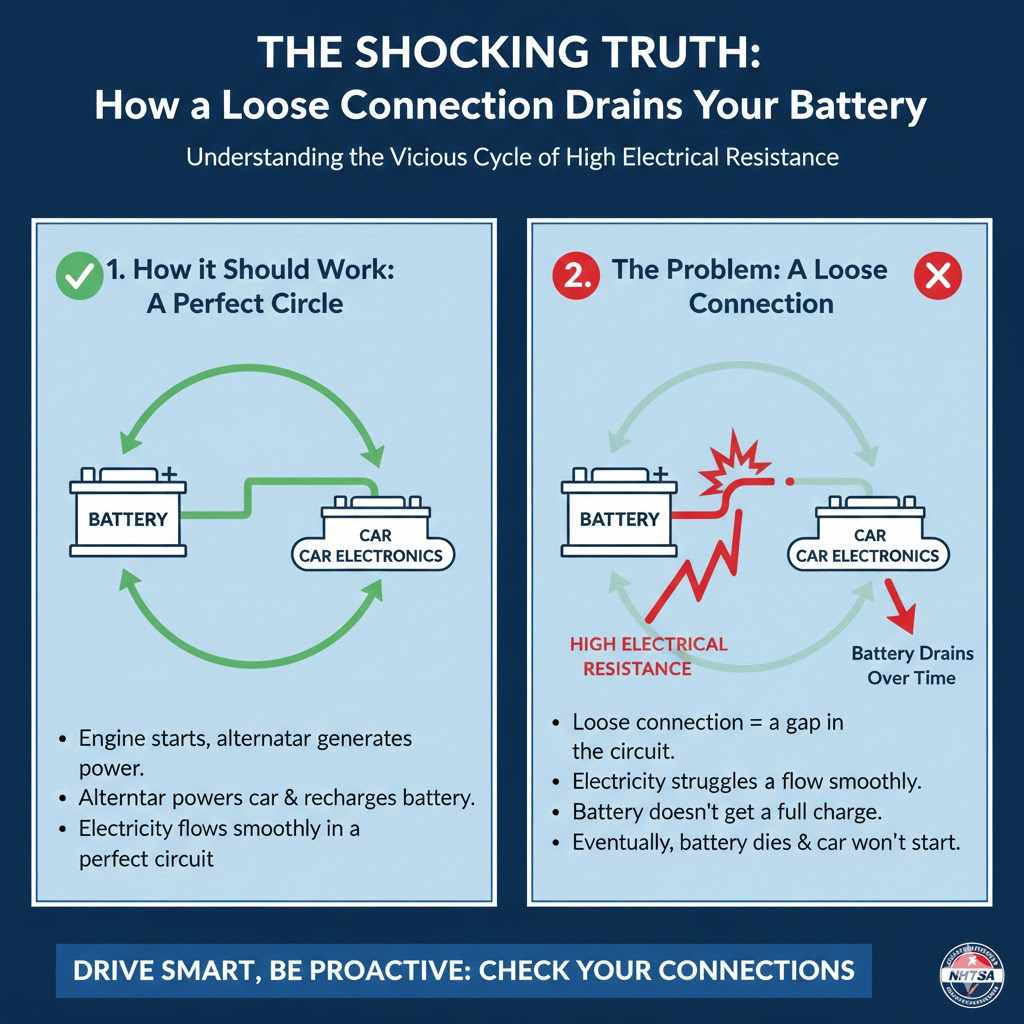
It seems backward, doesn’t it? How can something that’s loose cause your battery to drain? The answer lies in how your car’s electrical system works. Think of it like a simple circle of power.
Your battery provides the initial jolt to start the engine. Once the engine is running, the alternator takes over. The alternator is like a little power plant that generates electricity to run your car’s lights, radio, and computer. Crucially, it also recharges your battery, keeping it full for the next time you need to start the car.
Now, imagine a loose connection on your positive battery terminal. This loose connection acts like a roadblock in that circle of power. The electricity from your alternator tries to flow back to the battery to recharge it, but the loose connection creates a gap. This gap causes something called high electrical resistance.
Instead of flowing smoothly, the electricity struggles to jump that gap. Not all of it makes it across. This means your battery isn’t getting the full, consistent charge it needs. Over time, even with the alternator working perfectly, your battery slowly runs down. You might drive for an hour, but your battery only gets a 15-minute charge. Eventually, it won’t have enough juice left to start your car.
More Than Just a Dead Battery: Other Dangers of a Loose Connection
A loose battery terminal is more than just an inconvenience; it can create other serious problems for your vehicle. That high resistance we talked about doesn’t just block power—it generates a lot of heat. This can lead to a few dangerous situations:
- Melting and Damage: The intense heat can melt the plastic around the battery post and damage the battery cable itself. In severe cases, it can even cause the lead battery post to soften or melt.
- Voltage Spikes: The inconsistent connection can cause sudden spikes or drops in voltage. Your car’s sensitive electronics, like the engine control unit (ECU), radio, and dashboard displays, are designed to work with a steady 12-volt supply. These spikes can confuse or even permanently damage them, leading to very costly repairs.
- Arcing and Fire Hazard: Electricity jumping across the gap can create a spark, known as an arc. With flammable hydrogen gas naturally emitted by car batteries, a spark creates a significant risk of a fire or even an explosion under the hood. For more on vehicle safety, you can always check resources like the National Highway Traffic Safety Administration (NHTSA).
This is why fixing a loose connection isn’t just about getting your car to start; it’s about protecting the entire electrical system and ensuring your safety.
Is It a Loose Connection or a Bad Battery? Spotting the Symptoms
The trickiest part about a loose connection is that its symptoms are almost identical to those of a dying battery or a failing alternator. This often leads people to replace perfectly good parts. Here are the key warning signs to watch for that might point to a simple loose connection.
Common Symptoms of a Loose Battery Connection
- Trouble Starting the Car: This is the most obvious sign. You might hear a single click or a rapid clicking sound when you turn the key, but the engine won’t turn over. The connection might be just good enough to power your dashboard lights but not strong enough to crank the engine.
- Flickering Lights: Do your headlights or interior lights flicker or seem dim, especially when you start the car or when the engine is idling? A loose connection causes an inconsistent power supply, leading to this flickering.
- Loss of Power While Driving: In some cases, a bump in the road can be enough to momentarily break the connection. You might feel the engine stutter, the radio cut out, or see the dashboard lights flash for a second.
- Warning Lights on the Dash: A poor connection can trigger the battery warning light, the check engine light, or other electrical fault warnings because the car’s computer is getting confusing voltage readings.
- Corrosion Around the Terminals: A loose connection can sometimes accelerate the buildup of white, blue, or greenish crusty stuff (corrosion) on the battery posts and terminals. This corrosion makes the connection even worse.
- The “Wiggle Test” Works: If you can physically wiggle the battery cable connector on the battery post with your hand (with the engine off!), it is too loose. There should be zero movement.
To help you diagnose the issue, here’s a table comparing the common symptoms of a loose connection versus a genuinely bad battery.
| Symptom | Likely from a Loose Connection? | Likely from a Bad Battery? | Md Meraj’s Quick Tip |
|---|---|---|---|
| Car is completely dead (no lights, no sound). | Possible | Very Likely | A loose connection can sometimes disconnect completely. Always check the terminals first. |
| Clicking sound when trying to start. | Very Likely | Very Likely | This means there’s not enough power to turn the engine. It could be either issue. |
| Lights flicker or are dim. | Extremely Likely | Possible | Flickering is a classic sign of an inconsistent power flow from a loose connection. |
| Car starts after a jump, but dies again later. | Very Likely | Very Likely | This shows the battery isn’t recharging. The cause could be a loose connection, bad alternator, or bad battery. |
| Car loses power briefly while driving. | Very Likely | Unlikely | A battery usually dies gracefully. A sudden power cut often points to a connection issue. |
| Battery warning light is on. | Likely | Likely | This light indicates a charging system problem, which can be caused by the battery, alternator, or the connection between them. |
As you can see, the symptoms overlap a lot. That’s why the very first thing you should always do when you have battery trouble is check that the connections are clean and tight. It’s the easiest and cheapest place to start.
Your Step-by-Step Guide to Safely Checking and Tightening Battery Connections
Okay, it’s time to get your hands a little dirty! Don’t be intimidated. This is one of the simplest and most rewarding bits of car maintenance you can do. Follow these steps carefully, and you’ll have it done in less than 15 minutes.
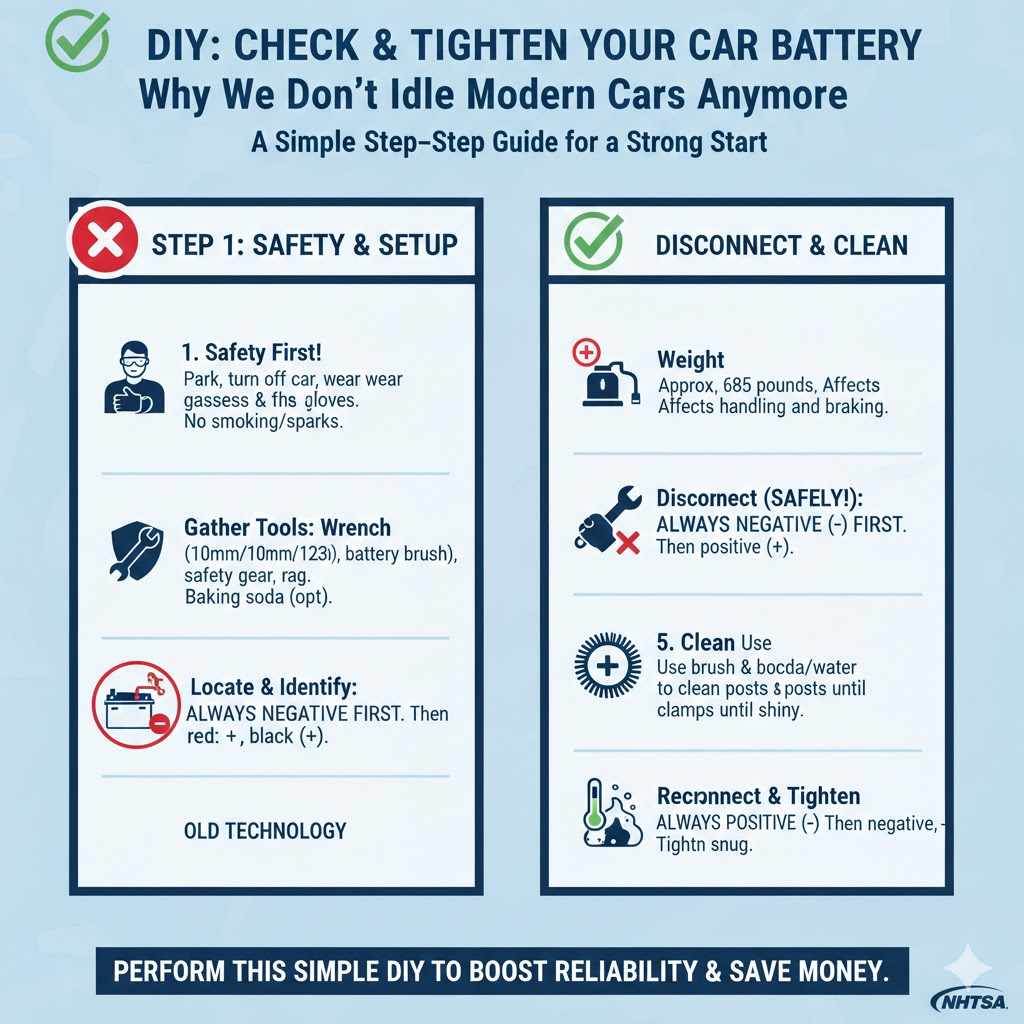
Step 1: Safety First!
Before you touch anything under the hood, safety is your number one priority. A car battery is powerful and needs to be treated with respect.
- Park on a flat, level surface. Make sure your car is in Park (for automatics) or in gear with the parking brake on (for manuals).
- Turn the engine off. Remove the keys from the ignition and put them in your pocket to prevent any accidental starts.
- Wear safety gear. Put on safety glasses and gloves. Battery acid is corrosive, and you want to protect your eyes and skin.
- No smoking or sparks. Keep any open flames or sources of sparks far away from the battery, as it can release flammable hydrogen gas.
Step 2: Gather Your Tools
You don’t need a professional mechanic’s toolkit for this job. You can find everything you need at a local auto parts or hardware store.
| Tool | Why You Need It | Beginner Tip |
|---|---|---|
| Wrench Set or Socket Set | To loosen and tighten the nuts on the battery terminals. Most cars use a 10mm, 12mm, or 13mm nut. | An adjustable wrench can work in a pinch, but a correctly sized wrench or socket is much better to avoid stripping the nut. |
| Battery Terminal Brush | A special wire brush designed to clean both the battery posts (the male part) and the terminal clamps (the female part). | They are very cheap and incredibly effective. A regular wire brush can work on the outside, but you need the round part for the inside of the clamp. |
| Safety Glasses & Gloves | To protect your eyes from debris or acid splash and your hands from dirt and acid. | Don’t skip this! Safety is non-negotiable. Nitrile or latex gloves are perfect. |
| Baking Soda & Water (Optional) | To neutralize battery acid and clean heavy corrosion. | Mix a tablespoon of baking soda in a cup of water to create a paste. It will fizz when it touches corrosion—that’s how you know it’s working! |
| Clean Rag or Paper Towels | For wiping everything clean and dry. | Have a few on hand. This job can be dirtier than you expect. |
Step 3: Locate Your Battery and Identify the Terminals
Pop your hood and secure it. Your car battery is a black, rectangular box. It’s usually located in one of the front corners of the engine bay, but some cars have it in the trunk or under a seat. If you can’t find it, a quick look at your owner’s manual will show you where it is.
You will see two connection points, or posts, on top of the battery. These are the terminals:
- The Positive (+) Terminal: Usually marked with a plus sign and often has a red plastic cover.
- The Negative (-) Terminal: Usually marked with a minus sign and is typically black.
Step 4: Disconnect the Battery (The Right Way)
This is the most important part of the process. To avoid creating a dangerous electrical short, you must disconnect the terminals in the correct order.
- ALWAYS DISCONNECT THE NEGATIVE (-) TERMINAL FIRST. Use your wrench to loosen the nut on the negative terminal clamp. You don’t need to remove the nut completely, just loosen it enough so you can twist and pull the clamp off the battery post. Tuck the cable away to the side so it can’t accidentally touch the post again.
- DISCONNECT THE POSITIVE (+) TERMINAL SECOND. Now, do the same for the positive terminal. Loosen the nut and remove the clamp.
Why this order? Your car’s entire metal frame is connected to the negative terminal (it’s “grounded”). If you loosen the positive terminal first and your metal wrench accidentally touches any other metal part of the car, you will create a huge spark and a short circuit. By removing the negative ground connection first, you break the entire circuit, making it safe to work on the positive side.
Step 5: Clean the Terminals and Posts
Now that the cables are disconnected, it’s time to clean. Even if you don’t see heavy corrosion, a thin layer of dirt or oxidation can interfere with the connection.
- If you see a lot of crusty buildup, apply your baking soda and water paste. Let it fizz for a minute to do its work.
- Use your battery terminal brush. Use the “female” end of the brush to clean the inside of the terminal clamps. Insert it and give it a good twist a few times.
- Use the “male” end of the brush to scrub the lead posts on the battery itself. You want both surfaces to be shiny, bare metal.
- Wipe everything clean and dry with your rag.
Step 6: Reconnect the Battery (The Right Way)
Just like disconnecting, there is a correct and safe order for reconnecting.
- ALWAYS RECONNECT THE POSITIVE (+) TERMINAL FIRST. Place the positive clamp back onto the positive battery post. Push it down so it sits flush and level.
- RECONNECT THE NEGATIVE (-) TERMINAL SECOND. Now, place the negative clamp back onto the negative post.
Reconnecting in this order prevents sparks. Since the positive is connected first, reconnecting the negative ground cable simply completes the circuit safely.
Step 7: Tighten the Connections Securely
This is the final, crucial step. Use your wrench to tighten the nuts on both the positive and negative clamps.
How tight is tight enough? You should tighten them until they are snug. Don’t use all your strength and overtighten, as you could strip the nut or crack the terminal clamp. The goal is to make it so you cannot twist or wiggle the clamp on the post with your hand. If you can move it at all, it’s still too loose.
Once both are secure, try giving them a gentle wiggle. If there’s no movement, you’ve done it perfectly!
Step 8: Start Your Car
Close the hood, get in your car, and start the engine. It should start up more strongly than before. You might notice your radio presets or clock have been reset—this is normal after disconnecting the battery. Just reset them and you’re good to go.
Congratulations! You’ve just performed one of the most important pieces of preventative maintenance on your car and potentially saved yourself hundreds of dollars.
Frequently Asked Questions (FAQ)
1. Can a loose negative terminal cause the same problem?
Yes, absolutely. The electrical circuit needs a complete loop to work. A loose connection on either the positive or the negative side will break that loop and cause the exact same symptoms: trouble starting, flickering lights, and a battery that won’t charge properly. Always check both terminals.
2. How tight should the battery terminals be?
They should be snug, but not overtightened. A good rule of thumb is to tighten the nut until the terminal clamp cannot be moved by hand. If you try to twist it and it doesn’t budge, it’s tight enough. Overtightening can damage the soft lead of the battery post or the clamp itself.
3. Will tightening the connection fix my battery immediately?
It will fix the connection immediately. However, if the loose connection has caused your battery to drain completely, you may still need to jump-start the car or use a battery charger to get it back to full strength. After that, a good 30-minute drive should allow the alternator to top it off.
4. What if my battery terminals are heavily corroded?
Heavy corrosion needs to be cleaned thoroughly. A mixture of baking soda and water is excellent for this. Apply the paste, let it dissolve the corrosion (it will fizz), and then scrub it away with a wire brush. Always wear gloves and safety glasses when dealing with corrosion, as it is acidic.
5. Can I just use pliers or an adjustable wrench?
You can in an emergency, but it’s not ideal. Pliers and adjustable wrenches can easily slip and round off the edges of the nut, making it very difficult to loosen or tighten later. Using the correct size socket or wrench (usually 10mm) is always the best and safest option.
6. How often should I check my battery connections?
It’s a great idea to make this part of your routine maintenance. A quick check every time you get an oil change or every 3-6 months is perfect. Just open the hood and give the terminals a gentle wiggle to make sure they’re still tight. This simple habit can prevent you from ever being stranded by this problem.
7. Could a loose connection damage other parts of my car?
Yes. The unstable voltage and potential for voltage spikes from a loose connection can damage sensitive electronics like your car’s main computer (ECU), your stereo system, and other modules. The heat generated can also melt the terminal and damage the battery itself. It’s a small problem that can cause big damage if ignored.
Conclusion: A Simple Check for Total Peace of Mind
The idea that a slightly loose piece of metal can bring your entire car to a halt is a perfect example of how the simplest things are often the most important. A loose battery connection is a sneaky problem, disguising itself as a major, expensive failure. But now you have the knowledge and the confidence to fight back.
You’ve learned not just that a loose connection can drain your battery, but exactly how it happens by preventing the alternator from doing its job. You know the warning signs to look for, from flickering lights to a stuttering engine. Most importantly, you have a safe, step-by-step guide to check, clean, and tighten those connections yourself.
Remember to make this quick check a regular part of your car care routine. By spending just a few minutes every few months ensuring your battery terminals are clean and tight, you are investing in your car’s reliability and your own peace of mind. You’re no longer at the mercy of a mysterious electrical problem; you’re an empowered car owner who knows where to look first. Happy driving!