Auxiliary Input Jack for Car: OEM Aux Port Replacement by Model
Choose the OEM auxiliary input jack for your car by matching the factory radio model, connector shape, and pin count; many swaps fail because the same trim can use different ports. Buy the wrong part and you can lose audio input, waste money, or damage the head unit with a misfit adapter. This guide shows how to match the factory AUX port to the exact radio family, check model fitment, and pair it with the right adapter before you order.
Verdict
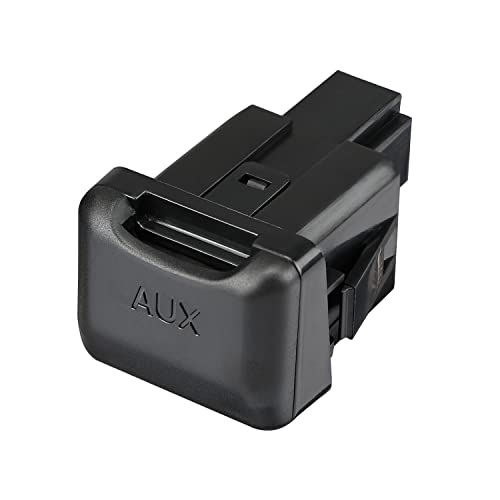
Buy by port type first, not by badge. The right replacement depends on AMI or MDI compatibility, the infotainment generation, and the adapter variant, so a correct-looking jack can still be wrong for your car.
If your car has the matching factory socket and the right head unit, an OEM AUX replacement is a clean fit for the factory audio system. If the car lacks AMI or MDI, or if the infotainment generation does not match, skip the purchase and recheck the radio or navigation unit before ordering.
What the right replacement depends
For Audi, the key question is AMI. For Volkswagen Group cars such as Volkswagen, Škoda, and Seat, the key question is MDI. The same model family can use different factory systems across years, so the adapter has to match the socket and the head unit together.
That is why this category is best treated as a fitment decision, not a universal accessory buy. The product belongs in the AUX/JACK/RCA OEM category, but the connector choice and infotainment version decide whether it will work.
When a USB, 3.5 mm, or media adapter fits best
Choose a USB or media adapter when you want playback, library browsing, or charging-related functionality through the factory system. Choose a 3.5 mm jack input when you only need analog phone audio from a single source. Choose a USB + 3.5 mm jack adapter when you want both media playback through USB 2.0 and an analog input in one lead.
The USB + 3.5 mm Jack/MDI adapter also supports control through the original system, sort-by-artist, sort-by-title, and sort-by-album functions, plus the multifunction steering wheel where listed. That makes it the strongest all-in-one pick for compatible cars.
When to skip a purchase and recheck the head unit
Skip the order if you cannot confirm AMI or MDI, or if the car has a different radio or navigation unit than the product listing names. A wrong-generation unit can leave you with no audio input at all, even when the plug looks close.
Say your Audi A4 has a glovebox socket but the head unit is not the listed MMI generation. The connector may physically resemble the correct one, yet the adapter can still fail because the system version is wrong.
Pros and cons
Pros
- Uses the factory audio system instead of an aftermarket head unit swap.
- Model-specific fitment can avoid bad-match purchases.
- Some versions add USB 2.0 media playback and analog 3.5 mm input together.
- Compatibility lists include Audi, Volkswagen, Škoda, and Seat applications.
- Several variants support the original interface and multifunction steering wheel.
Cons
- Fitment depends on AMI or MDI, not just the car brand.
- Wrong infotainment generation can make the adapter unusable.
- Some cars need a different lead for USB-only, media-only, or analog audio use.
- Availability can vary by exact connector and cable type.
Who it’s for
This suits owners replacing a broken OEM AUX port, drivers who want music or phone audio through the factory system, and buyers matching an original Audi, Volkswagen, Škoda, or Seat setup. It is not the right starting point if your car has no AMI or MDI socket, or if you are unsure which radio or navigation unit is installed.
A common first-timer mistake is assuming every trim of the same car uses the same OEM aux port replacement part. A 2010 Audi and a 2010 Volkswagen can both be from the same group and still need different adapters because the infotainment hardware and port type do not match.
How do you identify the right OEM AUX port?
The fastest way to avoid a wrong-fit purchase is to confirm three things: the socket location, the connector type, and the infotainment generation. If any one of those does not match the product listing, pause before buying.
Check the socket location in the car
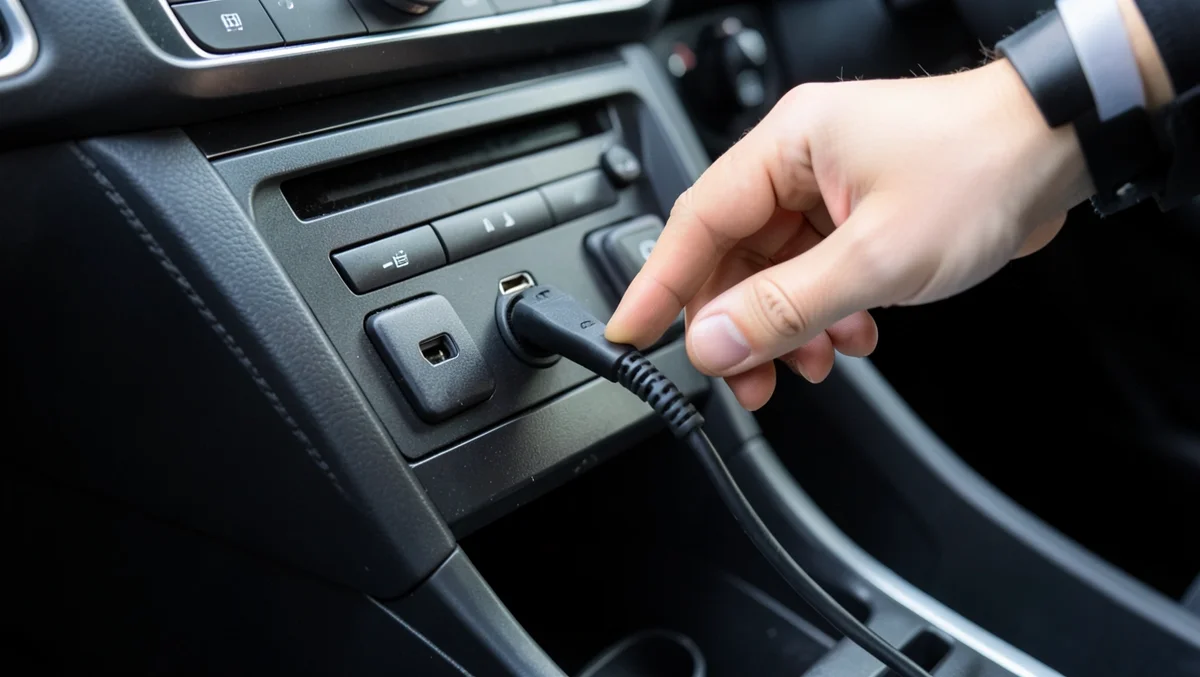
On Audi cars with AMI, the port may be located near the CD changer, in the glovebox, or under the armrest. Those are the first places to inspect because they are the most common factory locations for the system.
Look for a dedicated media socket rather than a loose aftermarket lead. Factory ports are usually tucked into the storage area or a media panel, not hanging near the shifter or dangling from the dash.
Match the factory connector type
AMI is Audi’s factory media interface, while MDI is the Volkswagen Group connection standard used in Volkswagen Group compatibility lists. The plug type and the adapter family have to match the system family.
If the listing says AMI, do not assume it will fit an MDI car. If the listing says MDI, do not assume it will work in every Audi, even within the same model range.
Confirm the infotainment generation
The head unit matters as much as the socket. Audi listings may call out MMI 2G or MMI 3G, and some USB plus 3.5 mm jack adapters list those generations directly. Volkswagen Group fitment can also depend on RNS510, RNS850, RNS310, or RCD-510 units.
- Read the radio or navigation model on the factory screen or unit label.
- Check whether the car has AMI or MDI.
- Match the year range to the listing, not just the badge.
- Verify that the adapter variant names your infotainment generation.
Spot the wrong-fit warning signs
If the listing names a different head unit, a different connector family, or a year range that does not include your car, treat that as a stop sign. A missing factory socket is another hard stop; an adapter cannot create AMI or MDI where none exists.
Suppose a Seat has an RCD-510 unit but the part you are eyeing is only listed for a different navigation system. That mismatch is enough reason to recheck before ordering, even if the exterior trim looks right.
Aux port fitment matrix
This matrix gives the model-to-connector cross-check first, then the likely adapter type. Use it as a fitment filter before you shop.
| Brand | Model | Year range | Infotainment system | Port type | Recommended adapter type |
|---|---|---|---|---|---|
| Audi | A3 | 2010- | MMI 2G / MMI 3G | AMI | OEM AMI media adapter; USB + 3.5 mm Jack if listed for your MMI |
| Audi | A4 / S4 | 2009-2010 | MMI 2G / MMI 3G | AMI | OEM AMI media adapter; check the system generation before choosing USB or jack |
| Audi | A8 | Compatibility list reference | MMI 2G / MMI 3G | AMI | OEM AMI adapter matched to the listed MMI version |
| Audi | AllRoad | Compatibility list reference | MMI 2G / MMI 3G | AMI | OEM AMI adapter matched to the listed MMI version |
| Audi | Q5 | Compatibility list reference | MMI 2G / MMI 3G | AMI | OEM AMI adapter matched to the listed MMI version |
| Audi | Q7 | Compatibility list reference | MMI 2G / MMI 3G | AMI | OEM AMI adapter matched to the listed MMI version |
| Audi | R8 | Compatibility list reference | MMI 2G / MMI 3G | AMI | OEM AMI adapter matched to the listed MMI version |
| Volkswagen | Group models with listed MDI support | By unit, not badge | RNS510 / RNS850 / RNS310 | MDI | RCA/MDI, USB-C/MDI, or USB + 3.5 mm Jack/MDI as listed |
| Seat | Group models with listed MDI support | By unit, not badge | RCD-510 | MDI | RCA/MDI or USB + 3.5 mm Jack/MDI |
| Škoda | Group models with listed MDI support | By unit, not badge | RNS510 / RNS310 | MDI | RCA/MDI, USB-C/MDI, or USB + 3.5 mm Jack/MDI as listed |
Audi AMI and MMI compatibility
For Audi, the strongest fitment cues are AMI plus the MMI generation. The compatibility details list Audi A3 2010- and Audi A4/S4 2009-2010, and the broader Audi group also includes A8, AllRoad, Q5, Q7, and R8 references.
That does not mean every car in those model lines shares the same socket. It means the correct adapter family is the one listed against the actual AMI-equipped MMI version in the car.
Volkswagen Group MDI compatibility
MDI appears in Volkswagen, Škoda, and Seat compatibility lists, and the relevant radio or navigation unit matters.
Use those unit names to filter the listing before buying. The brand alone is not enough.
Can you replace it with USB or 3.5 mm?
Yes, if the adapter listing supports your exact AMI or MDI system. USB is better when you want media playback through the factory interface. A 3.5 mm jack makes more sense for simple analog phone audio. A combined USB + 3.5 mm lead is the better call when you want both from one port.
When USB 2.0 is the better fit
USB 2.0 support matters when the adapter is meant for media files and indexed playback. The USB + 3.5 mm Jack/MDI adapter explicitly supports USB 2.0 fast data transfer, which suits music libraries and structured browsing through the original system.
If your goal is track selection through the head unit, USB is the better match than a plain analog jack.
When 3.5 mm jack input makes sense
3.5 mm jack input is analog audio. That is useful when the source device is a phone or player that you want to feed directly into the factory system without relying on media indexing or file sorting.
If you only need simple audio from one device and do not care about metadata browsing, a 3.5 mm option is often the cleaner fit.
When a USB + 3.5 mm adapter is the right call
The USB + 3.5 mm Jack/MDI adapter is the best all-round choice when you want music playback plus an analog backup input. It has a 140 cm cable, a 5 mm diameter cable, electromagnetic shielding, support for the original system, and multifunction steering wheel support where listed.
It also supports sorting by artist, title, and album. That makes it a practical pick for drivers who want factory-style control instead of a basic auxiliary lead.
Which models use AMI or MDI?
Audi models are commonly associated with AMI, while Volkswagen, Škoda, and Seat listings are typically built around MDI. The model badge matters less than the infotainment unit and the connector family on the car.
Audi model references
Those applications point to AMI-based compatibility and MMI generation checks.
Where Audi compatibility is listed, the adapter may sit near the CD changer, in the glovebox, or under the armrest. Those are the factory AMI location cues to use before you buy.
Seat, Škoda, and Volkswagen references
For Seat, Škoda, and Volkswagen, MDI is the connection standard to look for.
If the car has one of those systems and the listing names the same unit, the odds of a correct match are much better. If the unit is different, stop and verify before ordering.
Radio and navigation units to match before buying
Match the unit name exactly. RNS510, RNS850, RNS310, and RCD-510 are not interchangeable labels. The adapter family and the system generation have to line up, or the port may not communicate with the car.
That is the main failure case on these replacements: the car looks compatible from the outside, but the head unit is the wrong version for the adapter.
Frequently asked questions
Which OEM AUX jack fits my car model?
The correct jack depends on the factory port, the connector family, and the infotainment unit, not just the model badge. Start with AMI for Audi and MDI for Volkswagen Group brands, then match the year range and the exact head unit listed for your car.
How do I know if my car has AMI or MDI?
Check the socket location and the infotainment system name first. Audi AMI ports are often near the CD changer, in the glovebox, or under the armrest. Volkswagen, Škoda, and Seat listings usually reference MDI along with the matching radio or navigation unit.
Can I replace an OEM AUX port with a USB or 3.5 mm jack adapter?
Yes, if the adapter is listed for your exact AMI or MDI system. USB is better for media playback through the original system, while 3.5 mm jack input is better for analog phone audio. A combined USB + 3.5 mm adapter works best when both uses matter.
Where is the AMI port located in Audi cars?
The AMI port may be near the CD changer, in the glovebox, or under the armrest. Those are the first places to inspect on Audi models. If you do not find a factory socket there, do not assume a media adapter will work without confirming the head unit and wiring.
Which Audi, VW, Škoda, or Seat models are compatible with MDI adapters?
Audi listings instead point to AMI and MMI 2G or MMI 3G, so do not mix the two families.
Do OEM AUX adapters work with the original infotainment system?
Yes, that is the point of this category. The adapter integrates with the original audio system, but only when the port type and infotainment generation match the listing. If the wrong system is installed, the adapter may not function even though the plug looks close.
How long is the cable on an OEM AUX adapter?
Length varies by version. The RCA/MDI adapter has a 23 cm cable, the USB-C/MDI adapter also has a 23 cm cable, and the USB + 3.5 mm Jack/MDI adapter uses a 140 cm cable. Check the lead length before buying so the routing suits the car.
Can I use steering wheel controls with an OEM AUX/USB adapter?
Only where the compatibility listing says so. The USB + 3.5 mm Jack/MDI adapter supports the multifunction steering wheel and control through the original system, but that is not a universal claim across every OEM AUX adapter. Verify the specific product variant before ordering.
Follow the vehicle and product manual. Never work under a vehicle supported only by a jack; use jack stands on level ground. Keep dash and windshield items out of airbag zones and the driver’s view, and check local laws for added lights or lasers.
Products related to this article
Sponsored / affiliate links. As an Amazon Associate I earn from qualifying purchases. I may earn additional commission from eligible campaigns.