Google Automotive Services (GAS) Compliance: An Essential Win
Google Automotive Services (GAS) compliance is a process that allows car makers to build Google’s apps—like Maps, Assistant, and the Play Store—directly into a car’s infotainment system. Achieving compliance through licensing, integration, and certification ensures your car’s tech is secure, up-to-date, and works seamlessly, making your drive smarter and safer.
Have you ever wished your car’s navigation system was as good as Google Maps on your phone? Or that you could just ask your car to play your favorite podcast? Well, that future is here, and it’s powered by something called Google Automotive Services, or GAS. It might sound technical, but it’s the secret sauce that makes new car dashboards so smart.
But getting these great features into a car isn’t as simple as installing an app. Car makers have to go through a special process to make sure everything works perfectly and safely. We’re going to break down this process, step-by-step, in plain English. You’ll see why it’s a huge win for every driver.
What Exactly is Google Automotive Services (GAS)?
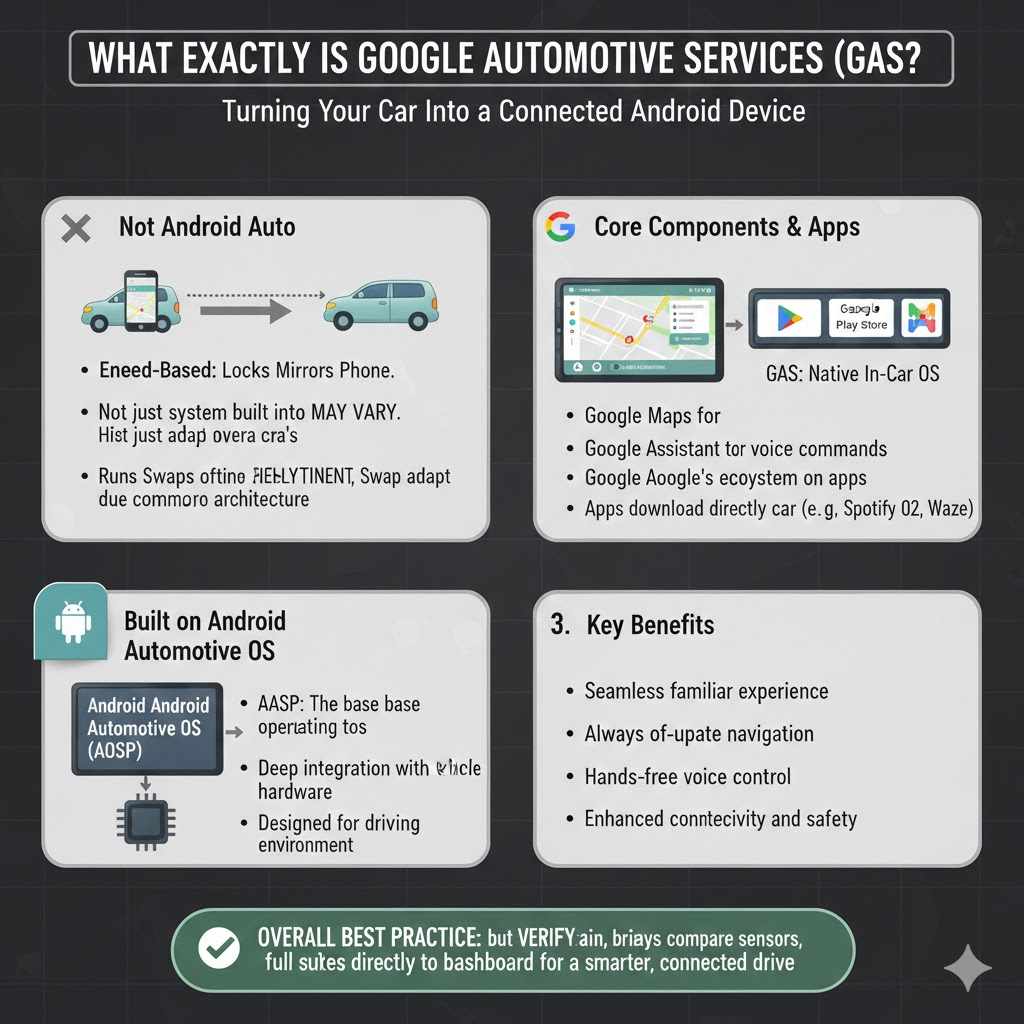
Think about the Android phone in your pocket. It comes with Google Maps, the Google Play Store, and the Google Assistant all ready to go. Google Automotive Services (GAS) is basically the same idea, but built specifically for your car.
It’s not just about mirroring your phone on the screen, which is what Android Auto does. Instead, GAS is the entire system running on your car’s dashboard computer. This means Google Maps is the car’s native navigation. The Google Assistant is the car’s built-in voice command system. The car has its own Play Store to download apps like Spotify or Waze directly to the vehicle.
In simple terms, GAS turns your car’s infotainment system into a powerful, connected Android device designed for the road. It runs on a core system called Android Automotive OS (AOSP), but GAS adds all the familiar Google apps and services on top, making the experience complete.
Why GAS Compliance is a Game-Changer for Drivers
When a car manufacturer says their vehicle is “GAS compliant,” it means they’ve met all of Google’s strict requirements. This isn’t just a fancy label; it’s a promise of quality, safety, and reliability for you, the driver. Here’s why it’s such a big deal:
- A Familiar, Easy-to-Use System: You get the same world-class Google Maps, real-time traffic updates, and easy-to-use interface you already love. No more clumsy, outdated built-in navigation systems.
- Hands-Free Safety with Google Assistant: With a compliant system, you can say “Hey Google, navigate to the nearest gas station” or “Hey Google, call Mom” without ever taking your hands off the wheel. This focus on voice commands is a huge boost for driver safety.
- An Ever-Growing World of Apps: The built-in Google Play Store is tailored for driving. It lets you download approved media, navigation, and communication apps directly to your car. Your car’s entertainment and utility options will keep growing over time.
- Regular, Automatic Updates: Just like your phone, a GAS-compliant car gets over-the-air (OTA) software updates. This means your maps, apps, and security features are always current, without you needing to visit a dealer.
- A Smooth, Integrated Experience: Because GAS is built into the car, it can connect with the vehicle’s systems. For example, Google Maps can estimate your arrival battery level in an electric vehicle (EV) or the Assistant can adjust the car’s climate control.
Achieving compliance is a rigorous process, but it ensures that all these powerful features work together flawlessly and don’t distract from the primary task: driving safely.
A Developer’s Guide: The Three Pillars of GAS Compliance
For a car maker to earn that “GAS compliant” badge, they must successfully navigate three major stages. Think of them as the three essential pillars that hold up the entire system: Licensing, Integration, and Certification. While this part gets a bit technical, understanding it helps you appreciate the quality built into your car’s dashboard.
Pillar 1: Licensing – Getting the Rulebook
The first step is a legal one. Before a car manufacturer (often called an Original Equipment Manufacturer, or OEM) can even think about putting Google apps in their cars, they need Google’s permission. This is done by signing a contract called the Mobile Application Distribution Agreement (MADA).
What is the MADA?
- It’s the official agreement that allows the OEM to pre-install Google’s proprietary apps (Maps, Play, Assistant, etc.).
- It outlines the core rules and responsibilities the OEM must follow.
- It ensures a consistent and high-quality user experience across all cars that use GAS.
Signing the MADA is like getting the official rulebook. It tells the manufacturer exactly what they have to do to be part of the Google ecosystem. Without this agreement, they simply cannot offer the full Google experience in their vehicles.
Pillar 2: Integration – Building It Right
This is where the real engineering work happens. The OEM’s development team has to take the core Android Automotive OS and skillfully weave in the Google services. This isn’t just a copy-paste job; it involves meeting hundreds of specific technical requirements.
The main guide here is the Android Compatibility Definition Document (CDD). The CDD is a technical manual that lists every single “must-have” for the hardware and software to be considered compatible.
Key integration tasks include:
- Meeting Hardware Requirements: The car’s infotainment system must have the right components to run everything smoothly. This includes the screen, processor, memory, and sensors. Google sets minimum standards to ensure the system is fast and responsive, not laggy and frustrating.
- Implementing Core Software: The OEM must correctly install and configure the base Android Automotive OS. They must ensure that all the fundamental parts of the operating system work as intended before adding Google’s apps.
- Integrating Google’s Required Apps: GAS isn’t an à la carte menu. If an OEM wants Google Maps, they must also include the Google Play Store and Google Assistant. These apps must be pre-installed and set as the default services.
- Customization Within the Rules: Car makers can still customize the look and feel of the system to match their brand (e.g., using their own colors, fonts, and app icons). However, these customizations cannot break the core functionality of the Google apps or violate the rules in the CDD.
The table below shows some basic hardware considerations for a GAS-compliant system.
| Component | Why It Matters for GAS Compliance |
|---|---|
| Screen | Must meet minimum resolution and size requirements to display apps like Google Maps clearly and safely. Touch responsiveness is also critical. |
| Processor (CPU) | Needs to be powerful enough to run the OS and multiple apps simultaneously without lag. A slow system can be distracting and unsafe. |
| Memory (RAM) | Sufficient RAM is required for multitasking, such as running navigation while streaming music and receiving notifications. |
| Microphone Array | High-quality microphones are essential for the Google Assistant to accurately understand voice commands, especially in a noisy car cabin. |
| Connectivity (LTE/Wi-Fi) | A reliable internet connection is needed for real-time map data, app downloads, and software updates. |
Pillar 3: Certification – Passing the Final Exam
Once the system is built, it’s time for the final exam. The OEM must prove to Google that they’ve followed all the rules and that their system is stable, secure, and provides a great user experience. This is done through a series of demanding tests known as test suites.
Passing these tests is mandatory. If the car’s system fails, it’s back to the drawing board for the engineers. The main test suites are:
- Compatibility Test Suite (CTS): This is a massive, automated set of tests that checks for thousands of software and hardware requirements defined in the CDD. It ensures that the fundamental Android framework is implemented correctly. Think of it as a comprehensive open-book exam for the car’s computer.
- Vendor Test Suite (VTS): This suite tests the lower-level parts of the system, like the hardware drivers. It makes sure the software that communicates directly with the car’s hardware is working properly.
- Google Test Suite (GTS): This is Google’s own set of tests focused specifically on the Google apps and services. It verifies that Google Maps, the Assistant, and the Play Store are configured correctly and perform as expected. It also checks that the OEM’s customizations haven’t broken anything.
Only after the infotainment system passes all of these tests with flying colors can the manufacturer get Google’s final approval. This certification is the green light to start mass-producing cars with GAS on board. It’s a guarantee that the system you’re using is not just powerful, but also stable and secure.
GAS vs. Android Auto vs. Android Automotive OS (AOSP): What’s the Difference?
This is a common point of confusion, but it’s easy to clear up. All three are related to Android in your car, but they work in very different ways. Understanding the distinction helps you see why GAS is such a major step forward.
| Feature | Android Auto | Android Automotive OS (AOSP) | Google Automotive Services (GAS) |
|---|---|---|---|
| What It Is | An app on your phone that projects a car-friendly interface onto the car’s screen. | The base operating system that runs the car’s entire infotainment system. It’s open-source. | The full package: AOSP plus Google’s licensed apps and services (Maps, Play Store, Assistant). |
| Where It Runs | On your smartphone. Requires your phone to be connected via USB or wireless. | Directly on the car’s built-in computer. No phone needed for core functions. | Directly on the car’s built-in computer. No phone needed. |
| Google Apps | Yes, because it’s running from your phone. | No. It’s the bare-bones OS. The car maker must build their own apps or use a third party. | Yes, they are built-in as the car’s native apps. This is the main feature. |
| Example | Most modern cars from Toyota, Hyundai, and Ford support this. You plug in your phone to use it. | Some vehicles use the AOSP base but create their own app store and navigation system. | Found in newer vehicles from Polestar, Volvo, GM, and Honda. The system works right away without a phone. |
In short, Android Auto is a temporary guest on your car’s screen, while GAS is the system that lives there permanently. AOSP is just the foundation, while GAS is the fully furnished house ready for you to move in.
The Future is Bright and Connected
Achieving GAS compliance is a challenging journey for automotive developers, but the payoff is enormous for everyone. For manufacturers, it provides a world-class, constantly improving infotainment platform without having to build one from scratch. For drivers, it’s a dream come true.
The system is designed with safety regulations in mind, such as those from the National Highway Traffic Safety Administration (NHTSA), by promoting hands-free operation and minimizing distraction. As more car makers adopt GAS, our vehicles will become even more integrated into our digital lives.
Imagine your car’s navigation automatically routing you around a crash based on real-time data, while your Assistant reads you your text messages and adds a grocery stop to your trip, all through simple voice commands. This isn’t science fiction—it’s the reality that GAS compliance delivers. It’s a true essential win, making our time on the road safer, more efficient, and far more enjoyable.

Frequently Asked Questions (FAQ)
1. Is Google Automotive Services (GAS) the same thing as Android Auto?
No, they are different. Android Auto is an app on your phone that projects onto your car’s screen when connected. Google Automotive Services (GAS) is the entire operating system built directly into the car, with Google apps like Maps and the Play Store installed natively. With GAS, you don’t need your phone for navigation or apps to work.
2. Do I have to pay a subscription for GAS?
No, the core features of GAS are included with the vehicle purchase. Just like the Google apps on your phone, there is no subscription fee to use the built-in Google Maps, Assistant, or Play Store. However, individual apps you download from the Play Store, like Spotify, may require their own subscriptions.
3. Can I install GAS on my older car?
Unfortunately, no. GAS is a deeply integrated system that has to be built into the car’s hardware and electronics by the manufacturer. It is not something that can be installed on an older vehicle with a different infotainment system. For older cars, using Android Auto remains the best option for a Google-powered experience.
4. Why do some new cars still not have GAS?
Car manufacturers have a choice. Some prefer to develop their own proprietary infotainment systems to maintain full control over the user experience and branding. Others choose to use the open-source version (AOSP) without Google’s apps. Adopting GAS means agreeing to Google’s rules and requirements, which not every brand wants to do.
5. How do I know if a car is GAS compliant?
The easiest way to tell is to look for the key features. If the car’s built-in system has Google Maps as its native navigation, a Google Play Store for downloading apps, and a “Hey Google” or Google Assistant voice command feature, it is GAS compliant. Sales materials will often advertise it as “Google built-in.”
6. Are there privacy concerns with Google being built into my car?
Just like with an Android phone, you have control over your data. You will sign in with your Google account and can manage your privacy settings, such as location history and web activity, through your account dashboard. Car makers and Google are required to be transparent about what data is collected and how it is used.
7. Will my GAS system become outdated?
No, and that’s one of its biggest advantages. GAS-compliant vehicles receive over-the-air (OTA) software updates, just like a smartphone. This means Google and the car manufacturer can send new features, bug fixes, and security patches directly to your car, keeping it fresh and secure for years to come.
Conclusion: A Smarter, Safer Drive for Everyone
So, the next time you step into a new car and are amazed by how intuitive and powerful its dashboard screen is, you’ll know the secret behind it. That seamless experience is often the result of the car maker’s hard work to achieve Google Automotive Services compliance. It’s a complex process hidden from view, full of strict rules, deep integration, and rigorous testing.
But for us as drivers, the result is simple: a car that just works. A car that understands what you say, knows the best way to get you there, and keeps you entertained and connected safely. It transforms the vehicle from just a mode of transportation into a helpful partner for your journey. GAS compliance isn’t just a technical achievement for developers; it’s a fundamental win that makes driving better for all of us.