How to Transfer SiriusXM to a New Car: Turnkey Steps and Fees
Trading in a car does not mean losing the channels you pay for. To transfer SiriusXM to a new car, get the new radio’s Radio ID, sign in to your account, and use SiriusXM’s online transfer tool at siriusxm.com/turnkeytransfer, or chat or call SiriusXM instead. Most paid plans can move to the new radio, but trials and extended service plans cannot, and a Lifetime subscription carries a $35 transfer fee. This guide covers what you need, the steps, the fees and what to check once the new car is on the road. Details are as of October 2026 and can change, so confirm them with SiriusXM.
Table of Contents
Preparing for SiriusXM Transfer
Three details make the transfer quick. SiriusXM’s New Car Transfer Service page says all you need is the Radio ID, ESN or VIN from your new vehicle, and you will also want your account login.
- The new car’s Radio ID. Per SiriusXM’s help center, most radios display the Radio ID (also called the ESN or SID) when you tune to channel 0. If you are away from the car, you can sign in to the Online Account Center and find it under Active Radios/Subscriptions.
- Your account number. After you log in to the Online Account Center, it appears beneath your name in the upper right corner of the screen and again under the Billing tab. If you only have a streaming plan (All Access, app only), it is in your order confirmation email.
- Your login. The online route needs it. If you are not set up yet, the transfer page says you can call or chat with an agent to get started.
Also check what kind of plan you have, because that decides whether it can move at all. SiriusXM’s help center says that in most cases you can transfer your current service to a different radio (vehicle), with these exceptions:
| Plan type | Can it be transferred? | What SiriusXM says |
|---|---|---|
| Standard paid subscription | In most cases, yes | Transfer online, by chat or by phone |
| Lifetime subscription | Yes, by phone or chat only | $35 transfer fee applies |
| Trial subscription | No | Trial subscriptions cannot be transferred |
| Extended service plan | No | Cannot be transferred to other radios |
| Some promotional plans | No | Cannot be transferred to other radios |
Best Add-On Tuner Pick
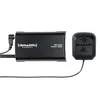 |
SiriusXM SXV300V1 Satellite Radio Vehicle Tuner
|
As an Amazon Associate we earn from qualifying purchases. Spec-based pick from the listing, not a hands-on test.
Understanding Your New Car’s Capability
Before you transfer anything, find out what radio the new car actually has. Cars come in a few situations, and each one changes what you do first.
| Your situation | What SiriusXM says to do |
|---|---|
| New car with a factory SiriusXM radio | The trial should be active at the time of purchase. If the radio is not receiving every channel, send a signal to it using your Radio ID. |
| Pre-owned car and the dealer mentioned a trial | The complimentary trial should be active at purchase. If channels are missing, send a signal using the Radio ID. |
| Car bought with no trial information | Try sending a signal first. If that fails, you can start a new trial. |
| Replacing an old satellite radio with a newer one | In most cases you can transfer your current service to the different radio. |
To check the car’s radio, tune to Preview Channel 1 or 184, depending on the vehicle. SiriusXM says hearing audio there confirms the radio is connected to its satellites. If you hear nothing, SiriusXM says to contact the dealership directly for support.
If the new car has no satellite receiver at all, a tuner can add one to a stereo that carries the SiriusXM-Ready logo, like the pick above. It still needs its own Radio ID and an active subscription. Our guide to how SiriusXM radio works explains the receiver, antenna and signal.
Initiating The Transfer Process
SiriusXM’s New Car Transfer Service page offers three ways to start:
- Log in online. The address siriusxm.com/turnkeytransfer led to SiriusXM’s transfer login page when we opened it.
- Chat with a live agent from the transfer page.
- Call 855-227-6738. SiriusXM lists hours of 8 am to 10 pm ET Monday to Friday and 8 am to 8 pm ET on weekends, as of October 2026.
According to SiriusXM, an agent can remove your old vehicle and transfer service to the new one, or link the new vehicle to your existing subscription. They can also pause billing on your current subscription through the end of a trial once you link or transfer, and check whether you qualify for discounted rates if you are keeping your previous vehicle.
Tesla owners: SiriusXM’s help center says eligible plans can be transferred online at siriusxm.com/transfer, and that Tesla IP owners should chat or call 855-346-8182. Tesla owners with satellite radios, where the ID does not begin with a V, should visit siriusxm.com/transfer.
Step-by-step Guide To Online Transfer
SiriusXM does not publish every on-screen prompt, and the wording can change, so treat these as the order of tasks rather than a screen-by-screen script:
- Tune the new car’s radio to channel 0, or check the Online Account Center under Active Radios/Subscriptions, and write down the Radio ID.
- Have your account login ready, and your account number if you plan to chat or call.
- Open siriusxm.com/turnkeytransfer and log in. If it is your first time, SiriusXM says to chat or call for help getting started.
- Ask to move service to the new radio, or add the new car as a second radio. In the Online Account Center, SiriusXM’s route for adding a vehicle is the Add Car + Streaming option on your dashboard, where you enter the new vehicle’s Radio ID.
- If the new radio is on an active trial, you can subscribe to a follow-up plan for when the trial ends, per SiriusXM.
- Check that the radio plays, using the checklist further down.
A Lifetime subscription cannot be moved this way. SiriusXM says it can only be transferred by calling or chatting with a SiriusXM Listener Care agent.
Contacting Customer Support
Use the phone or chat route if the online tool does not recognize your radio, if you have a Lifetime subscription, or if you are not sure which plan you have. Have these ready:
- The new vehicle’s Radio ID, ESN or VIN.
- Your account login or account number. If you cannot find the number, SiriusXM says an agent can look it up after verifying your identity.
- A note of whether the old car is being sold or kept, since that decides whether you remove it or add the new car as a second radio.
If the radio does not respond after the transfer, our guide on how to reset a Sirius radio covers the receiver side.
Fees And Charges
The one fee SiriusXM’s help center names for transfers is the $35 transfer fee for Lifetime subscriptions. It does not list a fee for moving other eligible plans. What can cost money is anything beyond a straight move, so check the price on screen or ask the agent before you confirm.
| Situation | Cost note from SiriusXM |
|---|---|
| Move a standard paid plan to the new car | The help center lists no transfer fee for this |
| Move a Lifetime subscription | $35 transfer fee applies |
| Keep the old car and add the new one | May qualify for the Family Discount; call customer service to learn more |
| Trial or extended service plan | Cannot be transferred; for a trial, a follow-up plan is the option |
Prices and plan names change often, so confirm current rates with SiriusXM before you commit.
Managing Multiple Vehicles
If you are keeping the old car, you do not have to choose. SiriusXM says you can add the new vehicle as a second radio to your existing account, and that having multiple subscriptions on one account may make you eligible for its Family Discount. If a radio is not showing in your account, the Online Account Center path is the Subscriptions tab, then Find subscription in the box that asks if you do not see your subscription, followed by entering the Radio ID.
Portable radios are another option. SiriusXM describes Dock & Play radios as models that move easily from car to car and car to home. For more on running two radios, see our guide to having SiriusXM in two cars, and for simply swapping cars, how to switch SiriusXM to another car.
Transfer or Trial: Which Applies to Your New Car?
Many buyers mix up the two. A trial that comes with a car belongs to that car’s radio and cannot be moved, while a plan you pay for can follow you to a new radio. The practical rule from SiriusXM’s pages is:
- You pay for SiriusXM on the old car: transfer that plan to the new radio so you keep one subscription.
- The new car comes with a trial: use the trial first. SiriusXM says an agent can pause billing on your current subscription through the end of the trial once you link or transfer.
- The old car had only a trial: there is nothing to transfer, because trials cannot be moved. Check the new radio for its own trial.
- You have a Lifetime subscription: call or chat, and expect the $35 fee.
Post-transfer Checklist
- Turn on the radio and tune to Preview Channel 1 or 184. Audio there means the radio is connected to the satellites.
- If you hear the preview channel but not your channels, SiriusXM says it can send a signal request to your radio. You will need the Radio ID.
- If there is no audio even on the preview channel, SiriusXM says to contact the dealership directly for support.
- Sign in to your account and confirm the new Radio ID is listed under Active Radios/Subscriptions.
- Check the plan name and billing date so there are no surprises on your next statement.
For everyday use once the radio is working, see our guide on how to use Sirius radio in a car.
Frequently Asked Questions
Is there a transfer fee for SiriusXM?
SiriusXM’s help center names one transfer fee: $35 for Lifetime subscriptions. It does not list a fee for moving other eligible plans, but trials, extended service plans and some promotional plans cannot be transferred at all. Check the amount shown on screen or ask the agent before you confirm, because plans differ.
Can two cars use the same SiriusXM account?
Yes. SiriusXM says you can add another radio to your existing account, and that doing so may qualify you for its Family Discount. The discount is arranged by calling customer service. Our guide on having SiriusXM in 2 cars covers the two-radio case.
How long do you have SiriusXM when you buy a new car?
SiriusXM says a new vehicle with a factory-installed radio should have its trial active at the time of purchase, and the same goes for a pre-owned vehicle when the dealer said it came with a complimentary trial. Check your dealer paperwork or your online account for your trial end date.
What is SiriusXM Turnkey Transfer?
It is the web address siriusxm.com/turnkeytransfer, which leads to SiriusXM’s online transfer login page. Use it to move an eligible paid subscription from your old vehicle to the new one. SiriusXM’s separate New Car Transfer Service page lists the same online route plus chat and phone.
What information do I need to transfer SiriusXM to a new car?
SiriusXM says all you need is the Radio ID, ESN or VIN from your new vehicle, plus your account login. Most radios show the Radio ID when you tune to channel 0, and your account number sits beneath your name in the upper right corner of the Online Account Center.
Can I transfer a SiriusXM trial to another car?
No. SiriusXM’s help center says trial subscriptions cannot be transferred. If your new car has its own trial, it runs on that radio, and you can subscribe to a follow-up plan for when the trial ends.
Conclusion
To move SiriusXM to a new car, get the new Radio ID, check whether your plan can be transferred, and then use SiriusXM’s online tool, chat or phone line. Standard paid plans usually move, trials and extended service plans do not, and a Lifetime subscription takes a call or chat and a $35 fee. Finish by checking Preview Channel 1 or 184 and confirming the new radio shows in your account.
This guide does not cover plan prices or current promotions; check SiriusXM for today’s rates.
Products related to this article
Sponsored / affiliate links. As an Amazon Associate I earn from qualifying purchases. I may earn additional commission from eligible campaigns.