Optimize Your Phone for Hands-Free Car Use: Setup Guide
To optimize your phone for hands-free car use, this guide covers a driving mode that silences notifications, a CarPlay or Android Auto connection to the car display, and voice control through Siri, Google Assistant or Gemini. It walks through the steps as Apple and Google publish them, then covers phone mounts and what NHTSA says about distracted driving. Everything here was checked against the pages named in each section on October 26, 2026, and menu names can change with software updates.
Phone Settings For Safer Driving
Air Vent Phone Mount Pick
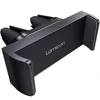 |
Lamicall Car Vent Phone Mount, Two Grips Design – $8.99 (listing price on Oct 26, 2026) A vent-clip phone holder, listed for phones 4.7 to 6.7 inches, for people who want a place to put the phone while using CarPlay, Android Auto or voice commands.
|
As an Amazon Associate we earn from qualifying purchases. Spec-based pick from the listing, not a hands-on test.
The first settings to look at are the ones that quiet the phone. Apple and Google each document a driving mode, described below.
Driving Focus on iPhone
Per the Apple iPhone User Guide page on staying focused while driving, turning on the Driving Focus silences or limits text messages and other notifications, and incoming calls are allowed only when the iPhone is connected to CarPlay, a car Bluetooth system or a hands-free accessory. Apple lists these steps:
- Open Settings, tap Focus, then tap Driving. If you do not see Driving, tap the plus button, then tap Driving.
- Tap Auto-Reply to choose who receives an auto-reply while Driving Focus is on; you can edit the message.
- Tap While Driving, below Turn On Automatically, and choose when it activates.
The activation choices Apple lists are Automatically (when iPhone detects you might be driving), When Connected to Car Bluetooth, Manually (from Control Center) and Activate With CarPlay (automatically when connected to CarPlay). If the Driving Focus turns on while you are a passenger, Apple says to tap the notification and then tap “I’m not driving.”
Driving mode and Do Not Disturb on Android
Google’s Android Help page on Modes and Do Not Disturb says to open Settings, tap Modes, tap Driving, tap Set up Driving, and under “When to turn on automatically” tap “While driving.” Google says some of these steps only work on Android 14 and up and that settings vary by phone. Under a mode’s Notification filters you choose what to block or allow, and the People setting includes “Allow repeat callers,” which lets a call through if the same person calls twice in 15 minutes.

Integrating Your Phone with Your Car’s System
Both phone platforms can show navigation, calls, messages and music on the car display. Compatibility depends on the car and the phone, so check the vehicle owner’s manual or ask the manufacturer.
Apple CarPlay
Apple’s CarPlay intro says CarPlay gives turn-by-turn directions, phone calls, music and a calendar on the vehicle display. It is not available in all countries or regions and is available on select automobiles and select aftermarket navigation systems. To connect, Apple says to start the car and make sure Siri is on, then:
- USB-only cars: plug the iPhone into the car USB port, which might be labeled with a CarPlay or smartphone icon, using an Apple USB cable.
- Cars with USB and wireless: plug in first; the next time you connect, an alert on the iPhone offers a wireless connection.
- Wireless-only cars: press and hold the steering-wheel voice command button and make sure the stereo is in wireless or Bluetooth mode. On the iPhone go to Settings, Wi-Fi, confirm Wi-Fi is on, tap the CarPlay network and check that Auto-Join is on. Then go to Settings, General, CarPlay and select the car.
On some models CarPlay Home appears automatically; if it does not, Apple says to select the CarPlay logo on the vehicle display. Inside CarPlay, Apple says you can open Settings with the vehicle’s built-in controls, go to Driving Focus and select Activate With CarPlay.
Android Auto
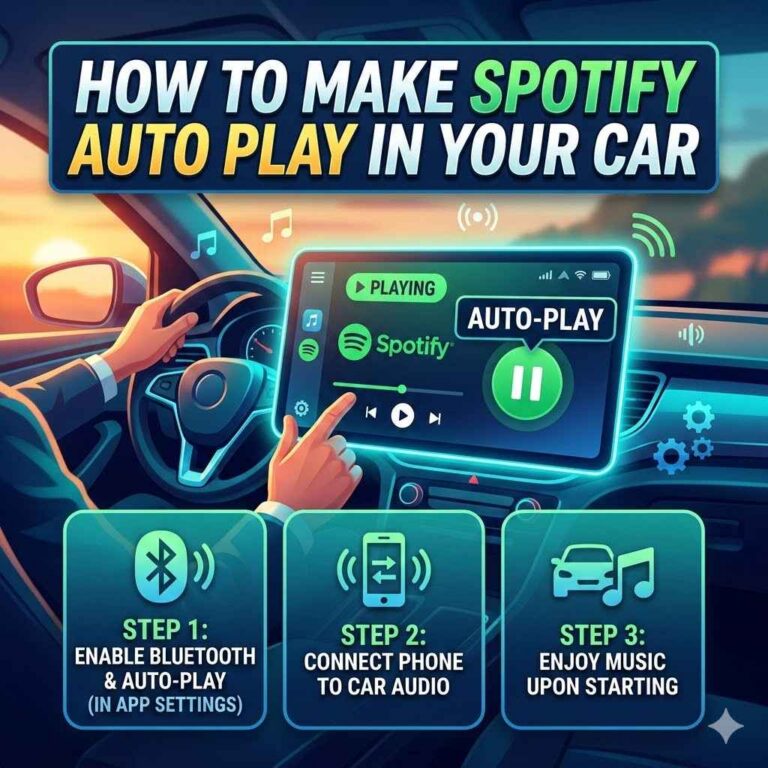
Per the Android Auto Help setup page, Android Auto is integrated into phones and does not need to be downloaded. Google says to park the car with the infotainment system on and allow time to set up before you drive. For a wired connection, plug a USB cable into the vehicle USB port and your phone and follow the on-screen instructions. For wireless, the first connection requires pairing over Bluetooth; Google says to keep Bluetooth, Wi-Fi and Location Services on during setup, and that Android Auto should start within a few seconds once paired.
| Apple CarPlay | Android Auto | |
|---|---|---|
| Phone requirement stated | iPhone; CarPlay not available in all countries or regions | Android 11.0 or higher with an active data plan; not available on Android (Go edition) |
| Wired connection | Apple USB cable in the car USB port | High-quality USB cable in the car USB port |
| Wireless connection | Steering-wheel voice button, Wi-Fi on, CarPlay network, Settings, General, CarPlay | Bluetooth pairing first; 5 GHz Wi-Fi support needed on the phone |
| Driving silence setting | Driving Focus, Activate With CarPlay | Driving mode under Modes (Android 14 and up for some steps) |
| Source read Oct 26, 2026 | Apple iPhone User Guide | Android Auto Help; Android Help |
If a connection drops after setup, see why Apple CarPlay keeps disconnecting or what to do when Android Auto has stopped working. For cars without CarPlay, this guide to adding Apple CarPlay and how to add Bluetooth to your car cover the options, and affordable touch screen displays compares head units.
Mastering Voice Commands for Hands-Free Control
Google’s Android Auto page on talking to Gemini or Google Assistant gives three ways to start: say “Hey Google,” tap the microphone, or press and hold the voice command button on the steering wheel. Wait for the tone, then say what you want. Google lists making a call, sending a message, getting driving directions and listening to music as examples, and notes that Gemini is replacing Google Assistant on most mobile devices.
Calls
Android Auto’s calls page says an incoming call appears as a notification with the caller’s information, and you tap it to accept; in some cars a steering-wheel button can also accept a call, so check the car manual. Its example voice commands include “Call [contact name]” and “Call my voicemail.” Google adds that call waiting works for incoming calls only: you cannot dial a second number while already on a call.
Messages
On the messages page, Google says that after you speak a message, Gemini or Google Assistant repeats it and confirms whether you are ready to send it, and you can ask to send, cancel or refine it. Message notifications can be played aloud: say “Hey Google” or select the microphone and ask for your messages to be read.
On iPhone, Apple’s steps for connecting to CarPlay say to make sure Siri is on before you connect.

Essential Accessories For Hands-Free Driving
Phone mounts
The facts here come from the product listing. The Lamicall vent mount in the box above is listed for phones 4.7 to 6.7 inches wide, with a stated phone width of 2.37 to 3.54 inches, and carries two vent clips. Its listing says it is not suitable for round vents. For comparisons of vent, dashboard and magnetic styles, see dashboard phone mount vs vent phone mount, best car phone mounts and best car phone holders for an air vent.
Bluetooth and power
Apple says the Driving Focus allows incoming calls when the iPhone is connected to a car Bluetooth system or a hands-free accessory, so a car Bluetooth system is one of the connections Apple lists for calls. For pairing and add-on options see how to connect your phone to car Bluetooth and best Bluetooth adapters for cars; for the power side, how a car cigarette lighter outlet works covers the 12 V outlet.
Safety and Legal Aspects of Phone Use While Driving
The NHTSA distracted driving page (read October 26, 2026) says distracted driving is any activity that diverts attention from driving, including talking or texting on your phone, eating and drinking, talking to people in your vehicle, and fiddling with the stereo, entertainment or navigation system.
- NHTSA reports that distracted driving claimed 3,208 lives in 2024 and that 315,167 people were injured by distracted driving in 2024.
- NHTSA says sending or reading a text takes your eyes off the road for 5 seconds, and at 55 mph that is like driving the length of an entire football field with your eyes closed.
- NHTSA says you cannot drive safely unless driving has your full attention, and that any non-driving activity is a potential distraction that increases your risk of crashing.
- Apple’s Driving Focus page warns that the Driving Focus is not a substitute for following all the rules that prohibit distracted driving. Google’s Android Auto pages say to pay attention to the road and driving conditions and always obey applicable laws.
On the law, NHTSA says state legislatures and governors make distracted-driving laws and that many states have laws against texting, talking on a cell phone and other distractions. It points readers to the Governors Highway Safety Association for the rules in each state. This is not legal advice, and requirements differ by state and change over time, so check your own state’s official pages.
Frequently Asked Questions
Does iPhone have a Do Not Disturb While Driving mode?
Apple’s iPhone User Guide describes a Driving Focus instead. It says text messages and other notifications are silenced or limited when it is on, and that incoming calls are allowed only when the iPhone is connected to CarPlay, a car Bluetooth system or a hands-free accessory.
How do I set up Driving mode on Android?
Google’s Android Help page says to open Settings, tap Modes, tap Driving, tap Set up Driving, and under “When to turn on automatically” tap “While driving.” Google notes that some of those steps only work on Android 14 and up and that settings can vary by phone.
What do I need for Android Auto on my car display?
Google lists an Android phone with Android 11.0 or higher and an active data plan, a compatible car, and a high-quality USB cable for the wired version. The wireless version needs a compatible phone with 5 GHz Wi-Fi support and a compatible car or stereo. Google also says Android Auto is built into phones and does not need to be downloaded.
How do I connect an iPhone to CarPlay?
Apple says to start the car and make sure Siri is on. If the car supports CarPlay with a USB cable, plug the iPhone into the car’s USB port using an Apple USB cable. For a car that supports only wireless CarPlay, Apple’s steps involve the steering-wheel voice command button, Wi-Fi, the CarPlay network and Settings, General, CarPlay.
Is hands-free calling safe to use while driving?
NHTSA defines distracted driving as any activity that diverts attention from driving, and lists talking or texting on your phone among its examples. NHTSA also says any non-driving activity is a potential distraction that increases the risk of crashing. State laws on phone use differ, and NHTSA says your state legislature and governor make them.
Wrap Up
To optimize your phone for hands-free car use, turn on the driving mode your phone offers, connect through CarPlay or Android Auto using the steps Apple and Google publish, and use voice commands instead of the screen. NHTSA’s definition of distracted driving lists talking or texting on your phone and fiddling with the stereo, entertainment or navigation system among its examples. This guide does not cover state-by-state laws or the settings of individual car models; check the vehicle owner’s manual for those.
Products related to this article
Sponsored / affiliate links. As an Amazon Associate I earn from qualifying purchases. I may earn additional commission from eligible campaigns.