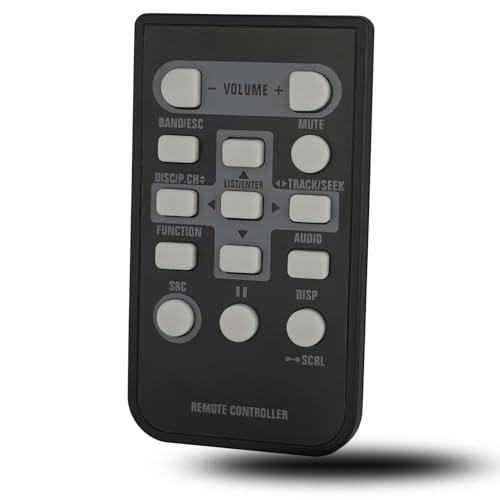
Universal Remote Control for Car Audio: 3 Types Explained
A universal car audio remote generally needs to match one of three control paths: an infrared sensor, a wired remote input, or Bluetooth pairing. For many aftermarket owners, the safest starting point is a brand-matched remote such as the Pioneer CD-R33 if your radio accepts Pioneer IR control, because the wrong path will do nothing and may still leave you buying an adapter you do not need. This guide shows you how to check the input first, then buy the right remote type.
Compatibility starts with the control input


The remote can change volume, skip tracks, switch sources, and sometimes control menu functions. That part is common. What is not common is the control path behind it. Some head units listen to infrared light, some need a physical remote jack or steering-wheel-control input, and some support Bluetooth control through a paired app or accessory profile.
That is why “universal” is a trap when the listing is vague. A remote can be universal within a brand, or universal within a control format, but it is not automatically universal across every car stereo.
Why compatibility starts with the input type
Begin with the radio’s actual input. If the head unit has an IR sensor, you need a remote that sends the right IR code set and can hit that sensor. If it has a wired remote or steering-wheel-control input, you need the correct cable and, in some vehicles, an adapter. If it only supports Bluetooth audio, that does not automatically mean it supports Bluetooth remote control.
Why universal does not mean one-size-fits-all
Ahifi says car radio remotes can be wired or wireless, and wireless control may use IR or Bluetooth. Ahifi also says these remotes are often installed on the steering wheel or within the driver’s reach, with safe music control in mind. That still leaves the key question unanswered until you check the model’s input standard.
Which remote type matches your radio?
The right match depends on whether your head unit exposes an IR receiver, a wired remote input, or Bluetooth control support. If you cannot confirm that path in the owner’s manual or the rear-panel labeling, do not buy by appearance alone. A round remote can still be wrong for a square input.
Identify an IR sensor and line of sight
Infrared remotes need line of sight to the receiver. If the sensor is hidden behind trim, blocked by a dash lip, or pointed away from the driver, IR control may fail even when the remote itself is correct. That failure mode is simple: the light never reaches the sensor.
Look for a wired remote or steering-wheel-control input
A wired steering-wheel remote connects through a physical cable. On aftermarket head units, the relevant port may be labeled for remote-in or steering-wheel control. Some cars also need a steering-wheel control interface adapter so the factory buttons continue to work after the radio swap. The adapter is not the remote. It is the bridge.
Check whether Bluetooth remote control is actually supported
Bluetooth for phone calls and music streaming is common. Bluetooth for remote control is much less universal. If the radio only uses Bluetooth for audio playback, a Bluetooth remote will usually not help. You need confirmed support for a Bluetooth remote accessory or the model’s app ecosystem, and that support varies by model.
Car audio remote compatibility matrix
This table separates the three control paths by common head-unit scenarios. Use it as a yes-or-no filter before shopping. Each cell says whether the path works, needs an adapter, or is not suitable for that setup.
| Scenario | IR remote | Wired remote | Bluetooth remote |
|---|---|---|---|
| Factory radio | needs adapter — only works if the factory unit has an IR receiver and supports the remote code set | needs adapter — factory buttons usually need a vehicle-specific interface or radio-specific input | not suitable, most factory radios do not accept Bluetooth remote pairing |
| Aftermarket Pioneer | works, use a Pioneer-matched IR remote if the model supports it | works, if the model has a remote input or steering-wheel-control port | needs adapter, only if that Pioneer model supports Bluetooth control accessories |
| Aftermarket Kenwood | works, many Kenwood multimedia units use IR remotes matched to the model | needs adapter, use the correct remote input or steering-wheel interface path | needs adapter, only if the unit supports Bluetooth remote control, not just audio streaming |
| Aftermarket Alpine | works, model-specific IR remotes are common on compatible Alpine units | needs adapter, only if the head unit accepts a wired remote or control harness | needs adapter, Bluetooth control depends on the exact Alpine model and accessory support |
| Multimedia receiver | works, if the receiver includes an IR sensor and supports remote codes | needs adapter, if the receiver uses a remote input or steering-wheel-control interface | needs adapter, only for receivers that explicitly support Bluetooth remote control |
| Amplifier remote | not suitable, most amps use trigger or level controls, not IR handsets | needs adapter, only if the amplifier or processor has a control port | not suitable, Bluetooth remotes are rarely used for amplifier-only control |
| Steering-wheel retrofit | not suitable, the retrofit goal is vehicle button control, not a line-of-sight handset | needs adapter, the factory buttons usually need a steering-wheel control interface module | not suitable, Bluetooth remotes do not replace vehicle button integration |
| Line-of-sight blocked | not suitable, blocked sensors prevent IR communication | works, a wired path does not depend on visible light | works, wireless pairing does not need line of sight if the model supports it |
| No remote input | not suitable, there is nowhere for the IR command to land if the unit lacks an IR receiver | not suitable, no remote jack or steering-wheel-control input means no wired path | not suitable, Bluetooth control still needs supported hardware or software |
| Bluetooth-only system | not suitable, IR does not substitute for Bluetooth control software | not suitable, a wired remote will not connect to a Bluetooth-only system | works, only if the system explicitly supports Bluetooth remote control, not just audio streaming |
How infrared remotes work
An infrared car audio remote sends commands with light, so the receiver must be able to see the signal. That is why IR remotes work best on head units with a visible sensor on the faceplate or a receiver placed where the driver can point at it. If the sensor is hidden or turned away, the remote may seem dead.
Where IR remotes fail
IR fails when the sensor is blocked, when the remote is aimed poorly, or when the head unit never supported IR control in the first place. It also fails on Bluetooth-only systems, because Bluetooth and IR are different control paths. The remote can be fine while the protocol is wrong.
Brand-specific IR examples
The same source lists the Pioneer CD-R33 at 19,99 EUR and the Kenwood KNA-RCDV331 at 29,99 EUR. Ahifi also lists the Alpine RUE-S100U as a universal multifunctional remote control. Those names matter because they point to model-level compatibility, not a vague promise of universal fit.
Say your head unit is a multimedia Pioneer with an exposed IR window on the faceplate. A Pioneer-matched IR remote can be the cleanest solution. If that same faceplate hides the sensor behind a trim piece, you may need a different placement or a different control path altogether.
How wired steering-wheel remotes work
A wired steering-wheel remote uses a physical cable to send commands to the radio. The control can be mounted on or near the steering wheel, which keeps the most common functions within easy reach. This is the closest thing to a direct control link, but it still depends on the right input at the radio end.
Factory buttons versus aftermarket remotes
Factory steering-wheel buttons and aftermarket wired remotes are not the same thing. Factory buttons usually need a steering-wheel control interface adapter when you install an aftermarket radio. That adapter translates the car’s button signals into a format the new head unit understands, and the exact harness match depends on the vehicle and the radio brand.
When an interface adapter is required
If your car originally had audio buttons on the wheel, the adapter is often the missing piece after a radio swap. Without it, the buttons may do nothing. With the wrong one, you may get partial function or no function mapping at all for volume, track, and source control. Check the vehicle-specific wiring and the head-unit brand protocol before you buy.
A common mistake is buying a steering-wheel button module when the radio has no compatible remote input. In that case, the module has nowhere to send the signal. The fix is not a different button shape. It is a head unit or adapter that matches the input path.
Can Bluetooth control replace a remote?
Sometimes, but only when the head unit or receiver explicitly supports Bluetooth remote control. Phone pairing and audio streaming are not the same thing as accessory control. If the radio only uses Bluetooth for calls and music playback, a Bluetooth remote will not add steering-wheel commands or menu navigation.
Pairing requirements and app dependence
Bluetooth control may depend on a supported profile, a brand app, or a specific accessory ecosystem. If the model does not list that support, assume it is not available. That is especially important on aftermarket stereos, where one Bluetooth feature can mask the absence of another.
Limits to expect before you buy
Bluetooth control can be convenient, but compatibility is narrower than many shoppers expect. Latency and device matching can also vary by model, so the safer purchase is the one that the manufacturer names for your unit. If the listing does not mention remote control, do not assume it is included.
Brand examples to verify before you buy
Brand examples are useful only when they match the exact control path. Pioneer, Kenwood, and Alpine all sell remotes that look similar at a glance, but the compatibility rules are still model-specific. Check the radio model number before you choose the remote.
Pioneer examples
Pioneer remotes can be wired or infrared depending on the model. The Pioneer CD-R33 is a clear example of a branded remote you can verify, and the CD-SR110 is another model to check against your radio’s compatibility list. A Pioneer remote is not automatically right for every Pioneer unit.
Kenwood examples
Kenwood infrared remotes for multimedia units include the KNA-RCDV331 and KCA-RCDV340. Kenwood compatibility still depends on the radio model, so check the supported accessory list before buying. The remote name alone does not guarantee the command set matches your receiver.
Alpine examples
Alpine offers IR and wireless options, including the RUE-4360, RUE-S100U, and RUE-BK01. Alpine remotes may cover multimedia functions, volume, or amplifier control, but only on the models they were built for. Match the remote to the exact head unit or amplifier, not just the brand.
What should you buy for your setup?
Buy the control path, not the label. If you know the input type, the choice becomes much simpler: IR for visible-sensor systems, wired for radios with the proper remote port or steering-wheel-control input, and Bluetooth only for units that explicitly support Bluetooth remote control. If you are unsure, the manual or rear-panel diagram should settle it.
- If you have a factory radio: check whether the unit has an IR receiver, a remote jack, or a documented steering-wheel-control interface. If it does not, you will need an adapter or a different radio.
- If you have an aftermarket Pioneer, Kenwood, or Alpine unit: match the remote to the exact model number and control path. Use the brand-specific remote listed for that unit before you buy anything generic.
- If you need to keep factory wheel buttons: choose a steering-wheel control interface adapter that matches both the vehicle wiring and the head-unit brand protocol.
- If your line of sight is blocked: avoid IR and move to a wired path or a supported Bluetooth-control setup.
- If the radio has no remote input: do not buy a handheld remote and expect it to work; the hardware path is missing.
Safety matters when you mount anything near the wheel, dash, or airbag zones. Follow the vehicle and product manual, keep items out of airbag deployment areas and the driver’s view, and check local laws before installing a remote or interface module.
Frequently asked questions
What are the 3 types of universal remote control for car audio?
The three control paths are infrared, wired remote input, and Bluetooth pairing. They are not interchangeable. IR needs line of sight to a sensor, wired remotes need a physical connection, and Bluetooth remotes need explicit support from the head unit or receiver.
Which car audio remote type works with my head unit?
Match the remote to the input type on the radio. If the unit has an IR receiver, use an IR remote. If it has a remote port or steering-wheel-control input, use a wired remote or the correct adapter. If it only supports Bluetooth audio, check for a separate Bluetooth control feature.
Are IR, wired, and Bluetooth remotes interchangeable?
No. An IR remote will not replace a wired remote input, and a Bluetooth remote will not work on a radio that lacks Bluetooth control support. The command method has to match the radio’s hardware and software path, not just the shape of the remote.
Can I add a remote to an aftermarket car stereo?
Often, yes. Aftermarket Pioneer, Kenwood, and Alpine units commonly support brand-specific remotes, and many cars can keep their steering-wheel buttons with the right interface adapter. The exact result depends on the radio model and whether the correct remote input is present.
What is the difference between steering-wheel and dash-mounted remotes?
A steering-wheel remote sits within easy thumb reach and is usually better for driving. A dash-mounted remote may be easier to place on the radio face or nearby, but it can be less ergonomic and may be harder to see or reach safely. Placement should never interfere with airbags or the driver’s view.
What should I buy if my radio brand is Pioneer, Kenwood, or Alpine?
Start with the model-specific remote the brand lists for your exact unit. For Pioneer, check models such as CD-R33 or CD-SR110. For Kenwood, check KNA-RCDV331 or KCA-RCDV340.
Products related to this article
Sponsored / affiliate links. As an Amazon Associate I earn from qualifying purchases. I may earn additional commission from eligible campaigns.
 NuIth Universal Car Amplifier RCA Level Controller, Car Audio Bass Control Knob, High Quality Sub Amp Volume Control Cable for Car, Motorcycle, Speakers, Home Theater
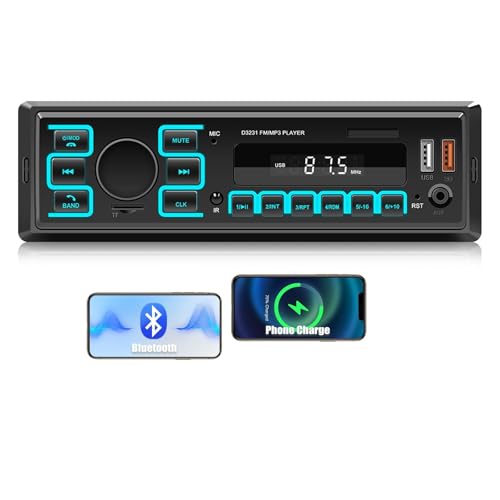 CAMECHO Single DIN Car Stereo with Dual Bluetooth 5.1, 1 Din Car Radio with USB/TF/AUX Inputs, FM Radio, MP3 Player, APP Connect, Voice Control, Multi Color Illumination, Car Audio Receivers