Video Players for Cars: Best Headrest DVD Players Compared
Choose a headrest DVD player with a screen in the roughly 10.1- to 13.3-inch range, a mount that fits your seats, dual-screen playback if kids ride together, and onboard controls if you want simple loading. Skip oversized screens that block exits or fit poorly. Bad fit means wobble, broken disc playback, and complaints from the back seat on longer trips. This guide compares headrest DVD players by fit, viewing modes, power options, and the failure points that matter most.
Headrest DVD players vs portable DVD players


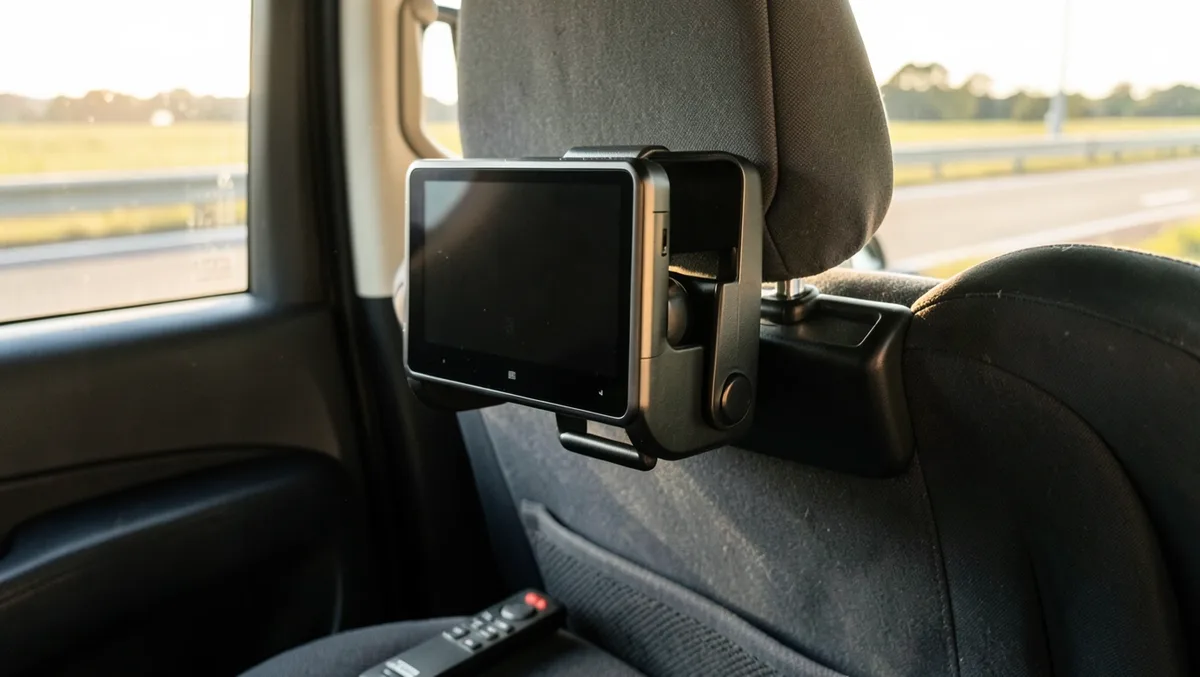
Headrest units are built for a fixed back-seat setup. Portable DVD players are built for flexibility, with swivel screens, built-in rechargeable batteries, and easier use across different vehicles. If your priority is a stable, set-and-forget install, headrest mounting usually wins. If you swap cars often, portability matters more.
What each setup is built to do
A headrest DVD player fits families who want a screen mounted behind a seat and left there. A portable DVD player works better when you need a self-contained screen that can sit on a tray, move between cars, or pull double duty outside the vehicle.
When a fixed headrest mount makes more sense
Choose a fixed mount when the same vehicle carries kids most days, when the second row has usable headrest posts, and when you want fewer loose parts in the cabin. Stable bracket mounting matters here, especially on rough pavement where flimsy clamps can shift.
When a portable swivel-screen player is the better fit
Portable units make more sense for rental cars, shared custody schedules, and mixed vehicle use. A swivel screen helps angle the picture toward one child or two, and the built-in battery keeps playback going when a car outlet is unavailable.
Comparison table: the models side by side
The options below are split into two dual-screen car DVD players and two portable DVD players. That mix matters because sibling conflict, battery life, and mounting security are usually the real decision points, not screen size alone.
| Model | Headrest fit | Single/dual viewing | Battery runtime / charging | Region-free playback | USB, SD, HDMI, AV support | Durability and road-trip notes | Best for | Watch out for |
|---|---|---|---|---|---|---|---|---|
| WONNIE 12-inch dual car DVD player | Best when the seat posts and brackets match the mount; confirm your headrest geometry before buying. | Dual-screen setup, with shared or independent viewing depending on the listing. | Battery details vary by listing; check the manufacturer page for runtime and charging method. | Check the listing for region-free support before relying on mixed discs. | Look for USB, SD, and AV details on the product page; HDMI support is not assumed. | Dual-screen layouts help siblings, but the mounting system needs a secure fit on bumpy roads. | Two kids who need different screens in the same row. | Do not assume the screens sync or that every disc format will play. |
| FANGOR 7.5-inch dual car DVD player | Works best in vehicles with compatible headrest posts and a bracket that locks down tightly. | Dual-screen use is the point here; check whether playback is shared or independent. | Battery information is listing-specific; verify whether it is wired-only or rechargeable. | Region-free support is product-specific and should be checked before purchase. | Confirm USB, SD, and AV support; do not assume HDMI input. | The smaller screen size can fit tighter cabins, but a shaky bracket can still ruin playback on rough roads. | Compact dual-screen use in smaller back seats. | Smaller screens can be harder to share if the second row is wide. |
| MEGATEK 12.5-inch portable DVD player | Portable design is more flexible than a fixed headrest mount, but bracket compatibility still needs verification if you plan to attach it in-car. | Usually best for single-screen use; check whether the swivel screen supports easy angle changes. | The listing says a 6-hour built-in battery; verify the charging method and whether car power is included. | Region-free support is not automatic; check the exact model listing. | Look for USB and SD support if you want offline viewing; HDMI is model-specific. | Portable designs help in rental cars, but the screen and hinge still need protection from repeated movement. | Longer trips where battery-backed playback matters more than a fixed mount. | A larger portable screen can be awkward if you want a tight headrest-style install. |
| DBPOWER 11.5-inch portable DVD player | Better for flexible placement than for permanent headrest mounting; check the mounting compatibility before buying. | Single-screen use is the main strength; a swivel screen helps with viewing angle. | The listing does not give a runtime in the supplied details; confirm battery life and charger type. | Region-free playback must be verified on the model page. | Check USB, SD, and AV support; some portable units also support phone or device input. | Portable use is practical for mixed vehicles, but the screen hinge and power port should be secure for road use. | One child, one screen, and frequent car swaps. | Do not buy it assuming Blu-ray support or HDMI input. |
Which features matter most on long trips?
On long trips, battery runtime and power source matter first, then how the kids will share the screen. Wired units are better when the car outlet stays available. Battery-backed portable players help when you need playtime without constant charging, but the screen mode can matter just as much.
Battery runtime versus wired power
A rechargeable player works best when you need flexibility outside the car or when you do not want a cord running across the second row. Wired setups are less likely to die mid-trip, but you need the outlet placement to work cleanly with the seats and passengers.
Shared viewing versus separate screens
The supplied buyer guidance says some models offer shared or independent viewing. That distinction matters for sibling peace. Shared playback is simpler. Independent screens help when one child wants a movie and another wants a different disc or program.
Disc playback versus USB or SD files
Disc playback is convenient until a library of mixed discs meets a player with limited format support. USB and SD playback help with offline files, but file formats and capacity limits vary by model. A common manufacturer limit to verify is around 32GB.
Why road vibration changes the choice
Loose mounts and poor bracket fit create the most annoying failure points. On rough roads, wobble can interrupt disc reading and shift the viewing angle. A stable mount matters more than a bigger screen if the player cannot stay put.
Say your family is on a three-hour drive with two kids in row two. If one player is loosely mounted and the other is clamped securely, the smaller, tighter setup often works better because the picture stays steady instead of skipping every time the vehicle hits a seam.
Suppose the trip is the same length, but the kids want different movies. A dual-screen car DVD player with independent viewing is the better fit than a single portable screen, even if the portable unit has a longer battery rating.
Will it fit your seats?
Maybe not automatically. Fit depends on headrest post spacing, bracket shape, and whether the seat geometry leaves enough room for a secure clamp. If the mount slides, tilts, or blocks the seatback, the installation is wrong for that vehicle even if the screen size looks appealing.
Headrest post spacing and bracket compatibility
Check the listing for the mount range, then compare it to your seat posts. Some vehicles have posts that sit too far apart, too close together, or at an angle that weakens the clamp. That is the first compatibility check, not an afterthought.
Stable mounting on bumpy roads
Road vibration exposes weak brackets fast. If the player shifts when someone closes a door or leans on the seatback, expect more movement when the car is in motion. A tight bracket and secure fastening are worth more than a flashy screen spec.
What to verify in the listing before you buy
- Headrest post spacing and clamp range.
- Whether the unit needs a car charger, wall adapter, or both.
- Battery runtime, if the player is rechargeable.
- Disc formats supported, including whether region-free playback is listed.
- USB and SD support, including any file or capacity limits.
- HDMI input or AV in/out, if you want phone or device sharing.
- Whether the model supports Blu-ray discs. Many do not.
Headrest DVD player comparison
For parents deciding between the four models above, the best choice usually comes down to one of three questions: do you need dual screens, do you need battery-backed portability, or do you need the easiest fit in your car’s rear seats. The answer changes with family size and trip length.
WONNIE 12-inch dual car DVD player
This is the more obvious pick for two kids who want screens in the same row. The 12-inch size gives it more presence than a compact portable unit, but the real value is the dual-screen layout. Check the exact listing for battery, region-free, and input details.
FANGOR 7.5-inch dual car DVD player
This suits tighter cabins and families that want a smaller dual-screen option. The 7.5-inch size makes it easier to fit in some back seats, but the smaller screen is a trade-off if the second row is wide or if the children sit farther apart.
MEGATEK 12.5-inch portable DVD player
The 12.5-inch portable format is the strongest fit for families who move the player between vehicles or need a battery-backed screen. The supplied details mention a 6-hour built-in battery, which is helpful on long trips if the charger is not always within reach.
DBPOWER 11.5-inch portable DVD player
This is the more flexible single-screen option for mixed use. The 11.5-inch size sits in the practical middle ground for portable players, but the buyer still needs to verify battery runtime, mounting compatibility, and media support before assuming it will solve a back-seat setup problem.
Choose headrest DVD players if… / Choose portable DVD players if…
Choose a headrest DVD player if you keep one vehicle, want a fixed mount, and need a stable setup that stays in place during regular family driving. Choose a portable DVD player if your vehicle mix changes, your kids move between cars, or you want a screen that can travel without a permanent install.
Choose headrest DVD players if…
- You need a secure back-seat setup for frequent road trips.
- Your seats can accept a bracket with the right post spacing.
- Two kids need shared or independent viewing in the same row.
- You want a cleaner permanent install with less cabin clutter.
Choose portable DVD players if…
- You switch cars often and do not want a fixed mount.
- You want battery power for stops, rentals, or short hops.
- You care more about swivel-screen flexibility than bracket stability.
- You need one player that can move between family vehicles.
Frequently asked questions
What is the best headrest DVD player for kids in the car?
The best choice for kids is usually the one that fits your seats securely and gives you the viewing mode you need. For two kids in one row, a dual-screen headrest player is usually more practical than a single portable unit. Check the mount, power source, and disc support first.
Are headrest DVD players better than portable DVD players for backseat entertainment?
Headrest players are better when you want a fixed, stable install in one vehicle. Portable DVD players are better when you need flexibility, a built-in rechargeable battery, or easier transfer between cars. The right answer depends on whether you value permanent mounting or portability more.
Can two kids watch different movies on a dual car DVD player?
Yes, if the model supports independent viewing. The buyer guide notes that some models offer shared or independent viewing, so you need to verify that feature on the product page. If the screens are only synced, both children will see the same content.
Do car DVD players support USB, SD cards, or HDMI input?
Some do, but support varies by model. USB and SD playback are common for offline viewing, though file-format and capacity limits can apply, including a 32GB cap on some units. HDMI input is less universal, so check for it specifically if you want 1080P video input or phone sharing.
How long do portable car DVD player batteries last?
Battery life varies by model, and the listing is the only safe place to confirm it. In the supplied details, one model says up to five hours of operation, another says a 5-hour rechargeable battery, and another says a 6-hour built-in battery. Verify the exact unit before buying.
Will a headrest DVD player fit my vehicle seats?
Only if the bracket matches your headrest posts and the seat geometry allows a secure clamp. Measure the spacing, check the mount range, and confirm that the player will not wobble or block seat access. Fit is a vehicle-specific issue, not a universal one.
Do these players work with Blu-ray discs?
Many car DVD players are reported not to support Blu-ray discs. Do not assume the format will play just because the screen is modern or the player is expensive. Check the manufacturer’s listing for Blu-ray support before you buy, especially if your disc collection includes mixed formats.
What should I check before mounting a DVD player on a headrest?
Start with bracket compatibility, then confirm seat-post spacing, cable routing, and whether the unit needs a car charger or wall adapter. Make sure the mount stays stable when the seat moves or the road gets rough. If the player shifts in your hand, it is not ready for the car.
Products related to this article
Sponsored / affiliate links. As an Amazon Associate I earn from qualifying purchases. I may earn additional commission from eligible campaigns.