Backup Camera Cost: How Much to Install a Car Kit
A backup camera retrofit usually costs $150 to $600 installed, with most older cars landing around $250 to $450; DIY can start near $50 if your radio already accepts a camera. Skip the right parts, and you can end up with a screen that shows nothing, a bad mount, or a camera that fails in rain and leaves you guessing. This guide breaks down installed price by vehicle type, the cheapest safe setup, the upgrade path, and the add-ons that change the final bill.
Typical cost range

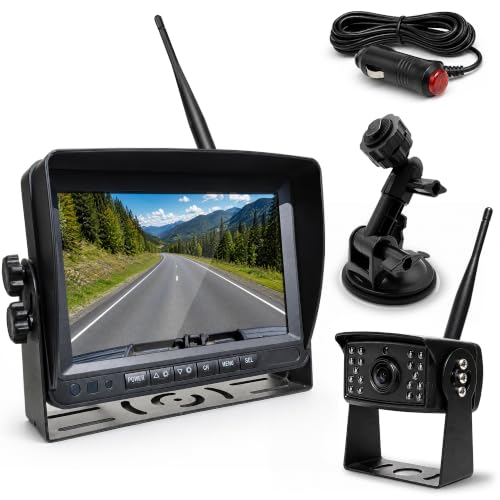
For a basic retrofit, expect $150 to $400 for installation alone, plus parts. A simple DIY wireless kit can stay near the low end if your vehicle already has the right screen, while an older car with no display, long wiring runs, or a hard-to-reach hatch can push the total toward $600 or more.
Backup camera cost table
| Install scenario | Parts cost | Labor cost | Likely add-ons | Estimated total |
|---|---|---|---|---|
| Camera-only replacement | $30 to $200 | $0 to $150 | $30 to $350 | |
| Basic DIY wireless kit | $100 to $300 | $0 | Mounting hardware, power tap, trim clips | $100 to $350 |
| Wired retrofit with separate monitor | $80 to $350 | $150 to $400 | Monitor, reverse trigger, wiring accessories | $230 to $750 |
| Professional install on an older car | $100 to $450 | $150 to $400 | Dash screen, bezel, harness, drilling, calibration | $250 to $850 |
That table is the clearest way to budget. The camera itself can be cheap, but labor, display integration, and fitment work are what move the final number.
New cars are required to have backup cameras before leaving the factory, and the federal rear visibility rule applied to vehicles manufactured on or after May 1, 2018. For older vehicles, the price depends far more on what you already have in the dash than on the camera lens itself.
What affects installation price?
Installation price rises when access is tight, the harness is not plug-and-play, or the vehicle needs a separate display. On many compact cars, the run from hatch to dash is shorter and simpler. On pickups, SUVs, and RVs, the work often takes longer because the camera has to be mounted farther from the cabin.
The biggest cost drivers are the screen, the wiring path, and the mount. If the vehicle already has a compatible display and a short cable run, the price stays lower. Add a long rear-to-front route or a custom bracket, and labor jumps fast.
Vehicle type and access
Hatchbacks and sedans often need less wire than pickups and tall SUVs. A tailgate, liftgate, or cargo-door camera can require more trim removal, more clips, and more care around seals. If the installer has to fish wire through the body and then route it past side panels, labor climbs quickly.
Wiring length and trigger work
Wired systems need a clean path from the rear camera to the display. That can mean hidden routing, a reverse trigger lead, and testing for a signal only when the vehicle is in reverse. If the car lacks a convenient trigger point, troubleshooting can add time and cost.
Existing display compatibility
If the head unit already accepts camera input, you avoid buying a separate monitor. If it does not, a dash screen or mirror display may be the cheapest fix. A factory infotainment screen can still require an adapter or interface module, so compatibility should be checked by year, trim, and radio model.
- Check the dash first. Confirm whether the vehicle already has a screen, camera input, or unused display port. That determines if you are buying only the camera or a larger kit.
- Inspect the rear mount. Look for a license plate bracket, handle area, or flat panel that can accept a camera. This affects whether drilling is needed and whether the camera sits centered.
- Map the wire path. Measure the distance from the rear hatch to the dash and note trim panels, grommets, and hinges. Longer runs increase labor and raise the chance of a poor connection.
- Verify the reverse signal. Make sure the camera can switch on with reverse gear. Missing trigger wiring is one of the most common reasons a screen stays black after install.
Wired vs wireless: which costs less?
Wireless kits usually cost less to install because they cut cable routing, and they are easier for a basic DIY job. Wired systems still tend to be the better long-term choice when image reliability matters. A wired backup camera typically costs $50 to $200 before installation, and professional installation can add $150 to $400 for wired systems. Wireless backup cameras are priced between $100 and $300, but interference can create dropouts or lag.
Wired backup camera
A wired backup camera is usually the more dependable setup because the video signal does not rely on a radio link. That matters on long vehicles, in busy electrical environments, or where the camera must send a clean image through metal body panels and a long cable.
The tradeoff is labor. Running the cable through trim, keeping it away from pinch points, and connecting the reverse trigger takes time. If the vehicle already has a camera input, the job is easier; if not, the installer may need to add a display or interface.
Wireless backup camera
Wireless kits are attractive because they cut down on cable routing. For many drivers, that means less labor and a simpler weekend install. The weak point is signal stability. Interference from other electronics, metal bodywork, or distance between camera and receiver can affect image quality.
Picture a pickup with a camper shell. A wireless camera can be the cheapest-looking solution at first, but a poor signal through the shell or across a long bed can lead to flicker or delay. In that case, wired often ends up cheaper over time because it avoids rework.
Best fit by vehicle
Use wired for older SUVs, pickups, and anything that needs a long, clean path and consistent image quality. Use wireless when the screen is close to the camera, the route is simple, and the owner wants the quickest install possible. For an RV or camper, cost can climb fast; CNET lists an RV and camper backup camera system at $751.
Do you need a separate screen?
Older cars often do. If the vehicle has no infotainment screen or camera-ready head unit, you need a monitor, mirror display, or replacement radio with video input. That added display can be the biggest single cost factor after labor, especially if the dash must be modified to fit it.
Using an existing display
If the factory screen already supports camera input, installation is simpler and cheaper. Many late-model vehicles can reuse the original display with the right adapter or cable. That avoids buying another screen and usually keeps the dash cleaner.
Adding an aftermarket monitor
On older vehicles, the monitor may cost as much as the camera itself. A basic mirror display can be a budget-friendly route, while a larger dash screen costs more but can be easier to see. The right choice depends on dash space, mounting preference, and how much trimming you want to avoid.
Integration problems to watch
Common trouble spots include an incompatible head unit, no reverse trigger, and a camera that powers on but never appears on the screen. If the vehicle’s radio cannot accept a camera signal, buying a camera alone will not solve the problem. That is the hidden cost many budget buyers miss.
Which camera style should you buy?
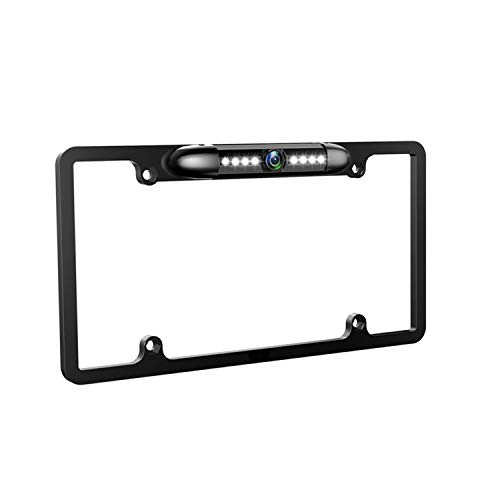
The cheapest safe setup is usually the one that fits the vehicle without custom fabrication. License plate cameras are easy to mount and often the lowest-cost option. Flush mount cameras look cleaner but may need drilling, careful alignment, and more time to seal properly against water intrusion.
License plate mount backup camera
License plate cameras cost between $30 and $150. They are popular because installation is usually straightforward, they fit many vehicles, and they do not require major body changes. The downside is appearance; the camera is visible and may sit lower or higher than an ideal factory-style location.
Flush mount backup camera
Flush mount cameras are priced at $50 to $200. They typically look cleaner because the lens sits nearly level with the body panel, but they often require drilling. That makes fitment more important, especially on painted surfaces where a bad cut is hard to hide.
Night vision and waterproofing
Night vision backup camera features matter if the vehicle is parked in dark lots or backed into unlit driveways. A better low-light sensor can improve image clarity, but waterproofing still matters because rain, road spray, and winter slush can blur a cheap lens fast. If the listing does not clearly address both, look elsewhere.
A common first-timer mistake is assuming a cheap backup camera kit will fit any vehicle without checking whether the display, wiring, and installation parts are included. If the lens sits too low on a muddy rear bumper, the image may look fine on a dry day and turn useless after a storm.
Can you install it yourself?
DIY is often the cheapest route if your car already has a compatible display and the kit includes clear instructions. Professional installation is worth the extra cost when the vehicle needs trim-heavy routing, a separate monitor, or troubleshooting for signal, trigger, or compatibility issues.
When DIY makes sense
CNET says many drivers can install aftermarket cameras themselves, and that is most true for simple license plate or wireless kits. If the parts match the vehicle and the cable path is short, the job may be manageable with basic tools and patient trim removal.
When a pro is worth it
A professional install makes more sense when the camera must interface with a factory screen, when the vehicle is an older model without a display, or when bodywork and sealing matter. Paying more up front can be cheaper than redoing a bad wire route or replacing a camera that was mounted poorly.
Common fitment problems
Expect problems like a blurry image from poor lens placement, a black screen from missing power or trigger wiring, and intermittent video from wireless interference. Drill placement matters too. If the camera is mounted off-center or at the wrong angle, parking lines will mislead instead of help.
- Confirm the screen path. Make sure the vehicle has a display, monitor, or radio that can accept the camera signal. If not, budget for a screen before buying the camera.
- Choose the mount style. Pick license plate mount for easy fitment or flush mount for a cleaner look. Select drilling only if the panel material and seal location make sense.
- Decide wired or wireless. Choose wired for the most reliable signal and wireless for easier routing. Check the vehicle length and rear-body shape before deciding.
- Price the add-ons. Add trim clips, adapter cables, sealant, and a monitor if needed. Those small parts often explain why a cheap kit becomes a mid-range install.
Frequently asked questions
How much to install backup camera
If the vehicle already has a compatible display, the total can be lower. If it needs a screen or interface, the bill can move much higher.
What does it cost to install a backup camera in a car?
For a car with a compatible screen, a basic install may stay near the low end of the usual range. For a car without a screen, expect to add the cost of a monitor or radio upgrade. Wiring length, trim work, and whether the camera is wired or wireless all affect the total.
How much does a wired backup camera installation cost?
That makes wired systems more labor-heavy but often more dependable. If the vehicle is larger or needs a reverse trigger run, cost and time go up.
How much does a wireless backup camera cost?
Wireless backup cameras are priced between $100 and $300, and they can be cheaper to install because they reduce cable routing. The tradeoff is possible interference and occasional troubleshooting. For shorter vehicles and simpler installs, wireless can be the lower-cost path.
Does my car need a separate screen for a backup camera?
If your car already has a compatible factory screen or aftermarket head unit, a separate display may not be needed. Older vehicles without camera input usually do need one. The screen cost can become a major part of the install, so check compatibility before buying the camera.
What is the best budget backup camera setup?
The best budget setup is usually a license plate camera paired with an existing compatible screen. If there is no screen, a basic monitor can still be cheaper than a full head unit swap. For simple installs, budget models can work well, but fitment and signal quality should come before price alone.
Products related to this article
Sponsored / affiliate links. As an Amazon Associate I earn from qualifying purchases. I may earn additional commission from eligible campaigns.