BMW Emergency Call System Not Available Fix Guide
It can be tricky when your BMW Emergency Call System shows “Not Available.” This message pops up for various reasons, and figuring out why can seem tough at first. Don’t worry! This guide will walk you through the steps to fix it.
We will cover simple checks and what to do next to get your system working again. Let’s get your BMW back to full safety function.
Understanding the BMW Emergency Call System
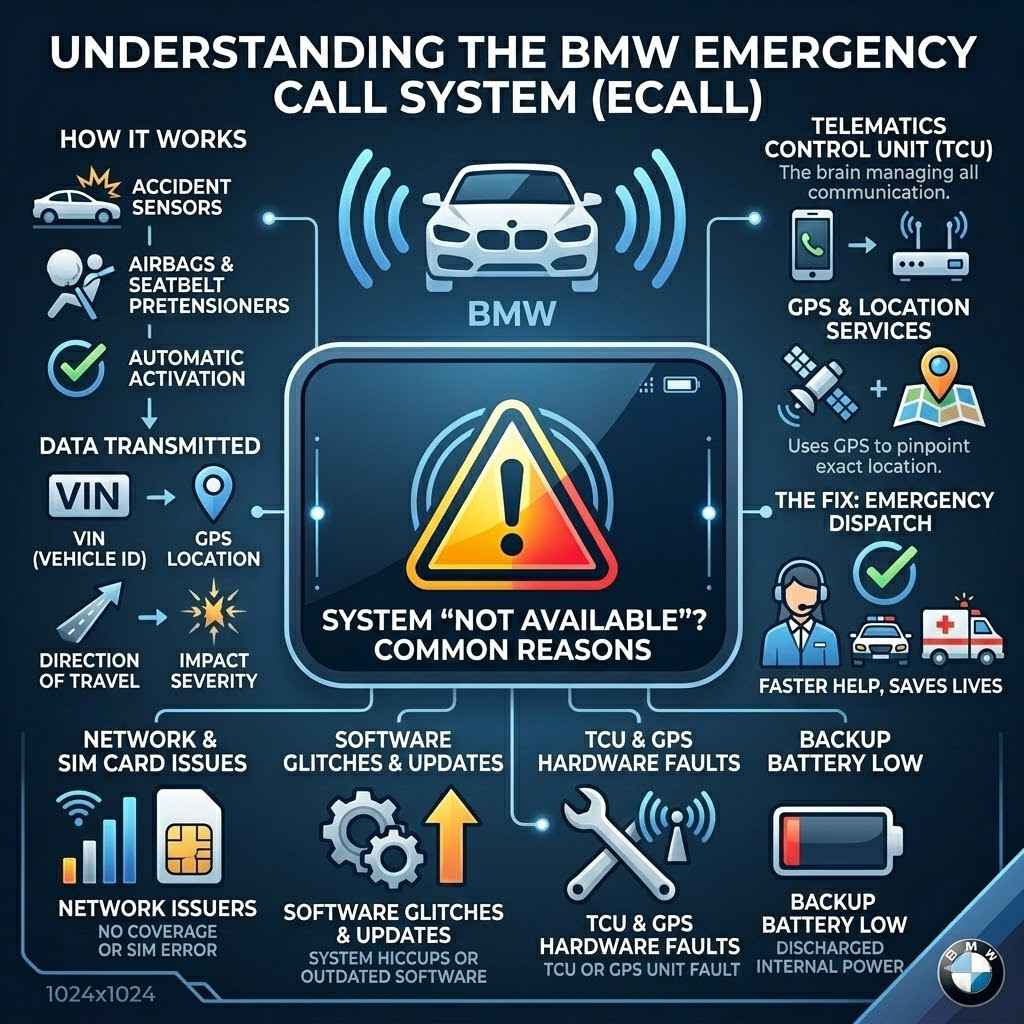
The BMW Emergency Call System, also known as the Intelligent Emergency Call or eCall, is a critical safety feature designed to automatically alert emergency services in the event of a serious accident. When an accident occurs, sensors within the vehicle detect the impact. If the airbags deploy or the seatbelt pretensioners activate, the system is triggered. It then transmits important information about the vehicle’s location, direction of travel, and other relevant data to a BMW call center or directly to emergency responders.
This allows for faster dispatch of help, even if the occupants are unable to make a call themselves. The system uses a built-in SIM card for communication and GPS for location tracking. It’s a crucial component for your safety and peace of mind on the road.
How the Emergency Call System Works
The Emergency Call System operates through a sophisticated interplay of sensors, communication modules, and a dedicated network. When a severe collision is detected by impact sensors or other triggering events like a rollover, the vehicle’s computer initiates the emergency call sequence. First, the system attempts to establish a connection with the BMW ConnectedDrive call center or directly with local emergency services. This connection is made using an integrated telecommunications module, often referred to as the TCU (Telematics Control Unit), which contains a SIM card. Simultaneously, the system determines the vehicle’s precise location using its GPS receiver. This location data is crucial for emergency responders to find the vehicle quickly.
The information transmitted includes the vehicle’s VIN (Vehicle Identification Number), the exact GPS coordinates, the direction of travel, and the severity of the impact. In some cases, it can also transmit details about the number of occupants detected by seatbelt sensors. This comprehensive data package helps emergency personnel assess the situation before they even arrive at the scene. The system is designed to work even if the vehicle’s main battery is damaged, as it usually has a backup power source. It’s a complex system, but its primary goal is simple: to get you help as fast as possible when you need it most.
The Role of Telematics Control Unit TCU
The Telematics Control Unit, or TCU, is the brain of your BMW’s connected services, including the Emergency Call System. This module is responsible for managing all communication between your car and the outside world, whether it’s for navigation updates, remote services, or that vital emergency call. It houses the SIM card that allows your BMW to make calls and send data over cellular networks. Think of it as your car’s personal phone and data modem all rolled into one.
When the Emergency Call System is activated, the TCU is the component that actually initiates the call. It gathers all the necessary information, like your location and vehicle details, and transmits it. If the TCU malfunctions or loses its connection, the “BMW Emergency Call System Not Available: Fix Guide” message can appear. Maintaining a good signal and ensuring the TCU is functioning correctly are key to the system’s reliability. It’s a small but incredibly important piece of technology.
GPS and Location Services
Global Positioning System, or GPS, is what allows your BMW to know where it is. For the Emergency Call System, accurate GPS data is absolutely essential. When an emergency call is made, the system uses GPS to pinpoint your exact location. This information is then transmitted to emergency services so they can find you quickly. Without a good GPS signal, the system cannot function as intended.
Several factors can affect GPS accuracy. Being in tunnels, covered parking garages, or areas with tall buildings can block or weaken the signal. Even severe weather can sometimes interfere. If the GPS antenna or module within your BMW is damaged or not functioning properly, this can also lead to the “BMW Emergency Call System Not Available: Fix Guide” message. Ensuring the GPS receiver and antenna are clear and operational is a vital step in troubleshooting. This technology is critical for ensuring help reaches you efficiently.
Common Reasons for the “Not Available” Message
The “BMW Emergency Call System Not Available” message can be frustrating, but it usually stems from a few common issues. Often, it’s related to a temporary network issue or a simple connection problem. Sometimes, it could be something as straightforward as a discharged battery in a backup power source for the system. Software glitches can also cause temporary errors.
More serious causes might involve a fault with the telematics control unit (TCU) itself, issues with the GPS antenna, or even problems with the integrated SIM card. In some instances, it might be a temporary system deactivation for maintenance or a software update. Understanding these possibilities helps you approach the troubleshooting process systematically. Each potential cause has its own set of solutions.
Network and SIM Card Issues
The Emergency Call System relies on a cellular network to communicate. If there’s no signal in your area, or if the network is experiencing problems, the system won’t be able to connect. This is often a temporary issue. Think of it like trying to make a phone call when you have no service.
The SIM card within your BMW’s telematics unit is also critical. This SIM card needs to be properly seated and functional. If the SIM card is damaged, dirty, or not registered correctly with the network provider, it can prevent the system from working. Sometimes, the SIM card might need to be replaced.
Software Glitches and Updates
Like any complex electronic system, the BMW Emergency Call System can sometimes encounter software glitches. These can be temporary hiccups that resolve themselves or require a system reset. Software issues can also arise if the system’s software is outdated or not functioning correctly.
BMW frequently releases software updates for their vehicles to improve performance, fix bugs, and enhance features. If the system has not received a recent update or if an update failed to install properly, this could lead to the “BMW Emergency Call System Not Available: Fix Guide” message. Keeping the vehicle’s software up-to-date is important for all its systems, including the eCall.
Troubleshooting Steps for BMW Emergency Call System Not Available
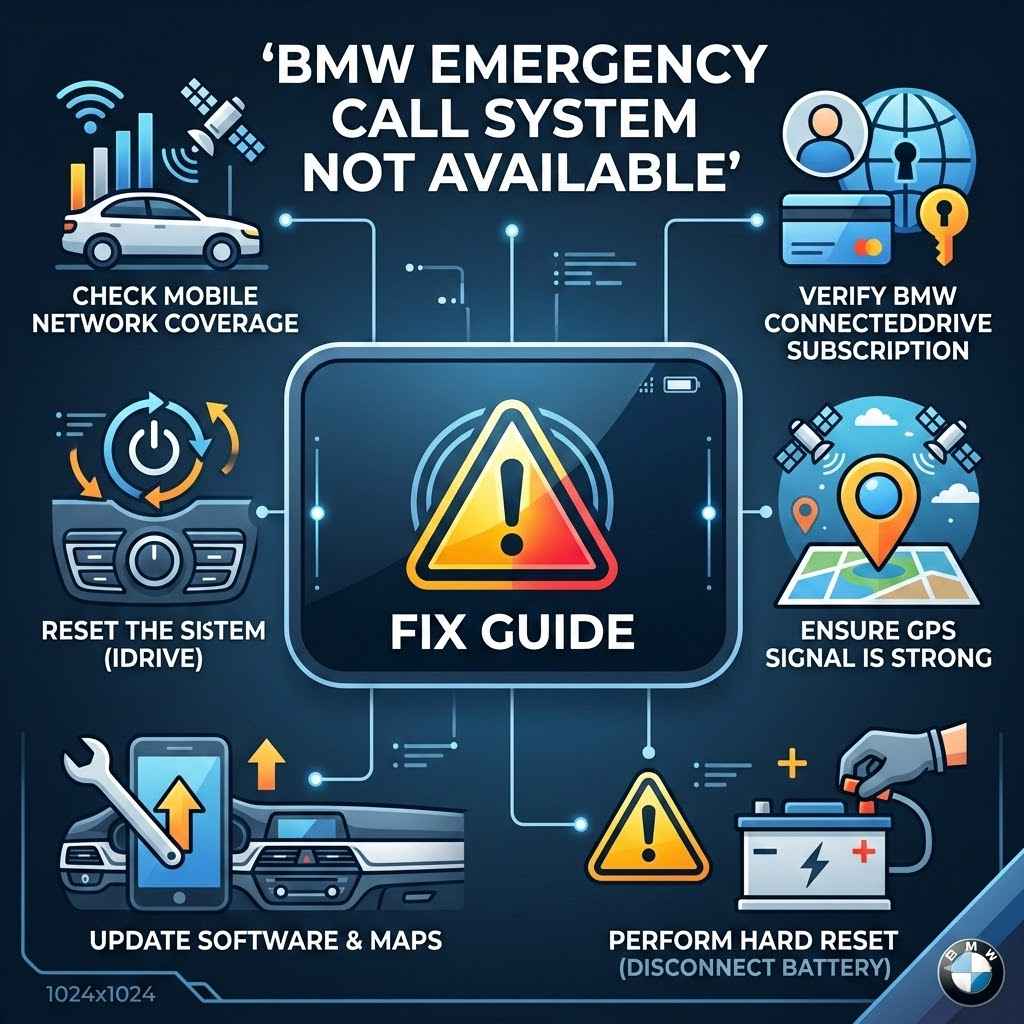
When you see that “BMW Emergency Call System Not Available” warning, don’t panic. There are several straightforward steps you can take to try and resolve the issue yourself before needing to visit a dealership. These steps involve checking basic connections and performing simple resets that often clear temporary errors.
The first and easiest step is to simply restart your vehicle. Turn the engine off completely, wait a minute or two, and then start it again. This can often reset minor electronic glitches. If that doesn’t work, you can try checking for any visible damage to antennas or modules, though this may require some technical knowledge.
Performing a System Reset
One of the most effective initial steps for troubleshooting the BMW Emergency Call System Not Available is to perform a system reset. This is similar to restarting your computer when it acts up. It can clear temporary memory issues or minor software glitches that might be preventing the system from functioning correctly.
To perform a general reset, you typically need to turn off your vehicle completely. Ensure all accessories are off, then remove the key and lock the car. Wait for at least 5-10 minutes. This allows the electronic modules to fully power down and clear their temporary memory. After waiting, unlock the car, start the engine, and check if the warning message has disappeared.
Resetting the Telematics Control Unit TCU
If a general system reset doesn’t work, you might need to specifically reset the Telematics Control Unit (TCU). This component is central to the Emergency Call System’s operation. Resetting it can sometimes resolve deeper communication issues.
The exact procedure for resetting the TCU can vary slightly depending on your BMW model and year. Often, it involves accessing a specific menu in the vehicle’s iDrive system or infotainment screen. You might need to look for options related to “ConnectedDrive” or “Telematics” and find a reset or reinitialize function. Consult your BMW owner’s manual for the precise steps for your vehicle. If you can’t find it, a dealership can guide you.
Checking the SIM Card
The SIM card inside the TCU is essential for making emergency calls. If this card is not properly seated, dirty, or damaged, it can cause the system to report as unavailable. Checking and reseating the SIM card is a relatively simple troubleshooting step.
First, you’ll need to locate the SIM card slot. This is typically found within the TCU module, which might be located in the trunk, under a seat, or behind a panel in the dashboard. Refer to your BMW’s owner’s manual or online forums specific to your model for the exact location. Once located, carefully remove the SIM card. Inspect it for any visible damage or dirt. Gently wipe it with a clean, dry, lint-free cloth. Reinsert the SIM card firmly, ensuring it clicks into place. Then, restart your vehicle and check if the issue is resolved.
Inspecting Antennas and Wiring
The Emergency Call System relies on antennas for GPS reception and cellular communication. It also uses wiring to connect these antennas and modules. Damage to these components can lead to the “BMW Emergency Call System Not Available: Fix Guide” message.
Visually inspect the exterior of your BMW for any visible damage to the shark fin antenna (often on the roof) or any other external antenna housing. Check for cracks, dents, or anything that looks out of place. If you notice any damage, it might indicate a problem with the antenna itself or the wiring connected to it.
GPS Antenna
The GPS antenna is crucial for providing your location. It’s often integrated into the shark fin antenna or located elsewhere on the vehicle’s exterior. Ensure this area is free from obstructions or damage. If you suspect an issue, it’s best to have a qualified technician inspect the antenna and its connections. They can test the signal strength and check for any breaks in the wiring.
Telematics Antenna
Similarly, the telematics antenna is responsible for cellular communication. This is also often part of the shark fin or a separate component. If this antenna is damaged or its connection is compromised, the TCU cannot communicate with the emergency services network. Proper functioning of both antennas is vital for the system’s overall reliability.
Software Updates and Diagnosis
If the simpler troubleshooting steps don’t resolve the issue, the problem might lie with the vehicle’s software or require a professional diagnosis. BMW vehicles have sophisticated diagnostic systems that can identify specific faults within the eCall system.
BMW Diagnostic Software
BMW dealerships and authorized service centers use specialized diagnostic software. This software connects to your car’s various control modules, including the TCU, and can read error codes. These codes provide detailed information about what is causing the “BMW Emergency Call System Not Available: Fix Guide” message.
A technician will use this software to identify any fault codes related to the eCall system, GPS, or TCU. Based on the diagnostic results, they can determine the exact cause of the problem and recommend the necessary repairs or software updates. This is often the most efficient way to diagnose and fix complex issues.
Importance of Regular Software Updates
Keeping your BMW’s software up-to-date is essential for the optimal performance of all its electronic systems. BMW regularly releases software updates to address known issues, improve functionality, and enhance security. If your vehicle’s software is outdated, it could be contributing to the eCall system malfunction.
When you take your BMW for regular servicing, ensure that any available software updates are installed. This can often resolve minor glitches and prevent future problems. If you suspect a software-related issue, ask your service advisor about the latest software versions for your car.
When to Seek Professional Help
If you’ve tried the basic troubleshooting steps and the “BMW Emergency Call System Not Available” message persists, it’s time to seek professional assistance. There are certain components and procedures that require specialized knowledge and tools. Attempting complex repairs without the proper expertise could potentially cause more damage.
The BMW Emergency Call System involves integrated electronics, antennas, and communication modules that are interconnected. Issues with these parts often require a diagnostic scan to pinpoint the exact problem. A qualified BMW technician has the necessary equipment and training to accurately identify and fix these issues.
Visiting a BMW Dealership
The most reliable place to get help for your BMW Emergency Call System is at an authorized BMW dealership. They have factory-trained technicians who are experts in BMW vehicles. They also have access to the latest diagnostic tools, genuine BMW parts, and up-to-date technical information.
When you bring your car in, they will connect it to their diagnostic computers. This allows them to read any error codes stored in the vehicle’s modules, including the TCU. They can then perform a thorough inspection of the eCall system, its antennas, wiring, and related components. Based on their findings, they will provide you with a clear explanation of the problem and a quote for the repair.
What a Dealer Can Do
A BMW dealer can perform a comprehensive diagnostic scan of your vehicle’s entire system. This includes checking the functionality of the TCU, GPS receiver, telematics module, and all associated wiring. If there’s a software issue, they can perform a software update or reflash the necessary modules.
If a physical component is faulty, such as a damaged antenna or a malfunctioning TCU, they can
Independent BMW Specialists
If an authorized dealership is not convenient or if you prefer to use an independent mechanic, look for a specialist who focuses on BMW vehicles. These specialists often have extensive experience with BMW systems and may have comparable diagnostic tools to dealerships.
When choosing an independent specialist, check their reputation and ask if they have experience with BMW’s eCall system. They should be able to perform similar diagnostic checks and repairs. Ensure they use quality parts, whether OEM (Original Equipment Manufacturer) or reputable aftermarket alternatives, and can provide a warranty on their work.
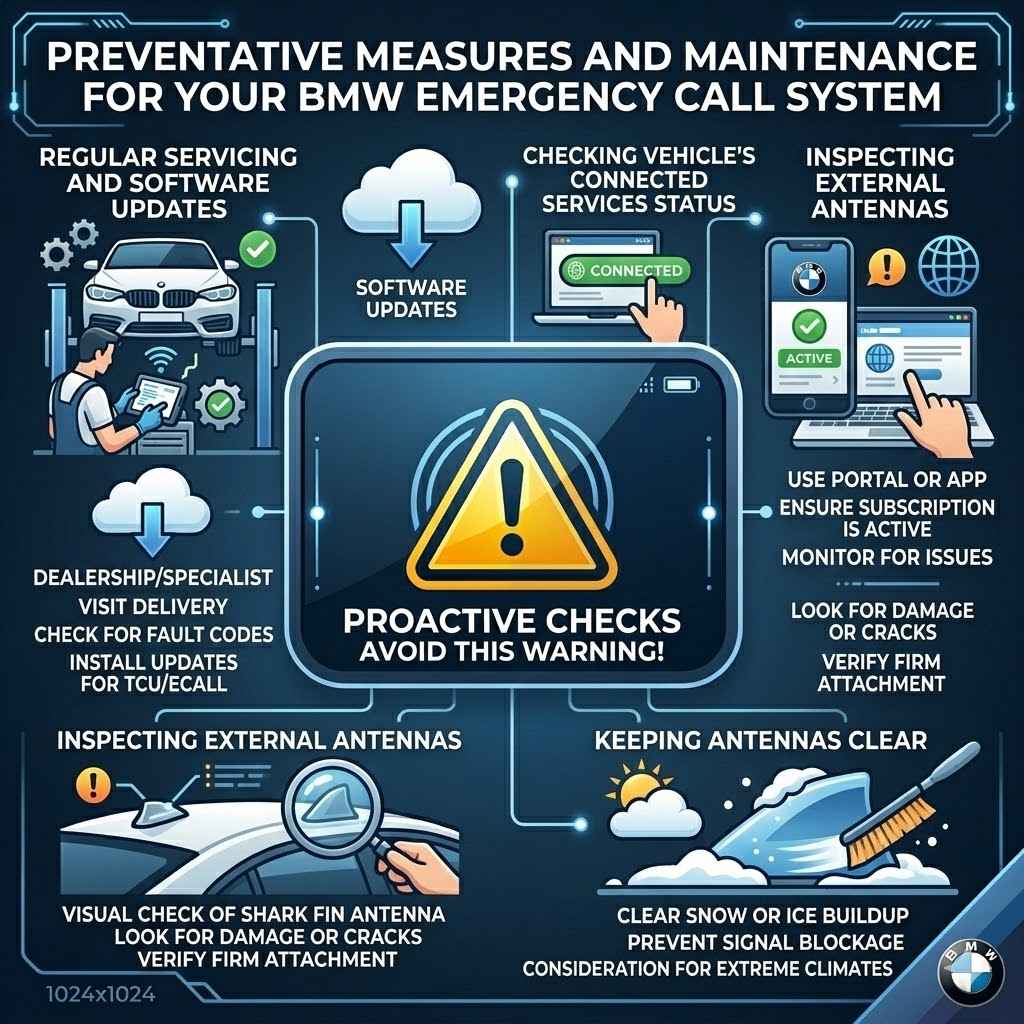
Preventative Measures and Maintenance
Keeping your BMW Emergency Call System in good working order involves a few simple preventative measures and regular checks. While the system is designed to be highly reliable, a little proactive care can help avoid the “BMW Emergency Call System Not Available” message and ensure it’s always ready when you need it.
One of the most important aspects is ensuring your vehicle’s software is up-to-date. BMW regularly releases updates that can fix bugs and improve system performance. Regular servicing at a BMW dealership or a qualified independent BMW specialist is the best way to ensure these updates are applied.
Regular Servicing and Software Updates
Your BMW’s service schedule is designed to keep all its systems in optimal condition. During regular maintenance, technicians can check for any fault codes that might be related to the Emergency Call System. They can also install any pending software updates for the vehicle’s modules, including the TCU.
These software updates are not just about adding new features; they often contain critical fixes for known issues that could otherwise cause system malfunctions. Keeping your car’s software current is a proactive way to prevent problems like the “BMW Emergency Call System Not Available” message from appearing. It ensures your vehicle’s technology is performing as intended.
Checking Vehicle’s Connected Services Status
BMW’s ConnectedDrive services, which include the Emergency Call System, often have an online portal or app where you can check the status of your subscriptions and services. It’s a good idea to occasionally log in and ensure that your eCall service is active and there are no outstanding issues reported.
Sometimes, the availability of the emergency call system can be linked to active subscriptions for BMW ConnectedDrive services. While the basic eCall function is often mandated and provided without a separate subscription in many regions, ensuring all connected services are functioning correctly can indirectly benefit the eCall system’s reliability.
Inspecting External Antennas
The external antennas, particularly the shark fin antenna often found on the roof of BMWs, are critical for the Emergency Call System’s GPS and cellular connectivity. These antennas are exposed to the elements and can be accidentally damaged.
Periodically, take a moment to visually inspect the shark fin antenna. Look for any signs of damage such as cracks, missing pieces, or loose fittings. Ensure it is firmly attached to the roof. If you notice any damage, it’s important to have it inspected and repaired or replaced by a professional to maintain the integrity of the eCall system.
Keeping Antennas Clear
While not a common issue, in areas with heavy snow or ice buildup, ensure that external antennas are clear. While the system is designed to function in various weather conditions, significant physical blockage of an antenna could potentially impact its performance. This is more of a consideration in extreme climates.
Frequently Asked Questions
Question: What is the BMW Emergency Call System?
Answer: The BMW Emergency Call System, also known as eCall or Intelligent Emergency Call, is a safety feature that automatically contacts emergency services in case of a serious accident. It transmits your location and vehicle details to help responders reach you faster.
Question: Why does my BMW say “Emergency Call System Not Available”?
Answer: This message can appear for several reasons, including network issues, a problem with the SIM card, software glitches, or a fault with the telematics control unit (TCU) or GPS antenna.
Question: Can I fix the “BMW Emergency Call System Not Available” message myself?
Answer: You can try some basic troubleshooting steps like restarting the car or checking the SIM card. However, more complex issues may require professional diagnosis and repair.
Question: How do I reset my BMW’s Emergency Call System?
Answer: A general reset can be done by turning off the car completely, waiting, and restarting. Some models might have a specific reset option in the iDrive menu for the telematics unit.
Question: Do I need a subscription for the BMW Emergency Call System?
Answer: In many regions, the basic emergency call function is a mandated safety feature and does not require a separate subscription. However, other BMW ConnectedDrive services may have subscription fees.
Conclusion
Addressing the “BMW Emergency Call System Not Available” message is manageable. By understanding its components and common causes, you can perform basic checks like restarting your car or inspecting the SIM card. If these steps don’t resolve the issue, professional help from a BMW dealer or specialist is recommended. Regular maintenance and software updates will keep your system working safely.