How Does SiriusXM Radio Work: Essential Guide
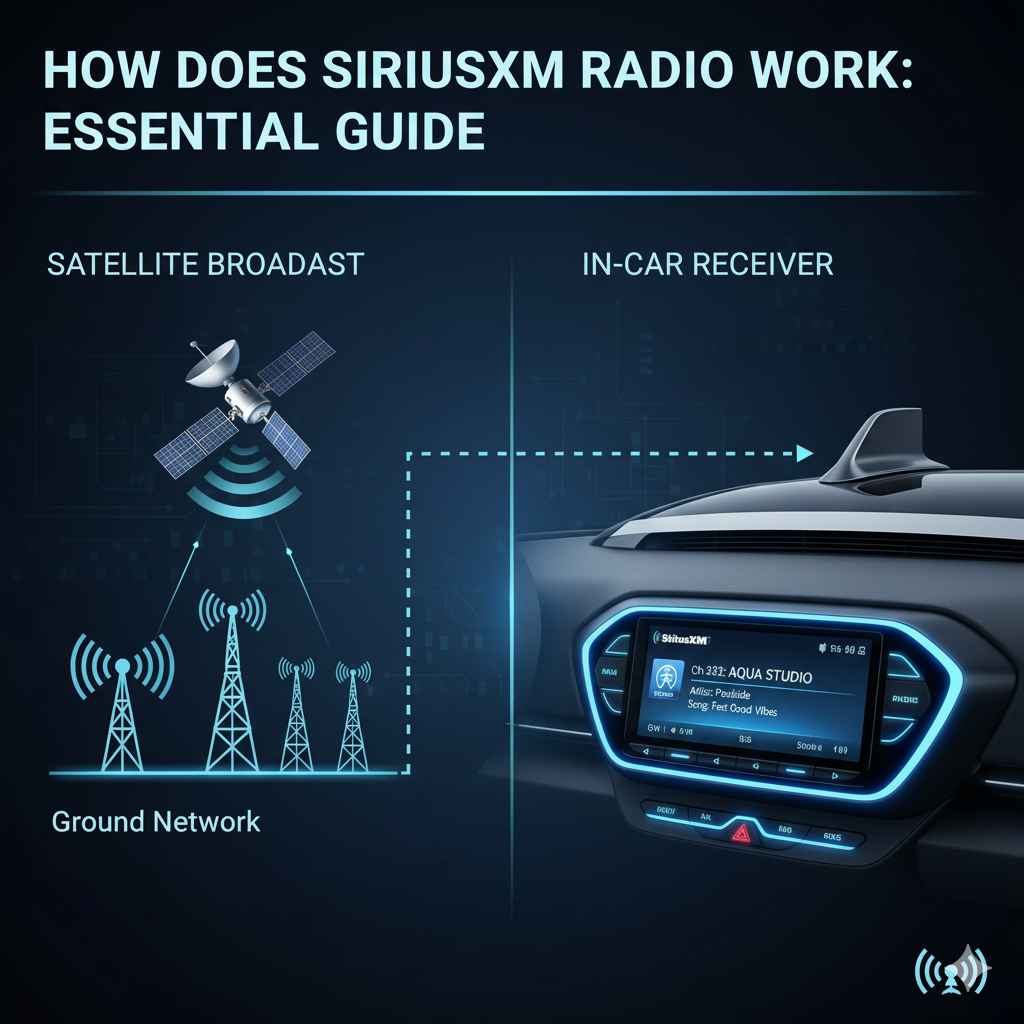
SiriusXM in your car works via satellite and terrestrial radio signals, broadcasting hundreds of channels of music, news, talk, and sports directly to your receiver. It’s a subscription-based service that bypasses traditional radio limitations for a premium audio experience.
Ever been on a road trip, only for your favorite station to fade out just as the song gets good? Or maybe you wish you had more options than just local channels. That’s where SiriusXM comes in! Many cars today come with it, or you might be thinking about adding it. But how does this magical box in your dashboard actually bring you so many channels, everywhere you go? It can seem a bit mysterious. Don’t worry! I’m here to demystify how SiriusXM radio works in your car, making it as clear as a crisp audio stream. We’ll break down the technology behind it, what makes it different, and what you need to know to enjoy it to the fullest.
Understanding the Magic: How SiriusXM Delivers Your Favorite Content
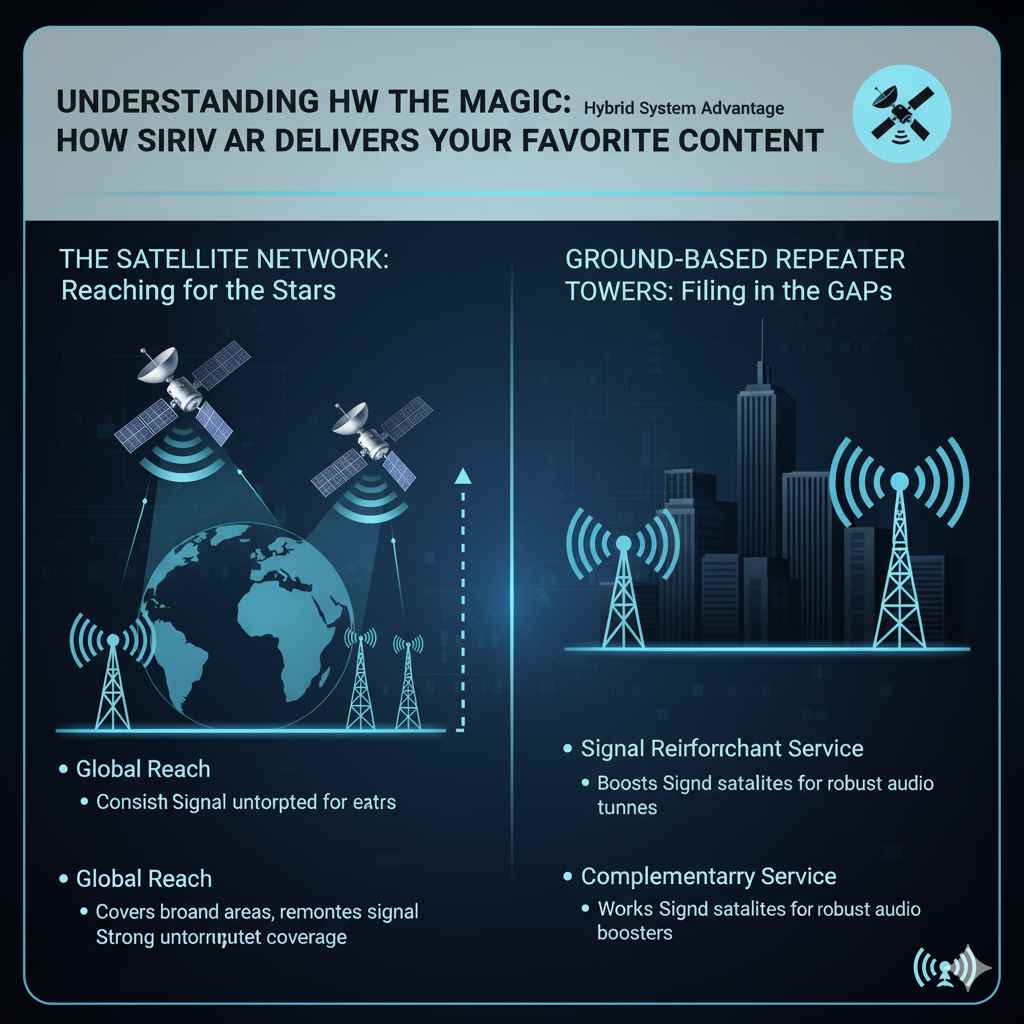
SiriusXM isn’t your typical radio. It uses a smart combination of technology to ensure you have a consistent listening experience, whether you’re cruising through the city or driving across the country. It’s built on two main delivery systems: satellites and ground-based towers. This dual approach is key to its widespread coverage and reliability.
The Satellite Network: Reaching for the Stars
The “S” in SiriusXM stands for “Satellite.” This is the primary way your radio gets its signal. Imagine giant, powerful radio transmitters in space – that’s essentially what their satellites are. They orbit the Earth and beam down a continuous radio signal that your SiriusXM receiver in your car can pick up.
- Global Reach: These satellites cover vast areas, including oceans and remote locations where traditional radio towers can’t reach. This means your favorite channels generally stay with you, no matter where your journey takes you across North America.
- Consistent Signal: Because satellites are positioned high above, they can broadcast a strong, consistent signal that’s less prone to the “fading” or static you might experience with terrestrial (ground-based) radio, especially when moving.
- Multiple Satellites: To ensure continuous coverage, SiriusXM uses a constellation of satellites. This smart arrangement means that as one satellite moves out of range, another is already in position to take over, ensuring uninterrupted listening.
Ground-Based Repeater Towers: Filling in the Gaps
While satellites are fantastic, there are a few situations where they aren’t the whole story. In certain environments, like deep urban canyons with tall buildings or within tunnels, the satellite signal might get blocked. To overcome this, SiriusXM also uses a network of ground-based repeater towers.
- Signal Reinforcement: These towers are strategically placed in areas where satellite signals might be weaker or obstructed. They essentially “repeat” the satellite signal, boosting it to ensure your receiver gets a clear transmission.
- Complementary Service: Think of these towers as backup singers for the lead satellite. They work in tandem with the satellites to provide the most robust and reliable audio experience possible, especially in tricky spots.
- Hybrid System Advantage: This hybrid approach – satellites plus repeaters – is what makes SiriusXM so dependable. It combines the broad coverage of space with localized signal boosters for a truly seamless listening experience.
The SiriusXM Receiver: Your Gateway to Entertainment
Every SiriusXM-equipped car has a special receiver built into the infotainment system or as a separate unit. This device is designed to pick up the specific signals sent by SiriusXM satellites and repeaters. It’s like a specialized antenna and decoder all rolled into one.
How Your Receiver Connects
Your car’s SiriusXM receiver has an antenna, usually a small fin on the roof of your car or sometimes integrated into the windshield. This antenna is tuned to the frequencies used by SiriusXM.
Once the signal is captured, the receiver decodes it. Each channel you see on your display has a specific digital code. The receiver processes this code and converts the digital audio data into the music, talk, or sports you hear through your car’s speakers.
Subscription is Key
It’s important to remember that SiriusXM is a subscription service, much like streaming music platforms. When you sign up, your receiver is activated to receive the signals for the channels included in your plan. Without an active subscription, the receiver won’t be able to decode the audio, and you’ll typically see a message indicating it needs activation or service.
You can manage your subscription directly through the SiriusXM website, which is a great resource for managing your account, choosing packages, and seeing what’s new.
What Makes SiriusXM Different from Regular Radio?
The way SiriusXM works gives it several advantages over traditional AM/FM radio. Understanding these differences can help you appreciate the technology and decide if it’s the right fit for your driving needs.
No More Fading or Static
As mentioned, the satellite delivery system means you’re far less likely to experience the annoying fade-outs and static that plague traditional radio. This is especially noticeable on long drives through diverse terrain or through populated areas.
A Vast Array of Channels
Traditional AM/FM radio stations are limited by their broadcast range and licensing. SiriusXM offers hundreds of channels, many of which are commercial-free music across every genre imaginable, plus exclusive talk shows, news channels from around the world, and live sports coverage that you just won’t find on local radio.
Exclusive Content
Beyond music, SiriusXM offers a wealth of unique content. This includes:
- Howard Stern Shows: Famous for his groundbreaking interviews and uncensored commentary.
- Artist-Dedicated Channels: Channels curated by your favorite musicians, playing their hits and influences.
- 24/7 News: Dedicated news channels providing in-depth reporting without constant commercials.
- Live Sports: Play-by-play coverage of major leagues like the NFL, NBA, MLB, and NHL, plus college sports.
- Comedy and Entertainment: Exclusive comedy channels, interviews, and podcasts you can’t get elsewhere.
Commercial-Free Listening
A significant draw for many users is the amount of commercial-free content. While some channels do have ads (often for SiriusXM itself or related services), a large portion of the music channels offer an uninterrupted listening experience. This is a stark contrast to the frequent ad breaks on many FM stations.
Setting Up and Using SiriusXM in Your Car
Getting SiriusXM up and running in your car is usually straightforward. If your car came with it as an option, it’s already installed. If you’re adding it later, you might get a portable or home unit that can be adapted for car use.
Activation Process
When you first get a car with SiriusXM or activate a new subscription, there’s an activation process. You’ll typically:
- Find your Radio ID: This is a unique identifier for your specific SiriusXM receiver. You can usually find it on the radio’s screen, in the owner’s manual, or by tuning to Channel 0 by SiriusXM.
- Subscribe: Visit the SiriusXM website or call their customer service to set up your account and choose a plan. You’ll need to provide your Radio ID.
- Activate: Once you’ve subscribed, SiriusXM will send a signal to your receiver to activate it. This can take a few minutes. Your radio might need to be on Channel 1 (or a specific preview channel) for this to complete properly.
If you’re unsure about your Radio ID or the process, the SiriusXM Listener Care page is an excellent place to find support and FAQs for activation.
Navigating Channels
Once activated, navigating is usually done through your car’s infotainment system or the SiriusXM radio display. You can typically:
- Browse by category: Look for music genres, news, sports, talk, etc.
- View channel lists: See all available channels in order.
- Use presets: Save your favorite channels for quick access.
- Search: Some systems allow you to search for specific channels or shows.
Understanding Your Subscription Plans
SiriusXM offers various subscription packages, often tailored to different interests. It’s helpful to understand what each level typically includes so you can choose wisely:
| Package Name | Typical Content | Key Features |
|---|---|---|
| Mostly Music | Music channels across all genres (often commercial-free). | Focuses on a wide variety of music, with limited talk or sports. |
| SiriusXM Select | Includes music channels and a selection of popular talk, news, and entertainment channels. | A balanced option for general listeners. |
| SiriusXM All Access | Covers everything: all music, every talk channel, all sports (including NFL, MLB, NBA, NHL), comedy, news, etc. | The most comprehensive package, offering the full SiriusXM experience. |
It’s always a good idea to check the official SiriusXM plans page for the most current offerings and pricing, as these can change.
Troubleshooting Common SiriusXM Issues in Your Car
Even with advanced technology, you might run into a snag now and then. Here are a few common issues and how to resolve them:
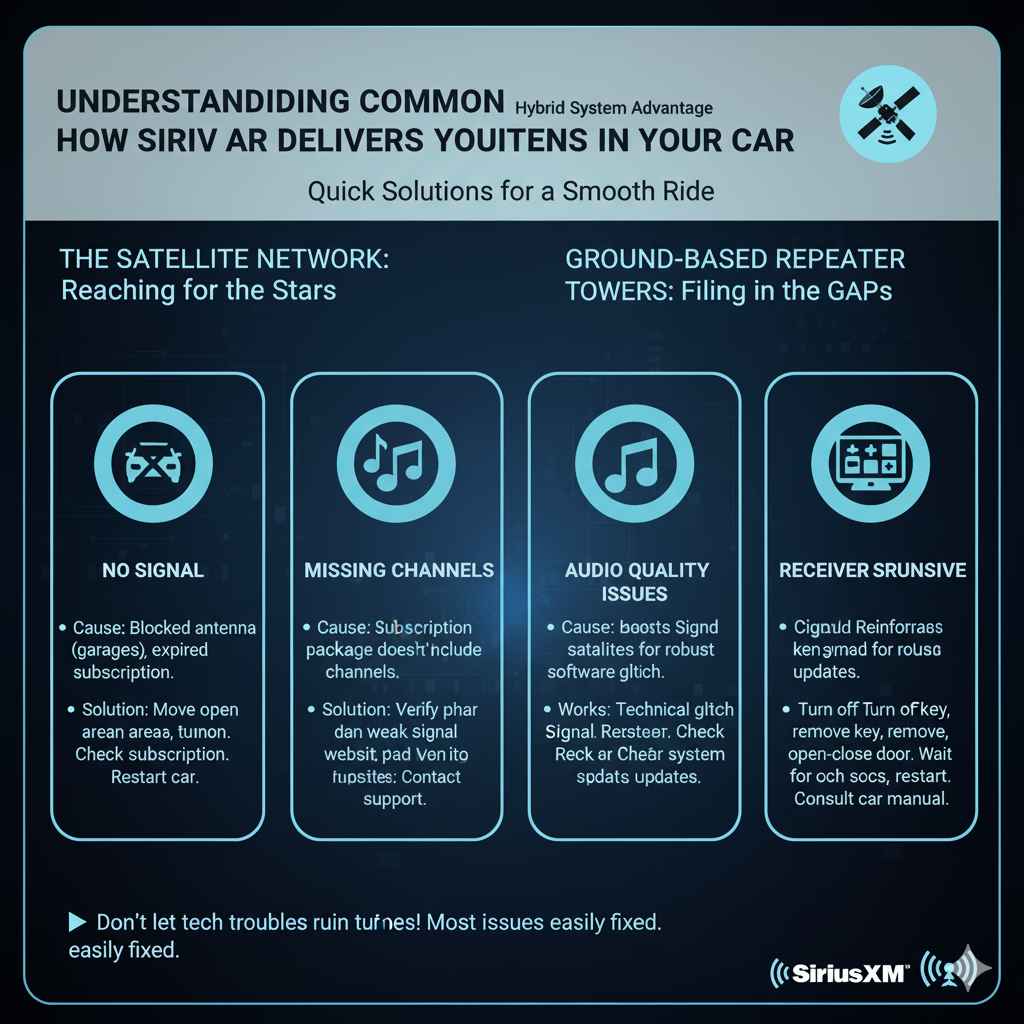
No Signal or “Acquiring Signal” Message
Cause: This usually means your receiver can’t detect the satellite or repeater signal. This can happen if:
- You’re in a covered parking garage, tunnel, or dense urban area.
- Your car’s antenna is blocked or damaged.
- The subscription isn’t active.
Solution: Move to an open area. If the problem persists, check your subscription status online or call SiriusXM. Inspect the antenna for any visible damage or obstructions. Sometimes, simply turning the car off and on again can reset the receiver.
Channels Are Missing or Unavailable
Cause: This could be due to your subscription package not including those channels, or a temporary broadcast interruption.
Solution: Verify your subscription plan on the SiriusXM website to ensure it includes the channels you’re trying to access. If it’s a persistent issue with specific channels, contact SiriusXM support.
Audio Quality Issues (e.g., crackling, popping)
Cause: While SiriusXM is known for good quality, occasional glitches can occur. This might be due to interference, a weak signal momentarily, or a software glitch on the receiver.
Solution: Like the “No Signal” issue, try moving to a different location or cycling the car’s ignition. If it’s continuous and localized, contact SiriusXM. Often, a software update from the manufacturer of your car’s infotainment system can also resolve these.
Receiver Not Responding
Cause: A frozen or unresponsive receiver is usually a technical glitch.
Solution: The first step is always to try restarting your car. Turn the engine off completely, remove the key (if applicable), and open and close the driver’s door to ensure all systems completely shut down. Wait 30 seconds, then restart. If that doesn’t work, consult your car’s manual or contact your dealership for potential system resets.
Frequently Asked Questions About SiriusXM Radio
Q1: How do I get SiriusXM in my car if it doesn’t have a built-in receiver?
A1: You can purchase portable SiriusXM radios that come with car mounts and antennas, or a satellite radio tuner that integrates with your existing car stereo. These often require a subscription just like the built-in units.
Q2: Can I use my SiriusXM subscription in multiple cars?
A2: A standard subscription is typically tied to a single Radio ID. If you have multiple vehicles, you’ll usually need separate subscriptions or you might be able to add an additional radio to your account for a discounted rate, depending on SiriusXM’s current policies.
Q3: What is the difference between SiriusXM and satellite radio?
A3: SiriusXM is a brand name for a company that provides satellite radio service. Satellite radio is the technology itself. So, SiriusXM is a type of satellite radio.
Q4: Do I need to keep my engine running for SiriusXM to work?
A4: No, your SiriusXM receiver simply needs power. As long as your car’s accessory power is on (which often allows the radio to play without the engine running), your SiriusXM will function.
Q5: How do I know if my car has a SiriusXM antenna?
A5: Look for a small fin-like antenna on the roof of your car, often towards the rear. It’s usually black. Some newer cars have antennas integrated into the windshield.
Q6: Can I listen to SiriusXM online or on my phone instead of in my car?
A6: Yes! Most SiriusXM subscriptions include access to the SiriusXM app for smartphones, tablets, and computers, allowing you to listen to most channels online outside of your vehicle.
Q7: What happens if I don’t pay my SiriusXM bill?
A7: If your subscription lapses without payment, your SiriusXM radio will eventually stop receiving the service. You may be able to tune into a limited number of free preview channels for a while, but your full channel lineup will be unavailable until your account is reactivated.
Conclusion: Enjoying Your Enhanced Driving Soundtrack
So, there you have it! How does SiriusXM radio work in your car? It’s a sophisticated system using satellites and ground-based repeaters to send a consistent, high-quality audio stream directly to your vehicle’s receiver. This clever combination bypasses many of the limitations of traditional radio, offering you a vast world of music, news, sports, and entertainment, no matter where your travels take you.
Understanding this technology should give you more confidence in using and enjoying your SiriusXM service. Whether you’re a music aficionado, a sports fanatic, or just love a good talk show, SiriusXM enhances your drive in ways regular radio can’t match. Don’t hesitate to explore the wide variety of channels available and discover new favorites. Happy listening, and safe travels!