How to Remove a CD Stuck in Your Car Stereo (Safest Steps First)
A CD stuck in a car stereo usually comes out with the least invasive step that works: press eject, hold it, cycle the ignition, then use the unit’s reset button. Pioneer, Kenwood and Sony documentation all point in that direction, and Sony warns against forcing the disc out. This guide gives the order, a symptom table that maps real error codes to actions, and the point where a car audio shop is the cheaper choice than another attempt.
CD Stuck in a Car CD Player: What the Manufacturers Say to Try First
Most pages on this topic tell you to reach for tweezers, compressed air or a battery wrench. The head unit manuals we read do not. They describe a short ladder instead: use the eject control, power-cycle the unit, reset it, and contact a dealer or service center if the disc still will not move. We rebuilt this page around that ladder and dropped the older tool-based steps that no maker document supports.
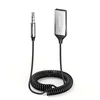 |
Best Bluetooth Backup After the Disc Is Out UGREEN Aux to Bluetooth 6.0 Adapter, 3.5mm plug with USB power This does not free a jammed disc. It is for the day after: if your dash has a 3.5mm aux jack and a USB power port, the adapter lets your phone play through the car speakers while the CD player waits for a shop.
|
As an Amazon Associate we earn from qualifying purchases. Spec-based pick from the listing, not a hands-on test.
Two limits apply to everything below. First, brands differ: the exact reset location and any forced-eject behavior depend on your model, so the owner’s manual for your unit beats any general guide, including this one. Second, a stuck disc is often a worn mechanism, and no reset can fix worn gears or rollers.
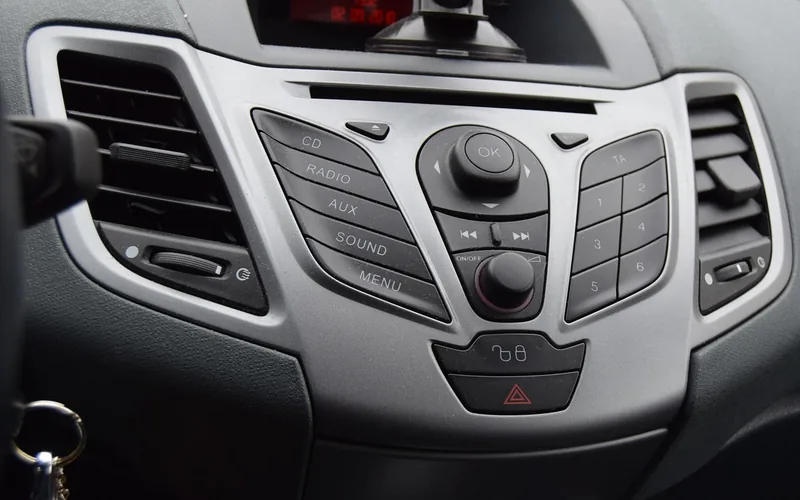
How to Get a Stuck CD Out of a Car CD Player, Step by Step
Work through these in order and stop the moment the disc moves. Each step is more disruptive than the one before it.
- Park, turn the engine off and set the ignition to accessory. This powers the stereo without starting the car. Do not run the engine in a closed garage.
- Press eject once, then check the display. Pioneer’s manual lists the eject control as the way to remove a disc, and Kenwood’s KDC-148 manual says the eject key shows NO DISC when the disc leaves. If the disc comes part way and stops, press eject again and check the disc for damage before you reinsert it, which is Pioneer’s advice for a disc left partly inserted.
- Press and hold eject. Sony’s support article on a disc stuck in a car stereo says to set the ignition to accessory, press and hold EJECT for about two minutes, release, then press EJECT once more. That is far longer than the ten seconds many guides repeat, so give it the full time before you move on. Other makers do not publish this exact step, so treat it as Sony guidance rather than a universal rule.
- Cycle the power or switch the source. For its CD errors that point to an electrical or mechanical fault, Pioneer’s manual says to turn the ignition switch off and back on, or switch to a different source and back to the CD player. Try the eject control again afterward.
- Use the reset button. Pioneer’s manual says to remove the front panel and press RESET with a pen tip or other pointed instrument. Kenwood’s manual says to press the reset button if the unit fails to operate properly. Sony’s article says to press the RESET button on the front of the stereo. Pointed tools are for the reset pinhole only, never for the disc slot.
- Sony only: a blank disc. Sony’s article says that if the first steps fail, you can insert a blank disc about an inch into the player without force and press EJECT a couple of times until both discs come out. Pioneer’s manual says not to insert anything other than a CD into the loading slot, so do not try this on a Pioneer unit or on any model whose manual does not describe it.
- Stop and get the unit serviced. If the disc still sits there after reset and power cycling, Sony’s article says service is needed, and Pioneer tells you to contact a dealer or authorized service station and note the error message.
Resetting has a cost. Kenwood’s manual says the unit returns to factory settings when the reset button is pressed, and Pioneer’s manual notes that preset memory is erased if the battery is disconnected or discharged. Write down your saved stations and sound settings first, and expect to re-enter them.
Why CDs Jam: Labels, Damaged Discs and Worn Mechanisms
Knowing the likely cause tells you whether any step above has a chance. The manuals we read name several disc-side causes, and they are mostly things you can prevent.
- Labels and printable surfaces. Pioneer’s manual warns that labels may come off during playback and prevent ejection, which may damage the equipment, and that with printable-surface discs, inserting and ejecting may not be possible.
- Damaged or odd-shaped discs. Pioneer says not to use cracked, chipped, warped or otherwise damaged discs, and to use only 12 cm, fully circular discs. Kenwood’s manual likewise lists discs that are not round and 3-inch CDs as unusable.
- Condensation. Pioneer says condensation may temporarily impair the player and suggests letting the unit rest for about one hour to adjust to a warmer temperature, and wiping damp discs with a soft cloth. A disc that will not read after a cold start is a reason to wait, not to pry.
- Mechanism wear. When an error code points to an electrical or mechanical fault, no reset fixes worn parts. That is the case for a shop, not for more attempts.
Symptom, Likely Cause, Safe Fix and When a Pro Is Cheaper
This table is the part most guides leave out. It matches what your head unit shows or does to the action the maker documents, and says when to hand the job to a professional. Error numbers below are from Pioneer’s manual for a CD receiver; other brands use different messages.
| Symptom | Likely cause (per maker docs) | Safe fix | Pro |
|---|---|---|---|
| Disc will not eject, display is normal | Software glitch or stalled mechanism | Eject, hold eject (Sony: about two minutes), power cycle, then reset | If the reset does nothing |
| ERROR-11, 12, 17 or 30 (Pioneer) | Dirty or scratched disc | Eject, wipe from the center outward with a soft cloth, or replace the disc | If the disc will not eject at all |
| ERROR-10, 15, A0 (Pioneer, 15 also means blank disc) | Electrical or mechanical error, or a blank disc | Ignition off and on, or switch source and back | If the message returns after a power cycle |
| Disc rejected or keeps ejecting (Sony) | Disc upside down, bad disc or unit fault | Eject, reinsert label side up, press RESET, test other discs | If other discs also fail |
| Disc stops part way out | Disc edge catching or weak eject action | Press eject again, check the disc for damage, pull it out horizontally (Kenwood advice) | If it will not move on its own |
| Motor sounds but disc does not move | Worn gear or roller (general reasoning, not a maker statement) | Reset once; do not force | Yes, mechanism repair or replacement |
| Label or sticker residue on the disc | Peeled label stuck inside (Pioneer warns about this) | None safe at home | Yes, the unit usually has to come apart |
The first column is also how to use the table: write down the exact message before you start. Pioneer’s manual asks you to note the error message when you contact a dealer or service center, and that detail is what lets a shop quote the job without opening the unit.
What Not to Put in the Slot, and Why Battery Disconnects Are Not a Step Here
No maker document we read tells you to push tweezers, a card, a knife blade or any liquid into the slot. The Pioneer DEH-6400BT operation manual says not to insert anything other than a CD into the loading slot and not to apply chemicals to discs. Kenwood’s manual says not to use any solvents on a disc. Sony’s article says outright not to forcibly remove the disc, because forcible removal can cause damage. Compressed air into the slot is not covered by any manual we read, so we no longer recommend it either.
The older version of this page listed a battery disconnect and a fuse check as steps. We removed both. We found no maker procedure that ejects a disc that way, and disconnecting a battery has side effects: Pioneer’s manual notes that preset memory is erased, and some factory radios ask for an anti-theft code after power is lost, so check your owner’s manual or ask a dealer before you consider it. If your manual does describe a battery or fuse procedure, follow its order and warnings exactly.
Trim and dashboard work is a separate matter. Panels around a dash can sit close to airbag and steering-wheel control wiring, and releasing a connector the wrong way can break it. If a shop or you must go that far, read our guide to removing electrical connectors on cars first, and do not remove dash trim near airbags without the vehicle maker’s instructions.
When to Stop and See a Car Audio Shop or Dealer
Stop at the first of these signs. None of them improves with another try at home.
- The disc is still in after a long eject hold, a power cycle and one reset.
- The same error message returns after you switch the ignition off and on.
- The motor runs or clicks and the disc does not move.
- A label, sticker or printable-surface disc is involved. Pioneer warns these can block ejection and damage the unit.
- The stereo is a factory unit tied into the dash, climate display or steering-wheel controls, where removal needs the vehicle maker’s information.
- You would need to remove the unit or dash trim, especially near airbags.
Bring the exact error message, the car’s year and model, and a note of what you already tried. Ask for a written quote for removing the disc and a second quote for repairing the mechanism, because those are different jobs. We did not find a reliable published price range for either, so we are not quoting one.
Is It Worth Replacing the Stereo? CD Versus Bluetooth
If the disc is out and the player jams again, the choice is repair, replace or skip the disc entirely. A mechanism repair on an old unit buys you a technology you can already replace with a phone. If your unit has an aux jack or USB input, the cheapest path is to keep the head unit and stream through it. Our phone to car stereo guide covers the connection options, and our car CD player fix guide covers skipping and no-read problems after the disc is out.
| Option | What you keep | What you give up | Check first |
|---|---|---|---|
| Repair the CD mechanism | Your current stereo and dash look | Money on a part that can wear again | Written quote from a shop |
| Add a Bluetooth aux adapter | Factory stereo, controls and display | A cable and a USB power port in use; CD slot stays unusable | Does the car have an aux jack and a USB power port |
| Replace the head unit | Modern inputs such as Bluetooth and USB | Possibly the factory look and some steering-wheel functions | Whether adapters are needed for your car, ask an installer |
The adapter in the box above was 12.99 dollars when we checked on 2026-10-13, which is why it is the first thing to price against any repair quote. It will not suit a car whose only audio input is the CD slot.
Preventing the Next Jam
- Do not use discs with labels or stickers, and do not write on or apply chemicals to a disc, per Pioneer’s manual.
- Use only 12 cm round discs. Kenwood’s manual says to remove the rims from the center hole and disc edge before inserting a disc.
- After a cold start with fogged windows, give the unit about an hour before blaming it, per Pioneer on condensation.
- Keep spare discs in cases.
Frequently Asked Questions
How long should I hold the eject button on a stuck CD?
Sony’s support article says to press and hold EJECT for about two minutes with the ignition in the accessory position, release it, and press EJECT once more. Other makers do not publish a hold time, so check your manual.
Can I use a second CD to push the stuck one out?
Only where the maker says so. Sony describes inserting a blank disc about an inch without force and pressing EJECT a couple of times. Pioneer’s manual says not to insert anything other than a CD, so using a second disc on a Pioneer unit is not supported.
Will resetting the stereo erase my settings?
Yes, usually. Kenwood’s manual says the unit returns to factory settings when the reset button is pressed, and Pioneer notes that preset memory is erased when the battery is disconnected. Write down your presets first.
Should I disconnect the car battery to eject a CD?
We do not list it as a step because we found no maker procedure for it. Check your owner’s manual first: it can affect saved settings and, on some factory radios, require an anti-theft code afterward.
Why does my stereo say ERROR when a disc is inside?
On Pioneer units, ERROR-11, 12, 17 and 30 mean a dirty or scratched disc, while ERROR-10, 12, 17, 30 and A0 can also mean an electrical or mechanical error. Your brand’s manual lists its own messages.
A stuck disc is rarely an emergency, and the safest result is usually the slowest one: eject, hold, power cycle, reset, then a professional. Skip the pointed tools in the slot and keep notes on the error message you see.
Products related to this article
Sponsored / affiliate links. As an Amazon Associate I earn from qualifying purchases. I may earn additional commission from eligible campaigns.