Google Automotive Services (GAS): What It Is and Which Cars Have It
Google Automotive Services (GAS) is the set of Google apps and services that a carmaker can build into the car itself: Google Maps, the Google Play Store and Google Assistant, now moving to Gemini. It is not the same thing as Android Auto, which runs on your phone. This guide explains what GAS is, how it differs from Android Auto, which models the carmakers name, and how to check your own car. If your car only mirrors a phone, see our guide to whether your car supports wireless CarPlay.
What Is Google Automotive Services (GAS)?
Google’s Android for Cars developer page defines it in one sentence: car makers who wish to provide Google services such as Maps, Play Store and Assistant can work directly with Google to support GAS, and GAS consists of software built on top of Android Automotive OS for the purpose of delivering those services. So GAS is a package a carmaker contracts for, not something a driver downloads.
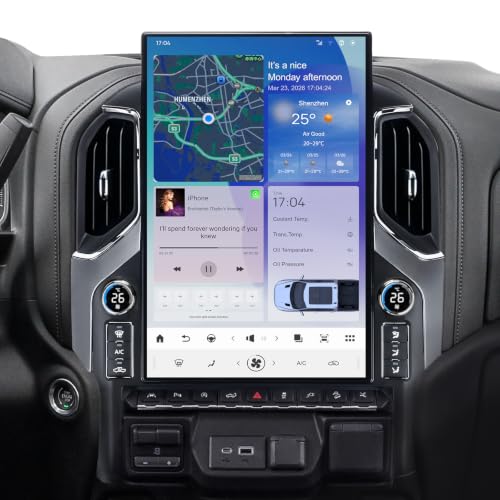
Google markets cars that include it as cars with Google built-in. Its consumer page says Google Maps handles navigation with real-time traffic, and that apps such as Spotify, YouTube Music and NPR One can be downloaded from Google Play.
Best USB-C Cable Pick for Wired Android Auto
 |
Cable Matters USB-IF Certified 10Gbps Gen 2 USB C Cable, 3.3ft/1m, Black
|
As an Amazon Associate we earn from qualifying purchases. Spec-based pick from the listing, not a hands-on test.
Google Automotive Services vs. Android Auto vs. Android Automotive OS
These three names are easy to mix up. Google’s developer page describes two complementary ways to deliver apps in a car. Android Auto is a phone-based infotainment system that is projected onto the screens of compatible cars. Android Automotive OS, or AAOS, is an infotainment platform that is built into cars and customized by car makers. GAS is the optional Google services layer that a carmaker adds on top of AAOS.
| Term | What it is | Where it runs | Source statement |
|---|---|---|---|
| Google Automotive Services (GAS) | Google services such as Maps, Play Store and Assistant, delivered as software built on top of Android Automotive OS | On the car itself | Google developer page: car makers work directly with Google to support it |
| Android Automotive OS (AAOS) | Infotainment platform built into cars and customized by car makers; the Android Open Source Project calls it a full-stack, open source, highly customizable platform running directly on in-vehicle hardware | On the car itself | Google developer page; Android Open Source Project, page updated 2026-09-30 |
| Android Auto | Phone-based system projected onto the screens of compatible cars; integrated into phones, no download needed | On your Android phone, shown on the car display | Google developer page; Android Auto Help |
| Apple CarPlay | Apple describes it as a way to use your iPhone while you drive, shown on your car’s built-in display | On your iPhone, shown on the car display | Apple CarPlay page |
The practical difference is where the software lives. With Android Auto or CarPlay, the phone does the work and the car screen is a display. With GAS, the apps are on the car’s own system, and Google says versions designed for cars can be downloaded from the Play Store to any car made by a GAS partner.
Where Each Google Product Runs and Whether You Need a Phone
The table sets each product against where it runs and what the sources say about the phone.
| Product | Where it runs | Needs your phone? | What the sources say |
|---|---|---|---|
| Google Maps in a Google built-in car | On the car | Not for the app itself; some features and sign-ins use a paired phone | Google: Maps is built in with real-time traffic. GM: some features require you to pair your compatible phone |
| Google Maps in Android Auto | On your phone, shown on the car display | Yes, every drive | Android Auto Help: connect by USB cable, or by Bluetooth for wireless; Google Maps has its own help section |
| Play Store apps in a Google built-in car | Installed on the car | No phone is mentioned for running them; a Google Account sign-in is needed to download | GM: features such as downloading apps on Google Play can only be used if you are signed in to a Google Account |
| Google Assistant or Gemini in a Google built-in car | Built into the car | Depends on the carmaker | Polestar footnote: a compatible Android phone and compatible active data plan are required for Android Automotive; GM lists plan and account requirements |
| Android Auto in a Google built-in car | Phone projection, on select vehicles | Yes | GM: Android Auto and Apple CarPlay are available via projection on select vehicles; during an Android Auto session voice control defaults to the phone assistant |
The Polestar and GM entries show why a flat claim such as no phone required is risky. Google’s own page says services and required devices may vary by car manufacturer and model, and that a subscription or internet connection may be required.
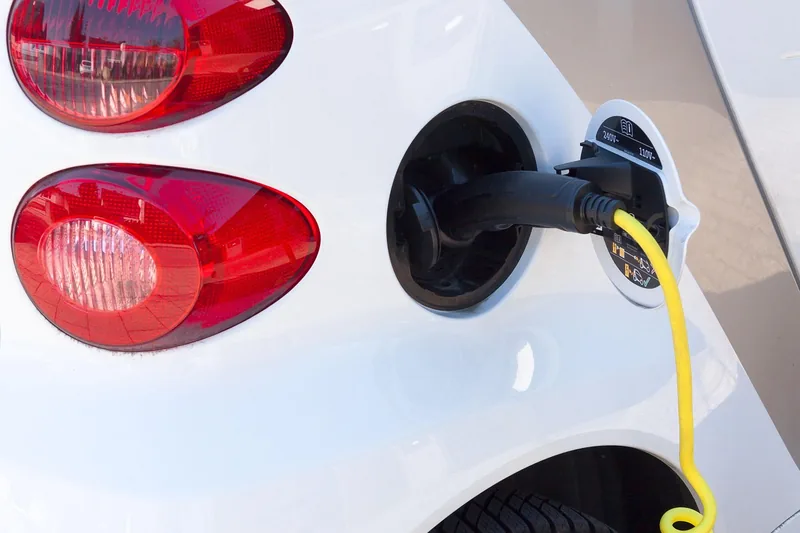
For electric cars, Google says built-in Maps optimizes the route for the vehicle’s specific needs and proactively suggests charging stops on long trips.
Which Automakers Use Google Automotive Services in 2026?
Google’s Cars with Google built-in page shows brand names rather than model lists: Polestar, Volvo, Chevrolet, GMC, Cadillac, Renault, Honda, Acura, Nissan, Infiniti, Lincoln, Ford, Buick, Mitsubishi, Mazda, BYD and Alpine. For models and years, the table lists only what the maker pages state.
| Carmaker | Named models and years | Source |
|---|---|---|
| Chevrolet | Select trims of the 2022 Silverado, 2022 Tahoe, 2024 Blazer EV, 2024 Equinox EV and 2025 Equinox, each and newer | GM’s OnStar Google built-in page |
| GMC | Select trims of the 2022 HUMMER EV Pickup, 2022 Sierra, 2022 Yukon, 2024 Sierra EV and 2025 Terrain, each and newer | GM’s OnStar Google built-in page |
| Cadillac | Select trims of the 2023 LYRIQ, 2025 Escalade, 2025 CT5, 2025 OPTIQ and 2026 VISTIQ, each and newer | GM’s OnStar Google built-in page |
| Buick | 2024 Envision and 2025 Enclave | Buick.com article dated 10-3-24 |
| Honda | Lineup listed with Google built-in: 2026 Prologue, 2027 CR-V Sport Touring, 2027 Passport and 2027 Prelude Hybrid, plus Civic and Accord trims | Honda Google built-in page |
| Polestar | Polestar 4 coupe, described as having Google built-in | Polestar 4 coupe page |
| Volvo | 2026 EX90, with Google services enabled through a digital services package included for four years | Volvo Cars EX90 page |
Select trims means the page does not promise it on every trim, so confirm yours before you buy. This is a snapshot of those pages on 2026-10-14, and a brand on Google’s list does not mean every model it sells has Google built-in. For the carmaker side, see our guide to how GAS compliance works for car makers.
Does My Car Have Google Built-in? A Checklist
- Look at the home screen. GM’s page says that if a vehicle comes with Google built-in, you will see Google Assistant, Google Maps and Google Play icons on the center display.
- Look for a Play Store on the car’s own screen, since Google says apps designed for cars install directly on the head unit of a GAS partner’s car.
- Check what happens when you plug in a phone. If Android Auto starts on the car screen, that is projection from the phone.
- Look for a Google Account sign-in in the setup wizard; GM says it also prompts you to pair your phone and review permissions.
- Check the model, year and trim on the maker’s page, or ask the dealer; Android Auto Help advises contacting the dealer or vehicle manufacturer if you are unsure.
- Check the service plan terms, covered next.
What You Need to Use It: Plans, Accounts and Phones
| Item | What the source says | Source |
|---|---|---|
| Service plan or trial | Some features, including Google Assistant, Google Maps and apps on Google Play, require a service plan or trial; after the initial period you choose a plan to continue | GM’s OnStar Google built-in page |
| Without a plan | AM/FM radio, and on select vehicles music from a paired device, Android Auto or Apple CarPlay, voice control through the connected phone, and vehicle settings | GM’s OnStar Google built-in page |
| Digital services package | Google services on the 2026 EX90 are included for four years; after that, new terms and fees apply if you choose to renew | Volvo Cars EX90 page |
| Google Account | Optional, but required to download apps from Google Play in the vehicle; a Gmail address is not required | GM’s OnStar Google built-in page |
Plan names and prices change, so check the maker’s current plan page. Built-in does not automatically mean free forever.
Gemini and Google Assistant in Cars
Google’s Cars with Google built-in page now refers to Google built-in and Gemini together, and Polestar’s page says drivers can chat with Google Gemini to control climate settings and plan routes. On the phone side, Google’s Android Auto page says Gemini is being integrated to replace the classic Google Assistant experience as a server-side rollout.
For GM vehicles, GM lists the checks: an active OnStar plan, Android 11 or higher on the vehicle (Settings, System, About), the Assistant language set to English, the latest Google Maps, a Google Account sign-in, and following the on-screen prompt to switch. Another maker’s requirements may differ.
Accounts, Permissions and Updates
GM’s page says your GM Account is different from your Google Account, and that signing in with a Google Account is optional. When you sign in you are asked to review the Google Terms and Privacy Statement, and the setup wizard asks you to accept or decline permissions such as location services; declining may prevent certain features from working. For how a particular maker handles vehicle data, read that maker’s own privacy page.
On updates, Google says cars with Google built-in receive automatic updates directly from Google while parked or on the go. GM says Google Play apps update over the air on connected vehicles with an active plan if you opt in, and the setup wizard must be completed in park.
Myths About Google Automotive Services
| Common belief | What the sources say | Source |
|---|---|---|
| Google built-in and Android Auto are the same thing | Google describes them as two complementary ways to deliver apps: Android Auto is phone-based and projected, Android Automotive OS is built into the car | Google developer page |
| Every car with Android Auto has Google Maps built in | Android Auto works with over 500 models per Google, but it runs on your phone, and Google lists Google built-in brands on a separate page | Android Auto page; Cars with Google built-in page |
| Built-in means every feature is free for the life of the car | GM says some features need a service plan after a trial, Volvo says its 2026 EX90 package is included for four years, and Google says a subscription may be required | GM OnStar page; Volvo EX90 page; Cars with Google built-in page |
| A Google built-in car cannot use Android Auto | GM says Android Auto and Apple CarPlay are available via projection on select vehicles, and that voice control defaults to the phone during an Android Auto session | GM’s OnStar Google built-in page |
For phone-based options, our guides on how to play music in the car and how to connect Bluetooth to your car cover the basics. If Android Auto stops connecting, see what to do when Android Auto has stopped working, and for audio upgrades see car audio systems for Android Auto.
What This Guide Does Not Cover
This guide does not list every model with Google built-in, give adoption numbers, or quote plan prices, because those change; use the carmaker’s current page. Drive safely, and set up apps and accounts while the car is parked, as the makers and Google advise.
Frequently Asked Questions
Who uses Google Automotive Services?
Google’s Cars with Google built-in page lists brands including Polestar, Volvo, Chevrolet, GMC, Cadillac, Honda, Ford, Lincoln, Nissan and Mazda. Availability depends on the carmaker, model, year and market, so check the maker’s own page for your exact car.
What is the difference between Google Auto and Google Automotive?
Android Auto is a phone-based system projected onto the screens of compatible cars. Android Automotive OS is built into the car, and Google Automotive Services is the optional set of Google services, such as Maps and Play Store, that a carmaker can add on top of it, per Google’s Android for Cars documentation.
What is GAS in Google Automotive Services?
GAS stands for Google Automotive Services. Per Google’s developer page, it is software built on top of Android Automotive OS for delivering Google services such as Maps, Play Store and Assistant, and carmakers who want those services work directly with Google to support it.
What does Google Auto do?
If you mean Android Auto, it shows a car-friendly interface from your Android phone on a compatible car display. Google’s help page says it is integrated into phones, so there is nothing to download, and you connect by USB cable or wirelessly in supported cars.
Is Gemini replacing Google Assistant in cars?
In Android Auto, yes: Google says Gemini is being integrated to replace the classic Google Assistant experience, as a server-side update rolling out over time. For GM vehicles with Google built-in, GM lists requirements for the switch.
The short answer: Google Automotive Services is the Google layer a carmaker builds into the car, while Android Auto and CarPlay run on your phone. Check your model, year and trim on the maker’s page, and read the plan terms before you count on any feature.
Products related to this article
Sponsored / affiliate links. As an Amazon Associate I earn from qualifying purchases. I may earn additional commission from eligible campaigns.