MOTOPOWER OBD2 Scanner Review: Worth It for Sensor Codes?
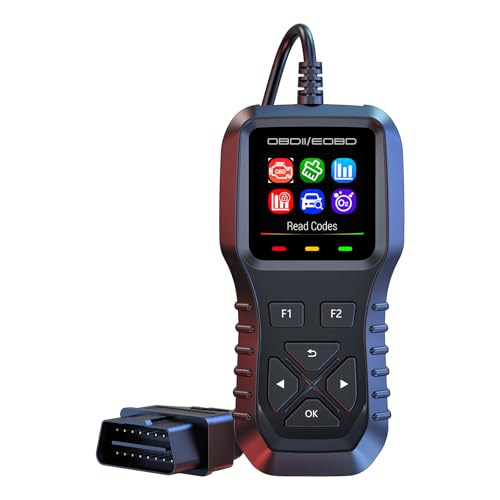
The MOTOPOWER OBD2 scanner is worth it for sensor-code triage if you want a low-cost first-pass tool: it can read and clear check-engine codes, but it cannot prove a sensor is bad. That matters because a bad connector, vacuum leak, or wiring fault can look the same as a failed sensor on the dash.
Verdict


Use it as a code reader, not a final diagnosis. For oxygen sensor, MAF, MAP, and crankshaft sensor complaints, it can tell you which circuit the ECU flagged and whether the code comes back after clearing. For anything intermittent, ABS-related, or wiring-related, you still need more than a code readout.
Pros
- Reads and clears check-engine codes.
- Built-in DTC lookup helps decode faults quickly.
- Small handheld format is easy to keep in the glovebox.
Cons
- Does not prove a sensor has failed.
- Basic OBD2 readers usually do not cover ABS or chassis faults.
- May only repeat the code if the real fault is wiring, vacuum, or a connector issue.
Specs at a glance
| Item | Detail |
|---|---|
| Product type | OBD2 code reader scanner |
| Main use | Reads and clears engine trouble codes on supported OBD-II vehicles |
| Connection | 16-pin diagnostic connector |
| Target use | DIY check-engine-light diagnosis |
| Display functions to confirm on the listing | Live data and freeze frame may be included on some OBD2 scanners; check the manufacturer’s listing for your model |
| Update support | Software downloads and updates are available from MOTOPOWER |
Who it
This scanner fits a DIY driver who wants a low-cost way to pin down a sensor-related check engine light before buying parts. It also suits anyone who wants a basic reader for a family car, a commuter, or a used vehicle with an occasional warning light.
It is less useful if you need ABS coverage, bidirectional controls, or deep live-data analysis. If you already know you need actuator tests, relearns, or module-level coverage, a pricier bidirectional scanner is the better tool.
Say your check engine light comes on after an engine starts hesitating on hills and a scan points to an oxygen sensor code. A scanner can point you to an oxygen sensor code, but it cannot tell you whether the sensor, the exhaust leak before it, or the wiring is the real fault.
Suppose the car sets a MAP code after a cold start and then drives normally. Clearing the code and seeing it return is useful, but the next step is still a pressure or vacuum check, not a blind sensor swap.
What works
For sensor-code triage, the MOTOPOWER reader does the first job well: it reads powertrain trouble codes through the vehicle’s OBD2 port, then gives you a starting point. That is enough to confirm the ECU saw a fault in the oxygen sensor circuit, MAF circuit, MAP circuit, or crank sensor circuit.
It also helps you separate a stored code from a code that comes back after repair. If a code clears and stays gone, the fix may have been simple. If it returns quickly, the scanner has done its job by sending you back to the actual fault path.
What a basic OBD2 scanner can confirm
- Stored powertrain codes.
- Pending codes that have not yet turned the light back on.
- Whether a code clears and returns after a repair.
- Basic fault location, such as sensor circuit versus system issue.
Sensor code decision table
This table shows what a basic OBD2 reader can tell you, what it cannot prove, and the next step that usually saves the most money.
| Code or symptom | What the scanner can reveal | Extra test needed | Most likely next step |
|---|---|---|---|
| P0130 oxygen sensor circuit fault | Confirms the ECU sees a fault in the O2 sensor circuit | Live data verification or multimeter check | Inspect wiring |
| P0133 slow O2 response | Shows the sensor response problem, not the cause | Live-data verification | Replace sensor |
| P0101 MAF performance code | Confirms airflow plausibility is out of range | Smoke test or live-data verification | Inspect wiring |
| P0102 low MAF input | Shows a low-signal fault, not whether the sensor is dirty, unplugged, or damaged | Multimeter | Inspect wiring |
| P0106 MAP range/performance | Points to a MAP signal that does not match expected engine load | Smoke test | Inspect vacuum |
| P0107 low MAP voltage | Confirms a low-signal issue in the MAP circuit | Multimeter | Inspect wiring |
| P0335 crankshaft position sensor code | Shows the ECU lost crank sensor input | Multimeter | Inspect wiring |
| Intermittent stalling with no hard code | May show a pending code or freeze-frame clue if supported | Live-data verification | Inspect wiring |
| Check engine light returns after clearing | Shows the fault is active or recurring | Smoke test or live-data verification | Inspect vacuum |
| ABS warning light | Usually outside basic engine-code coverage | Different scan coverage | Use a scanner with ABS support |
What does not?
A code reader is not a parts tester. A sensor code can point to the affected circuit, but the bad part may be the connector, the wiring, a vacuum leak, contamination, or a power or ground issue. That is the main limit of budget code readers.
It can also miss the full picture on systems outside generic powertrain coverage. ABS-related faults often need a scanner with ABS access, and some chassis, airbag, and maintenance-reset functions are model-specific. Basic OBD2 readers are not built for every module in the car.
Why a code is not a failed part
- A code shows what the ECU saw.
- It does not prove which part failed first.
- Intermittent faults may set pending codes only.
- Clearing a code without fixing the cause usually means it comes back.
When extra tests matter more
Wiring tests matter when a code points to a low-voltage or open-circuit problem. Vacuum tests matter when MAF or MAP readings do not match engine behavior. Smoke testing matters when the engine is pulling unmetered air and the scanner only reports a performance code.
Picture a car that idles fine on the driveway but sets a P0101 on the highway. The scanner gives you the code, but a smoke test and live-data check are what separate a dirty sensor from a leak or intake problem.
Which MOTOPOWER model fits your needs?
If you want a plain code reader for sensor-code triage, start with the simpler update-and-print style units. If you want more firmware attention or maintenance-reset functions, check the listing carefully before you buy, because MOTOPOWER sells more than one version and they are not identical.
For most budget shoppers, the right choice depends on whether you need only code reading and clearing, or whether you also want extra reset coverage. Do not assume every MOTOPOWER scanner has the same feature set; verify the listing for the exact model, software version, and supported functions.
MP69033, MP69035, MP69039, and MP69040
The MP69033 is a basic handheld OBD2 code reader with DTC lookup, which fits the cheapest sensor-code use case. For MOTOPOWER’s update-and-print lineup, the sourced listings identify MP69035 as an OBD2 Code Reader Scanner with Update & Print V1.0, with update file V251206, and MP69039 as an OBD2 Code Reader Scanner with Update & Print V1.0 with an update date shown as 2025.11.03.
MP69040 is the more feature-rich listing in this group: Update & Print V1.1, update date 2026.08.28, and an AI Analysis function added. If you want the most assistance from the MOTOPOWER side, that is the model to compare first, but check the listing for what the AI feature actually covers.
MP69041 and MP69042
MP69041 and MP69042 are maintenance reset tools, not plain code readers. The sourced listings identify MP69041 as a maintenance reset tool with V1.0 firmware and an update date of 2025.08.31, and MP69042 as a maintenance reset tool with V1.0 firmware and an update date of 2026.08.07.
Choose these only if the listing shows the reset functions you need. For a buyer focused only on sensor codes, a maintenance-reset model may be more tool than necessary.
Do you need an update?
An update is worth doing if the scanner will not read correctly, if the listing says newer vehicle coverage was added, or if you want the latest software before relying on the tool for diagnosis. MOTOPOWER says the update may take about 10 minutes, and the device may already be on the latest version.
If the update fails, reactivation may be needed. That makes the update process worth doing carefully, not casually, and only when the listing or the tool itself shows a reason to update.
- Check the model number against the listing before updating.
- Confirm whether the device already shows the latest software.
- Allow about 10 minutes for the update process.
- Do not disconnect power unless the instructions say to stop.
- If the update fails, follow the reactivation steps from MOTOPOWER.
Should you buy it?
Buy the MOTOPOWER scanner if you want a low-cost code reader for sensor-code triage and you are comfortable pairing it with other basic tests when the code points to a sensor circuit. It can save money when the issue is obvious and the code confirms the system at fault.
Skip it if you expect it to prove a sensor failure on its own. For ABS faults, stubborn intermittent issues, or jobs where you need active tests and full module access, a pricier bidirectional scanner is the better buy.
Frequently asked questions
Is the MOTOPOWER OBD2 scanner good for sensor codes?
Yes, for first-pass diagnosis. It can read the code that points to the affected sensor circuit and clear it after repair, which is useful for oxygen sensor, MAF, MAP, and crankshaft complaints. It is not enough to prove the sensor is bad, so you still need live data, a smoke test, or a multimeter when the fault is unclear.
Can it read oxygen sensor, MAF, and MAP codes?
It should read the engine codes that flag oxygen sensor, MAF, and MAP faults on supported OBD-II vehicles. The value is in the code itself and any freeze-frame or live-data support your model may include. What it cannot do is tell you whether the sensor, wiring, or a vacuum leak caused the code.
Will it show live data and freeze frame for troubleshooting?
Some OBD2 scanners include live data and freeze-frame access, but you should check the manufacturer’s listing for this exact model before counting on it. Those features are useful for sensor diagnosis because they show what the engine was doing when the code set. They still do not replace wiring or vacuum tests.
Is the MOTOPOWER scanner accurate enough for check engine lights?
It is accurate enough to read and clear check-engine codes on supported OBD-II vehicles. That is the right standard for a budget reader. The limitation is diagnostic depth: a correct code does not equal a correct parts call, especially when the root cause is intermittent or electrical.
Does it work on my car’s OBD2 port?
It should work on supported OBD-II vehicles through the standard 16-pin diagnostic connector. If your car is OBD-II compliant, it is in the right category for this tool. If you need ABS, chassis, or manufacturer-specific module access, a basic engine-code reader may not be enough.
Can it clear sensor-related codes after repairs?
Yes. Clearing codes after a repair is one of the main reasons to buy a budget OBD2 reader. The useful part is whether the code stays gone afterward. If it comes back, the tool has done its job by telling you the problem was not fully fixed.
Do I need a software update for the MOTOPOWER scanner?
Not always. MOTOPOWER says the update may take about 10 minutes, and the device may already be on the latest version. Update it if the listing or the tool suggests newer coverage, if you see a reading issue, or if you want the latest supported data before troubleshooting.
Which MOTOPOWER model is best for sensor diagnostics?
For simple sensor-code reading, a basic update-and-print MOTOPOWER reader is enough. If you want the newest listed firmware features, MP69040 is the one to compare first because it adds AI Analysis and is listed as Update & Print V1.1. If you need maintenance reset functions, look at MP69041 or MP69042 instead.
Products related to this article
Sponsored / affiliate links. As an Amazon Associate I earn from qualifying purchases. I may earn additional commission from eligible campaigns.