Car Audio and Video Upgrades: CarPlay Screens and Stereos
Pick a floating CarPlay screen if your dash has the space and you want the simplest upgrade; pick a vehicle-specific stereo if you need factory fit, steering-wheel controls, camera retention, or fewer install surprises. A bad match can waste money, drop factory features, or leave you with a screen that blocks vents, buttons, or airbags. This guide compares screen types, fitment complexity, and retained features so you can choose the right upgrade for your car.
The main decision is not “screen or stereo.” It is whether you need a simple display for navigation and calls, or a head unit that replaces the factory audio system and keeps the car’s original functions working as expected.
CarPlay stereo decision matrix


| Upgrade type | Install difficulty | Factory feature retention | Camera compatibility | Wireless stability | Screen size | Total likely add-on cost |
|---|---|---|---|---|---|---|
| Portable CarPlay screen | Low to medium; usually mounts to the dash and powers from 12V | Low; factory radio and controls usually stay as they are | Varies by kit; some add a reverse camera input, but wiring can be separate | Good for quick use, but depends on phone connection and dash placement | Often around 7 inches to 10.3 inches | Lower at the start, then add mount, power lead, camera, and any hardwire parts |
| Replacement head unit | Medium to high; may need fascia, harness, antenna adapter, and coding | Medium to high if the right adapters are used; otherwise features can be lost | Usually better integrated with factory camera and parking sensor systems | More stable once fitted correctly, especially with wired use | Commonly 6.75, 6.8, 6.95, or 7 inches; some floating units are 9.0 or 10.1 inches | Higher after fitting kit, steering-wheel adapter, camera work, and labor |
| Vehicle-specific upgrade kit | Medium; easier than a custom install because the dash parts are pre-matched | Usually the best chance of keeping steering wheel controls and factory camera behavior | Strong, because the kit is built for the vehicle platform | Depends on the head unit inside the kit; wired tends to be steadier | Often 9.0 or 10.1 inches in floating-screen formats | Usually the highest sticker price, but fewer surprise parts may narrow the gap |
That table is the short version. Portable screens suit drivers who want CarPlay or Android Auto without pulling the dash apart. Full replacement head units suit drivers who want better integration, more control over audio sources, and a cleaner factory-style result.
What is the difference between a CarPlay screen and a stereo?
A CarPlay screen is usually a display-first add-on that mirrors phone features and sits on the dash or mounts over the factory setup. A car stereo or head unit replaces the factory audio source and often adds deeper control over radio, sound settings, camera inputs, and steering wheel buttons.
Portable dashboard screens
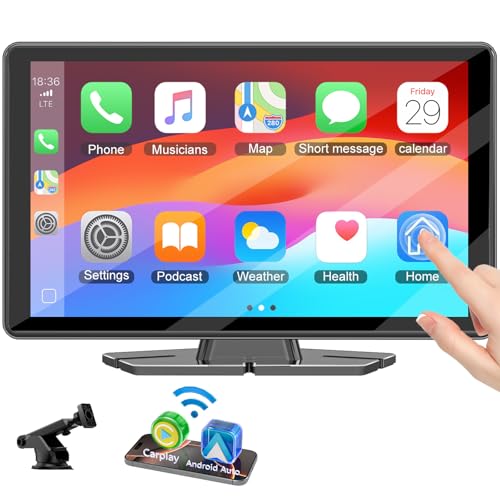
Portable CarPlay screens are the simplest route for older cars, leased vehicles, and work vans where you do not want to remove the original radio. Many support Apple CarPlay and Android Auto, including wireless and wired use on some models. Carpuride’s W103, for example, uses a 10.3-inch HD IPS capacitive screen and supports both platforms.
That kind of unit usually keeps the original stereo in place. Sound may play through Bluetooth streaming, auxiliary input, or FM transmission depending on the model. The tradeoff is that you still rely on the factory radio for some functions, and the screen may sit in a position that can catch glare or block part of the dash.
Single-DIN and double-DIN head units
Replacement head units are the classic car stereo upgrade. Single-DIN and double-DIN describe the opening size, and many double-DIN units now use touchscreen displays with Apple CarPlay, Android Auto, Bluetooth streaming, and radio support such as DAB+ digital radio.
Cartoys lists 6.8-inch touchscreen receivers with wireless/wired CarPlay and Android Auto, which is a common middle ground for drivers who want a direct replacement. Cartoys also shows wired-only filters, which matters if you want a more stable connection and do not care about cable-free use.
Floating-screen multimedia systems
Floating-screen multimedia systems use a display that sits forward of the dash opening. KENWOOD highlights a 10.1-inch floating screen model and also lists a 9.0-inch floating HD screen model. That format helps when the dash opening is too small for a large display but you still want a modern look and a bigger interface.
Floating systems can work well in family haulers and touring vehicles because the display is easier to read on the move. They can also fit vehicles where a fixed double-DIN screen would sit too low or look cramped. The catch is that proper fit depends on the vehicle-specific bracket and trim pieces.
Will a CarPlay screen fit your car?
No, not every car will accept every screen or stereo without extra parts. Fit depends on dash space, air vents, hazard-switch location, shifter clearance, and whether the car uses a standard opening or a brand-specific dash shape. That is where vehicle-specific fitting kits matter most.
Dash space and mounting options
Portable screens are the most flexible option when the dash shape is awkward. They can suit cars with older single-DIN radios, van dashboards with limited space, or vehicles whose factory unit is awkward to replace. The downside is that they still need a safe mounting point and a power source that does not clutter the cabin.
Suppose your car has a narrow center stack and a high dash shelf. A 10.1-inch floating display may look attractive, but it can block a hazard switch or the top of a vent if the kit is not made for that model. In that case, a smaller replacement head unit or a portable screen may be the safer choice.
Vehicle-specific fitting kits
Vehicle-specific fitting kits are built for an OEM-style finish. They reduce visible gaps, help the screen sit at the right angle, and often provide the correct brackets, trim, and wiring interfaces. That matters when you want the upgrade to look like part of the car rather than a bolt-on accessory.
Car Screen City sells a Nissan Navara 2015-2023 wireless CarPlay upgrade kit and a Ford Transit/Custom 2018-2024 wireless CarPlay upgrade kit. Those examples show the appeal of a platform-specific package: you are buying a known fit rather than trying to make a universal unit behave like an original part.
Older cars, vans, and factory systems you want to keep
Older cars and vans often benefit most from a vehicle-specific kit because the original dashboard may not have a modern touchscreen opening. If you want to keep the factory amplifier, parking sensors, or climate display, a tailored kit lowers the odds of losing those functions.
A common first-timer mistake is assuming the dash opening is the only issue. The wiring can be the real obstacle. The right fascia still needs the right loom, and the right loom may still need steering-wheel-control support or camera adapters before everything behaves properly.
Do you need wireless or wired CarPlay?
Wired CarPlay is the safer choice if you want consistent startup and fewer connection drops. Wireless CarPlay is better if you value quick get-in-and-go use and hate plugging in a cable every drive. Many systems offer both, which gives you a backup when one mode is less convenient.
Boot time and connection stability
Wireless connections can take longer to wake up, and some cars need a few moments before the phone and screen handshake completes. Wired setups usually start faster and are less likely to drop during a commute or a long trip. That difference is why many drivers still prefer a cable, even when wireless is available.
KENWOOD offers Wireless & Wired Apple CarPlay and Android Auto multimedia systems, which is useful because it lets the driver choose the connection method per use case. Short errands may suit wireless. Long-distance touring often suits wired if you want steady navigation, audio, and charging together.
Daily convenience versus cable reliability
Wireless is convenient for commuters who hop in and out several times a day. Wired is better when the car spends long stretches on the road, when the phone battery is already low, or when you want fewer surprises from Bluetooth pairing and Wi-Fi connection behavior.
Carpuride mentions Bluetooth 5.0 and built-in 5G WiFi on the W103, but that does not remove the need to think about signal quality and placement. Dashboard position, phone case thickness, and nearby electronics can all affect how smoothly the system connects.
Screen size, display type, and visibility
Screen size matters, but so does where the screen sits and how it behaves in sunlight. A larger display is easier to read for navigation, yet a poorly placed one can be harder to see than a smaller screen mounted correctly. Capacitive touch also matters because a laggy screen is frustrating when you are changing routes or taking a call.
6.75, 6.8, 6.95, and 7-inch screens
These sizes are common for replacement head units because they fit many standard double-DIN installs without overwhelming the dashboard. The same source lists 6.8-inch touchscreen receivers, and that size is a sensible middle ground for drivers who want a clean factory-style result without a large floating display.
Smaller displays can help in compact cars and older dashboards where screen height is limited. They also tend to interfere less with vents and dash trim. The tradeoff is that map text, album art, and on-screen buttons can feel tight compared with a larger floating display.
9.0 and 10.1-inch floating displays
Larger floating displays are useful when the driver wants quick visibility and a bigger touch target. KENWOOD’s 9.0-inch floating HD screen model and 10.1-inch floating screen model fit that brief. They work especially well in vans, SUVs, and touring builds where the dash can carry a larger panel without looking crowded.
Carpuride’s W103 uses a 10.3-inch HD IPS capacitive screen, which shows how far portable units have moved toward larger display sizes. Bigger is not automatically better, though. A screen that sits too far forward may reflect more light or sit in the driver’s line of sight in an awkward way.
Glare, day/night readability, and capacitive touch
Glare can be a real issue, especially on portable screens that sit near the windshield or on a glossy dash. Daylight readability depends on screen brightness, angle, and anti-reflective behavior, not just size. Night use brings a different problem: a screen that is too bright can be distracting.
Capacitive touch is now the expected standard because it responds more like a phone. That helps when you are toggling navigation, music, and calls while driving. Still, a good screen should stay usable with light glove use or quick taps, because a polished interface matters less if it is hard to control in traffic.
Can you keep factory features after upgrading?
Yes, but only if the kit or head unit supports those features and the installer wires them correctly. Steering wheel controls, backup camera support, parking sensors, Bluetooth streaming, and DAB+ digital radio can often be retained. They are not automatic, and the wrong parts can break them.
Steering wheel controls
Retaining factory steering wheel controls usually requires a vehicle-specific interface or adapter. It is common on modern replacement head units, but the installer has to match the car’s protocol and the new radio’s input method. Without that adapter, volume, track skip, and phone buttons may stop working.
That matters most in family cars and work vans, where the driver uses the wheel controls constantly. It is less of a concern for a portable screen, because the original stereo usually remains in place and keeps its normal control path.
Reversing camera and parking sensors
Backup camera support is common, but the wiring path can be tricky. Some vehicles use a factory camera that needs an adapter to keep working with the new screen. Parking sensor integration can also need vehicle-specific coding or a compatible interface, especially on cars that show sensor graphics on the original display.
Can you add a backup camera with a CarPlay screen? Usually yes, if the screen has a camera input and the kit includes the right trigger wire or adapter. The failure case is often not the camera itself. It is the wiring, trigger signal, or mount position that leaves the image blank or delayed.
Bluetooth streaming and DAB+ digital radio
Bluetooth streaming gives you hands-free calling and music playback when CarPlay or Android Auto is not the active source. DAB+ digital radio is another useful addition for drivers who still want broadcast radio alongside smartphone integration. Many modern head units combine all three: phone integration, Bluetooth, and digital radio.
That combination is especially useful for commuters and long-distance drivers who switch between podcasts, live traffic, and local radio. If you still want the factory AM/FM antenna and a clean sound path, ask whether the new unit needs an antenna adapter or a specific radio module.
How much does a CarPlay screen upgrade cost?
The sticker price is only part of the cost. Add up the screen or head unit, trim kit, wiring loom, antenna adapter, camera if needed, steering-wheel-control interface, and installation labor. That total can move a “cheap” upgrade into a much more expensive one than the box price suggests.
Portable screen kits often look affordable because the base unit is the only visible purchase. A hardwire kit, better mount, and reverse camera can narrow that gap quickly. Replacement stereos often cost more up front, but a cleaner fit and retained features can justify the extra spend in older cars or vans.
Car Screen City advertises a full three-year warranty and worldwide delivery in 5-7 business days. Those are useful purchase signals, but they do not replace a fit check. A fast-shipping kit is still the wrong choice if it does not match the dash layout or factory wiring.
- Identify the dash opening and whether the car uses single-DIN, double-DIN, or a model-specific fascia.
- Check whether you need to keep steering wheel controls, the factory camera, or parking sensor display.
- List the adapters you may need: harness, antenna adapter, camera adapter, and steering-wheel module.
- Decide whether you want wireless use, wired reliability, or both.
- Add the install labor before comparing total cost across options.
Say your van already has a factory camera and steering wheel buttons, but the radio is outdated. A vehicle-specific kit may cost more than a portable screen, yet it can avoid the expense and annoyance of losing features you use every day.
What screen size is best for a car stereo upgrade?
The best size depends on the dash, the seating position, and how much screen you want to see at a glance. For many cars, 6.75 to 7 inches is the cleanest fit. For larger dashboards, 9.0 or 10.1 inches can be easier to read and better for navigation-heavy use.
If your car has a small dash opening, a 6.8-inch touchscreen receiver may be the practical choice. If you drive a van, SUV, or touring vehicle and want a stronger OEM-style presence, a floating screen can work better. The wrong size can obscure vents or look like an afterthought.
Frequently asked questions
What is the difference between a CarPlay screen and a car stereo?
A CarPlay screen is usually a display focused on phone integration, while a car stereo or head unit replaces the factory audio system and controls more of the vehicle’s media functions. Head units are better when you want stronger integration with cameras, steering wheel controls, radio, and sound settings.
Will a CarPlay screen work in any car?
No. Portable screens are the most flexible, but “any car” still depends on dash space, power access, and where the screen can sit safely. Replacement stereos and vehicle-specific kits depend even more on the dash shape, trim, and wiring, so a fit check is essential before buying.
Do I need wireless or wired Apple CarPlay?
Choose wired if you want more consistent startup and fewer connection drops. Choose wireless if you value quick entry and do not want to plug in every trip. Many systems support both, which is the safest choice if you want convenience on short drives and stability on longer ones.
Can I keep steering wheel controls after upgrading the stereo?
Usually yes, but only with the correct adapter or vehicle-specific interface. It is not automatic, and some cars need extra wiring or coding to preserve volume, track, and phone buttons. If steering wheel control retention matters, make it a buying requirement, not a nice extra.
Do CarPlay stereos support Android Auto too?
Many do. KENWOOD offers Wireless & Wired Apple CarPlay and Android Auto multimedia systems, and Cartoys lists 6.8-inch touchscreen receivers with wireless/wired CarPlay and Android Auto support. If you share a car or may switch phones later, dual-platform support is the safer buy.
Products related to this article
Sponsored / affiliate links. As an Amazon Associate I earn from qualifying purchases. I may earn additional commission from eligible campaigns.