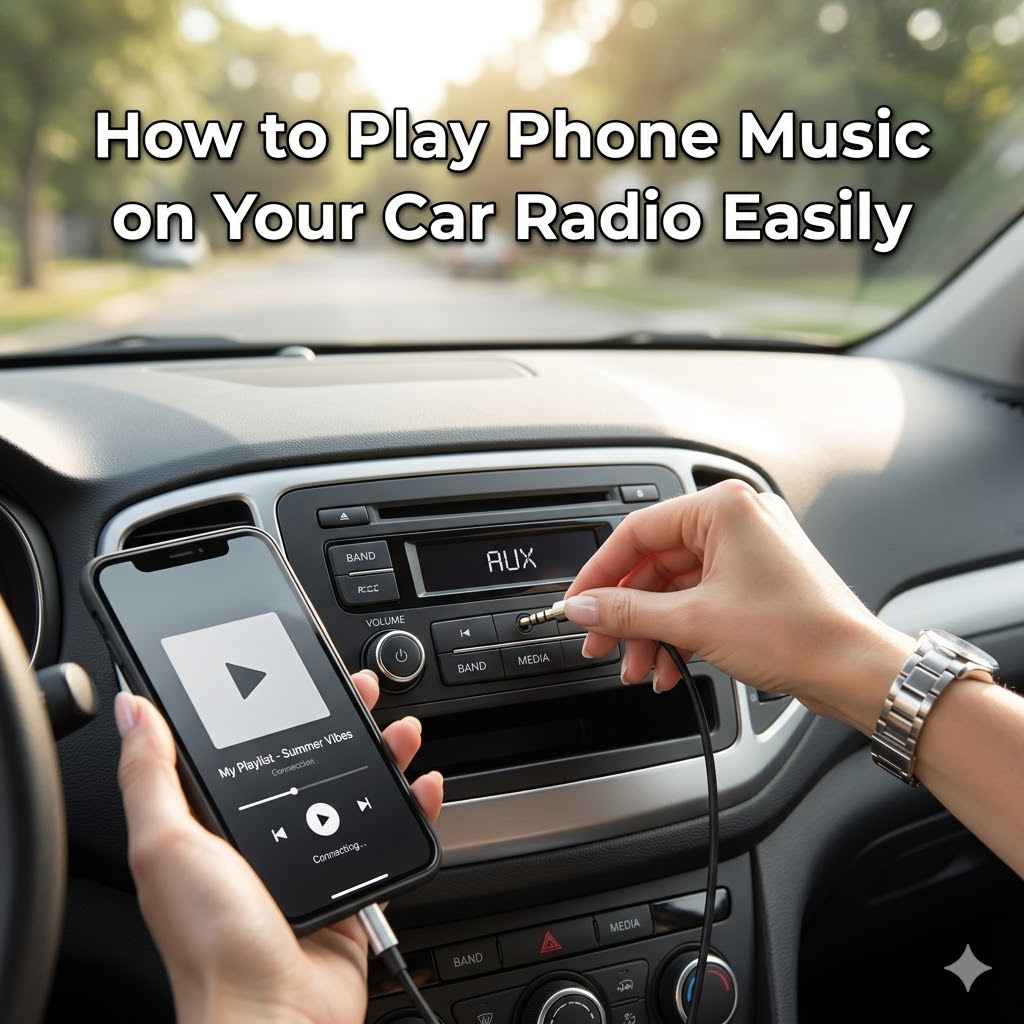
How to Play Phone Music on Your Car Radio Easily
Many people want to play music from their phones in their cars. This can seem tricky at first. You might wonder how to connect your phone to your car’s speakers.
Don’t worry, it’s often much simpler than it appears. We will walk you through How to Play Phone Music on Your Car Radio Easily. Get ready to enjoy your favorite songs on the go with this easy guide.
Let’s look at how to get started.
Connecting Your Phone To Your Car Radio
This section covers the most common ways to get your phone’s audio playing through your car’s speakers. We’ll explore different connection methods, explaining what they are and how they work. Understanding these options helps you pick the best way for your car and phone.
It’s about making your drives more enjoyable with your personal soundtrack.
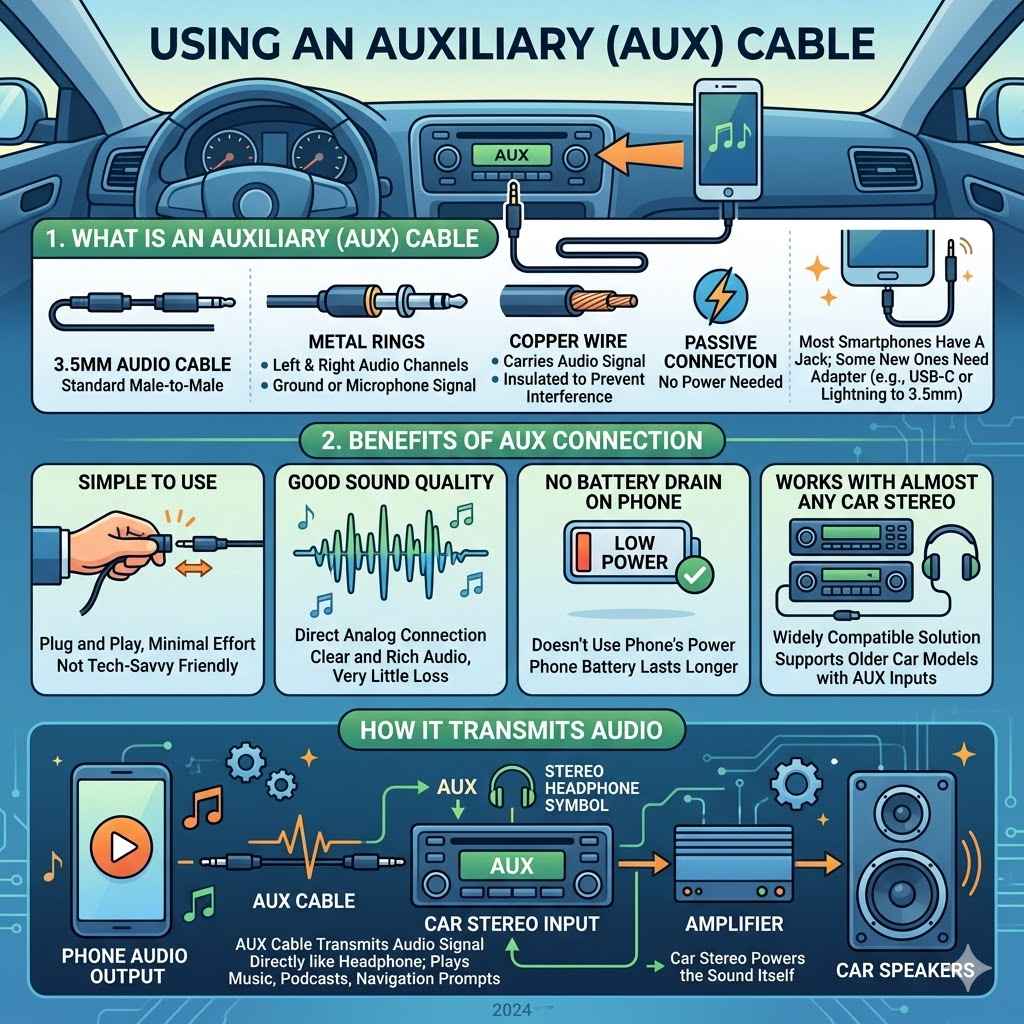
Using An Auxiliary (AUX) Cable
An auxiliary cable is a simple wire with a plug on each end. These plugs look like headphone jacks. You plug one end into your phone’s headphone port.
The other end goes into a matching port on your car radio. This port is often labeled “AUX” or has a small headphone symbol. It’s a straightforward way to get clear sound.
The AUX cable transmits audio signals directly. It’s like plugging headphones into your phone. The car stereo then plays whatever sound comes from your phone.
This includes music, podcasts, or even navigation prompts. The quality is usually very good, as it’s a direct connection.
What is an Auxiliary Cable
An auxiliary cable, often called an AUX cable, is a 3.5mm audio cable. This size is standard for most headphones and audio jacks on phones and devices. It has two or three metal rings on each connector.
These rings separate the left and right audio channels and sometimes a ground or microphone signal.
The cable itself is usually made of copper wire. This wire carries the electrical signals that make up the sound. It’s insulated to prevent interference.
A good quality cable can make a difference in sound clarity. It’s a passive connection, meaning it doesn’t require power to work.
Most smartphones still have a headphone jack, though some newer ones do not. If your phone lacks a headphone jack, you might need an adapter. This adapter would connect to your phone’s charging port (like USB-C or Lightning) and have a 3.5mm headphone jack on the other end.
Benefits of AUX Connection
Simple to use. You just plug it in. There are no complicated settings.
This is a major advantage for people who are not very tech-savvy. It requires minimal effort to get started. You just need the cable and the correct ports.
Good sound quality. It’s a direct analog connection.
Because the signal is sent directly from your phone to the car radio, there is very little loss of audio quality. This means your music can sound clear and rich, just as the artist intended. It’s a very reliable way to hear your tunes.
No battery drain on your phone. It doesn’t use your phone’s power.
Unlike Bluetooth connections, which can use more battery power, an AUX connection simply uses the audio output. The car stereo powers the sound itself. This means your phone’s battery will last longer on your drive.
Works with almost any car stereo. Most cars have an AUX port.
Many cars, even older models, were built with AUX inputs. This makes it a widely compatible solution. If your car has a headphone-like jack on the stereo, it likely supports AUX.
Using Bluetooth Connectivity
Bluetooth is a wireless technology that lets devices communicate with each other. Many modern cars and smartphones have Bluetooth built-in. This means you can connect your phone to your car without any wires.
It’s a convenient way to stream your music.
To use Bluetooth, you first need to pair your phone with your car’s system. This process involves making your phone and car “discoverable” and then selecting them from each other’s lists. Once paired, your phone’s audio will automatically play through the car speakers when you connect.
What is Bluetooth
Bluetooth is a short-range wireless technology standard. It allows devices to exchange data over short distances. Think of it as an invisible leash connecting your phone to your car.
It uses radio waves in a specific frequency band.
For audio streaming, Bluetooth uses profiles like A2DP (Advanced Audio Distribution Profile). This profile is designed to carry stereo audio signals from one device to another. It compresses the audio slightly to send it wirelessly.
The range for Bluetooth is typically around 30 feet (10 meters). However, this can be affected by physical obstructions like walls or even your body. For car audio, the connection is usually very stable as the devices are close.
How to Pair Your Phone via Bluetooth
Turn on your car’s stereo. Make sure it’s set to Bluetooth mode.
Your car stereo needs to be on and ready to connect. Sometimes this is called “pairing mode” or you might need to select “Bluetooth” from the menu on the stereo display.
Enable Bluetooth on your smartphone. Go to your phone’s settings and turn on Bluetooth.
On most phones, you’ll find Bluetooth in the main settings menu. You’ll see a switch to turn it on. Once on, your phone will start looking for nearby devices.
Search for devices on your car stereo. Your car system should show a list of available Bluetooth devices.
Your car radio might scan automatically, or you may need to select “Scan” or “Add Device.” It will then display the name of your phone if it finds it.
Select your phone on the car stereo. Your car radio will then prompt you to connect.
Look for your phone’s name in the list shown on your car’s screen. Tap on it or select it using your car’s controls.
Confirm the pairing code. Both your phone and car might show a numerical code. Make sure they match and confirm.
This is a security step. It ensures you are connecting to the correct device. If the codes match, select “Pair” or “Connect” on both devices.
Once paired, your phone can now play music through the car speakers. You can select your music app and hit play.
After successful pairing, your phone is recognized by your car. You can then control your music from your phone. The car stereo will act as the speaker.
Pros and Cons of Bluetooth
| Pros | Cons |
|---|---|
| Wireless convenience | Can use more phone battery |
| Easy to use after initial setup | Sound quality can sometimes be slightly lower than AUX |
| Often supports hands-free calling | Requires compatible devices |
| No physical connection needed | Potential for interference if many devices are nearby |
Wireless convenience means no tangled wires. This is great for a clean look in your car. Once paired, it’s very simple to start playing music.
Just turn on Bluetooth and connect. Many systems also allow for hands-free phone calls. You can answer calls using your car’s buttons.
However, Bluetooth uses more battery power than wired connections. The audio compression can also sometimes lead to a slight reduction in sound quality compared to a direct AUX cable. It also requires both your phone and car to have Bluetooth capabilities.
Using USB Connection
Many modern cars have USB ports. These ports are usually used for charging devices, but some can also play music directly from a phone. This method often offers a good balance between ease of use and sound quality.
To use a USB connection, you’ll need a USB cable. This is the same cable you might use to charge your phone from a computer. Plug one end into your phone and the other into your car’s USB port.
Your car stereo will then need to recognize your phone as a media device.
How USB Music Playback Works
When you connect your phone via USB, your car stereo can sometimes “see” your phone’s storage. It can then browse and play music files stored on your phone. This is similar to how a USB drive works.
Some car systems might also support specific apps from your phone.
The USB connection is digital. This means the audio data is transferred in a digital format. This can result in very high-quality sound.
It also allows your car stereo to potentially control playback directly, like skipping songs or creating playlists using your car’s buttons and screen.
Not all car USB ports support audio playback. Some are strictly for charging. You might need to check your car’s manual or experiment with your phone.
If your car supports it, it might appear as an option under “Media Source” on your stereo, listed as “USB” or the name of your phone.
What You Need for USB Connection
A compatible car USB port. Some ports are only for charging.
It’s important to know if your car’s USB port is designed for more than just power. Often, you’ll find a specific USB port for media playback, or the manual will clarify which ports support music.
A reliable USB cable. Use the one that came with your phone or a high-quality alternative.
A good cable ensures a stable connection and prevents errors. Cheap or damaged cables can cause playback issues or fail to connect at all.
A smartphone that supports USB media transfer. Most modern smartphones do.
Your phone needs to be able to output audio data through its USB port. This is a common feature, but it’s good to be aware of it.
Car Brands and USB Support
Many car manufacturers have adopted USB connectivity for music playback. Brands like Toyota, Honda, Ford, Chevrolet, and Volkswagen often include USB ports that support audio streaming. The exact functionality can vary greatly between models and trim levels.
For example, a newer Honda Civic might offer full Apple CarPlay or Android Auto support via USB, allowing your phone’s interface to appear on the car’s screen. An older model from the same brand might simply play MP3 files from a connected USB drive. It’s always best to consult your car’s owner’s manual for specific details about your vehicle.
Using FM Transmitters
An FM transmitter is a small device that converts your phone’s audio signal into an FM radio signal. You tune your car radio to a specific, unused FM frequency. Then, you tune the FM transmitter to the same frequency.
This allows your phone’s music to be broadcast to your car stereo.
These are a good option for older cars that lack AUX, USB, or Bluetooth capabilities. They are relatively inexpensive and easy to set up. However, the sound quality can be affected by radio interference.
How FM Transmitters Work
The FM transmitter takes the audio from your phone, typically via an AUX cable or Bluetooth connection to the transmitter itself. It then modulates this audio onto an FM radio carrier wave. This means it turns your phone’s sound into a radio station that only your car can pick up.
You then set both the transmitter and your car radio to the same frequency, usually in the 88.1 MHz to 107.9 MHz range. The car radio acts like a receiver for this mini radio station. The closer the frequency is to an actual radio station, the more likely you are to experience interference.
Many modern FM transmitters also offer charging ports, hands-free calling, and even Bluetooth connectivity for streaming. This makes them more versatile than older models.
Choosing the Right FM Transmitter Frequency
Find an empty FM frequency. Scan through the FM dial in your area.
Look for static or silence. Avoid frequencies that have strong radio stations broadcasting. A frequency with just static is ideal.
Set your FM transmitter to that frequency. Most transmitters have buttons to adjust the frequency up or down.
Follow the device’s instructions to set the desired frequency. This is usually a simple button press.
Tune your car radio to the same frequency.
Once your transmitter is set, tune your car stereo to that exact same number. You should then hear your phone’s audio.
Test the connection. Play some music and see if it sounds clear.
If there’s a lot of static or other radio interference, try a different FM frequency. Sometimes changing locations can also help.
Potential Issues with FM Transmitters
The main issue with FM transmitters is sound quality and interference. Radio waves can be disrupted by many things. This includes other radio stations, passing cars, and even buildings.
Sometimes, you might find that the music sounds a bit muffled or has a constant hiss. You might also experience dropped signals or unexpected audio from other radio stations bleeding through. It’s often not as crisp as a direct AUX or USB connection.
However, for cars without other options, it’s a functional way to enjoy phone music. Many users find the trade-off acceptable for the convenience.
Troubleshooting Common Issues
Even with simple setups, problems can arise. This section tackles common issues people face when trying to play phone music in their cars. We’ll provide quick solutions so you can get back to enjoying your tunes.
Phone Not Connecting
If your phone isn’t connecting via Bluetooth or USB, try restarting both your phone and your car stereo. This simple step can often clear temporary glitches.
For Bluetooth, ensure Bluetooth is enabled on your phone and that it’s discoverable. On your car stereo, go into the Bluetooth settings and try removing any old or unwanted pairings. Then, attempt to pair again.
Sometimes, the car needs to forget the phone to allow a fresh connection.
If using USB, make sure the cable is fully plugged in at both ends. Try a different USB cable, as damaged cables are a common cause of connection failure. Also, confirm that your car’s USB port supports media playback and not just charging.
For AUX cables, check for visible damage to the cable or plugs. Ensure both ends are securely inserted into the correct ports. Try a different AUX cable to rule out a faulty cable.
Sound Quality Problems
Poor sound quality can stem from several sources. If using Bluetooth, check your phone’s volume and your car stereo’s volume. Sometimes, the audio compression used by Bluetooth can lead to a slight loss in clarity.
Using a higher-quality Bluetooth connection if available (like aptX) can help, though both devices must support it.
With AUX cables, ensure you are using a good quality cable. A cheap or damaged cable can introduce static or reduce bass. Also, make sure the volume on both your phone and car stereo is set appropriately.
Avoid maxing out both, as this can cause distortion.
FM transmitters are most prone to sound quality issues. If your music sounds fuzzy or has static, try switching to a different, less crowded FM frequency. Moving your car to a different location can also sometimes reduce interference.
USB connections usually offer the best sound quality. If you experience issues, it might be due to the specific audio file you are playing, or a compatibility issue between your phone and car system.
Car Stereo Not Recognizing Phone
If your car stereo doesn’t show your phone as a connected device, first check your phone’s settings. Ensure that USB debugging is turned off if you’re using USB, unless it’s required for specific app integration like Android Auto.
For Bluetooth, make sure your car stereo is in “pairing mode” or “discoverable mode.” Some stereos have a specific button or menu option for this. If your phone is already paired but not connecting, try “forgetting” the device on both your phone and car stereo, then re-pairing them from scratch.
If using an AUX cable, the car stereo should recognize it as an input as soon as the cable is plugged in. If not, the AUX port on the stereo might be damaged or not functioning correctly.
Advanced Features and Integrations
Beyond basic music playback, many modern car systems offer advanced features. These integrations can make your driving experience even more seamless and enjoyable. Let’s explore some of these possibilities.
Apple CarPlay and Android Auto
Apple CarPlay and Android Auto are sophisticated systems that mirror your smartphone’s interface onto your car’s display screen. This allows you to use apps like music players, navigation, and messaging directly from your car’s touchscreen or voice commands.
To use these, you typically need a compatible car stereo and a smartphone running iOS or Android. The connection is usually made via USB cable, though some newer systems support wireless CarPlay and Android Auto. This is arguably the most integrated way to use your phone in the car.
How CarPlay and Android Auto Work
These systems act as a bridge between your phone and your car’s infotainment system. They present a simplified, driver-friendly interface on the car’s screen. This interface is optimized for use while driving, with larger icons and fewer distractions.
You can access music apps like Spotify, Apple Music, or Pandora. You can also use navigation apps such as Google Maps or Waze, and send or receive text messages using voice commands. The integration is deep, allowing for full control of compatible apps.
Benefits of Using CarPlay and Android Auto
Access to your favorite apps in a safe, car-friendly format.
This is a significant safety benefit. Instead of fumbling with your phone, you can control essential apps from your car’s integrated display, reducing distraction.
Voice control for most functions.
You can use “Hey Siri” or “OK Google” to control music playback, send messages, get directions, and more, keeping your hands on the wheel.
Seamless integration with car controls.
Your car’s steering wheel buttons, knobs, and touchscreen can all be used to control CarPlay or Android Auto, making it feel like a natural part of the car.
Regular updates through your phone.
As your phone’s apps and the operating systems are updated, so are the versions of CarPlay and Android Auto you use, meaning you always have the latest features.
Steering Wheel Controls Integration
Many car stereo systems, especially aftermarket ones, can be configured to work with your car’s existing steering wheel controls. This means you can use the buttons on your steering wheel to control music playback, volume, and even answer calls.
To achieve this, you often need a special adapter that translates the signals from your steering wheel buttons into commands that your aftermarket stereo can understand. This provides a very convenient and safe way to manage your audio without taking your hands off the wheel.
How Steering Wheel Adapters Work
Steering wheel control adapters are electronic modules. They connect to both your car’s steering column wiring and your aftermarket car stereo. The adapter “learns” the signals sent by your steering wheel buttons.
It then converts these signals into a format that your stereo can interpret.
For example, when you press the “Volume Up” button on your steering wheel, the adapter detects this signal. It then sends a “Volume Up” command to your stereo. This process is usually straightforward and involves a simple setup procedure guided by the adapter’s manual.
Example Scenario: Controlling Music From the Wheel
John installed an aftermarket stereo in his older car.
He wanted to upgrade his car’s audio system and gain modern features.
He purchased a steering wheel control adapter specific to his car model and the new stereo brand.
This adapter was the key to bridging the gap between his car’s original buttons and the new stereo.
During installation, he wired the adapter to both the car and the stereo, following the instructions.
The wiring process involved connecting a few wires, ensuring proper contact.
He then followed a simple programming sequence, pressing each button on his steering wheel while the adapter was in programming mode.
This taught the adapter what each button did.
Now, John can skip tracks, adjust the volume, and even answer calls using his steering wheel buttons, without looking away from the road.
This significantly improved his driving experience and safety.
Choosing the Best Method For You
Deciding how to play phone music on your car radio depends on your car’s features, your phone, and your personal preferences. Each method has its own strengths.
Considering Your Car’s Features
First, examine your car’s stereo system. Does it have an AUX input? A USB port?
Is it equipped with Bluetooth? Does it support Apple CarPlay or Android Auto? The presence of these features will guide your choices.
For instance, if your car has a built-in Bluetooth system, that’s often the most convenient wireless option. If it has a USB port that supports media, that’s usually the best for sound quality and integration.
If your car is older and lacks these modern ports, an FM transmitter or an AUX cable (if you can add an AUX port) might be your best bet.
Considering Your Phone’s Capabilities
Most modern smartphones are quite capable. They all support Bluetooth. Most have headphone jacks or can use adapters for AUX output.
Newer phones all support USB audio output.
If you have an iPhone, Apple CarPlay integration will be a priority if your car supports it. For Android users, Android Auto offers similar benefits. Your phone’s specific capabilities will help you choose the most suitable connection.
Personal Preference and Convenience
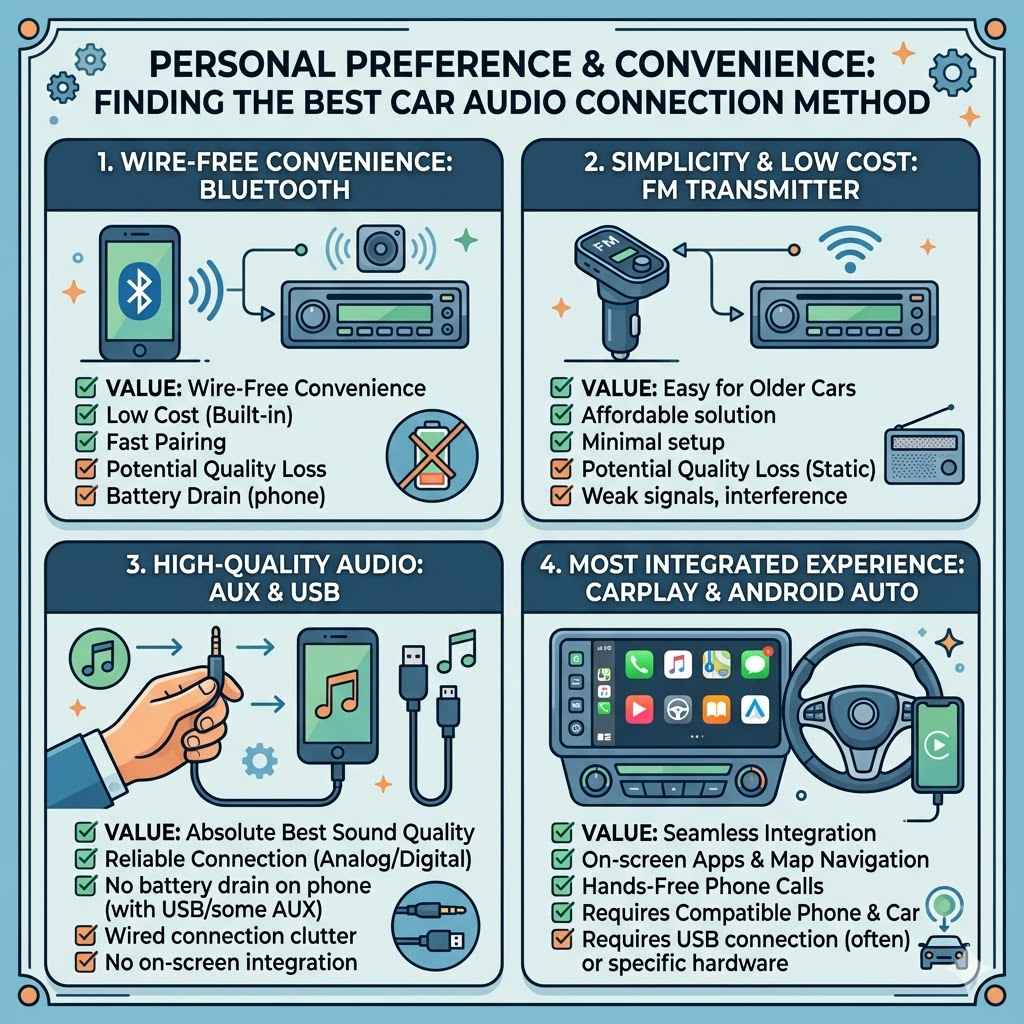
Ultimately, the best method is the one that works best for you. Some people prioritize the absolute best sound quality, which might lead them to USB or a high-quality AUX connection. Others value the wire-free convenience of Bluetooth.
For those with older cars, the simplicity and low cost of an FM transmitter might be appealing, despite potential sound quality compromises. If you want the most integrated experience, and your car and phone support it, Apple CarPlay or Android Auto are hard to beat.
Frequently Asked Questions
Question: Can I play music from my phone on any car radio?
Answer: Not all car radios are equipped to play music directly from a phone. Older cars might require accessories like FM transmitters or AUX cables. Newer cars often have Bluetooth, USB, or support for systems like Apple CarPlay and Android Auto.
Question: Do I need a special app to play music from my phone?
Answer: Generally, you don’t need a special app for basic playback. Standard music player apps on your phone will work. However, for advanced features like Apple CarPlay or Android Auto, you’ll use compatible apps that integrate with those systems.
Question: Will playing music from my phone drain its battery quickly?
Answer: Bluetooth and actively using apps can drain your phone’s battery. Wired connections like USB or AUX, especially if your car charges your phone simultaneously, tend to be more battery-friendly. FM transmitters generally use minimal phone power.
Question: Is Bluetooth audio quality as good as a wired connection?
Answer: Wired connections like AUX and USB often offer slightly better audio quality because they transfer data directly without compression. Bluetooth uses compression, which can result in a minor loss of fidelity, though modern Bluetooth codecs have greatly improved.
Question: How do I know if my car’s USB port supports music playback?
Answer: Check your car’s owner’s manual. It will specify if the USB port is for charging only or if it supports media playback. You can also try connecting your phone and seeing if your car stereo recognizes it as a media source.
Summary
You have learned how to play phone music on your car radio easily. Whether you use an AUX cable, Bluetooth, USB, or an FM transmitter, the process is straightforward. Explore the options available for your car and phone.
Enjoy your favorite songs on every drive.