Best OBD2 Scanners for DIY Car Repairs (2026): we compared
For most DIY car repairs, buy a scanner with live data and Mode $06. Move up to bidirectional controls and service resets only if you plan brake, battery, or throttle work. Pick too little scanner and you will keep throwing parts at a fault you could have traced on one road test. This guide matches scanner features to the jobs I see most often, from code reads and emissions checks to advanced diagnosis.
This guide is part of our Car maintenance and repair guide series.
Quick comparison
| Product | Badge | Best for | Price | ||
|---|---|---|---|---|---|
 |
OBDLink MX+ OBD2 Bluetooth Scanner for iPhone, Android, andOBDLink | Also great | Bluetooth scanner for iPhone, Android, and Windows | $139.95
Price as of 25 Sep 2026
|
View |
 |
Innova 5610 OBD2 Bidirectional Scan Tool – Understand YourInnova | Upgrade pick | Innova 5610 bidirectional scan tool with updates | $349.99
Price as of 25 Sep 2026
|
View |
 |
ANCEL AD410 Enhanced OBD2 Scanner, Vehicle Code Reader forANCEL | Budget pick | ANCEL AD410 vehicle code reader | $39.99
Price as of 25 Sep 2026
|
View |
 |
FOXWELL NT301 OBD2 Scanner Live Data Professional MechanicFOXWELL | Our pick | FOXWELL NT301 professional mechanic OBDII diagnostic code reader | $69.99
Price as of 25 Sep 2026
|
View |
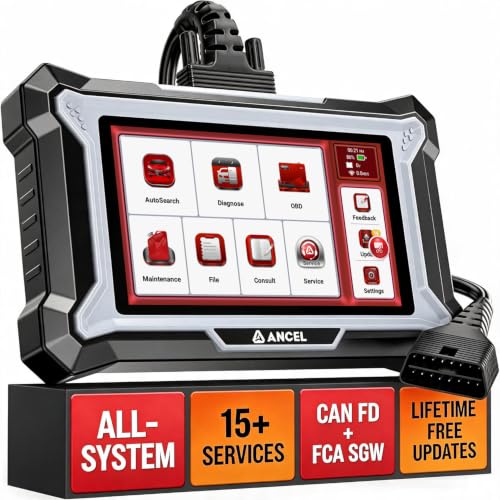 |
ANCEL DS200 Full System OBD2 Scanner, 15+ ServiceANCEL | Upgrade pick | ANCEL DS200 full system OBD2 scanner | $269.99
Price as of 25 Sep 2026
|
View |
The right scanner depends on the repair, not the badge. A cheap reader is enough for a warning light on a commuter, while app-based and bidirectional tools pay off when the fault comes and goes or the job needs a commanded action.
Top pick: Ancel BD310, because it can run corded or Bluetooth, includes free app access, supports battery testing, and gives you a middle-ground feature set without pushing you into premium pricing.
According to Best OBD-II Scanners for 2026, Tested — The Motopower MP69033 is described as the fastest hardwired OBD-II scanner tested. (source)
How we chose
We compared the scanners by diagnostic depth, setup friction, repair usefulness, and daily usability. That meant checking live data PIDs, freeze-frame data, I/M monitors, and whether the tool actually helps on common DIY jobs like code reads, battery checks, and brake-service work.
We also weighed the annoyances that matter after the first week: tiny screens, app accounts, slow pairing, and whether a cable length makes the scanner awkward under the dash. Price mattered only when it changed what the tool can do.
Value tiers were judged by repair scope. Under $30 should mean basic code reading. Around $40 to $100 should buy better live data and easier use. Around $250 to $500+ should buy service functions or bidirectional control, not just a fancier shell.
Ancel BD310: best overall for mixed DIY use
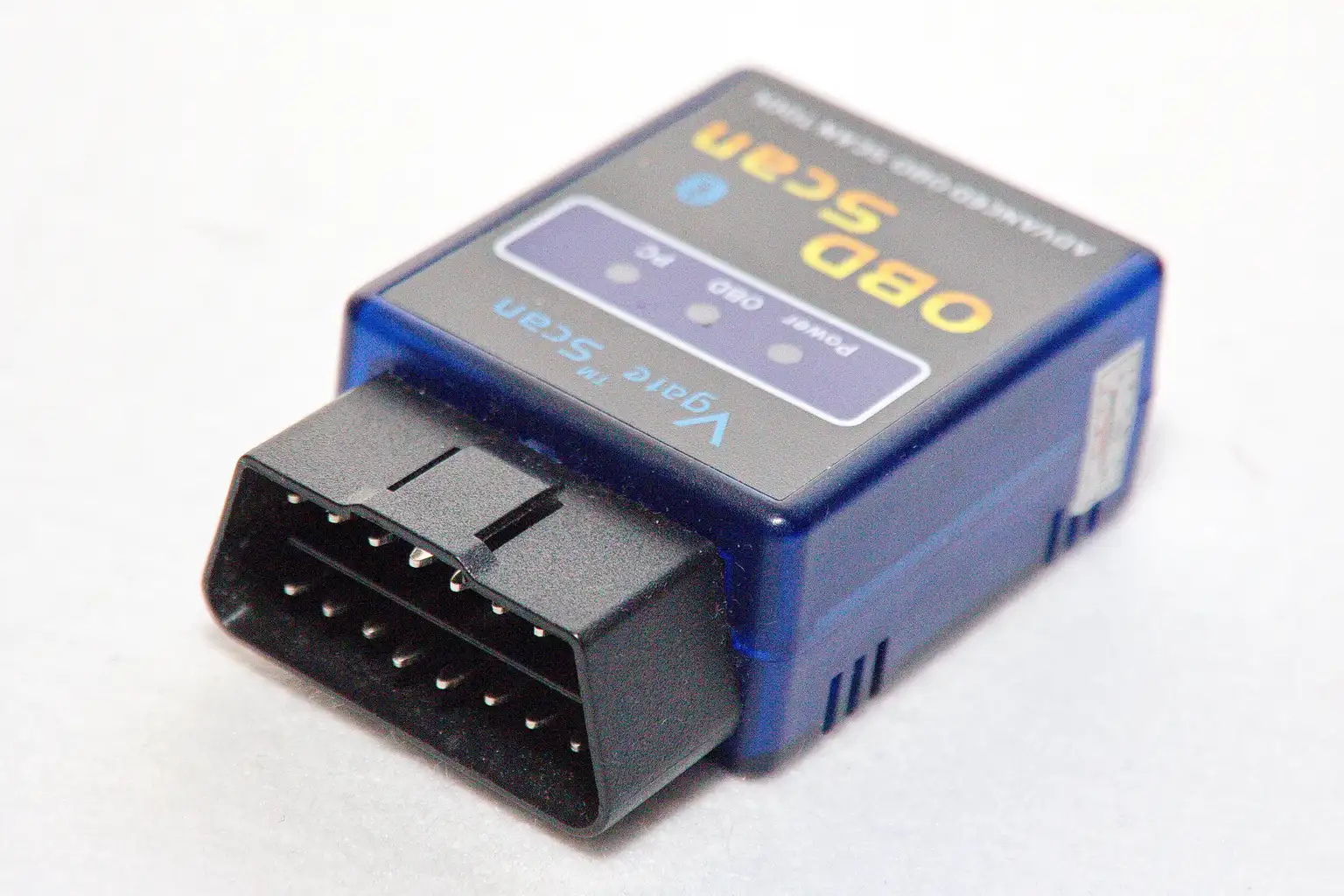
The Ancel BD310 is the best fit for a DIY owner who wants one scanner that can handle check-engine work, basic live data, and the occasional battery issue without jumping straight to a full pro tablet. From the spec sheet and owner feedback, its corded-or-Bluetooth setup gives it more flexibility than a single-mode reader.
What stands out is the mix of free app access, battery test support, and a 55.0-inch cord. That gives enough reach for most hood-up diagnostics, and it keeps the tool useful whether you prefer a phone screen or a hardwired connection.
The drawback is that it is still a middle-tier tool. It is not a bidirectional scanner, so brake-service functions and actuator tests are out of reach. The live-data count is useful, with 18 active live data PIDs recorded, but it will not replace a higher-end tablet when you start chasing module-level faults.
BlueDriver Pro Next Gen: best Bluetooth pick
The BlueDriver Pro Next Gen is the better Bluetooth choice for drivers who want app-based diagnostics and do not want to pay a subscription after purchase. It does require account creation before use, so setup is a little more involved than a plain wired reader, but the tradeoff is a cleaner phone-first workflow.
Its strength is speed where it matters. Based on the comparison data, it delivered faster live data readouts than the slower budget tools, and that matters when you are watching misfire counters, fuel trims, or oxygen sensor response during a road test.
The drawback is simple: Bluetooth convenience can still mean phone friction. If your app setup is slow, your battery is low, or you just want instant plug-and-read behavior, a corded tool is less fussy. It also recorded 12 active live data PIDs, which is enough for many jobs but less flexible than the better scan tablets.
Autel MaxiCOM Mk808Z-BT: best bidirectional scanner
The Autel MaxiCOM Mk808Z-BT is the one to buy when you need commanded functions, not just diagnosis. It is a bidirectional scanner, so it can send commands to components and support actuator tests, which is where DIY repair stops being code reading and starts becoming active troubleshooting.
Its touchscreen interface makes it easier to move through menus than the tiny-screen budget units, and the one-year free subscription helps offset the sticker shock. It also supports features such as electronic parking-brake retraction and ABS bleeding, which are the kinds of service jobs that can make a bidirectional scanner worth considering.
The drawback is cost. This is a higher-price-tier tool, and many DIY owners will never use its full capacity. It also demands more time up front, because advanced scanners tend to expose more menus, more vehicle-specific paths, and more chances to click the wrong function if you are rushing.
Motopower MP69033: best budget wired code reader
The Motopower MP69033 is the budget pick for one job: fast, basic OBD-II code reading. It is the fastest hardwired scanner tested, which makes it appealing for anyone who wants to pull a code quickly and decide whether the car needs a simple fix or a deeper diagnosis.
It stays lean on purpose. The screen is pixelated, and it gives basic info only, so it is not the tool for a beginner who wants polished menus or lots of guidance. It can graph certain live data PIDs, though, which is more than many cheap readers offer.
The drawback is obvious. If you want service resets, guided help, or deep live-data detail, this is the wrong tier. It is a code reader, not a diagnostic tablet, and that is exactly why it is cheap.
ANCEL DS200: best for full-system service work
The ANCEL DS200 is aimed at DIY owners who want to move beyond basic engine-light checks and into broader maintenance work. It offers full-system diagnostics for available modules and includes 15+ service functions, so it belongs in the conversation once brake work, maintenance resets, and module-level faults start piling up.
Its standout value is breadth. It also supports CAN FD and FCA SGW access, which can matter on newer vehicles where basic readers stop short. For households that keep cars a long time, that extra coverage can matter more than a cheaper scanner’s nicer box.
The drawback is that it is easy to overbuy. If your main task is clearing a check-engine light or checking readiness before inspection, this is more scanner than you need, and the extra menu depth can slow a beginner down.
Which one should you buy
If you want the cheapest workable option, buy the Motopower MP69033 and use it for code reads only. If you want the best all-around DIY balance, the Ancel BD310 is the one to get, because it covers more repair types without jumping into tablet pricing. If you live in an app and want Bluetooth, pick the BlueDriver Pro Next Gen.
Choose the Autel MaxiCOM Mk808Z-BT only if you already know you need actuator tests, ABS bleeding, or electronic parking-brake retraction. If you are moving into full-system maintenance, the ANCEL DS200 is the more practical step than buying another basic code reader and hoping it can do more later.
Beginners usually buy too much scanner for the job. The smarter move is to match the tool to the repair you plan to do next month, not the repair you might do someday.
What features matter most in a DIY OBD2 scanner?
The features that matter most are live data PIDs, freeze-frame data, and I/M monitors. Live data PIDs are real-time diagnostic parameter values, and the count varies by scanner. Freeze-frame data is the snapshot captured when the fault set. I/M monitors tell you whether emissions readiness checks are complete before inspection.
If you only read a check-engine light once or twice a year, you can live with a small feature set. If you troubleshoot misfires, fuel trims, charging problems, or repeated warning lights, live data and freeze-frame data are where the real time savings come from.
Mode $06 is also worth having because it can help spot failing parts before a code hardens into a major fault. That is especially useful on intermittent misfires and emissions-related issues, where a simple parts swap often misses the real cause.
Do I need a Bluetooth OBD2 scanner or a wired one?
Use a wired scanner if you want the least setup and the fewest connection problems. Use Bluetooth if you want app-based diagnostics, a larger phone screen, and the option to carry one adapter across vehicles. For many beginners, wired wins on reliability, while Bluetooth wins on comfort.
Wired tools are also better when you are in a hurry, the phone battery is low, or you do not want to deal with pairing and app permissions in a parking lot. Bluetooth starts making more sense once you care about live graphs, saved reports, and easier data viewing.
Beginners often assume Bluetooth is automatically easier. It is not. Account creation, app downloads, and phone compatibility can slow the first use more than a simple cord ever would.
Can a cheap OBD2 scanner read check engine codes?
Yes. A cheap OBD2 scanner can usually read and clear check-engine codes, and that is the core job of the basic code-reader class. It can also show emissions readiness status on many models, which helps before a smog check or inspection.
Where cheap readers fall short is diagnosis depth. They usually offer limited live data, little or no freeze-frame detail, and no service functions. That means they can tell you a circuit is unhappy, but they rarely tell you enough to decide whether the sensor, wiring, or mechanical fault is at issue.
That is why the cheapest tool is fine for isolated faults and poor for recurring ones. If the light keeps coming back, the money saved on the scanner can disappear quickly in parts you did not need.
Can an OBD2 scanner reset codes and clear the check engine light?
Most OBD2 scanners can clear stored engine codes and turn off the check-engine light after the fault has been addressed. That is a basic function, not an advanced one. Some scanners also clear readiness monitors, though that can matter for inspection timing.
Clearing a code is not the same as fixing the fault. If the issue is still present, the light will return, often after one drive cycle or a short road test. A scanner that can show live data and freeze-frame information gives you a far better shot at fixing the cause instead of resetting the symptom.
For repeated faults, the real value is not the button that clears the light. It is the data that tells you why the light came on.
How much should I spend on an OBD2 scanner?
Under $30 should buy a plain code reader for basic reads and clears. Around $40 to $100 usually gets a better screen, better app support, and some live data. Around $250 to $500+ is where you start paying for service functions, bidirectional control, and broader module access.
That price ladder is useful because the repair jobs change. Check-engine reads and emissions checks do not need a tablet. Brake-service resets, actuator tests, and some battery-related functions do.
If your car is old and your work is simple, stop at the budget tier. If you do your own maintenance on multiple vehicles, the midrange often makes more sense than buying the cheapest tool twice.
What is the best OBD2 scanner for DIY car repairs?
The best all-around scanner for most DIY repairs is the Ancel BD310, because it balances code reading, live data, battery testing, and flexible corded-or-Bluetooth use. It is broad enough for common troubleshooting without forcing you into the price and complexity of a bidirectional tablet.
If your work is mostly code reading, the Motopower MP69033 is enough. If you want app-based diagnostics, the BlueDriver Pro Next Gen is the stronger Bluetooth pick. If your repairs now include brake service or actuator tests, the Autel MaxiCOM Mk808Z-BT is the smarter step.
The best scanner is the one that matches your next repair, not your aspirational garage list.
Is a bidirectional scanner worth it for home mechanics?
It is worth it only if you will use actuator tests or service functions. A bidirectional tool makes sense for brake work, some throttle and pump tests, and certain module procedures. If your repairs stop at code reading and parts replacement, the extra cost is usually wasted.
Which OBD2 scanner is best for beginners?
The best beginner pick is the Ancel BD310 because it gives you room to grow without overwhelming you. The BD310’s corded-or-Bluetooth flexibility, app access, and battery test support make it easier to start with basic diagnosis and move toward more serious troubleshooting later.
Products related to this article
Sponsored / affiliate links. As an Amazon Associate I earn from qualifying purchases. I may earn additional commission from eligible campaigns.