Dash Cam Price: What You Really Get at Each Tier
Expect to spend about $60 to $250 for most dash cams, plus about $0 to $300 for installation, with the right choice depending on the video quality, parking mode, and storage that match your driving needs. Ignore total cost, and a cheap camera can turn into an expensive regret after hardwiring, mounts, memory cards, and app fees. This guide breaks down each price tier, what it includes, what it leaves out, and when extra features stop being worth more money.
What dash cam price actually covers


Dash cam price covers more than the camera itself. The sticker often leaves out a memory card, a hardwire kit for parking mode, and professional installation, so the real bill can climb fast. For many buyers, the right question is not what costs least, but what total setup gets the needed footage without paying for features that sit unused.
Sticker price versus total cost
At the low end, a camera may look affordable until you add the SD card it needs to loop-record, plus wiring if you want parking mode. At the high end, a dual- or triple-channel setup can add rear hardware, longer cables, and more labor. That is where dash cam price becomes a system decision, not a shelf-price decision.
What usually changes as price rises
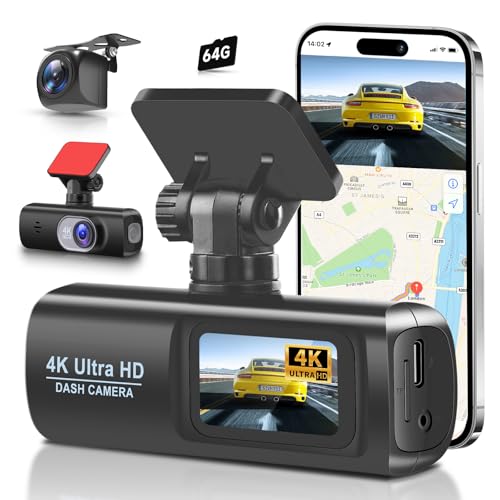
Price usually rises with channel count, resolution, parking features, GPS, app support, and display size. A front-only 1080p model can be cheap. A 2-channel 4K model with GPS, Wi-Fi/app control, and 24-hour parking monitoring costs more because it includes more sensors, more wiring, and more storage demand.
When extra features stop mattering
Extra spending stops paying off when the footage already solves the problem you care about. If you mainly need a clear daytime record of incidents on a commute, a solid front camera with loop recording may be enough. If the car sits on the street overnight, parking mode and heat-tolerant power matter more than a bigger display.
Dash cam price by feature tier
Most shoppers can think in three tiers, budget, midrange, and premium. The value jump is not linear. A camera around $100 is usually a large upgrade over a stripped-down sub-$50 unit, while a higher-priced model may only make sense if rear coverage, stronger parking support, or a screenless design for a cleaner install is needed.
Budget tier: entry-level basics
Budget models usually sit around about $50 to $100 and focus on front-only recording, 1080p to 2K video, loop recording, and a small screen or simple app control. They often depend on a separately purchased SD card. GPS, hardwire parking support, and rear cameras are less common at this level.
Wirecutter’s budget pick, the Miofive S1, cost $90 from Amazon, and it still recorded in 4K. That matters because a low price does not always mean low resolution, but it can still mean a lean feature set and more reliance on add-ons. The budget line often trims convenience before it trims recording basics.
Midrange tier: the usual sweet spot
Midrange models generally land around about $100 to $250. This is where you usually see better video processing, stronger night performance, GPS logging, Wi-Fi/app support, and more reliable parking features. Many drivers should stop here, because the extra money buys practical gains rather than cosmetic upgrades.
Garmin’s standard dash cam was priced at $220, while the GPS version cost $250. Garmin’s dash cam recorded in 1080p, 720p, or WXGA resolutions and included 4GB of storage. That combination shows how midrange pricing often buys brand refinement, GPS as an add-on, and a modest built-in storage baseline rather than huge spec jumps.
Premium tier: what you pay extra
Premium models often start around $250 and can run higher when they add extra channels, higher-resolution front recording, hardwired parking support, screenless designs, and advanced app features. A price like $499.00, such as the Wolfbox K9 Pro, usually signals a setup built for broader coverage, not just a better front view.
Wirecutter’s top pick, the Viofo A229 Pro, cost $280 from Amazon for the 2-channel version. Wirecutter said it delivered 4K video, had 24-hour parking monitoring, and used a supercapacitor instead of a battery. That is a good example of premium pricing buying function that matters in heat, parking, and rear coverage.
Price-feature matrix
This matrix shows what common price bands usually buy, what they leave out, and who should choose them. Use it to compare total ownership cost, not just the sticker. Add storage, wiring, and install labor before deciding whether a higher tier is actually worth the jump.
| Street price | Channel count | Resolution | GPS | Parking mode | Power type | App support | Memory card need | Hardwire kit need | Install cost risk | Buyer profile |
|---|---|---|---|---|---|---|---|---|---|---|
| $50 to $100 | 1-channel | 1080p to 2K | Often no | Usually limited or absent | Battery or supercapacitor | Sometimes | Yes, usually | No for driving only | Low to moderate | Commuter who wants basic front coverage |
| $100 to $200 | 1-channel or 2-channel | 2K to 4K front, 1080p rear | Common on some models | Often available with hardwire kit | Supercapacitor is common | Often yes | Yes, higher-capacity card recommended | Often yes for parking mode | Moderate | Daily driver who wants a better balance of price and features |
| $200 to $300 | 2-channel | 4K front, 1080p rear | Often yes | 24-hour monitoring is common | Supercapacitor | Usually yes | Yes | Usually yes | Moderate to high | Parked-street buyer who needs reliable evidence after incidents |
| $300+ | 2-channel or 3-channel | 4K front, 2K or 1080p other channels | Usually yes | Stronger parking support and settings control | Supercapacitor | Usually yes | Yes, larger card often needed | Usually yes | High | Rideshare, fleet, motorcycle, or high-exposure parking use |
What raises dash cam price the most?
The biggest price jumps usually come from adding cameras, not from adding a few menu features. Front-only models are the cheapest. Dual-channel setups cost more because they need a second sensor and cable run. Triple-channel setups cost more again because they add an interior or cabin view and more processing load.
Front-only versus front and rear
A front/rear camera setup costs more than a front-only model because the rear unit adds hardware and installation effort. It also raises storage demand, since two streams fill a card faster. For many drivers, the rear camera is worth the increase because it captures tailgating, rear impacts, and parked bumps that a front unit never sees.
Suppose a commuter parks on a street where rear-end contact is more likely than a front-end scrape. A front-only camera may miss the event entirely if the impact starts behind the car. A dual-channel setup gives a better chance of catching the plate, angle, or motion that identifies the other vehicle.
Triple-channel setups
Triple-channel systems usually suit rideshare, taxi, or fleet use because they cover the road, rear, and cabin. The extra cost is not only for the third lens. It also reflects longer wiring, more data, and more setup time. For most private drivers, that third channel is a cost many will not recover in practical value.
4K, GPS, and app control
4K recording often raises price because it needs better sensors and processing. GPS adds location stamping and speed context, which helps when a clip needs time and place context. Wi-Fi/app control adds convenience for downloading clips to a phone and changing settings without pulling the card, but it should be viewed as a comfort feature, not a must-have.
Is a front and rear dash cam worth it?
A front and rear dash cam is worth the extra cost when rear incidents, parking hits, or tailgating are part of the risk profile. It is less compelling for drivers who mainly want proof of what happens ahead on a low-risk commute. The rear view becomes more valuable as exposure to traffic, curb parking, or rideshare pickups goes up.
When dual-channel makes sense
Daily drivers in dense traffic, parked-street buyers, and anyone who wants a fuller incident record should look at 2-channel pricing. The higher cost is easier to justify when a rear camera can capture a plate, a lane cut-in, or a tap from behind. That is also why rear-camera add-ons often feel more useful than a bigger screen.
When a rear camera add-on is worth paying
If the car is often parked in tight spaces, or if a rear strike is more likely than a front impact, the add-on is worth it. If the front camera already uses 4K and GPS, the rear unit can complete the coverage picture without forcing a full premium jump. The value comes from added evidence, not from symmetry.
Who should skip triple-channel pricing?
Private drivers who only need front evidence can usually skip triple-channel pricing. So can buyers who rarely carry passengers and do not need cabin footage. Triple-channel makes more sense for commercial driving, shared rides, and fleet accountability than for a solo commuter with ordinary parking risk.
How much should you spend on a good dash cam?
For most daily driving, $100 to $200 is the safest range to target. That band often buys clearer video, acceptable app support, and better odds of getting GPS or parking mode without overspending. Push above that only when your use case needs rear coverage, 24-hour monitoring, or stronger heat resistance.
Daily driving
If you mainly drive to work, errands, and school runs, a midrange front-only or basic dual-channel unit is usually enough. You want clean daytime video, decent night capture, and reliable loop recording. A camera that records well but needs constant fiddling is not a bargain.
Parked-street parking mode users
If the car spends nights on the street, spend more for parking mode and a supercapacitor. Hardwired power is often the price of 24-hour monitoring, impact detection, and motion detection. That setup costs more up front, but it can matter far more than a slightly sharper daytime image.
Rideshare, fleet, and motorcycle use
Rideshare and fleet buyers often need 2-channel or 3-channel coverage, stronger file management, and easier clip retrieval. Motorcycle buyers may prioritize compact design, weather-resistant mounting, and simple wiring over a large screen. For those uses, premium pricing can be justified because the vehicle exposure is higher and the use case is narrower.
Do cheap dash cams record well at night?
Cheap dash cams can record usable night footage, but they usually struggle with plate readability, glare, and shadow detail. A low price does not automatically mean bad night video, but budget models often cut corners in sensor quality, lens performance, and image processing. That is where low-light performance starts to slip.
Why low-light plates are hard to capture
At night, moving cars and mixed lighting make plates harder to read. Headlights can blow out details. Streetlights can create reflections. A budget camera may still show the event, but not the number on the plate unless the vehicle is close, slow, and well lit.
What budget models tend to miss
Budget models often miss cleaner rear coverage, better wide dynamic range, and solid parking features. They may also rely on smaller cards, simpler mounts, or weaker app tools. Wirecutter’s Miofive S1 Ultra, priced at $130, shows how rear-camera support can push a budget-friendly model upward without reaching premium territory.
When higher-resolution specs matter more
Higher resolution matters most when distance, speed, or poor light make details hard to recover later. That is why 4K can be useful even if the file sizes are larger. It gives more room to crop or zoom, but it does not fix every night scene. Lens quality and processing still matter.
A common first-timer mistake is choosing a bargain dash cam and forgetting to budget for a larger memory card. The camera then fills the card too quickly, loop recording starts overwriting clips sooner, and the owner assumes the device failed. In reality, the setup was under-spec’d for the chosen resolution.
Installation and ownership costs
Installation and ownership can change dash cam price by a lot. A camera that looks inexpensive on the shelf may need a hardwire kit, a larger SD card, and a shop visit before it is ready for parking mode. Those add-ons are part of the real purchase decision, not afterthoughts.
Hardwire kits and parking mode
Parking mode usually needs hardwired power to stay active when the car is off. That supports 24-hour monitoring, impact detection, and motion detection without draining the start battery in normal use. If you do not want hardwiring, choose a model that can run as a driving-only camera and skip parked monitoring.
Memory cards and replacement cycles
Most dash cams depend on an SD card because built-in storage is usually limited. Loop recording overwrites old files, so a larger card can matter more than many buyers expect. Cards also wear out, especially in hot cars or in units that record continuously. That is another hidden cost of ownership.
Professional install versus DIY
Professional installation can make sense when you want clean wiring, parking mode, or multiple cameras. DIY saves money, but it adds setup risk. A rough rule is that install labor can range from free to a few hundred dollars, depending on the vehicle layout and whether the camera must be hardwired.
- Decide whether you need front-only, front/rear, or triple-channel coverage.
- Check whether parking mode matters enough to justify hardwiring.
- Budget for an SD card sized for your chosen resolution and loop recording.
- Decide whether app control and GPS are convenience features or must-haves.
- Add installation cost before comparing models at the same sticker price.
Frequently asked questions
What is dash cam price?
Dash cam price usually starts around $50 for basic front-only models and climbs past $300 when you add dual-channel coverage, GPS, parking mode, and app control. The important number is the total setup cost, because memory cards, wiring, and labor can change the final bill by a lot.
How much does a dash cam cost?
For most buyers, a usable dash cam costs about $60 to $250 before installation. A budget model can work for simple commuting, while a midrange unit usually gives the best mix of video quality and features. Higher prices make sense when you need rear coverage or parking monitoring.
How much dash cam cost with installation?
With installation, many setups land between $60 and $550 depending on camera type and labor. A front-only DIY install may be cheap, while a hardwired 2-channel or 3-channel system can add significant shop time. The final cost depends on wiring complexity, not just the camera box.
What features change dash cam price the most?
The biggest price drivers are channel count, video resolution, parking mode hardware, GPS, and app support. A rear camera adds parts and installation work. A supercapacitor, bigger screen, or screenless design can also affect cost, but those usually matter less than adding a second or third channel.
Is a front and rear dash cam worth the extra cost?
Yes, if you park on the street, drive in dense traffic, or want coverage for rear impacts and tailgating. A rear camera adds cost, storage demand, and setup work, but it also fills the biggest blind spot in a front-only system. For many buyers, that trade is worth it.
Do I need hardwiring to use parking mode?
Usually, yes. Parking mode is most useful when the camera has a constant power source, and hardwiring is the common way to provide it safely. Some units offer separate battery packs or alternate kits, but if you want 24-hour monitoring, hardwiring is the normal path.
Which dash cam price range is best for daily driving?
The best range for daily driving is usually $100 to $200. That bracket often gets you solid front video, decent night performance, and optional GPS or app control without paying for a triple-channel setup you may never use. It is the most balanced range for everyday use.
Products related to this article
Sponsored / affiliate links. As an Amazon Associate I earn from qualifying purchases. I may earn additional commission from eligible campaigns.