Best Smart Dash Cams for Wi-Fi Parking: We Compared
For most drivers, the VIOFO A229 Pro is the easier Wi-Fi dash cam to live with, while the Thinkware U3000 is the stronger choice for parking protection. App speed and buffered parking clips matter more than resolution alone. If you pick the wrong one, transfers can drag, parking clips can miss the moment, and the camera can end up ignored. This guide compares the two on phone workflow, parking evidence quality, and total cost.
Quick comparison
| Product | Badge | Best for | Price | ||
|---|---|---|---|---|---|
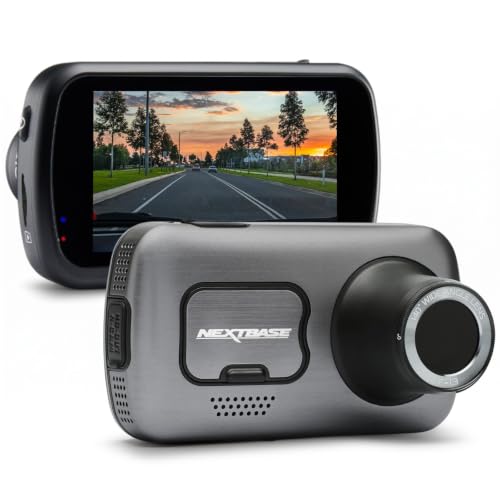 |
Nextbase 622GW Dash Cam Full 4K/30fps UHD Recording in CarNextbase | Our pick | 4K · Wi-Fi · GPS · Night Vision | $199.99
Price as of 23 Oct 2026
|
View |
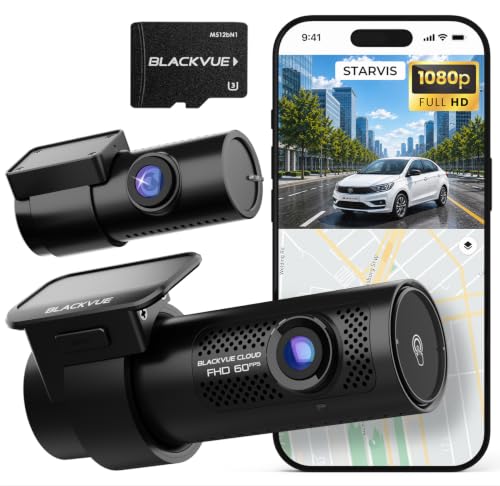 |
BlackVue DR770X II, 1080P+1080P Dash Cam Front and Rear,Blackvue | Also great | 1080p dual · 24H Parking · Cloud · Wi-Fi | $347.99
Price as of 23 Oct 2026
|
View |
 |
Garmin Dash Cam Mini 2, Tiny Size, 1080p and 140-degreeGarmin | Also great | $300.00
Price as of 23 Oct 2026
|
View | |
 |
VIOFO A229 Plus Dash Cam Front and Rear, 2K Dual STARVIS 2VIOFO | Also great | $189.99
Price as of 23 Oct 2026
|
View |
The trade-off is straightforward: Thinkware leans toward parking surveillance and approach capture, while VIOFO leans toward easier phone use and lower system cost. Both use Wi-Fi for local phone access, not automatic remote viewing from home.
How we chose
We compared the two cameras on local Wi-Fi workflow, parking evidence quality, power setup cost, and storage needs. Resolution mattered, but only after phone usability and parked-car behavior.
Also check whether each model needs extra hardware to get real parking protection. That hidden cost matters.
Finally, we looked at app transfer speed, reconnection reliability, and whether the camera can export clips without turning the process into a chore.
Thinkware U3000 pro: best for parking surveillance
The Thinkware U3000 Pro is the better fit if your main concern is what happens while the car is parked. A dual-radar setup can wake when a vehicle approaches, and it may hold parked surveillance for around 10 days, which is the kind of behavior many drivers want from a parking-focused camera.
The other advantage is the video stack: 4K front and 2K rear sensors, plus 5GHz Wi-Fi in the box. That mix gives you strong front detail, a usable rear channel, and faster phone transfers than a 2.4GHz-only setup.
The drawback is cost and complexity. Parking protection is not plug-and-play here. You still need the right power setup, and that can mean a hardwire kit, installation time, and possibly a larger microSD card if you want to keep longer dual-channel clips.
Why the 24GHz dual radar matters
This is the part that separates parking evidence from simple motion detection. Radar wake can catch an approaching person or vehicle before impact, which matters more than a camera that only starts recording after a hit. That pre-event window is often where the useful context lives.
5GHz Wi-Fi and app use on the move
Thinkware’s 5GHz Wi-Fi helps when you want to pull clips onto a phone without waiting forever. It is still local pairing, though. It does not mean you can stream full footage from home unless the system specifically supports a cloud path and the camera stays connected.
4K front and 2K rear video stack
The front sensor gives you 4K detail, while the rear sensor records in 2K. That is a practical balance for plate capture and rear-end disputes, but parking behavior still matters more than headline resolution if the goal is evidence from a driveway or apartment lot.
Who should pay for the added parking hardware?
If you park on the street, leave the car in a shared garage, or care about overnight incidents, the extra spend makes sense. If you mostly want a quick phone workflow for occasional clips, the power and install overhead can feel heavy.
VIOFO A229 Pro: best for easier app use
The VIOFO A229 Pro is the easier pick if you want a dual-channel Wi-Fi dash cam that is simpler to pair with a phone and cheaper to build out. It records 4K front and 2K rear video, uses dual Sony STARVIS 2 sensors, and supports 2.4/5GHz Wi-Fi for flexible transfers.
Its buffered parking modes are the practical advantage. Buffered recording can capture a few seconds before and after an event, which gives you better context than impact-only clips. That matters when someone leans on a bumper, sideswipes a mirror, or walks past the car without setting off a full-motion trigger.
The drawback is that the parking system is still only as good as the power you give it. Without the right hardwire kit, OBD cable, or battery pack, parked surveillance endurance drops fast. App behavior can also vary by phone and file size, especially with dual-channel clips.
2.4/5GHz Wi-Fi for phone transfers
The A229 Pro’s dual-band Wi-Fi is useful because you can choose the band that fits your phone workflow. 5GHz usually moves clips faster at close range. 2.4GHz can be steadier through weak connections, though it is slower.
Dual Sony STARVIS 2 sensors and low-light detail
STARVIS 2 sensors are valuable because low-light footage is where many parking cams fall short. Add HDR or WDR behavior and you reduce blown-out headlights and dim side streets. The point is not just sharpness; it is usable evidence when light is poor.
Buffered parking modes and when they help
Buffered parking recording helps when the trigger happens just before an impact. If a shopping cart rolls into a door, or a pedestrian brushes the quarter panel, pre-buffer seconds can show the cause instead of only the aftermath.
Why the lower system cost matters
The A229 Pro is easier to recommend if you want strong wireless access without a pricey parking-first system. The lower out-of-pocket cost leaves room for a better microSD card, a clean hardwire install, or a battery pack later if you decide you need longer parked surveillance.
What Wi-Fi actually gets you in a dash cam
Wi-Fi on a dash cam usually means local phone pairing. You connect the camera to your phone, preview footage, download clips, and sometimes change settings through a companion app. It does not automatically mean you can view the car from your couch.
Local phone pairing versus remote viewing
Most Wi-Fi dash cams are built for short-range access while standing near the car. Remote viewing from home is a different feature set, usually tied to cloud support or a separate connectivity system. If you want remote access, read the fine print before you buy.
2.4GHz vs 5GHz transfer tradeoffs
5GHz is often faster for clip transfer and can give smoother live preview at close range. 2.4GHz can be more forgiving when signal strength drops, but the transfer pace is slower. For large dual-channel files, that difference is obvious during export.
App preview, playback, and clip downloads
These are the features that matter most in daily use. A good app should connect quickly, show preview without repeated failures, and move clips onto your phone without forcing extra retries. Slow downloads are the fastest way to make a Wi-Fi camera feel clumsy.
Voice control and OTA updates
Voice control is a convenience feature, not the deciding factor. OTA updates matter more because they can fix bugs, improve stability, or refine parking behavior. A camera with a weak update path can age badly even if the hardware looks strong on paper.
Parking mode power and evidence quality
Parking mode is not just a menu item. It depends on power hardware, wake behavior, and whether the camera records before the event or only after impact. That is why two cameras with similar resolution can produce very different evidence.
Hardwire kit versus OBD cable versus battery pack
A hardwire kit is the most common way to enable parked surveillance because it gives the camera a low-voltage supply from the fuse box. An OBD cable is easier to install in some cars. A dedicated battery pack costs more, but it can protect the vehicle battery better and extend parking runtime.
Pre-buffer seconds and approach capture
Buffered systems can catch the approach, not just the hit. That matters when someone circles the car, backs too close, or opens a door into the side panel. Approach capture gives you context that impact-only systems miss.
Idle draw and overnight endurance
Idle draw affects how long a car can sit before the camera becomes a battery concern. A parking system with better efficiency, smarter sleep, or radar wake can stretch surveillance longer than a camera that stays fully active all night.
Impact-only recording versus buffered recording
Impact-only recording is better than nothing, but it can miss the setup to the incident. Buffered recording is usually the better evidence format because it shows what happened before the trigger. That is the difference between a blurry hit and a useful case file.
Say your car sits in an apartment lot and a neighbor’s door taps your rear quarter panel at 2:10 a.m. A buffered system can show the person opening the door and walking away. An impact-only system may only show a shake and a partial plate.
Suppose you drive daily, park in a busy office garage, and mostly want to grab clips on your phone after a commute. A faster app and simpler pairing matter more than a radar wake system that is built for longer parked surveillance.
Storage and included accessories
Storage size changes the real cost of a dual-channel Wi-Fi dash cam. Dual-channel files fill cards faster than front-only footage, and parking mode adds even more clips. If the camera supports larger cards, that is helpful, but you still need to budget for one if it is not included.
Why 128GB is a practical floor
A 128GB card is a reasonable starting point for dual-channel recording because front and rear clips both use space. Loop recording helps by overwriting old files, but if you want more parking history, bigger storage is the safer choice.
Why 512GB support matters
Support for up to 512GB can leave more room for longer drives, more parking footage, and less frequent overwrite behavior. It does not mean you must fill the card. It does mean you can size the system around how long you want evidence to remain available.
Smart dash cams decision matrix
| Decision point | Thinkware U3000 Pro | VIOFO A229 Pro 2CH |
|---|---|---|
| Setup complexity | Higher; parking-first setup with added power planning | Lower; easier to live with for phone-first use |
| App transfer speed | 5GHz Wi-Fi helps, but large clips still take time | 2.4/5GHz Wi-Fi gives more flexibility for transfers |
| Parking behavior | 24GHz dual radar wakes on approach; roughly 10 days parked standby | Buffered parking modes; strong context, less radar-based wake behavior |
| Included accessories | Wi-Fi in the box; parking hardware still matters | Wi-Fi in the box; parking power gear still matters |
| Storage needs | Dual-channel files benefit from larger cards | Dual-channel files benefit from larger cards |
| Total out-of-pocket cost | Higher once parking hardware and storage are added | Lower overall, especially for casual parking use |
Which one should you buy?
Choose the Thinkware U3000 Pro if parking protection comes first, you want approach capture, and you are willing to pay for the power hardware that makes parked surveillance worthwhile. It is the better fit for curb parking, overnight street parking, and drivers who want radar wake behavior.
Choose the VIOFO A229 Pro if you want a smoother phone workflow, a lower system cost, and buffered parking clips without moving into a premium parking-first setup. It is the better fit for commuters who want quick app access and solid dual-channel footage.
If you are choosing between them for a driveway, the better answer often comes down to power planning. A camera that is easier to feed well will outperform a more advanced one that is underpowered.
Storage changes the budget too. A 128GB card is workable, but if you expect long drives, repeated parking events, or lots of clip exports, step up sooner rather than later.
Choose Thinkware U3000 Pro if… / Choose VIOFO A229 Pro if…
Choose Thinkware U3000 Pro if… you park on the street often, want radar-based wake behavior, and care more about parked evidence than about the fastest possible phone workflow.
Choose Thinkware U3000 Pro if… overnight protection matters more than saving money on the install.
Choose VIOFO A229 Pro if… you want easier app access, dual-band Wi-Fi for clip transfers, and buffered parking without committing to the highest total cost.
Choose VIOFO A229 Pro if… you expect to export clips often and want the simpler day-to-day experience.
Nextbase 622gw: best for feature-heavy front recording
The Nextbase 622GW is the feature-heavy pick in this group, with 4K/30fps front recording, Wi-Fi, GPS, Bluetooth, and what3words location tagging. Its image stabilization and night features make it a strong choice if your priority is front video polish and location context.
The drawback is that it is a front-focused camera in a comparison that leans on dual-channel parking evidence. If your main concern is overnight protection, it is not the most parking-first option here.
BlackVue DR770X ii: best for cloud-minded parking use
The BlackVue DR770X II is the most connectivity-heavy option in this group. It includes Wi-Fi, cloud connectivity, hardwire cable, and 24H parking mode, plus a free 64GB card and STARVIS sensors for low-light footage.
The drawback is cost. At $347.99, it sits well above the simpler phone-first picks, and its 1080p+1080p recording is less resolution than the 4K and 2K dual-channel setups above. That may be enough for some buyers, but it is not the value leader.
Frequently asked questions
Which smart dash cam with Wi-Fi is easiest to use with a phone app?
The VIOFO A229 Pro is the easier live-with choice for most phone-first buyers because it supports 2.4/5GHz Wi-Fi and keeps the workflow straightforward. If you want simple clip transfers and less friction, that matters more than chasing the most advanced parking hardware.
Do Wi-Fi dash cams let me view footage remotely from home?
Usually not by default. Most Wi-Fi dash cams use local phone pairing for preview, playback, and downloads when you are near the car. Remote access from home depends on a separate cloud or connected-car feature, which is not the same thing as ordinary Wi-Fi.
Is 5GHz Wi-Fi faster than 2.4GHz on a dash cam?
Yes, 5GHz is typically faster for local transfers and live preview at close range. 2.4GHz can be more tolerant of weak connections, but it usually moves clips more slowly. For dual-channel files, that speed difference is easy to notice.
Which dash cam is better for parking mode and overnight protection?
The Thinkware U3000 Pro is stronger for parking and overnight use because it uses 24GHz dual radar to wake when a vehicle approaches and can hold parked surveillance for roughly 10 days. That approach-capture behavior is more useful than impact-only recording.
Do I need a hardwire kit for parking mode to work?
In most cases, yes, or you need an equivalent power source such as an OBD cable or dedicated battery pack. Parking mode is not a simple plug-in feature. The power setup determines how long the camera can stay awake and how well it protects the car.
What matters more for evidence, 4K resolution or parking behavior?
Parking behavior matters more. A 4K front camera is helpful, but buffered recording, pre-event capture, and the wake method determine whether you get usable evidence. A clean, contextual clip beats a sharper clip that starts too late.
Which dash cam app is more reliable for downloading clips?
The more reliable app is the one that reconnects quickly, previews clips without repeated failures, and moves large files without stalling. Based on specs and published features, the VIOFO A229 Pro has the easier phone workflow because it supports both 2.4GHz and 5GHz Wi-Fi.
How much storage do I need for a dual-channel Wi-Fi dash cam?
For dual-channel use, 128GB is a practical starting point, especially if the camera loops old footage. If you drive a lot or want longer parking history, a larger card makes sense. Check the maximum supported size too, since some systems go up to 512GB.
Products related to this article
Sponsored / affiliate links. As an Amazon Associate I earn from qualifying purchases. I may earn additional commission from eligible campaigns.