How To Get Bluetooth In Your Car With An Adapter (It Works)
It’s one of those moments. You get in your car, ready to blast your favorite playlist. But then you realize your car is from, well, before Bluetooth was even a thing.
No streaming music. No taking calls hands-free. It feels like a big step backward, right?
You might think you need a whole new stereo system. But what if I told you there’s a super simple way to get Bluetooth in your car? And it actually works really well?
This guide is all about those easy-to-use adapters. We’ll break down how they work. We’ll look at the different types.
And you’ll see how you can bring your old car into the modern age of wireless sound. It’s easier than you think!
This guide explains how to add Bluetooth to your car using adapters. You’ll learn about different adapter types and how to choose the best one for easy wireless music streaming and hands-free calls, making older vehicles modern.
What is a Car Bluetooth Adapter?
A car Bluetooth adapter is a small device. It lets your car connect to your phone or other smart devices. This connection is wireless.
It uses Bluetooth technology. Think of it as a bridge. It connects your newer tech to your older car stereo.
Most car radios before the early 2000s didn’t have this feature. They often used CDs or cassette tapes. Bluetooth adapters change that.
They bring modern features like streaming music and taking calls into your car. It’s like giving your old car a smart upgrade.
Why do we need them? Well, our phones are our music players now. They hold all our podcasts and audiobooks too.
We also want to talk on the phone safely while driving. A Bluetooth adapter makes all of this possible. It adds this functionality without needing to replace your entire car stereo.
This can save a lot of money and hassle. It’s a practical solution for many drivers.
How Do Car Bluetooth Adapters Work?
These adapters are pretty clever. They work in a few main ways. The most common types connect through your car’s audio input.
Some use your car’s USB port. Others plug into your cigarette lighter. The adapter then sends the sound wirelessly from your phone.
It uses Bluetooth. Your car’s stereo receives this sound. It plays it through your speakers.
It’s like your phone is now a source for your car’s audio system.
Some adapters might use your car’s radio waves. They broadcast the audio signal. Your car radio then tunes into that specific signal.
It’s like having your own mini radio station in your car. Other adapters might plug into your auxiliary (AUX) port. This port is usually a small round jack.
It’s designed to take audio signals from external devices. The adapter takes your phone’s Bluetooth audio. It converts it into a signal that the AUX port can understand.
Then, your car stereo plays it.
The key is that the adapter acts as an intermediary. It takes the digital audio from your phone. It converts it into a format your car stereo can handle.
This could be through an AUX cable, FM transmission, or even some newer USB connections designed for audio. It’s a direct route for sound. This allows you to enjoy your digital library on the go.
Types of Bluetooth Adapters for Cars
There are a few main kinds of adapters you’ll find. Each has its own way of working. And each has its pros and cons.
Knowing these will help you pick the best one for your car and your needs. It’s not a one-size-fits-all situation. Different cars have different features.
And different drivers have different priorities.
Let’s look at the most popular options. We’ll see how they connect. We’ll also talk about what kind of car they work best with.
This way, you can make an informed choice. You won’t be stuck with something that doesn’t fit your vehicle’s setup. It’s all about finding the right tool for the job.
And for your car.
1. AUX Bluetooth Adapters
These are very popular. They work with cars that have an auxiliary input port. This port usually looks like a headphone jack.
It’s a small, round hole. You’ll likely find it on your dashboard or in your center console. The adapter has a small plug that goes into this AUX port.
It also has a Bluetooth receiver. You pair your phone to this receiver. The audio then travels through the AUX cable.
It goes straight to your car speakers.
The sound quality with AUX adapters is often the best. This is because it’s a direct wired connection for the audio signal. There’s less chance of interference.
It bypasses the radio waves. This means your music will sound clear and crisp. Most modern smartphones and older AUX-equipped cars can use these.
They are also usually very simple to set up. Plug it in, pair your phone, and you’re good to go. Many also have a built-in microphone.
This lets you take calls hands-free. You can place the microphone where it’s easy to hear you. This is a big plus for safety.
Some AUX adapters are small. They look like tiny dongles. Others might be a bit larger and have a cable.
They often plug into a USB port or a cigarette lighter for power. This is important to remember. They need power to receive the Bluetooth signal.
So, make sure you have a spare USB port or a 12V socket available. The setup process is usually just pairing your phone. You might also need to select AUX as your car stereo’s input source.
This is typically done with a button on your car’s radio.
2. FM Transmitter Bluetooth Adapters
These are great for cars that don’t have an AUX port. Or if you want a solution that doesn’t involve any cables running from a port. An FM transmitter adapter plugs into your car’s 12V power socket (the cigarette lighter).
It then broadcasts the audio from your phone. It does this wirelessly. You tune your car’s FM radio to a specific, often unused, frequency.
The adapter broadcasts on that same frequency. Your car radio picks up the adapter’s signal. It then plays your phone’s audio.
The setup is a bit different here. First, you plug the adapter into your car’s power source. Then, you pair your phone to the adapter via Bluetooth.
Next, you find an empty FM station on your car radio. You then set the adapter to broadcast on that same station. Instructions usually guide you through this.
Once synced, your phone’s audio will play through your car speakers. Many of these also have a microphone for hands-free calls.
The main drawback of FM transmitters is sound quality. Because it’s using radio waves, there can be interference. Other radio stations can sometimes bleed through.
Or you might get static. This can be especially true in cities. There are many radio signals around.
However, many newer models have improved significantly. They can find clearer frequencies automatically. Or they let you choose from a range of channels.
For cars without an AUX port, these are often the best and easiest solution. They also tend to be quite affordable.
3. Bluetooth Dongles for Older Stereos (e.g., CD/Cassette Adapters)
This type is a bit more niche. It’s for cars that have CD players or cassette players but no AUX input. These adapters often mimic older audio sources.
For example, a cassette adapter has a physical tape. You put this into your cassette deck. The cassette itself contains the Bluetooth receiver.
It connects to your phone wirelessly. The audio is then played through the cassette mechanism. It’s a clever workaround.
Similarly, some adapters might connect to the back of your car stereo. This is a more advanced installation. It might require removing parts of your dashboard.
These often aim to integrate more deeply. They might even provide a way to control music from your car’s stereo buttons. However, these are less common as simple plug-and-play adapters.
The cassette and AUX-style dongles are more user-friendly for most people. They offer a way to bypass the limitations of older hardware.
For cars with just a CD player and no other inputs, a cassette adapter won’t work. In that case, an FM transmitter is usually the go-to. If your car has a CD changer input, there might be specific adapters for that too.
These are often called “virtual CD changers.” They trick the car into thinking a CD changer is connected. But they actually provide an AUX or USB input. This requires a bit more research for your specific car model.
4. USB Bluetooth Adapters
Some cars have USB ports. But not all USB ports are for audio. Many are just for charging.
However, some newer cars have USB ports that can play audio from a connected device. If your car’s USB port supports audio input, you can use a USB Bluetooth adapter. This adapter plugs into the USB port.
It then acts as the Bluetooth receiver. You pair your phone. The audio plays through the USB connection.
These adapters often look like small USB drives. They might have a small antenna. The advantage is that they use a digital connection.
This can offer good sound quality. Like AUX adapters, they need your car’s USB port to be designed for audio playback. If your USB port only charges devices, this type of adapter won’t work.
Always check your car’s manual. Or look for labels on the USB port itself. Some might say “USB Audio” or have a music note symbol.
These are less common than AUX or FM adapters. This is because not all cars have audio-capable USB ports. And for those that do, they might already have a native Bluetooth system.
But if you’re lucky, and your car has an audio-capable USB port, this is a clean and effective solution. It often requires no extra cables. Just plug and play.
And pair. It’s very minimalist.
Quick Scan: Which Adapter Type is Best?
Best For: Cars with AUX port.
Pros: Great sound, simple pairing, mic.
Cons: Needs AUX port, needs power.
Best For: Cars without AUX.
Pros: Works in almost any car, easy setup.
Cons: Sound quality can vary, potential interference.
Best For: Cars with cassette deck.
Pros: Uses existing old tech.
Cons: Sound quality depends on deck, less common.
Best For: Cars with USB audio input.
Pros: Digital sound, clean look.
Cons: Needs specific USB port, less common.
Choosing the Right Bluetooth Adapter
So, you’ve seen the types. Now, how do you pick the one that’s right for your car? It’s not just about what sounds cool.
It’s about what will actually work well for you. Think about your car first. That’s the most important step.
What features does your car stereo have?
Do you have an AUX port? Look for that small round jack. It’s usually on the front of the radio or in a center console compartment.
If you have it, an AUX adapter is likely your best bet. It will give you the clearest sound. It’s a direct connection.
It’s like your phone is plugged in, but without the wire.
If you don’t have an AUX port, what then? Check for a 12V power outlet. This is the cigarette lighter socket.
Most cars have at least one. If you have this, and no AUX, an FM transmitter is probably your next option. It will work by broadcasting to your radio.
Just be prepared for potential static. But many people find them perfectly fine for daily use.
What about USB ports? Look closely at them. If it says “USB Audio” or has a little music note, it might work with a USB adapter.
But if it only shows a battery symbol, it’s probably just for charging. If your car is older and has a cassette player but no other inputs, a cassette adapter is your only option for that style of integration. It’s a bit retro, but it works!
Consider Your Phone and Usage
Besides your car, think about your phone. Most modern smartphones use Bluetooth 4.0 or newer. Any adapter you buy should be compatible with that.
Most adapters available today support these newer versions. They also usually support older ones, so compatibility is rarely an issue.
How will you use it? Is it mainly for music? Or do you take a lot of calls?
If calls are important, look for an adapter with a good quality microphone. Some have external microphones you can place closer to you. Others have them built-in.
Read reviews. People often talk about how clear the calls are. This is a big factor for many drivers.
You want to be heard clearly by the person on the other end. And you want to hear them well too.
Think about power. AUX and USB adapters often need power. This usually comes from a USB port or the 12V socket.
Make sure you have one free. Some FM transmitters plug directly into the 12V socket. They don’t need another port.
This is convenient. Others might have a USB port on them too. This lets you charge your phone at the same time.
That’s a nice bonus feature.
Sound Quality and Interference
Sound quality is a big deal for music lovers. AUX adapters generally provide the best sound. It’s a direct line.
FM transmitters can be hit or miss. In rural areas, they might be perfect. In busy cities, you might get interference.
Static can be annoying. Look for adapters that let you manually select FM frequencies. Some have a small screen.
Others use buttons to cycle through channels. This gives you more control to find a clear spot.
If you’re concerned about interference, look for adapters that use higher quality Bluetooth codecs. Like aptX. These codecs can provide better audio fidelity.
But your phone also needs to support them. Most higher-end smartphones do. For most people, though, standard Bluetooth audio is perfectly fine.
Especially if you’re upgrading from radio or CDs.
Check reviews for sound quality. People are usually pretty honest about whether the audio is tinny or clear. They will also mention if they experience a lot of static or dropouts.
This is a great way to gauge real-world performance. What works for one person might not work for another. But consistent good reviews are a strong indicator.
Setting Up Your Bluetooth Adapter
Getting your adapter hooked up is usually pretty straightforward. Most manufacturers want it to be easy for you. They know most people aren’t tech wizards.
The steps might change slightly depending on the type of adapter you get. But the general idea is the same. It’s like connecting any new Bluetooth device.
Let’s walk through the common steps. Follow these, and you should be up and running in no time. It’s a simple process that makes a big difference.
You’ll be streaming your tunes in minutes.
Pairing Your Phone
This is the core step for any Bluetooth device. First, you’ll need to turn on your car and your phone. Make sure Bluetooth is enabled on your phone.
Now, turn on your Bluetooth adapter. It might have a power button. Or it might turn on automatically when plugged in.
On your phone, go to your Bluetooth settings. You should see a list of available devices. Look for the name of your Bluetooth adapter.
It might be something like “CarKit XYZ” or a model number. Tap on it to connect. Your phone and the adapter will try to pair.
You might see a message on your phone saying “Paired” or “Connected.” Some adapters have a voice prompt. It might say “Bluetooth connected.”
You might need to enter a PIN code. This is usually “0000” or “1234.” But most modern devices don’t require this. They use a simpler pairing process.
Once paired, your phone should remember the adapter. The next time you get in the car, they should connect automatically. This is the magic of Bluetooth.
It remembers your devices.
Connecting to Your Car Stereo
This part depends on the adapter type. For AUX adapters, you’ll plug the adapter’s audio cable into your car’s AUX port. If your adapter needs power, plug that into a USB port or 12V socket.
Then, on your car stereo, you need to select “AUX” as your audio source. This is usually done with a button labeled “AUX,” “Input,” or “Source.” Your car stereo might cycle through modes like FM, AM, CD, and then AUX.
For FM transmitters, plug the adapter into your 12V socket. Pair your phone to the adapter. Then, find an empty FM station on your car radio.
Pick a frequency that doesn’t play anything. It’s usually in the 88-108 MHz range. Avoid major station frequencies.
Once you find a clear one, set the FM transmitter to broadcast on that same frequency. The adapter usually has buttons for this. You might see the frequency displayed on a small screen.
Once both are on the same frequency, your phone’s audio will play through your car speakers.
For USB adapters, plug the adapter into the car’s USB port. Make sure it’s an audio-capable port. Your car stereo might automatically recognize it.
Or you might need to select USB as the input source. Similar to AUX, this is usually done via the “Source” or “Input” button on your radio. Your car’s screen might show the adapter as a media source.
Troubleshooting Common Issues
Sometimes, things don’t connect right away. Don’t panic! Most issues are easy to fix.
If your phone won’t pair, try turning Bluetooth off and then on again on your phone. Also, try restarting the Bluetooth adapter. Unplug it and plug it back in.
Sometimes, forgetting the device on your phone and re-pairing can help.
If you have no sound after pairing, double-check your car stereo’s input source. Make sure it’s set to AUX, FM, or USB, depending on your adapter. Also, check the volume on both your phone and your car stereo.
Is the adapter’s volume turned up? Some adapters have their own volume controls.
For FM transmitters, if you hear static or other stations, try finding a different empty FM frequency. Sometimes, even a slight difference can make a big improvement. Moving the adapter itself might help too.
Try plugging it into a different 12V socket if you have one. Or repositioning it away from other electronics.
If calls aren’t working well, ensure the microphone is positioned correctly. It should be facing you. Make sure it’s not covered by anything.
Check your phone’s call settings. Sometimes, an app might be set to use the phone’s speaker instead of the Bluetooth output.
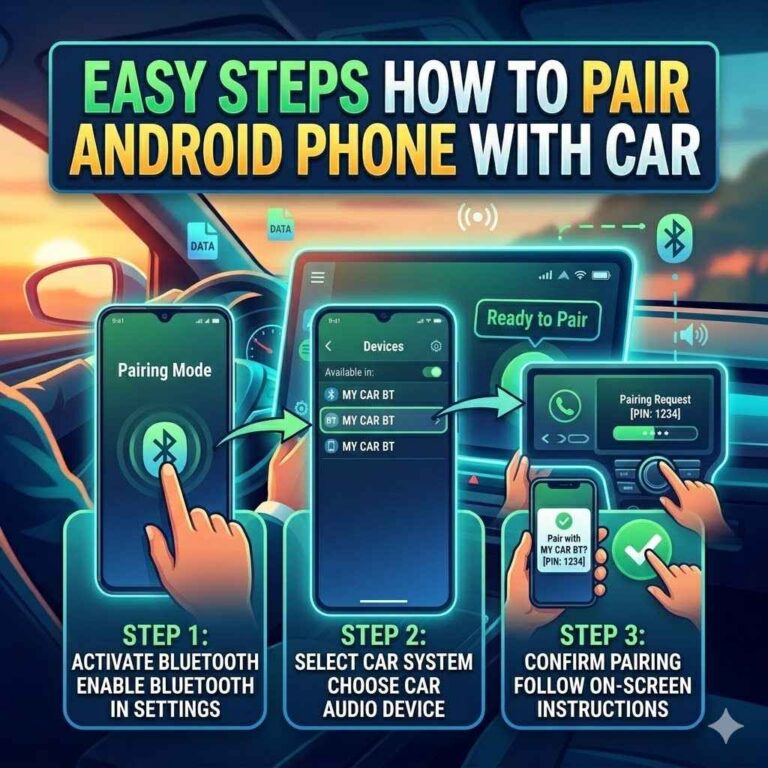
Setting Up in 3 Simple Steps (General Guide)
- Plug In & Power On: Connect your adapter to your car’s power source (12V socket, USB) and/or audio input (AUX, Cassette).
- Pair Your Phone: Go to your phone’s Bluetooth settings. Find and select your adapter’s name to connect.
- Select Car Input: Set your car stereo to the correct input source (AUX, FM, USB, Cassette) to hear the audio.
Real-World Experiences: Adapters in Action
I remember my first car. It was a reliable old sedan. But it had no Bluetooth.
None. Just a CD player that skipped if you looked at it funny. I love listening to podcasts.
Especially on my commute. Having to use my phone on speaker was awful. And dangerous.
I felt so disconnected from my music.
I started looking for solutions. A new stereo was way too expensive. I didn’t want to mess with car electronics.
Then I found out about AUX adapters. My car, thankfully, had an AUX port hidden in the glove box. I bought a small, sleek adapter.
It plugged into the AUX port. It needed a USB power source. I had a cigarette lighter adapter that gave me a USB port.
It was a bit of a setup, but it took about five minutes.
The moment of truth came when I paired my phone. I selected AUX on my radio. And then… there it was.
My podcast. Playing through my car speakers. It sounded so clear.
It was like magic. I could control the volume from my steering wheel. I could skip tracks on my phone.
I could even take a call. A little light on the adapter had a microphone. The person on the other end said I sounded clear.
It was a total game-changer for my daily drives. That little adapter made my old car feel new again. It was a small purchase that made a huge difference.
I’ve seen friends use FM transmitters too. One friend has a truck from the late 90s. No AUX, no USB.
Just an old radio. He got an FM transmitter. He had to play with the frequencies a bit at first.
There was some static in the city. But on the highway? Crystal clear.
He’d sing along to his music. He’d take calls. He’d even stream directions from his phone.
He told me he couldn’t imagine driving without it now. It’s funny how a simple piece of tech can solve such a common frustration.
When is an Adapter the Best Solution?
An adapter is a fantastic choice when you want to add Bluetooth functionality without a big investment. If your car’s stereo is perfectly fine otherwise, why replace it? Adapters are cost-effective.
They are easy to install. They don’t require complex wiring or taking apart your dashboard. For many people, this is the biggest plus.
Consider cars that are classics or older models. You might not want to alter their original look or feel. A discreet adapter can add modern convenience without compromising the car’s vintage appeal.
They are also great for leased vehicles. You can easily remove the adapter when you turn the car in. There’s no permanent change to the car.
Another situation is when your car’s built-in Bluetooth is faulty or limited. Sometimes, the factory system might be clunky. Or it might not support newer audio codecs.
An aftermarket adapter can often provide a better user experience. It’s like giving your car a software update. It breathes new life into your audio system.
It makes your daily commute more enjoyable. And safer too.
Adapter vs. New Stereo: Key Differences
Adapter: Low ($20-$100)
New Stereo: High ($200-$1000+)
Adapter: Easy, plug-and-play
New Stereo: Complex, professional often needed
Adapter: External, may look added on
New Stereo: Seamless, factory look
Adapter: Adds Bluetooth audio/calls
New Stereo: Adds Bluetooth, often CarPlay/Android Auto, GPS, etc.
Limitations to Keep in Mind
While adapters are great, they aren’t perfect. It’s good to know their limits. The biggest one is often sound quality with FM transmitters.
As mentioned, city driving can lead to interference. You might get static. Or you might hear snippets of other radio stations.
This can be distracting and annoying. It’s not always a seamless experience.
Another limitation is the microphone quality. Some adapters have basic microphones. They might not pick up your voice clearly.
Or they might pick up a lot of road noise. If you make a lot of important calls while driving, you might need to test the microphone thoroughly. Or look for adapters with external mic options.
Power source is also something to consider. If your car only has one 12V socket and you need it for charging your phone, you might have to choose between charging and using your adapter. Unless your adapter has a pass-through USB port.
Or you buy a multi-port adapter for your 12V socket.
Also, these adapters won’t give you all the features of a new head unit. You won’t get Apple CarPlay or Android Auto support. You won’t get a big touchscreen display.
You won’t get advanced EQ settings. They are primarily for adding Bluetooth audio streaming and hands-free calling. If you want a full infotainment system upgrade, an adapter won’t cut it.
But if Bluetooth is your main goal, they are excellent.
What This Means for You
If your car doesn’t have Bluetooth, you have options! You don’t need to suffer through bad radio. You can enjoy your music and podcasts.
And you can take calls safely. It’s about finding the right adapter for your specific car. And for your needs.
It’s normal for cars from the early 2000s and before to lack Bluetooth. This is not a sign your car is bad. It just means technology has moved on.
And these adapters bridge that gap. They let you enjoy modern conveniences in older vehicles.
When should you worry? You probably don’t need to worry much with adapters. The biggest concern would be if the adapter itself is faulty.
Or if it causes issues with your car’s electrical system. But this is rare. Most are designed to be safe and reliable.
If you notice strange car behavior after installation, remove the adapter and see if the problem stops. If it does, contact the adapter manufacturer.
Simple checks: Does it pair? Does it play sound? Can you hear calls?
These are the main things to test. If these work, you’re likely in good shape. The technology is pretty robust for its intended purpose.
Tips for Getting the Most from Your Adapter
Here are some final thoughts to make sure you have a great experience. First, always read the instructions. Even simple devices can have specific setup steps.
They might tell you the best way to find an empty FM station or how to update the firmware. Yes, some adapters can be updated!
Keep your adapter’s firmware updated if possible. Manufacturers sometimes release updates. These can improve sound quality, fix bugs, or add new features.
Check the manufacturer’s website now and then. It’s a small step that can make a big difference.
Position your microphone well. For hands-free calls, the mic is crucial. Try placing it on your visor, near your rearview mirror, or on the A-pillar.
Experiment to see where you sound clearest. Avoid placing it where it will pick up direct wind noise.
Clean your car’s power ports. Sometimes, dirt or dust in the 12V socket or USB port can cause connection issues. A quick clean with a dry cloth can sometimes solve problems.
Make sure the car is off before cleaning any ports.
Consider a multi-port charger if you need to charge your phone and use the adapter. Many 12V adapters have two USB ports. This way, you don’t have to choose between music and a full battery.
It’s a small addition that adds a lot of convenience.
Adapter “Do’s” and “Don’ts”
DO: Read manual for specific setup.
DO: Update firmware if available.
DON’T: Force connections; if it doesn’t fit, it’s not for your car.
DON’T: Rely on it for advanced features like CarPlay.
Frequently Asked Questions
Can I get Bluetooth in my car if it’s really old?
Yes, very likely! For cars with an AUX port, an AUX Bluetooth adapter is perfect. If your car has a cassette player, a cassette adapter works.
For cars with no special ports, an FM transmitter can broadcast audio to your car radio. So even very old cars can get Bluetooth.
Will a Bluetooth adapter affect my car’s warranty?
Generally, no. Most Bluetooth adapters are plug-and-play. They don’t require permanent modifications to your car’s electrical system.
They are considered external accessories. However, it’s always a good idea to check your car’s warranty documentation. Or ask your dealership if you have specific concerns.
How do I choose the right FM frequency for my transmitter?
Look for a frequency that is not used by a local radio station. Usually, these are between 88.0 MHz and 108.0 MHz. In the U.S., you can often find quiet spots on the dial.
Your adapter might have a scan feature or buttons to cycle through frequencies. Try listening to your car radio first to find a static-only spot.
Can I use my adapter to play music from my tablet too?
Yes, absolutely! As long as your tablet has Bluetooth, you can pair it with your car adapter just like you would your phone. This is great for watching movies with better sound or listening to audiobooks.
The adapter connects to your phone or tablet, and then that device’s audio plays through your car speakers.
What’s the difference between Bluetooth 4.0 and 5.0 adapters?
Bluetooth 5.0 offers improvements over 4.0. These include faster speeds, better range, and improved power efficiency. For car adapters, the difference might not be huge for basic audio streaming.
But 5.0 can provide a more stable connection. It’s generally better to get a 5.0 adapter if available, for future-proofing.
My adapter connects but there’s no sound. What should I do?
First, check that your phone’s volume is turned up. Second, ensure your car stereo is on the correct input (AUX, FM, USB, etc.). Third, check the adapter’s volume if it has one.
Sometimes, forgetting the device on your phone and re-pairing can resolve connection issues that prevent sound output.
Conclusion
Adding Bluetooth to your car doesn’t have to be complicated or expensive. These adapters are a fantastic way to upgrade your driving experience. Whether you choose an AUX adapter for clear sound, an FM transmitter for universal use, or another type, you’re bringing your car into the modern age.
Enjoy your music, podcasts, and hands-free calls!
Products related to this article
Sponsored / affiliate links. As an Amazon Associate I earn from qualifying purchases. I may earn additional commission from eligible campaigns.