Kenwood Car Stereo Review: Best Models for Your Car
Kenwood head units are a strong buy if you match the model to your dash opening, wiring, and feature needs. For most shoppers, start with a 2-DIN touchscreen with wireless CarPlay and Android Auto, or pick a single-DIN only if the car cannot accept double-DIN. Buy the wrong one and you can lose steering-wheel controls, factory camera support, or pay for features your car cannot use.
This guide is part of our Car audio systems guide series.
Verdict


This Kenwood car stereo review focuses on fitment, feature tiers, and the failure modes that trip up buyers, so you can choose the right receiver the first time. Kenwood is a Japanese electronics brand dating to 1946, headquartered in Hachiōji, Tokyo, and merged with JVC in 2008 to become part of JVCKenwood, which matters here because trust depends on product fit and wiring compatibility, not hype. (en.wikipedia.org)
Pros and cons
- Pros: Wide receiver range across multimedia, audio, navigation, and disc-capable units.
- Pros: Good fit for buyers who want CarPlay, Android Auto, or stronger tuning controls.
- Cons: Some models are a poor match for older dashboards or factory integration.
- Cons: Wireless convenience can bring slower pairing or connection inconsistency on some setups.
Who it’s for
Kenwood suits daily drivers who want modern phone integration, bass-first builds that need stronger preouts and tuning, and older cars that only have room for a single-DIN chassis. It is less suitable if you expect every factory feature to survive unchanged, or if your dash needs a very specific bezel and interface module.
📊 Kenwood is a Japanese consumer electronics brand with roots dating to 1946. Source: Kenwood Corporation.
Specs at a glance
| Kenwood family | Typical fitment | Screen or media format | Phone integration | Audio tuning depth | Install complexity |
|---|---|---|---|---|---|
| DMX4707S | Double-DIN | 6.8-inch capacitive display | Wired CarPlay and Android Auto | 13-band EQ, time alignment | Medium |
| DMX709S eXcelon | Double-DIN | Touchscreen multimedia | Wireless smartphone integration | Premium tuning features | Medium to high |
| DMX125BT | Double-DIN | Bluetooth multimedia | Bluetooth streaming | Basic | Low to medium |
| KMM-BT332U | Single-DIN | Digital media receiver | Bluetooth | Simple controls, EQ and time alignment | Low |
| KMM-X705 eXcelon | Single-DIN | Digital media receiver | Media-focused | High-voltage preouts, advanced tuning | Medium |
| DNX577S | Double-DIN | 6.8-inch navigation head unit | Full smartphone connectivity | Navigation plus multimedia | High |
| DDX57S | Double-DIN | 6.8-inch touchscreen with DVD | Wired CarPlay and Android Auto | Moderate | Medium to high |
Who is Kenwood best for?
Kenwood is best for buyers who want a clear path from a factory stereo to a better interface without jumping straight into custom fabrication. The brand’s line under Kenwood USA “Car Entertainment” includes eXcelon Series, direct replacement multimedia, cameras, receivers, amplifiers, speakers, and subwoofers, so it covers mainstream upgrades and higher-output systems.
Daily commuters
If you want faster phone pairing, clear camera support, and a screen that replaces a dated factory radio, Kenwood’s multimedia units make sense. A common first-timer mistake is buying a navigation-heavy unit for short commutes, then never using the maps because the phone already handles routing better.
Bass-first builds
For bass-focused systems, the better Kenwood choices are usually the higher-tier eXcelon models and units with stronger preouts and deeper tuning. That matters more than a flashy screen, because subwoofer integration depends on signal voltage, EQ control, and time alignment, not the logo on the bezel.
Older cars and simple upgrades
Older cars often do better with a single-DIN receiver like the KMM-BT332U or KMM-X705 eXcelon because the dash may not accept a double-DIN opening. Say your car has a shallow metal dash cavity and no factory touchscreen; a single-DIN avoids cutting, filler panels, and a lot of wasted labor.
Drivers who want navigation or disc playback
Pick a navigation or disc-capable model only if you actually need offline maps, DVD playback, or a built-in screen for passengers. Suppose your vehicle sees road trips through weak data coverage; a DNX577S can still be useful. In a city car with constant phone data, that same hardware may be overkill.
What works
Kenwood’s lineup works because it separates receiver types cleanly. Multimedia units are for touchscreen phone integration, audio receivers are for simpler control and better packaging, navigation units add built-in routing, and CD/DVD-capable models remain relevant for buyers with disc libraries or travel needs.
Model families and what they share
Across the line, the recurring strengths are smartphone integration, camera input support on many multimedia units, and tuning tools that go beyond a cheap factory radio. The DMX4707S, for example, is listed with a 6.8-inch capacitive display, wired CarPlay and Android Auto, a 13-band EQ, time alignment, rear camera input with parking guidelines, and SiriusXM readiness.
The DNX577S is the opposite kind of solution: it is a 6.8-inch navigation head unit with built-in Garmin navigation and DVD/CD playback, plus full smartphone connectivity. That is useful when the buyer wants a self-contained dash unit instead of relying on the phone for every trip.
Why eXcelon matters
Kenwood’s eXcelon and eXcelon Reference tiers usually buy you stronger output stages, more advanced tuning, and in some cases better display quality. The KMM-X705 eXcelon is a good example, with high-voltage preouts, advanced tuning options, and FLAC/WAV playback for buyers who care about cleaner source files and stronger signal to external amplifiers.
When CarPlay and Android Auto are worth paying for
CarPlay and Android Auto matter most when you want navigation, messaging, music apps, and voice control without living in the stock radio interface. Wired versions are often the simpler choice for reliability and boot-up speed; wireless versions are nicer for daily use, but they can expose pairing quirks on some vehicle-electrical setups.
What does not work as well?

The weak points are usually not Kenwood’s feature list. They are fitment, integration, and feature overlap. A great receiver can still be the wrong purchase if the dash is shallow, the factory amp needs a specific interface, or the vehicle expects steering-wheel controls that the buyer forgot to budget for.
Fitment traps in single-DIN and double-DIN installs
Single-DIN units can be the only sane option in older cars, but they may leave storage pockets or awkward trim gaps. Double-DIN units can look cleaner, yet many older dashboards simply cannot accept the height without a fascia kit, trim work, and sometimes a different wiring plan.
Feature overlap you may pay for but never use
It is easy to spend more on DVD playback, built-in navigation, or wireless mirroring when the car already has a mounted phone solution. That extra spend only makes sense when the car’s use case supports it, such as long road trips, offline map needs, or passenger entertainment.
Common failure modes
Known problems across this category include glare on bright days, slow boot behavior on some setups, wireless connection inconsistency, and lost factory features after install. Older cars can be especially punishing, because aged wiring, odd dash depths, and prior owner wiring mistakes turn a simple upgrade into a parts chase.
- Confirm dash opening size before choosing single-DIN or double-DIN.
- Check whether the vehicle uses a factory amplifier or amplified data-bus harness.
- Budget for dash kit, wiring adapter, antenna adapter, steering-wheel control module, and camera adapter if needed.
- Decide whether you really need wired, wireless, or no smartphone integration.
- Match the receiver to the real use case, not the longest feature list.
How should you compare current Kenwood models?
Start with the car, not the stereo. Dash shape, factory amplifier type, camera wiring, and steering-wheel controls decide whether a model is a clean install or a headache. Then choose the receiver family that fits the use case: daily driving, bass, older cars, navigation, or disc playback.
Decision matrix by vehicle type and use case
| Model | Best vehicle type | Screen size / format | Smartphone integration | Audio tuning depth | Install complexity | Red-flag mismatch scenario |
|---|---|---|---|---|---|---|
| KMM-BT332U | Older cars, shallow dashboards, budget upgrades | Single-DIN digital media | Bluetooth | Moderate for a basic deck | Low | Do not buy if you need a touchscreen or built-in maps. |
| KMM-X705 eXcelon | Older performance cars, amplifier builds, clean audio installs | Single-DIN digital media | Media-focused | High-voltage preouts, advanced tuning | Medium | Poor pick if the goal is a large display or wireless phone mirroring. |
| DMX125BT | Budget double-DIN swaps in mainstream cars | Double-DIN multimedia | Bluetooth streaming | Basic | Low to medium | Weak fit for buyers who expect CarPlay or advanced EQ control. |
| DMX4707S | Daily drivers and family cars with standard double-DIN openings | 6.8-inch capacitive display | Wired CarPlay and Android Auto | 13-band EQ, time alignment | Medium | Skip if wireless phone use is mandatory. |
| DMX709S eXcelon | Better-trim daily drivers and buyers who want a premium screen | Double-DIN touchscreen | Wireless smartphone integration | Premium tuning features | Medium to high | Do not buy if the dash cannot accept a full double-DIN screen. |
| DNX577S | Road-trip vehicles and drivers who want offline navigation | 6.8-inch navigation unit | Full smartphone connectivity | Navigation plus multimedia | High | Overkill if the phone already handles navigation reliably. |
| DDX57S | Disc users and buyers who still want touchscreen phone integration | 6.8-inch touchscreen | Wired CarPlay and Android Auto | Moderate | Medium to high | Not ideal if you never use DVDs or CDs. |
Which Kenwood model should you buy?
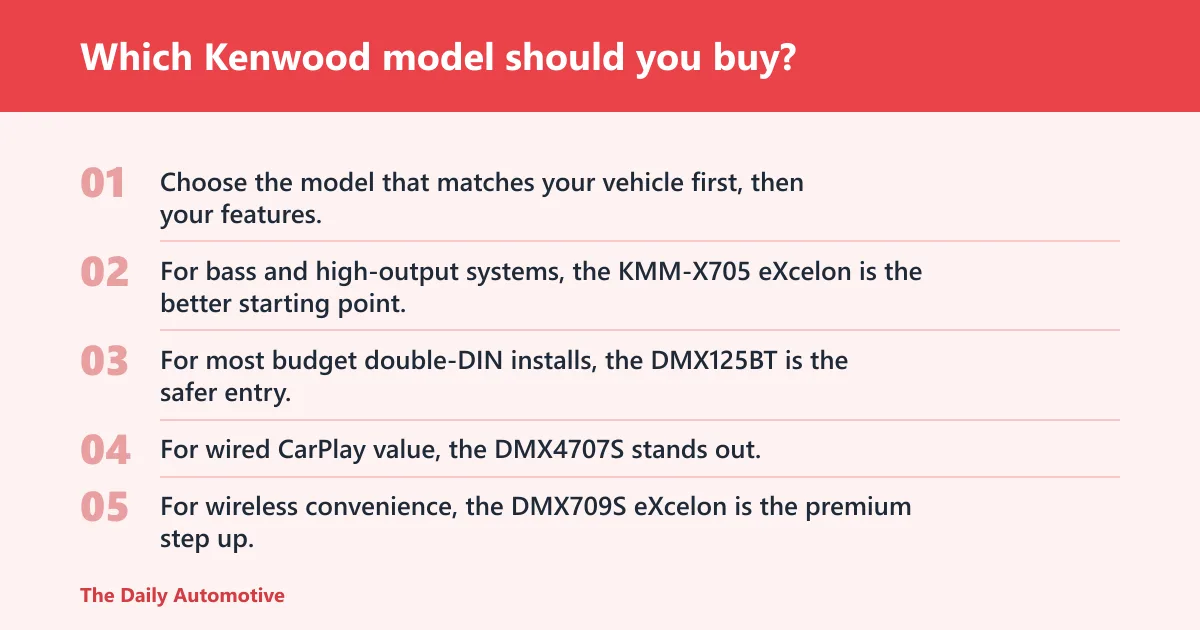
Choose the model that matches your vehicle first, then your features. For bass and high-output systems, the KMM-X705 eXcelon is the better starting point. For most budget double-DIN installs, the DMX125BT is the safer entry. For wired CarPlay value, the DMX4707S stands out. For wireless convenience, the DMX709S eXcelon is the premium step up.
Best for bass and high-output systems: KMM-X705 eXcelon
The KMM-X705 eXcelon makes sense when the rest of the system already includes amplifiers, subwoofers, and tuning goals that justify a higher-end source. Its high-voltage preouts and FLAC/WAV playback matter more than a big screen if the install is about sound control.
Best budget double-DIN: DMX125BT
The DMX125BT is the plain answer for buyers who want a cheaper double-DIN with Bluetooth streaming and simple controls. It is the least risky choice only when the buyer does not need CarPlay, Android Auto, or deep tuning.
Best wired CarPlay value: DMX4707S
The DMX4707S is a practical sweet spot because it pairs a 6.8-inch capacitive display with wired CarPlay and Android Auto, plus the 13-band EQ and time alignment that help in real installs. It is especially good when the car accepts double-DIN cleanly and the buyer does not care about wireless convenience.
Best wireless upgrade: DMX709S eXcelon
The DMX709S eXcelon is the smarter premium pick if wireless smartphone integration is the priority and the dash can handle a full touchscreen. It is a better fit for drivers who want fewer cable plugs every morning, but it demands a more careful install and a healthier budget.
Best for older cars: KMM-BT332U
The KMM-BT332U is the straightforward single-DIN answer for older cars and simple replacements. It brings Bluetooth, a detachable face, 13-band EQ, digital time alignment, and 6-channel 2.5V preamp outputs, which is a strong feature set for a basic-size receiver.
Best for discs and navigation: DNX577S and DDX57S
The DNX577S is for drivers who want built-in Garmin navigation and disc support in one unit. The DDX57S is better when you want a 6.8-inch touchscreen, wired CarPlay and Android Auto, and DVD playback without jumping to full navigation hardware.
Alternatives
Kenwood is not the only sensible choice. Another brand may fit better if your dash needs a different screen shape, your factory system is heavily integrated, or you want a simpler path through installation and wiring.
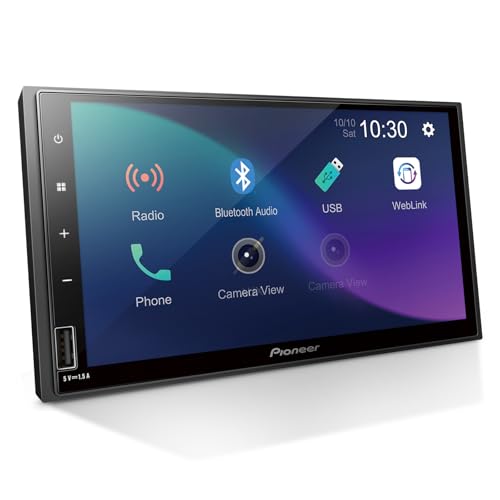
The Pioneer DMH-S110EX is a reasonable alternative if you want a 7-inch touchscreen double-DIN receiver with Bluetooth and a straightforward feature set. It may suit buyers who prioritize a responsive display and rear-view camera support, but it still brings the same core risk: it is only a good buy if your dash and wiring are ready for a double-DIN swap.
Should you buy it
Yes, if you treat Kenwood as a fitment decision first and a feature decision second. The brand’s range covers single-DIN, double-DIN, multimedia, navigation, and disc-capable receivers, so there is a sensible match for many vehicles. The wrong match, though, can cost you in adapters, lost factory features, and wasted screen or audio capability.
If your car accepts a standard double-DIN opening, the DMX4707S is one of the clearest value picks because it bundles wired CarPlay, Android Auto, a 6.8-inch capacitive display, and useful tuning tools. If your car is older or shallow, start with the KMM-BT332U or KMM-X705 eXcelon instead of forcing a touchscreen into the wrong dash.
Frequently asked questions
Is Kenwood safe?
Yes, in the practical sense that matters here: Kenwood is an established consumer electronics brand under JVCKenwood, not a fly-by-night radio label. The real safety question is electrical compatibility, meaning correct wiring, proper fuse protection, and a receiver that fits the vehicle’s dash and factory system.
Is Kenwood car stereo good?
Kenwood is a good choice when you want a broad lineup with clear separation between basic Bluetooth decks, CarPlay units, navigation models, and higher-end eXcelon options. It is less appealing only when the vehicle’s dash or factory integration makes the install difficult enough to erase the value.
What is the best Kenwood car stereo for my car?
The best Kenwood for your car is the one that matches the opening and the use case. A double-DIN daily driver usually points to the DMX4707S or DMX709S eXcelon, while an older car with a single-DIN slot is better served by the KMM-BT332U or KMM-X705 eXcelon.
How much does a Kenwood car stereo cost?
Head unit price is only part of the bill. You also need to budget for wiring adapters, dash kits, antenna adapters, steering-wheel control modules, camera adapters, and installation labor, all of which can raise the final cost well beyond the sticker price of the stereo itself.
Does Kenwood support Apple CarPlay and Android Auto?
Yes, many Kenwood multimedia receivers support Apple CarPlay and Android Auto, including wired versions on models like the DMX4707S and DDX57S. Some higher-tier units add wireless smartphone integration, which is convenient but can be less consistent on certain vehicle power and antenna setups.
What are common Kenwood car stereo problems?
Common issues include glare in bright light, slow boot behavior on some installations, wireless pairing inconsistencies, and losing factory features after the swap. Most of those problems come from the install environment, not the brand name, so the dash kit and interface module matter as much as the receiver.
Products related to this article
Sponsored / affiliate links. As an Amazon Associate I earn from qualifying purchases. I may earn additional commission from eligible campaigns.