Does My Car Have a GPS Tracker? How to Check Safely
A car can be tracked in several ways: a hidden GPS device, a small Bluetooth tag, a plug-in OBD device, a device a lender requires, or the maker’s own connected-car service. This guide covers where to look, how phone alerts for unknown trackers work, what GM and Ford say about factory services, and what to do if you find a device.
Safety first: if you think someone is tracking you to stalk or control you, do not rush to rip anything out. The Safety Net Project at the National Network to End Domestic Violence (NNEDV) warns that making changes will often alert the other person, could make them more abusive, and might erase evidence. If you are in immediate danger, call 911. The National Domestic Violence Hotline (thehotline.org) is free, confidential and open 24/7 at 1-800-799-7233, or text START to 88788.
Understanding Car GPS Trackers
Best Inspection Mirror Pick
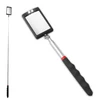 |
Telescoping Car Inspection Mirror with LED Light, 12 to 35 Inch
|
As an Amazon Associate we earn from qualifying purchases. Spec-based pick from the listing, not a hands-on test.
NNEDV describes GPS devices as inexpensive, small and easily hidden, and says they usually need to be connected to a power source. The data can be real-time, sent to a website or phone for the person who installed the device, or it can be a location history reviewed later.
Newer Bluetooth-style location trackers work differently. Per NNEDV, they do not have to be connected to a power source and can last for months without recharging, they connect to an app or online account, and they use some combination of GPS, active RFID, Bluetooth LE and WiFi networks. NNEDV names AirTags, Tiles, SmartTags and trackers made for pet collars as examples that abusive people have hidden in cars.
| Type | What it is | How to check |
|---|---|---|
| Hidden GPS device | Small, usually needs power (NNEDV) | Trunk, under the hood, inside the bumper, under and between the seats |
| Bluetooth tag | AirTag, Tile or SmartTag; no power needed (NNEDV) | Phone unknown tracker alert or manual scan, then a physical search |
| OBD plug-in device | NNEDV says an unauthorized one could be misused to track you | Look at what is plugged into the OBD port |
| Lender device | Many lenders require one, per a 2023 CFPB release | Loan paperwork; ask your lender |
| Maker connected service | Built-in telematics tied to an app account | Owner accounts, authorized drivers and the maker privacy page |
How to Physically Search Your Car
NNEDV says that if you are worried about a device, you should check for hidden GPS devices in your belongings or vehicle, and that in a car this means the trunk, under the hood, inside the bumper, and under and between the seats. NNEDV also says you could ask a trusted mechanic or law enforcement to see whether they can find the device. Work through those spots one at a time and photograph anything that does not look like part of the car before you touch it.
A light and a mirror on a stick help you see dark gaps, which is why one is in the box above. Keep your search to what you can see and reach from the ground, and leave the underside to a shop.
What to Look For: Signs of a Tracker
- An object attached to the car or wired into it that you cannot identify, since GPS devices usually need a power connection.
- A device that looks like an everyday item. NNEDV notes a tracking device in belongings can be as small as a quarter.
- A plug in the OBD port that you or your shop did not install.
- Electronic parts inside a non-electronic item, such as something that arrived as a gift.
If you want to know what an aftermarket unit looks like once you find one, see what a GPS tracker on a car looks like, and for a second angle on the same question see is there a tracking device on my car.
Checking Your Car’s Electronics
EPA says the on-board diagnostics (OBD) system is found on 1996 and newer vehicles. NNEDV says OBD devices are meant to help fix problems with the car, and that an unauthorized one could be misused to track your activity. It also says wireless carriers can offer car services through a separate device plugged into the OBD port, and that such carrier apps may provide car Wi-Fi, location tracking and crash detection. NNEDV adds that insurers’ safe driver devices and parents’ teen-driver monitors work in a similar way, so a device in the port is not automatically the work of a stalker.
Built-in navigation can also hold a trail. NNEDV notes that many cars have navigation systems that could reveal a history of where you have been to anyone with access to the system. Think about who has had access to the system or account.
Phone Alerts for Unknown Bluetooth Trackers
Phones can warn you about AirTag-style trackers. Per Apple Support, if an AirTag or compatible Bluetooth location tracker is separated from its owner and seen moving with you over time, you get a notification or the device makes a sound. On iPhone this needs iOS 17.5 or later for compatible Bluetooth trackers, with Bluetooth and Location Services on, Tracking Notifications allowed and Airplane Mode off.
Google says unknown tracker alerts on Android work with Find Hub network compatible tags and Apple AirTags, and you can run a manual scan from Settings under Safety and emergency, Unknown tracker alerts, Scan now, which takes about 10 seconds. Google says playing a sound on the tracker does not notify its owner.
Apple and Google both say that turning off Bluetooth or location on your phone does not stop the owner of the tracker from seeing its location; the tracker itself has to be disabled. Google warns that some trackers, once turned off, may be factory reset and no longer linked to their owner, and says you can keep one on if you are concerned that turning it off could be unsafe.
Does Your Car Have a Factory Tracker?
Many people searching this are really asking about the car’s own telematics. NNEDV says newer, more expensive cars offer people who sign up as owners very detailed information, including location, speed and driving habits, and even the ability to control some things remotely. Older cars might have a navigation system built in or added later, such as OnStar or Garmin. What yours does depends on the maker, model year and subscription, so confirm it in the owner’s manual and the privacy or security section of the maker’s website, as NNEDV suggests.
| Maker | What the maker says | How the maker says to disconnect |
|---|---|---|
| GM and OnStar (privacy statement updated June 17, 2026) | Precise location is used for app vehicle locate features, turn-by-turn routing and stolen-vehicle recovery. Government requests must be a warrant or court order, absent exigent circumstances or applicable statutory authority. | Call 1-888-4ONSTAR or press the blue button. Some 2019 and later models have a location setting in the infotainment privacy menu, though GM may still collect location in an emergency. |
| Ford (support page on disconnecting remote access) | A master reset disconnects a modem-equipped vehicle from any app account tied to it, whether the account is yours or someone else’s. | Master reset, turn off Vehicle Connectivity, or turn off location sharing. Ford lists (800) 392-3673 if a setting is locked. |
Ford says every connected app account gets a notification when you make those changes. If someone else is on the account they will know, and NNEDV says an abusive person may escalate, so talk to an advocate first if that applies to you.
NNEDV points to a common gap: an ex-owner may never have unlinked their app account from the car, and some makers let owners add authorized drivers who keep access. If an abuser shares your phone plan, the Safe Connections Act of 2022 makes it easier to leave it without termination fees. For Honda owners, how to disable HondaLink tracking covers that app, and how to disable Ford GPS tracking covers Ford.
Why Might Your Car Have a GPS Tracker?
Some reasons are ordinary. The CFPB said in a 2023 release that many auto lenders require devices using GPS technology that let the lender or servicer prevent a borrower from starting a car, often called starter interrupters or kill switches. If your loan has one, it should be in your paperwork, and your lender can confirm. Related reading: do cars have GPS trackers for repo and what a repossessed car is. Insurers use plug-in devices for safe driver programs, and parents use them to monitor teen drivers, per NNEDV. If the car belongs to your employer, ask them directly. For a rental, see do rental cars have trackers.
The concerning case is covered by the Department of Justice’s Office on Violence Against Women, which defines stalking as a course of conduct directed at a specific person that would cause a reasonable person to fear for their safety or the safety of others, or to suffer substantial emotional distress.

When Is It Normal to Have a GPS Tracker?
A tracker you can explain is normal: a lender device, an insurer’s safe driver device you enrolled in, a parent’s teen-driver monitor, or a factory connected service. The test is whether you know who owns it, who can see the data and how to turn it off.
When Should You Worry About a Tracker?
NNEDV suggests narrowing it down with questions. Is there a pattern to what the other person knows? Do they know where you are in real time, or only where you have been? Does anyone share your phone account or know how to log in to it? Which apps share your location, and who can see that? NNEDV lists these questions as the first step in narrowing down how your location is being tracked.
NNEDV also notes that toll statements, vehicle service bills, credit card statements and cameras connected to national data systems can reveal where a car has been, so a clean physical search is not proof that nobody can see your movements.
What to Do If You Find a Tracker
Start with documentation, if it feels safe. NNEDV says to take pictures or screenshots before you make any changes, and to note who you showed and when.
Then decide on a path with help. NNEDV says you can consider notifying law enforcement if it feels safe, and to ask them to look first. Apple says law enforcement can work with it to request information about an Apple item. If you cannot find the device and feel unsafe, both Apple and Google say to go to a safe public place and contact law enforcement or a trusted contact.
Removal is a choice, not an automatic step. NNEDV says that if it is safe, you can remove the tracking device, and that you can decide when to keep tracking working and when to turn it off as part of a safety plan. If the tracking runs through an account, NNEDV says you could try to take control of the account or have the service discontinued. See also what happens if you remove a GPS tracker on your car.
On the legal side, Apple states that using these products to track people without their consent is a crime in many countries and regions. Laws differ by place; NNEDV suggests help from a civil attorney or legal aid organization, and that you may consider a civil order of protection on your own or with an advocate. The NNEDV connected cars guide is the fullest resource for cars, and the Office on Violence Against Women lists the National Center for Victims of Crime at 855-4-VICTIM (855-484-2846) for stalking help.
Action Steps If You Find a Tracker
- If you are in immediate danger, call 911.
- Document the device and its location, if it is safe.
- Call an advocate: National Domestic Violence Hotline, 1-800-799-7233.
- If you report, ask police to look at the car first.
- Contact your lender, employer or insurer if it may be theirs.
- Remove or disable it only when your safety plan says it is safe.
Frequently Asked Questions About Car GPS Trackers
How Do I Know If My Car Has A GPS Tracker?
Check the places a hidden device is usually put: the trunk, under the hood, inside the bumper, and under and between the seats, as the Safety Net Project at NNEDV lists them. Then check what is plugged into the OBD port, look at the connected-car and navigation accounts tied to the vehicle, and run your phone’s unknown tracker scan for Bluetooth tags.
Does A Phone Alert Mean My Car Has A Tracker?
Not necessarily. An unknown tracker alert means a Bluetooth tracker that is separated from its owner appears to be moving with you, which can be a borrowed item. Apple and Google both say to look through your belongings, including your vehicle, and to contact law enforcement from a safe public place if you feel your safety is at risk.
Can I Turn Off OnStar Or Ford Connected Tracking?
Both makers publish steps. GM says you can disconnect a vehicle from OnStar by calling 1-888-4ONSTAR or pressing the blue button, and some 2019 and later models have a location setting in the infotainment privacy menu. Ford says a master reset, turning off Vehicle Connectivity or turning off location sharing disconnects remote access, and every connected app account gets a notification.
Final Thoughts on Your Car’s Privacy
Check the right place for each kind of tracker: a physical search for hidden devices, your phone’s scan for Bluetooth tags, the OBD port for plug-in units and your accounts for built-in services. If safety is the concern, get help before you change anything. This is general information, not legal advice.
This guide does not cover model-specific tracker locations, state tracking laws or repossession rules. For those, use your owner’s manual, a local attorney or your loan agreement.
Products related to this article
Sponsored / affiliate links. As an Amazon Associate I earn from qualifying purchases. I may earn additional commission from eligible campaigns.
 OBD II GPS Tracker for Vehicles | Real Time Car GPS Tracker Device | Hidden Car Tracking Device | Fleet OBD2 Tracker | Monthly Fee and Activation Fee Not Included
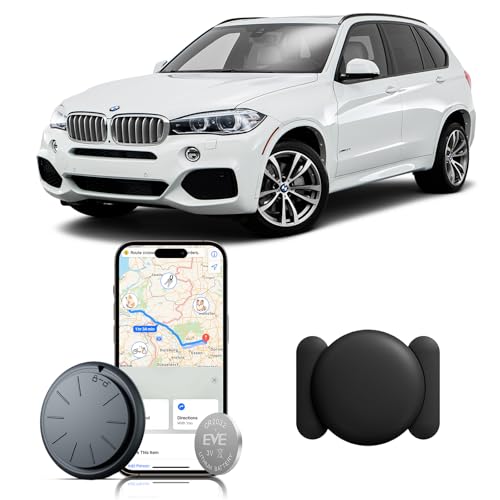 ZFSJTAG Car GPS Tracking Device for Vehicles, 1PCS Real Time GPS Tracker for Car, Work with Find My (iOS Only),Hidden Mini GPS Tracker,No Monthly Fee (Black Tracker, Black Magnetic Case)