Why Is My Aux Not Working in My Car? Fixes That Work
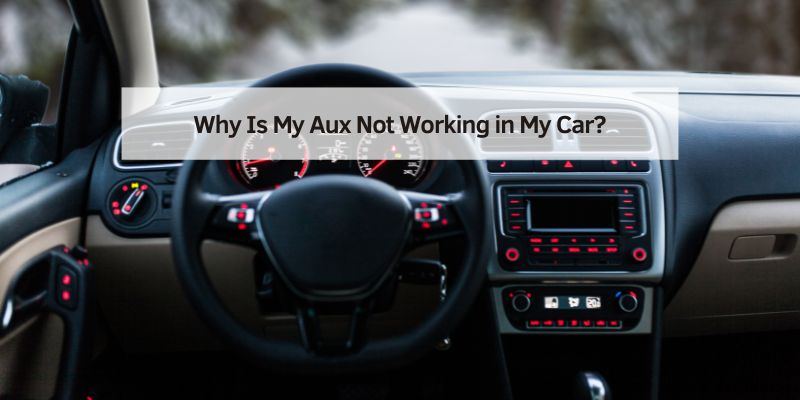
Your car’s aux isn’t working because of one of three things: a worn cable, a dirty or damaged aux port, or your car simply doesn’t have a physical aux port anymore — some 2018+ models (like the Volvo V90) dropped it entirely in favor of Bluetooth and USB. I’ve chased this exact problem down myself, and 9 times out of 10 it’s the cheap $5 cable, not the car.
Here’s how to check each cause in order, starting with the cheapest and easiest fix first.
Quick Answer
Try a different aux cable first — a frayed 3.5mm cable is the most common cause. If that doesn’t fix it, check the port for lint or damage and confirm your phone’s volume/output settings. If your car is a 2018+ model with no physical aux jack at all, it may have been dropped in favor of Bluetooth/USB — that’s a design change, not a malfunction.
Checking the Aux Cable
Let’s start with the simplest thing: the aux cable. I can’t tell you how many times I’ve blamed my car when the real culprit was a cheap, worn-out cable. Aux cables are just 3.5mm audio cables, and they can wear out over time. The wires inside can fray, especially near the connectors, from being bent or twisted too much. A damaged cable won’t send a clear signal, so your car’s stereo stays silent.
Try this: grab a different aux cable and plug it in. If it works, your old cable was the problem. I always keep a spare cable in my glove compartment now, just in case. Also, check the cable for visible damage like exposed wires or bent connectors. If you’re buying a new one, go for a sturdy, high-quality cable. Those dollar-store ones might save you a buck, but they’ll fail you fast.
Inspecting the Aux Port
Next up, let’s talk about the aux port itself. I’ve seen my fair share of dusty, lint-filled aux ports that cause all sorts of connection issues. Your car’s aux port can get clogged with debris, especially if you’re always on the road or have kids tossing snacks around. Dirt or lint can block the connection, making it seem like the port is broken.
Grab a flashlight and take a peek inside the port. If you see gunk, use a small, non-metal tool like a plastic toothpick or compressed air to gently clean it out. Be careful not to push the debris further in. I once fixed a “broken” aux port by blowing out a tiny piece of lint—problem solved in seconds! If the port looks damaged, like it’s loose or bent, you might need a professional to take a look, but cleaning it is a good first step.
Our Pick: Aux Cables & Bluetooth Fixes
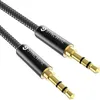
Syncwire 3.5mm Nylon Braided Aux Cable (3.3ft/1m,Hi-Fi Sound), Audio Auxiliary I
Best for: A cheap, worn-out aux cable is the #1 cause of a dead connection — swap it before troubleshooting anything else.
- Universal Compatibility: Perfectly compatible with any devices with a 3. 5mm aux port. Such as Apple iPhone, i
- Unparalleled Sound Quality: Polished 24K gold-plated connectors ensure reliability and eliminate signal loss a
Main drawback: Only fixes cable-related issues — won’t help if your car never had a physical aux port.
View Our Pick on Amazon — $7.99
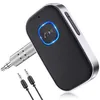 Best if you have no aux port COMSOON Bluetooth Receiver for Car, Noise Cancelling 3.5mm AUX Bluetoo Plugs into your phone and pairs with your car radio when there’s no physical jack at all Check on Amazon — $16.99 |
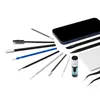 Best for cleaning a dirty port iFixit Precision Cleaning Kit – Phone, Laptop, Tablet Precision tools to safely clear lint and dust without damaging the connector Check on Amazon — $14.95 |
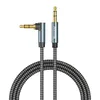 Best budget/backup cable Nanxudyj AUX Cord 6ft, 3.5mm Stereo Audio Cable 90 Degree Right Angle A cheap spare to keep in the glove box for when your main cable fails again Check on Amazon — $4.71 |
Phone or Device Issues
Sometimes, the problem isn’t your car at all—it’s your phone or device. I learned this the hard way when I spent an hour troubleshooting my car, only to realize my phone’s headphone jack was the issue. If your phone has a case, it might be blocking the aux cable from fully plugging in. Take the case off and try again.
Also, check your phone’s settings. On iPhones, for example, the sound output might be set to Bluetooth or AirPlay instead of the headphone jack. Go to your settings and make sure the audio is routed to the correct output. For Android users, check if the volume is up and the phone isn’t on silent mode. Another quick trick? Restart your phone. It’s amazing how often that fixes random glitches.
Car Stereo Settings
Your car’s stereo system can also be the culprit. I’ve made the mistake of overlooking this one before. Most car stereos have an input selection menu, and if it’s not set to “AUX,” you won’t hear a thing, no matter how good your cable or phone is. Check your stereo’s display or manual to find the input menu. Look for options like “AUX,” “Line-In,” or “External.” Switch to the right input and test again.
Some cars also have volume settings specific to the aux input. I once thought my aux was dead, but the input volume was turned all the way down. Crank it up and see if that does the trick. If your stereo has an equalizer or sound mode, make sure it’s not set to something weird like “mute” or “radio only.”
Compatibility Problems
Not all devices play nice with every car’s aux system. I ran into this when I tried connecting an old MP3 player to a newer car stereo. Some cars have aux ports that expect a certain signal strength or impedance, and older devices might not match up. If you’re using an adapter (like a 3.5mm-to-USB-C dongle for newer phones), that could also cause issues if it’s low quality.
If you suspect compatibility, test the aux port with a different device, like another phone or a tablet. If it works, the issue is with your original device. You might need a better adapter or a device-specific cable. For example, some iPhones need a certified Lightning-to-3.5mm adapter to work properly.
Software Glitches
Modern cars are like computers on wheels, and that means software glitches can mess with your aux port. I’ve had my car’s infotainment system freeze up, refusing to recognize the aux input until I reset it. If your car has a fancy touchscreen or digital display, check for software updates. Manufacturers often release updates to fix bugs like this.
To reset your car’s stereo, try disconnecting the car battery for a few minutes (make sure you know any radio or security codes first). Alternatively, check your car’s manual for a reset option in the stereo menu. I fixed an aux issue in my old sedan by doing a soft reset through the settings—it took five minutes and saved me a trip to the mechanic.
Faulty Aux Port Hardware
If you’ve tried everything and still get no sound, the aux port itself might be broken. This happened to me in an older car where the port’s internal connections had worn out. Over time, the constant plugging and unplugging can loosen the port’s wiring or damage the internal contacts.
To test this, you’ll need a multimeter to check for continuity in the port, but that’s a bit technical for most folks. Instead, try plugging in a different device and cable to rule out other issues. If nothing works, it’s time to visit a mechanic or car audio specialist. They can test the port and replace it if needed. In my case, a new aux port cost about $100 to fix, but it was worth it to get my music back.
Fuse or Electrical Issues
Here’s one I didn’t expect when I first ran into aux troubles: a blown fuse. Your car’s stereo system, including the aux port, relies on fuses to protect the electrical circuits. If the fuse for the audio system blows, the aux port might stop working, even if the radio still plays.
Check your car’s manual to find the fuse box (usually under the dashboard or hood). Look for the fuse labeled for the audio or infotainment system. If it’s blown (you’ll see a broken wire inside the fuse), replace it with one of the same rating. I keep a small fuse kit in my trunk now—it’s a lifesaver for little electrical issues like this.
Aftermarket Stereo Problems
If your car has an aftermarket stereo (one installed after the car was built), there could be installation issues. I helped a friend troubleshoot her aftermarket system, and we found loose wiring behind the stereo that caused the aux to cut out. Aftermarket stereos can also have quirky settings or compatibility issues with certain devices.
Double-check the stereo’s wiring if you’re comfortable popping off the dashboard panel. Look for loose or disconnected aux cables. If you’re not sure, take it to a car audio shop. They can diagnose whether the stereo’s aux input was wired correctly or if it’s a hardware issue.
Environmental Factors
Believe it or not, the environment can affect your aux port. Extreme heat or cold can mess with electronics, especially in older cars. I noticed my aux port acting up during a brutal summer when my car’s interior hit triple digits. The heat can cause connectors to expand or contract, leading to poor connections.
If you live in a hot or cold climate, park your car in a garage or shaded area when possible. Also, avoid leaving your aux cable plugged in all the time—it can stress the port in extreme temperatures. If you suspect environmental damage, cleaning the port or replacing the cable might help, but severe cases might need a pro to fix.
Troubleshooting Table
Here’s a quick table I put together to summarize the common causes and fixes for a non-working aux port. Keep this handy for quick reference:
| Problem | Possible Cause | Solution |
|---|---|---|
| No sound from aux | Faulty aux cable | Try a new, high-quality cable. |
| Aux port not responding | Dirty or clogged port | Clean with compressed air or a plastic toothpick. |
| No audio output | Wrong stereo input | Switch to “AUX” in the stereo’s input menu. |
| Intermittent sound | Phone case blocking connection | Remove the case and plug in the cable fully. |
| Aux works with some devices | Compatibility issues | Use a certified adapter or test with a different device. |
| No sound after trying all | Blown fuse or hardware failure | Check the fuse box or consult a professional for port replacement. |
Preventive Tips to Keep Your Aux Working
Once you get your aux port working, you’ll want to keep it that way. I’ve learned a few tricks to avoid future headaches. First, invest in a good aux cable with gold-plated connectors—they resist corrosion and last longer. Second, clean your aux port every few months to prevent buildup. Third, avoid yanking the cable out of the port; gently unplug it to reduce wear. Finally, keep your car’s software updated if it has a digital infotainment system. These small habits can save you a lot of trouble down the road.
When to Seek Professional Help
If you’ve tried everything and your aux port still won’t cooperate, it might be time to call in the pros. I took my car to a local audio shop when I couldn’t figure out a persistent aux issue, and they found a loose wire in the stereo system. A professional can diagnose deeper electrical or hardware problems that aren’t easy to spot. Expect to pay $50-$150 for a diagnosis and repair, depending on the issue. If your car is under warranty, check with your dealer—some repairs might be covered.
Does Your Car Even Have an Aux Port? (Some Newer Models Don’t)
Before you keep troubleshooting, check something basic: does your car actually have a physical aux jack? Starting around 2018, some automakers began dropping the 3.5mm aux port entirely, the same way phone makers dropped headphone jacks. Volvo removed the aux input from the V90 for the 2018 model year — the 2017 version had one, the 2018 didn’t — and other manufacturers have quietly done the same on newer trims, especially in cars that ship with Android Auto or Apple CarPlay as the default. If you can’t find a labeled 3.5mm jack anywhere near the USB ports or in the center console/armrest, your car likely never had one to begin with, and no amount of troubleshooting will bring it back. In that case, skip ahead to the alternatives below.
Exploring Alternatives to Aux
If your aux port is beyond repair or you’re tired of dealing with cables, consider other ways to play music in your car. I’ve switched to Bluetooth in my newer car, and it’s a game-changer. Many cars have built-in Bluetooth, or you can add a Bluetooth adapter for about $20-$50. FM transmitters are another option—they plug into your phone and broadcast to your car’s radio. USB connections are also common in newer cars, letting you play music directly from your phone or a flash drive. Each option has its pros and cons, but they’re worth exploring if your aux port keeps giving you grief.
Why Fixing Your Aux Matters
You might be wondering, “Why bother fixing the aux when I can just use Bluetooth?” For me, it’s about reliability. Aux connections don’t rely on batteries or wireless signals, so they’re rock-solid for long drives. Plus, not all cars have Bluetooth, especially older models. Fixing your aux port can save you money compared to installing a new stereo or Bluetooth system. And let’s be honest—there’s something satisfying about plugging in a cable and hearing your music blast through the speakers without any fuss.
Conclusion
If your issue is specifically a cable that’s frayed or won’t stay in the jack, see our dedicated aux cord troubleshooting guide for cable-specific fixes.
Dealing with a broken aux port can feel like a hassle, but it’s usually fixable with a little patience. From checking your cable to cleaning the port to tweaking your stereo settings, there are plenty of ways to get your music back on track. I’ve been through this myself, and I know how satisfying it is to hear your favorite song fill the car again. Whether it’s a simple cable swap or a quick cleaning, you’ve got this. And if all else fails, a professional can step in to save the day. Keep this guide handy, and you’ll be back to rocking out on your drives in no time. Happy cruising!
Frequently Asked Questions
Why does my aux port work with some devices but not others?
Some devices have different signal outputs or impedance levels that don’t match your car’s aux port. Try a certified adapter or a different cable. Testing with another device can also confirm if it’s a compatibility issue.
Can a phone case cause aux problems?
Yes, a bulky phone case can prevent the aux cable from plugging in fully. Remove the case and try again to ensure a secure connection.
How do I know if my car’s aux port is broken?
If you’ve tried a new cable, different devices, and checked the stereo settings with no luck, the port might be damaged. A professional can test it with a multimeter or replace it.
Is it worth fixing my aux port if my car has Bluetooth?
If you prefer a reliable, wired connection or don’t have Bluetooth, fixing the aux port is worth it. It’s often cheaper than adding Bluetooth or replacing the stereo.
How can I prevent aux port issues in the future?
Use a high-quality cable, clean the port regularly, and avoid yanking the cable out. Keeping your car’s software updated can also prevent glitches.
Can a bad aux cord affect my speedometer or other gauges?
No. The aux port is part of your car’s audio system and has no electrical connection to the speedometer, fuel gauge, or any other instrument cluster reading. If you notice gauge issues right after plugging in an aux cable, it’s almost always a coincidence — check for a blown fuse, a loose battery connection, or an unrelated electrical issue instead.
Products related to this article
Sponsored / affiliate links. As an Amazon Associate I earn from qualifying purchases. I may earn additional commission from eligible campaigns.